
OLEBR X-23RG
OLEBR 3-in-1 Charging Station User Manual
Model: X-23RG
1. Introduction
This user manual provides detailed instructions for the OLEBR 3-in-1 Charging Station, Model X-23RG. This device is designed to simultaneously charge your Apple iPhone, Apple Watch, and AirPods, offering a convenient and organized charging solution. Please read this manual thoroughly before use to ensure proper operation and maintenance.
2. Product Overview
The OLEBR 3-in-1 Charging Station integrates dedicated charging points for your iPhone, Apple Watch, and AirPods into a single, compact unit. It features a foldable design for portability and includes a 12W fast charging adapter for efficient power delivery.

Image 2.1: The OLEBR 3-in-1 Charging Station in Rose Gold, shown charging an iPhone, Apple Watch, and AirPods simultaneously. An external power adapter is connected.
Package Contents:
- OLEBR 3-in-1 Charging Station (Model X-23RG)
- 12W Fast Charging Adapter
- USB-C Charging Cable
- User Manual
3. Setup Instructions
- Unpack the Device: Carefully remove the charging station and all accessories from the packaging.
- Unfold the Station: If the station is in its folded, compact state, gently unfold the phone stand and the Apple Watch charging disc until they click into their upright positions.

Image 3.1: Top image shows the charging station in its folded, compact state. Bottom image shows the station unfolded and ready for use, with the phone stand and Apple Watch charger extended.
- Connect Power: Insert the USB-C end of the provided charging cable into the port on the back of the charging station. Connect the other end of the cable to the 12W fast charging adapter.
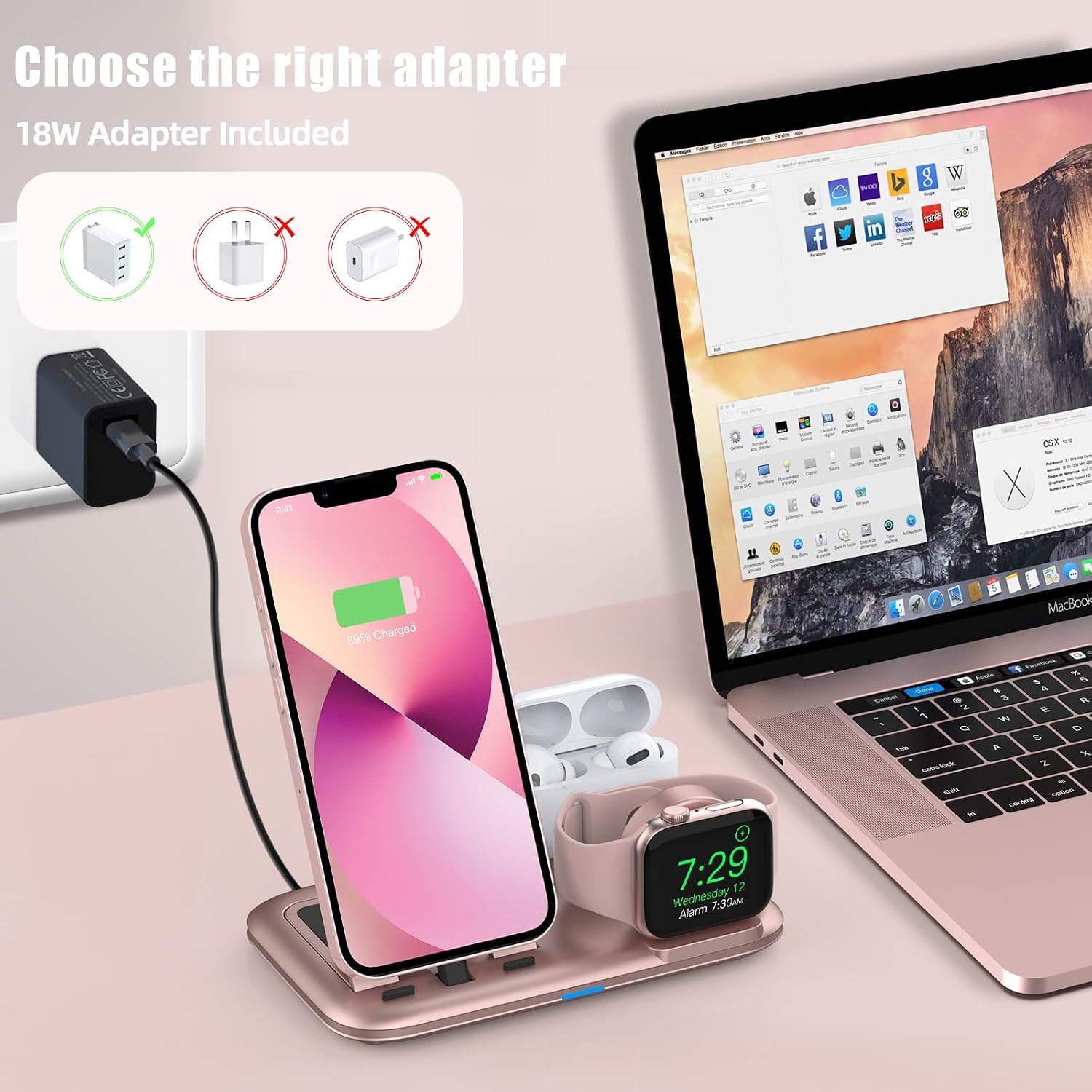
Image 3.2: The charging station is shown connected to a wall outlet via an 18W adapter. The image highlights the importance of using the correct adapter for optimal performance.
- Plug into Wall Outlet: Plug the power adapter into a standard wall outlet. A blue indicator light on the charging station will illuminate, indicating it is powered on and ready for use.
- Organize Cables: The station helps reduce cable clutter. The image below illustrates the before and after of cable management with the charging station.

Image 3.3: A visual comparison showing a cluttered desk with multiple charging cables (Before) and an organized desk with the OLEBR 3-in-1 Charging Station (After), demonstrating its cable management benefits.
4. Operating Instructions
The OLEBR 3-in-1 Charging Station allows for simultaneous charging of your Apple devices. Ensure your devices are compatible as listed in the compatibility section.
4.1 Charging Your iPhone
- Place your iPhone onto the Lightning connector on the adjustable phone stand. Ensure the phone is securely seated and charging begins.
- The phone stand supports both vertical and horizontal orientations, allowing for media viewing or FaceTime calls while charging.

Image 4.1.1: An iPhone is shown charging horizontally on the OLEBR station, demonstrating its use for media consumption in "Horizontal Mode".

Image 4.1.2: An iPhone is shown charging vertically on the OLEBR station, positioned on a nightstand next to an Apple Watch and AirPods.
- The charging station provides up to 10W of power for iPhone charging.
4.2 Charging Your Apple Watch
- Place your Apple Watch onto the magnetic charging disc. The watch will automatically align and begin charging.
- The charging disc supports Nightstand mode for your Apple Watch.
- The charging station provides up to 3W of power for Apple Watch charging.
4.3 Charging Your AirPods
- Insert your AirPods case (with AirPods inside) onto the Lightning connector located in the dedicated AirPods charging dock. Ensure the case is fully seated.
- The charging station provides up to 5W of power for AirPods charging.

Image 4.3.1: An illustration detailing the power output for each charging area: 10W for iPhone, 5W for AirPods, and 3W for Apple Watch.
5. Compatibility
This charging station is designed for a wide range of Apple devices. Please refer to the list below for compatible models:
- iPhone: iPhone 14 Pro Max/14 Pro/14/14 Plus, iPhone 13 Pro Max/13 Pro/13/13 mini, 12 Pro Max/12 Pro/12/12 mini, iPhone 11 Pro Max/11 Pro/11, iPhone SE (2nd generation), iPhone XS MAX/XS/XR/X, iPhone 8 Plus/8, iPhone 7 Plus/7, iPhone 6s Plus/6s, iPhone 5s.
- AirPods: AirPods Pro/3/2/1.
- Apple Watch: Apple Watch Series 7/6/SE/5/4/3/2/1 and Apple Watch Sport/Nike Plus/Hermes/Edition.

Image 5.1: A visual guide illustrating the compatibility of the charging station with various models of Apple Watch, AirPods, and iPhone.
Note: For optimal charging, ensure your iPhone case is not excessively thick, as this may prevent the Lightning connector from seating properly.
6. Key Features
- 3-in-1 Charging: Simultaneously charges iPhone, Apple Watch, and AirPods.
- Portable & Foldable Design: Compact and lightweight, making it suitable for travel.

Image 6.1: The charging station is shown in its folded state, easily fitting into a pocket, highlighting its portability.
- Multi-Protection Mechanisms: Includes over-current protection, over-voltage protection, short-circuit protection, temperature control, and foreign object detection for device safety.
- Bedside Charging Stand: Organizes and charges devices, supporting Nightstand mode for Apple Watch and horizontal/vertical phone orientation.
- 12W Fast Charger Included: Comes with a dedicated power adapter for efficient charging.
7. Maintenance and Care
- Cleaning: Disconnect the power before cleaning. Use a soft, dry cloth to wipe the surface of the charging station. Avoid using abrasive cleaners or solvents.
- Storage: When not in use, store the charging station in a cool, dry place. Its foldable design allows for compact storage.
- Handling: Handle the device with care. Avoid dropping it or exposing it to extreme temperatures or moisture.
- Cable Management: Ensure the charging cable is not bent sharply or tangled, which can cause damage over time.
8. Troubleshooting
| Problem | Possible Cause | Solution |
|---|---|---|
| Device not charging. |
|
|
| Slow charging. |
|
|
| Buzzing noise from the station. |
|
|
| Device (e.g., Apple Watch) gets hot during charging. |
|
|
9. Product Specifications
| Feature | Detail |
|---|---|
| Model Number | X-23RG |
| Brand | OLEBR |
| Product Dimensions | 5.94 x 3.58 x 0.63 inches |
| Item Weight | 5.3 ounces |
| Color | Rose Gold |
| Connector Type | Lightning (for iPhone and AirPods) |
| Power Output (iPhone) | Up to 10W |
| Power Output (Apple Watch) | Up to 3W |
| Power Output (AirPods) | Up to 5W |
| Total USB Ports | 1 (for power input) |
| Wattage (Input) | 12 watts (with included adapter) |
| Special Features | 3-in-1 charging, foldable design, multi-protection, bedside stand functionality. |
10. Warranty and Support
For warranty information and customer support, please refer to the product packaging or contact OLEBR customer service directly. Details for contacting support are typically available on the manufacturer's official website or through the retailer where the product was purchased.
Please retain your proof of purchase for any warranty claims.
Related documentsX-23RG

Ask a question about this manual
Ask about setup, troubleshooting, compatibility, parts, safety, or missing instructions. Manuals+ will review the question and use this page’s manual context to help answer it.