
1. Introduction
The Radtel RT-518 is a compact and reliable FRS (Family Radio Service) two-way radio designed for clear communication. This manual provides essential information for the proper setup, operation, and maintenance of your RT-518 radios, ensuring optimal performance and longevity. Please read this manual thoroughly before using the device.
2. What's in the Box
Upon unboxing, please verify that all components are present:
- 4 x Radtel RT-518 Two-Way Radios
- 4 x Lithium Ion Batteries (pre-installed or separate)
- 4 x USB Charging Cables
- 4 x Power Adapters (for USB charging cables)
- 4 x Earpieces
- 4 x Belt Clips
- Instruction Manual
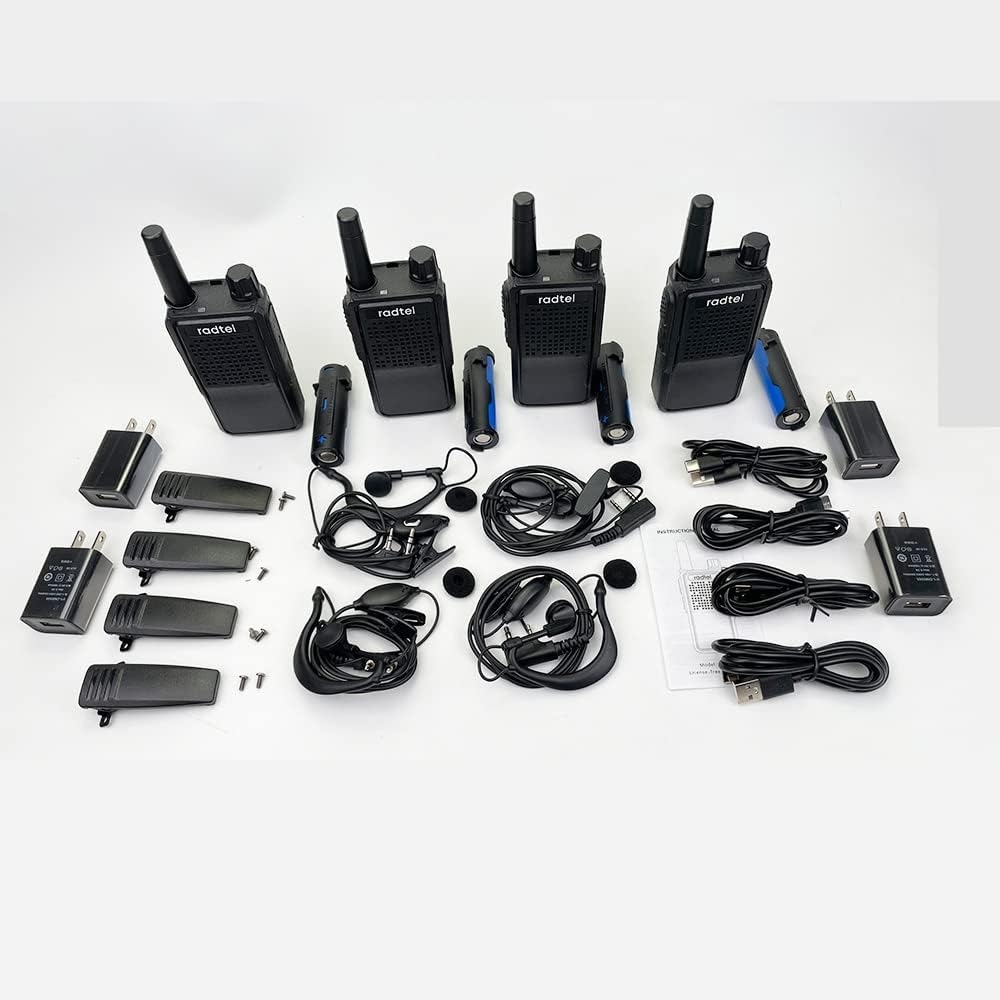
Image: The complete package contents, including four walkie-talkies, batteries, charging cables, power adapters, earpieces, and belt clips.
3. Product Overview
The Radtel RT-518 features a robust design with essential controls for straightforward communication.
3.1 Key Components
- Antenna: For transmitting and receiving signals.
- Channel Knob: To select desired communication channels.
- Power/Volume Knob: To turn the radio on/off and adjust volume.
- Push-to-Talk (PTT) Button: Press and hold to transmit your voice.
- Speaker/Microphone: For audio output and input.
- Accessory Jack: For connecting earpieces or programming cables.
- USB Charging Port: For convenient charging.
- Battery Compartment: Houses the rechargeable Lithium Ion battery.

Image: Various side views of the Radtel RT-518 radio, highlighting its compact design and button placement.
4. Setup
4.1 Battery Installation
- Ensure the radio is powered off.
- Locate the battery compartment cover on the back of the radio.
- Slide the cover down or unclip it to open.
- Insert the Lithium Ion battery, ensuring correct polarity (+/-).
- Replace the battery compartment cover and secure it.

Image: A close-up view of the open battery compartment, showing how to correctly insert the battery.
4.2 Charging the Battery
The RT-518 radios are rechargeable via a standard USB connection.
- Connect the USB charging cable to the radio's USB port.
- Plug the other end of the USB cable into a power adapter (included), a computer's USB port, or a power bank.
- The charging indicator light on the radio will illuminate (color may vary) to show charging in progress.
- Once fully charged, the indicator light may change color or turn off. Disconnect the radio from the charger.

Image: A Radtel RT-518 radio connected to a laptop via a USB cable for charging.
4.3 Attaching the Belt Clip
Align the belt clip with the screw holes on the back of the radio and secure it with the provided screws.
4.4 Connecting the Earpiece
Insert the earpiece plug into the accessory jack on the side of the radio until it clicks into place.
5. Operating Instructions
5.1 Power On/Off and Volume Adjustment
Rotate the Power/Volume knob clockwise to turn the radio on. Continue rotating clockwise to increase the volume. Rotate counter-clockwise to decrease volume and turn the radio off.
5.2 Channel Selection
Rotate the Channel knob to select one of the 22 available FRS channels. Ensure all radios in your group are set to the same channel for communication.

Image: An illustration demonstrating multi-way communication with the RT-518, highlighting 22 FRS channels and 123 sub-tones (CTCSS/DCS).
5.3 Transmitting and Receiving
- To Transmit: Press and hold the PTT (Push-to-Talk) button located on the front of the radio. Speak clearly into the microphone. Release the PTT button when finished speaking.
- To Receive: Ensure the PTT button is not pressed. The radio will automatically receive transmissions on the selected channel.
5.4 VOX Function (Hands-Free Operation)
The VOX (Voice Operated Exchange) function allows for hands-free transmission. When VOX is enabled, the radio will automatically transmit when it detects your voice, without needing to press the PTT button. The RT-518 typically offers 3 sensitivity levels for VOX, which may require programming.

Image: An illustration showing a person cycling while using the RT-518 with the VOX function for hands-free communication.
5.5 Channel Scan
The channel scan feature allows the radio to automatically scan through all channels to detect activity. Refer to the specific programming instructions for your RT-518 model to activate and use this feature.
5.6 Sub-Tones (CTCSS/DCS)
The RT-518 supports CTCSS (Continuous Tone-Coded Squelch System) and DCS (Digitally Coded Squelch) sub-tones. These codes help filter out unwanted conversations on a busy channel, allowing you to hear only transmissions from radios set to the same channel and sub-tone. These settings are typically configured via programming software.
6. Range Information
The communication range of the Radtel RT-518 varies significantly based on terrain, obstructions, and electromagnetic interference. Typical ranges are:
- Open Air (Line of Sight): Up to 10 miles (approximately 16 km)
- Woods/Forest: 4-5 miles (approximately 6-8 km)
- Town/City (Urban Areas): 2-3 miles (approximately 3-5 km)

Image: An illustration depicting the estimated communication range of the RT-518 in various environments: mountain to valley (up to 12 miles), open air (up to 4 miles), and city/town (up to 2 miles).
7. Maintenance
7.1 Cleaning
Wipe the radio's surface with a soft, damp cloth. Do not use harsh chemicals or abrasive cleaners. Ensure the radio is dry before use.
7.2 Battery Care
- Charge batteries fully before first use.
- Avoid overcharging or completely draining the battery.
- Store radios and batteries in a cool, dry place when not in use for extended periods.
- If the radio will not be used for a long time, remove the battery.
8. Troubleshooting
| Problem | Possible Cause | Solution |
|---|---|---|
| No power | Battery drained or incorrectly installed | Charge battery; check battery installation and polarity. |
| Cannot transmit or receive | Incorrect channel, out of range, or PTT not pressed/released | Verify all radios are on the same channel; move closer to other radios; ensure PTT is used correctly. |
| Poor audio quality | Low battery, interference, or radio too far apart | Charge battery; move away from sources of interference; reduce distance between radios. |
| VOX not working | VOX disabled or sensitivity too low | Enable VOX and adjust sensitivity (may require programming). |
9. Specifications
- Model: RT-518
- Channels: 22 FRS Channels
- Frequency Range: 462/467 MHz
- Sub-tones: CTCSS/DCS (123 combinations)
- Battery Type: Lithium Ion (included)
- Battery Life: Approximately 10 hours (typical use)
- Charging: USB Charging
- Special Features: VOX (Hands-free), Channel Scan, Squelch System, Keypad Lock
- Material: PC+ABS (durable and drop-protected)
- Water Resistance: Waterproof (level not specified, generally splash-resistant for FRS)
- Item Weight: Approximately 2.07 pounds (for 4-pack)
- Package Dimensions: 7.8 x 7.36 x 3.39 inches

Image: An infographic highlighting key features such as PC+ABS material, drop protection, squelch system, 22 main channels, 38 CTCSS codes, 83 DCS codes, easy removable battery, VOX hands-free, and keypad lock.
10. Safety Information
- Do not operate the radio in explosive atmospheres (e.g., near flammable gas, dust, or powders).
- Do not modify the radio or its antenna. Unauthorized modifications may void your warranty and violate FCC regulations.
- Keep the radio away from medical devices, as it may cause interference.
- Use only approved batteries and chargers.
- Avoid exposing the radio to extreme temperatures or direct sunlight for prolonged periods.
11. FCC Compliance
This device complies with Part 95 of the FCC Rules. The FCC ID for the Radtel RT-518 is 2AZSA-RT518. Operation is subject to the condition that this device does not cause harmful interference.


