
1. Safety Information
Please read all instructions carefully before assembly and use. Retain this manual for future reference.
- Weight Capacity: Do not exceed the maximum load capacity of 30KG for the TV mount and 5KG for the accessory shelf. Overloading can cause instability and damage.
- TV Size: This stand is designed for TVs and monitors between 23 and 60 inches. Ensure your TV falls within this range.
- VESA Compatibility: Verify your TV's VESA mounting pattern is between 100x100 mm and 400x400 mm.
- Stable Surface: Always place the TV stand on a flat, stable, and level surface.
- Children and Pets: Keep children and pets away from the stand during assembly and ensure the TV is securely mounted to prevent tipping.
- Proper Assembly: Follow all assembly steps precisely. Incorrect assembly can lead to product failure and injury.
- Moving the Stand: When moving the stand, ensure the casters are unlocked and move slowly. Lock the casters once the stand is in its desired position.
2. Product Overview
The TVON MT2004R is a versatile, caster-equipped TV stand designed for 23-60 inch televisions and monitors. It offers adjustable height, tilt functionality, and a convertible design allowing for both high-type and low-type configurations. Integrated cable management helps maintain a tidy appearance.
Key Features:
- VESA Compatibility: Supports VESA patterns from 100x100 mm to 400x400 mm.
- Adjustable Height: Customize the viewing height for optimal comfort.
- Tilt Functionality: Adjust the screen tilt from +8° upwards to -2° downwards to reduce glare and improve viewing angles.
- Caster Wheels with Locks: Four 360° rotating casters allow for easy movement, with integrated stoppers for secure positioning.
- Adjustable Shelf: A removable and height-adjustable shelf provides space for AV equipment, game consoles, or other accessories.
- Convertible Design: Can be assembled as a high-type or low-type stand by adjusting the main pole sections.
- Cable Management: Integrated clips and channels help organize and conceal cables.
Product Components:
Refer to the assembly diagram for a detailed list of parts and hardware. Ensure all components are present before beginning assembly.
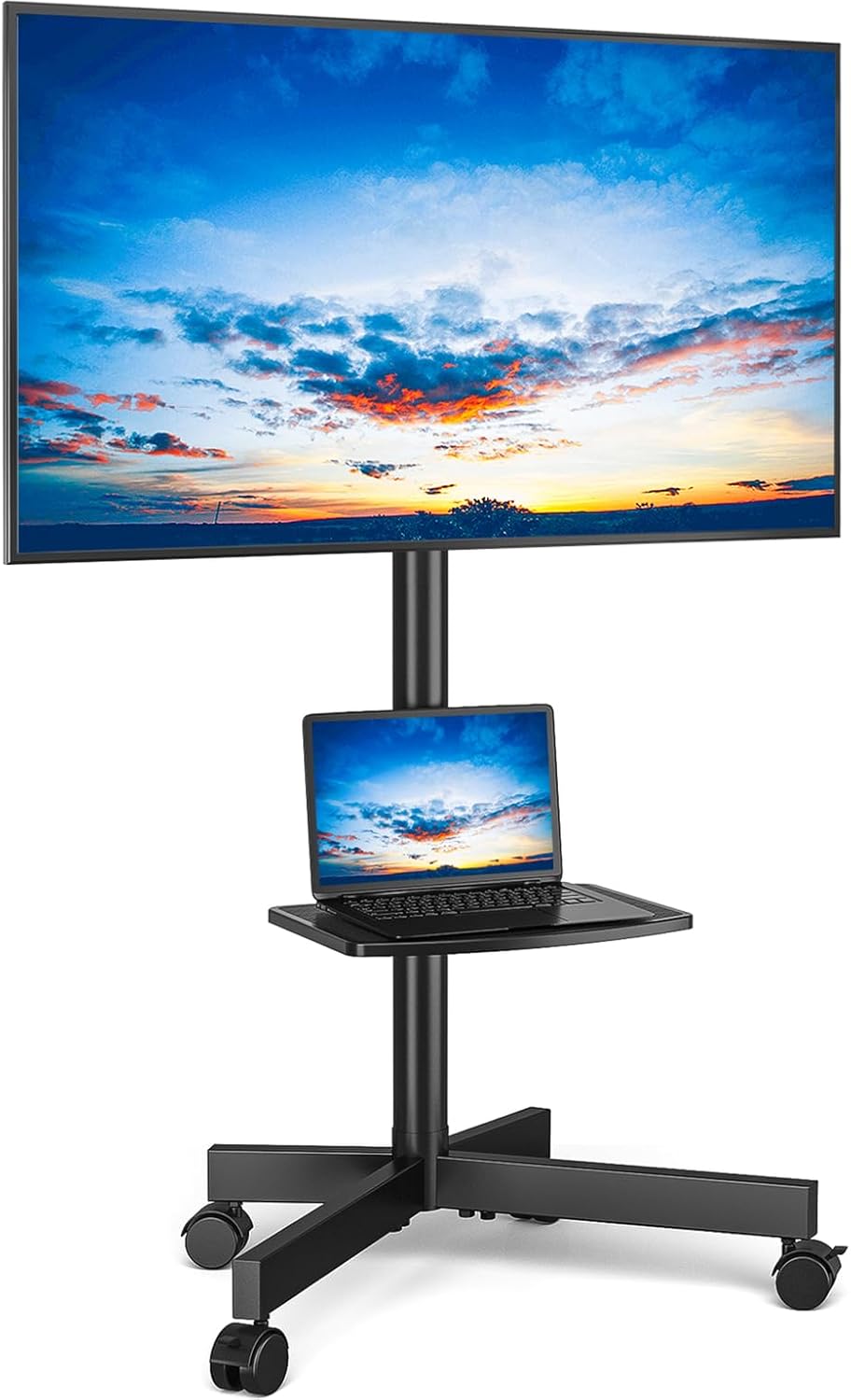
Image 2.1: The TVON MT2004R Caster-Equipped TV Stand in its high-type configuration, displaying a television and a laptop on its adjustable shelf.

Image 2.2: Detailed dimensions of the TV stand, including height, width, and depth, along with load capacities for the TV mount (30KG) and the accessory shelf (5KG).

Image 2.3: Visual representation of the stand's adjustable height, 360-degree rotating casters, and tilt adjustment capabilities.
3. Setup and Assembly
Assembly typically requires two people for safely mounting the TV. All necessary parts and hardware are included. Refer to the provided Japanese instruction manual for detailed diagrams and part numbers.
3.1. Unpacking and Part Identification
- Carefully unpack all components from the box.
- Compare the contents with the parts list in the included manual to ensure all pieces are present and undamaged.
3.2. Base Assembly
- Attach the caster wheels to the base frame. Ensure the locking casters are positioned at the front for easy access.
- Securely fasten all screws.

Image 3.1: A close-up view of one of the 360-degree rotating caster wheels, highlighting its locking mechanism for stability.
3.3. Main Pole Assembly (High-Type or Low-Type)
- For High-Type Configuration: Assemble all three sections of the main support pole.
- For Low-Type Configuration: Omit the middle section of the main support pole. This allows the TV to be positioned at a lower height, suitable for viewing from the floor.
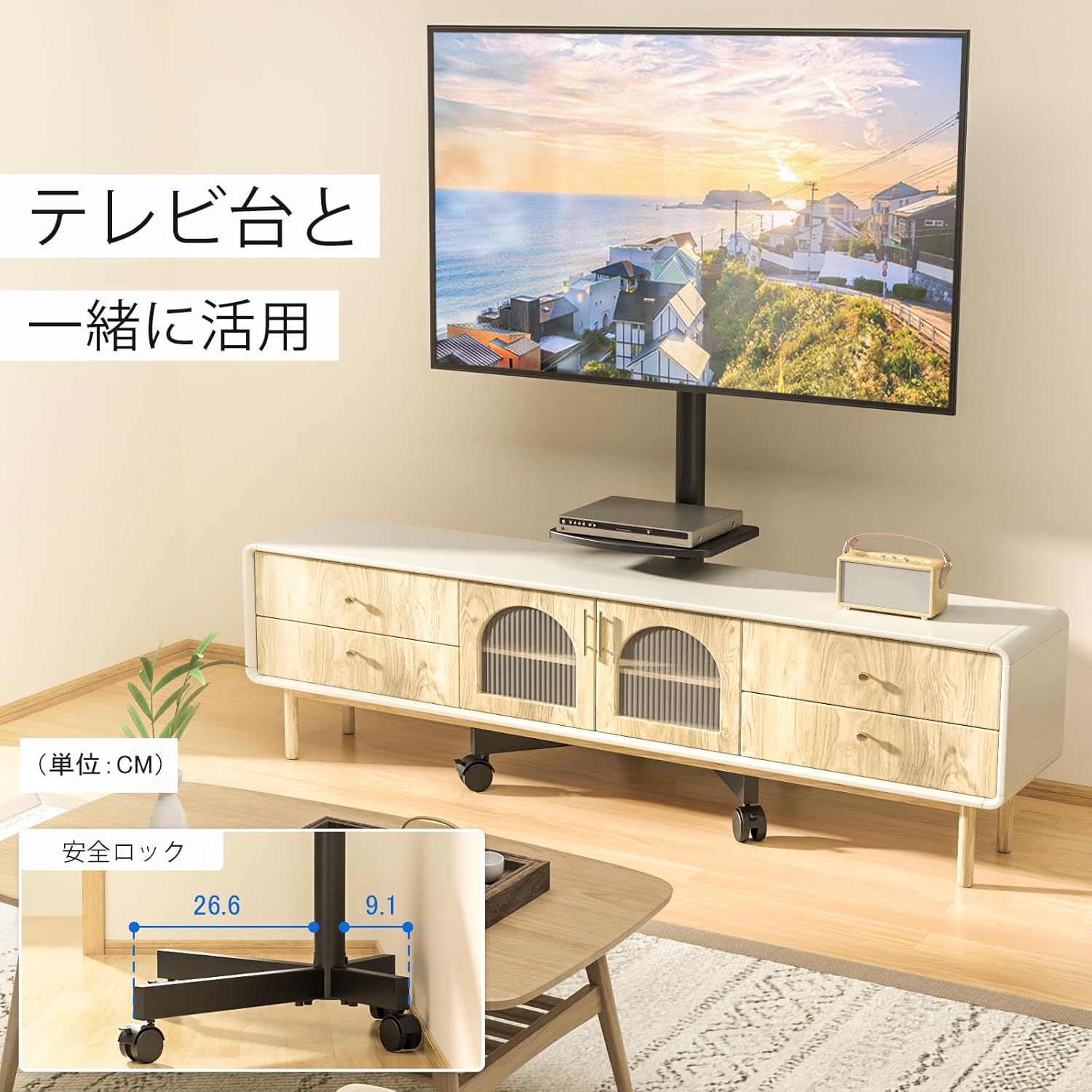
Image 3.2: The TV stand configured in its low-type setting, demonstrating how it can be used in conjunction with a TV cabinet for a compact setup.
3.4. Attaching the TV Mount and Shelf
- Attach the TV mounting bracket to the top section of the main pole.
- Install the accessory shelf at your desired height on the main pole. Use the provided safety lock mechanism to secure it.

Image 3.3: A visual guide demonstrating how the accessory shelf can be adjusted vertically along the main pole to suit different needs.
3.5. Mounting the TV
- Attach the VESA adapter plates to the back of your TV using the appropriate screws and spacers.
- With assistance, carefully lift the TV and hook the adapter plates onto the TV mounting bracket on the stand.
- Secure the TV to the bracket using the safety screws or locking mechanisms provided.
4. Operating Instructions
4.1. Adjusting TV Height
The TV mount allows for vertical height adjustment. Loosen the securing bolts on the back of the TV mount, slide the TV to the desired height, and then firmly tighten the bolts to secure it.

Image 4.1: An illustration detailing the minimum (139.1 cm) and maximum (144.1 cm) height adjustments for the TV screen on the stand.
4.2. Adjusting TV Tilt Angle
The TV mount can be tilted to achieve an optimal viewing angle. It supports an upward tilt of up to 8° and a downward tilt of up to 2°. Loosen the tilt adjustment knobs on the sides of the TV mount, adjust the screen to your preferred angle, and then tighten the knobs to lock it in place.

Image 4.2: The TV stand demonstrating its tilt capability, with indicators for +8 degrees upward and -2 degrees downward tilt, enhancing viewing comfort.
4.3. Moving the Stand
To move the TV stand, unlock the casters by disengaging their stoppers. Gently push the stand to its new location. Once positioned, engage the caster stoppers to prevent accidental movement and ensure stability.
4.4. Cable Management
Utilize the integrated cable clips and channels along the main pole to route and organize your TV and accessory cables. This helps maintain a clean and clutter-free setup.
5. Maintenance
- Cleaning: Wipe the stand with a soft, dry cloth. For stubborn marks, a slightly damp cloth can be used, followed by immediate drying. Avoid abrasive cleaners or solvents.
- Regular Checks: Periodically check all screws and bolts to ensure they remain tight. Re-tighten if necessary.
- Caster Functionality: Keep casters free of debris to ensure smooth movement.
6. Troubleshooting
- Stand is unstable: Ensure all assembly screws are tightened. Verify the stand is on a flat, level surface. Lock all casters. Do not exceed the maximum weight capacity.
- Difficulty moving the stand: Check that all caster stoppers are disengaged. Clean any debris from the caster wheels.
- TV does not fit the mount: Confirm your TV's size is between 23-60 inches and its VESA pattern is within 100x100 mm to 400x400 mm. Ensure the correct screws and spacers were used during TV attachment.
- Shelf is not secure: Ensure the safety lock mechanism for the shelf is properly engaged and tightened.
7. Specifications
| Feature | Specification |
|---|---|
| Brand | TVON |
| Model Number | MT2004R |
| Compatible TV Sizes | 23 - 60 inches |
| VESA Compatibility | 100x100 mm to 400x400 mm |
| TV Load Capacity | 30 KG |
| Shelf Load Capacity | 5 KG |
| Material | Alloy Steel |
| Color | Black |
| Mounting Type | Floor Mount |
| Movement Type | Tilt, Caster Wheels |
| Tilt Angle | +8° / -2° |
| Product Dimensions (High-Type) | 53.9 x 40.9 x 143.7 cm (L x W x H) |
| Product Weight | 6.07 kg |
| UPC | 747966797819 |

Image 7.1: An overview of the stand's compatibility, including supported screen sizes (23-60 inches), maximum load (30kg), VESA patterns (10-40cm horizontally and vertically), and compatibility with flat, curved, or irregular TVs.
8. Warranty and Support
For warranty information or technical support, please refer to the documentation included with your purchase or contact TVON customer service through the retailer where the product was purchased.
