
Introduction
This manual provides detailed instructions for the Acer Aspire 5 A515-46-R3CZ Slim Laptop. It covers essential information for setup, operation, maintenance, and troubleshooting to ensure optimal use of your device. The Acer Aspire 5 is designed for productivity and features an AMD Ryzen 7 3700U processor, a 15.6" Full HD IPS display, 8GB DDR4 memory, and a 256GB NVMe SSD, running on Windows 11 Home.

Image: The Acer Aspire 5 A515-46-R3CZ Slim Laptop, showcasing its sleek design and display.
Video: A 360-degree view of the Acer Aspire 5 A515-46 laptop, highlighting its design and ports.
Setup
Initial Power-On and Windows 11 Setup
- Unpack the Laptop: Carefully remove the laptop and all accessories from the packaging.
- Connect Power: Plug the AC adapter into the laptop's DC-in jack and then into a power outlet.
- Power On: Open the laptop lid and press the power button, usually located on the top right of the keyboard.
- Follow On-Screen Instructions: The laptop will guide you through the initial Windows 11 setup process, including language selection, network connection, and user account creation.
Video: An overview of Microsoft 365 tools, which are compatible with Windows 11 on your Acer Aspire 5 laptop.
Connecting to Wi-Fi
During the initial setup or at any time, you can connect to a Wi-Fi network.
- Click the Wi-Fi icon in the taskbar.
- Select your desired network from the list.
- Enter the network password if prompted and click "Connect".

Image: Illustration of Wi-Fi 6 connectivity, highlighting fast and efficient wireless performance.
Operating Your Laptop
Display and Visuals
Your Acer Aspire 5 features a 15.6" Full HD (1920 x 1080) widescreen LED-backlit IPS display. This display offers vibrant colors and wide viewing angles, enhanced by narrow bezels for an immersive visual experience.

Image: The Acer Aspire 5 display, emphasizing its Full HD resolution and narrow bezels.
Performance and Processing
The laptop is powered by an AMD Ryzen 7 3700U Quad-Core Mobile Processor with Precision Boost up to 4.0GHz, coupled with AMD Radeon RX Vega 10 Mobile Graphics. This configuration provides efficient performance for daily tasks, multimedia, and light content creation. It includes 8GB DDR4 on-board memory and a 256GB NVMe SSD for fast boot times and application loading. An additional hard drive bay is available for storage expansion.

Image: Visual representation of the AMD Ryzen 7 processor and Radeon RX Vega 10 Mobile Graphics, indicating strong performance for various tasks.
Security Features
The Acer Aspire 5 includes a biometric fingerprint reader for secure login via Windows Hello. This feature allows for quick and secure access to your device without needing to type a password.

Image: Depiction of the fingerprint reader for Windows Hello biometric security.
Audio and Communication
Equipped with two built-in stereo speakers featuring Acer TrueHarmony Gen 2 Technology, the laptop delivers enhanced audio. Acer Purified.Voice Technology with two built-in microphones ensures clear communication during video calls and recordings.

Image: A person engaged in a video call, illustrating the laptop's audio and microphone capabilities for clear communication.
Ports and Connectivity
The laptop offers a variety of ports for connecting peripherals:
- 1 x USB 3.2 (Type-C) Gen 1 port (up to 5 Gbps)
- 2 x USB 3.2 Gen 1 Ports (one with Power-off Charging)
- 1 x USB 2.0 Port
- 1 x HDMI 2.0 Port with HDCP support
- Headphone/Speaker/Line-Out Jack
- 10/100/1000 Gigabit Ethernet LAN (RJ-45 port)
- DC-in for AC adapter
Wireless connectivity includes Wi-Fi 6 (802.11ax) Dual-Band 2.4GHz and 5GHz with 2x2 MU-MIMO technology, and Bluetooth 5.1.

Image: Diagram illustrating the various ports available on the Acer Aspire 5 laptop, including USB-C, USB 3.2, HDMI, and Ethernet.
Keyboard and Touchpad
The laptop features a backlit keyboard for comfortable typing in various lighting conditions. The precision touchpad supports multi-touch gestures for intuitive navigation.

Image: Close-up view of the Acer Aspire 5's backlit keyboard and touchpad, highlighting the fingerprint reader.
Fan Modes
You can control the fan speed to optimize for quiet operation or maximum performance. Use the "Fn + F" keyboard shortcut to cycle through Silent, Normal, and Performance modes.
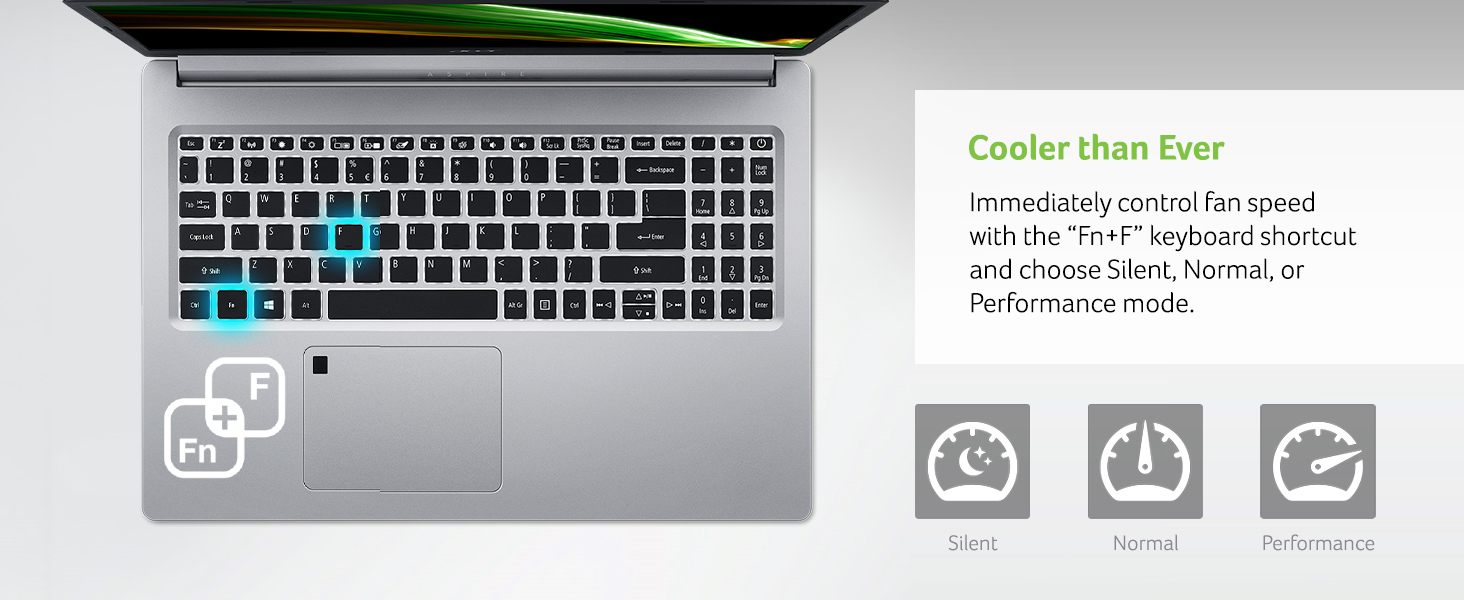
Image: Visual guide to controlling fan speed with keyboard shortcuts, showing Silent, Normal, and Performance modes.
Maintenance
Battery Care
The laptop's Lithium-Ion battery provides up to 10 hours of battery life. To prolong battery lifespan, avoid extreme temperatures and fully discharging the battery frequently. It is recommended to occasionally discharge the battery below 50% before recharging.
Cleaning
Use a soft, lint-free cloth to clean the screen and exterior surfaces. For stubborn smudges, a slightly dampened cloth with water or a screen-specific cleaner can be used. Avoid harsh chemicals.
Storage Expansion
Your laptop includes one available hard drive bay for future storage upgrades. Consult a qualified technician for installation to avoid damaging the device.
Troubleshooting
Common Issues and Solutions
- Laptop not powering on: Ensure the AC adapter is securely connected to both the laptop and a working power outlet. Try a different outlet.
- Wi-Fi disconnection: Check your router and modem. Restart your laptop. Update Wi-Fi drivers through Windows Update or Acer's support website.
- Slow performance: Close unnecessary applications. Check for background processes in Task Manager. Ensure Windows and drivers are up to date. Consider adding more RAM or upgrading to a larger SSD if performance issues persist due to heavy usage.
- Screen issues: If the screen is blank, try connecting an external monitor to check if the display output is working. Adjust brightness settings.
For more detailed troubleshooting or issues not covered here, please refer to the official Acer support website or contact customer service.
Video: Demonstrates Windows 11 centralized universal search, a feature that can help you quickly find information and troubleshoot issues on your laptop.
Video: Explains Windows 11 cloud file backup, a useful feature for protecting your data and ensuring easy recovery in case of issues.
Specifications
| Feature | Detail |
|---|---|
| Brand | Acer |
| Model Name | A515-46-R3CZ |
| Screen Size | 15.6 Inches |
| Screen Resolution | 1920 x 1080 pixels (Full HD IPS) |
| Processor | AMD Ryzen 7 3700U Quad-Core Mobile Processor (up to 4.0GHz) |
| RAM | 8 GB DDR4 |
| Hard Drive | 256 GB NVMe SSD (1 available hard drive bay) |
| Graphics Coprocessor | AMD Radeon RX Vega 10 Mobile Graphics |
| Operating System | Windows 11 Home |
| Wireless Type | 802.11ax (Wi-Fi 6), Bluetooth 5.1 |
| USB Ports | 1x USB 3.2 Type-C, 2x USB 3.2 Gen 1 (1 with Power-off Charging), 1x USB 2.0 |
| HDMI Port | 1x HDMI 2.0 with HDCP support |
| Ethernet | 10/100/1000 Gigabit Ethernet (RJ-45) |
| Special Features | Backlit Keyboard, Fingerprint Reader |
| Average Battery Life | Up to 10 Hours |
| Item Weight | 3.99 pounds (1.81 kg) |
| Product Dimensions | 14.31 x 9.86 x 0.71 inches |
What's in the Box
- Acer Aspire 5 A515-46-R3CZ Laptop
- AC Adapter
- Power Cord
- Hard Drive Upgrade Kit

Image: The Acer Aspire 5 laptop along with its included AC adapter and power cord.
Warranty and Support
Your Acer Aspire 5 A515-46-R3CZ laptop comes with a One-Year International Travelers Limited Warranty (ITW). For warranty claims, technical support, or additional product information, please visit the official Acer support website or contact their customer service. Keep your purchase receipt and product serial number handy for faster service.


