
Amplicomms BigTel 1582 (1580 + Additional Handset)
Amplicomms BigTel 1582 Cordless Big Button Phone User Manual
Model: BigTel 1580 + Additional Handset
Introduction
Thank you for choosing the Amplicomms BigTel 1582 Cordless Big Button Phone. This system is designed to provide clear and accessible communication, especially for users with hearing or visual impairments, or those who prefer simplified operation. It features large buttons, a loud ringer, amplified audio, and an integrated answering machine. This manual provides detailed instructions for setting up, operating, and maintaining your new telephone system.

Image: The Amplicomms BigTel 1582 system, showing the main base station with one handset and an additional charging cradle with a second handset.
Safety Information
- Use only the power adapter and batteries supplied with the product.
- Do not expose the phone to water or moisture.
- Avoid placing the base station or charging cradle near heat sources or direct sunlight.
- Keep the phone away from strong electromagnetic fields.
- Do not attempt to open or repair the unit yourself. Refer all servicing to qualified personnel.
- Dispose of batteries responsibly according to local regulations.
Package Contents
Please check that all items are present in your package:
- 1 x BigTel 1580 Base Station with integrated answering machine
- 2 x Cordless Handsets (one for the base, one for the additional charging cradle)
- 2 x Handset Charging Cradles (one integrated with base, one separate)
- 2 x Power Adapters (for base and additional cradle)
- 1 x Telephone Line Cord
- 4 x AAA Rechargeable Batteries (2 per handset)
- 1 x User Manual (this document)
Product Overview
Handset Features

Image: Detailed view of the handset highlighting the large backlit display, M1/M2/M3 direct memory buttons, and indicators for increased ring volume and audio amplification.
- Large Backlit Display: Provides clear visibility of caller ID and menu options.
- Big Buttons: Large, easy-to-read keypad for effortless dialing.
- M1, M2, M3 Direct Memory Buttons: For quick dialing of frequently called numbers.
- Volume Boost Button: Increases in-call audio volume by up to +35dB.
- Hearing Aid Compatible: Reduces interference for hearing aid users.
- Visual Ring Indicator: A light on the handset flashes when there's an incoming call.
Base Station Features

Image: The base station, showing the integrated answering machine controls and the M1/M2/M3 direct call buttons, allowing calls directly from the base.
- Integrated Answering Machine: Records up to 30 minutes of messages.
- Hands-Free Speakerphone: Allows calls directly from the base unit.
- Direct Call Buttons (M1, M2, M3): Initiate calls to pre-programmed numbers directly from the base.
- Message Counter: Digital display shows the number of new messages.
Setup
1. Connecting the Base Station
- Connect one end of the telephone line cord to the "LINE" socket on the back of the base station.
- Connect the other end of the telephone line cord to your telephone wall socket or router/hub.
- Connect the power adapter to the "POWER" socket on the back of the base station.
- Plug the power adapter into a mains power outlet.
2. Installing Handset Batteries
- Open the battery compartment cover on the back of each handset.
- Insert the 2 AAA rechargeable batteries, observing the correct polarity (+ and -).
- Close the battery compartment cover securely.
3. Charging the Handsets
- Place each handset onto its respective charging cradle (one on the base station, one on the additional cradle).
- Ensure the "Charge" indicator on the handset or base lights up, indicating proper charging.
- For first-time use, charge the handsets for at least 15 hours to ensure full battery capacity.
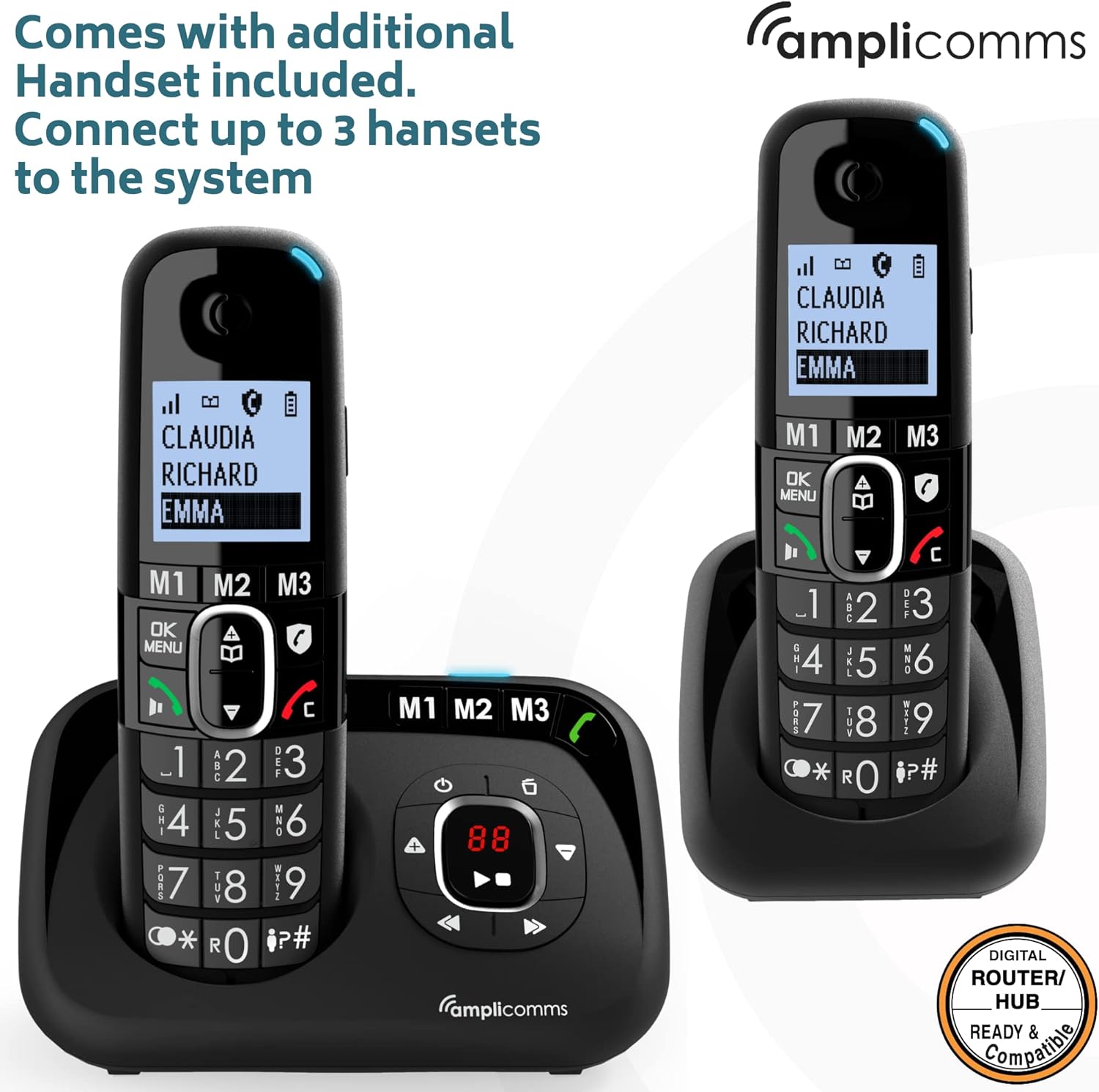
Image: The Amplicomms BigTel 1582 system with both the main base and the additional charging cradle, demonstrating the multi-handset capability.
4. Registering Additional Handsets (if necessary)
Your additional handset(s) should be pre-registered. If not, or if you purchase additional handsets (up to 3 total), follow these steps:
- On the base station, press and hold the PAGE button (usually located on the side or back) until the registration indicator on the base starts flashing.
- On the handset, press MENU/OK, then navigate to "Register Handset" (or similar option) and press MENU/OK again.
- Enter the system PIN (default is 0000) and press MENU/OK.
- The handset will display "Registering..." and then "Handset Registered" once successful.
Operating Instructions
Making Calls
- From Handset:
- Dial the desired phone number using the large keypad.
- Press the GREEN (Call) button to initiate the call.
- To end the call, press the RED (End Call) button.
- Using Direct Memory Buttons (M1, M2, M3):
- To program: Press and hold M1/M2/M3, enter the number, then press MENU/OK to save.
- To call: Simply press the desired M1, M2, or M3 button on the handset or base. The phone will automatically dial the stored number.
Receiving Calls
- When the phone rings, the visual ring indicator on the handset will flash.
- Press the GREEN (Call) button on the handset or the Speakerphone button on the base to answer.
Adjusting Volume
- Earpiece Volume (during a call): Use the UP/DOWN navigation buttons on the handset.
- Ringer Volume: Navigate through the handset menu to "Settings" > "Ringer Volume" to adjust. The ringer can be increased up to 90dB.
- Audio Boost: During a call, press the dedicated Boost button (often marked with an ear icon) on the handset to amplify the incoming audio by up to +35dB. Press again to deactivate.
Answering Machine Functions
The integrated answering machine can record up to 30 minutes of messages.
- Turning On/Off: Press the ON/OFF button on the base station.
- Playing Messages: Press the PLAY button on the base station. The message counter will display the number of new messages.
- Skipping/Deleting Messages: Use the SKIP and DELETE buttons on the base during message playback.
- Recording Outgoing Message (OGM): Access the answering machine settings via the handset menu or base controls to record your personalized greeting.
Intercom (for multiple handsets)
- To call another handset: Press the INT (Intercom) button on your handset, then dial the number of the desired handset (e.g., 2 for handset 2).
- To transfer a call: During an external call, press INT, dial the handset number, wait for them to answer, then hang up to transfer.
Maintenance
- Cleaning: Wipe the phone and base station with a soft, damp cloth. Do not use abrasive cleaners or solvents.
- Battery Care:
- Always use the supplied rechargeable AAA batteries.
- If the phone will not be used for an extended period, remove the batteries to prevent leakage.
- Replace batteries when they no longer hold a charge effectively.
- Placement: Place the base station in a central location to maximize cordless range. Avoid placing it near large metal objects or other electronic devices that may cause interference.
Troubleshooting
| Problem | Possible Cause | Solution |
|---|---|---|
| No dial tone. | Telephone line cord not connected or faulty. | Check connections. Try another phone in the same socket. |
| Handset not charging. | Handset not correctly seated in cradle; dirty charging contacts; batteries not inserted or faulty. | Ensure handset is properly seated. Clean contacts with a dry cloth. Check battery insertion and condition. |
| No display on handset. | Batteries flat or not inserted. | Charge handset for 15 hours. Check battery insertion. |
| Poor sound quality / static. | Out of range; interference from other electronic devices. | Move closer to the base station. Relocate base station away from other electronics. |
| Cannot make or receive calls. | Handset not registered; base station not powered. | Register handset (see Setup section). Check base station power connection. |
| Answering machine not recording. | Answering machine is off; memory full. | Ensure answering machine is turned on. Delete old messages to free up space. |
Specifications
- Model: Amplicomms BigTel 1582 (1580 + Additional Handset)
- Telephone Type: Cordless DECT Phone
- Answering System Type: Digital, up to 30 minutes recording time
- Ringer Volume: Up to 90 dB
- Audio Boost: Up to +35 dB
- Batteries: 4 x AAA rechargeable batteries (included)
- Colour: Black
- Material: Plastic
- Item Weight: 0.8 Kilograms (total package)
- Package Dimensions: 21.2 x 17.3 x 9.1 cm
- Manufacturer: Atlinks
- Country of Origin: Hong Kong
- Compatible Devices: Digital home networks (e.g., routers, home hubs)
Warranty and Support
Amplicomms products are designed for reliability and performance. For warranty information, please refer to the warranty card included in your product packaging or visit the official Amplicomms website. For technical support or service inquiries, please contact your retailer or the Amplicomms customer service department.
Manufacturer: Atlinks
Brand: Amplicomms
Website: www.amplicomms.com (Note: This is a placeholder URL, please refer to your product documentation for the correct support contact information.)
Ask a question about this manual
Ask about setup, troubleshooting, compatibility, parts, safety, or missing instructions. Manuals+ will review the question and use this page’s manual context to help answer it.