
Amplicomms 1500
Amplicomms BigTel 1500 Cordless Phone User Manual
Model: BigTel 1500
Introduction
Welcome to the user manual for your new Amplicomms BigTel 1500 Cordless Big Button Phone. This phone is designed with enhanced features for ease of use, particularly for individuals who are hard of hearing, visually impaired, or prefer simplified technology. It offers loud ringer volume, increased audio during calls, large buttons, and direct memory dialling for convenience and accessibility.
Package Contents
Please check the box for the following items:
- Amplicomms BigTel 1500 Handset
- Base Unit
- Power Adapter
- Telephone Line Cord
- Rechargeable AAA Batteries (2x)
- User Manual (this document)
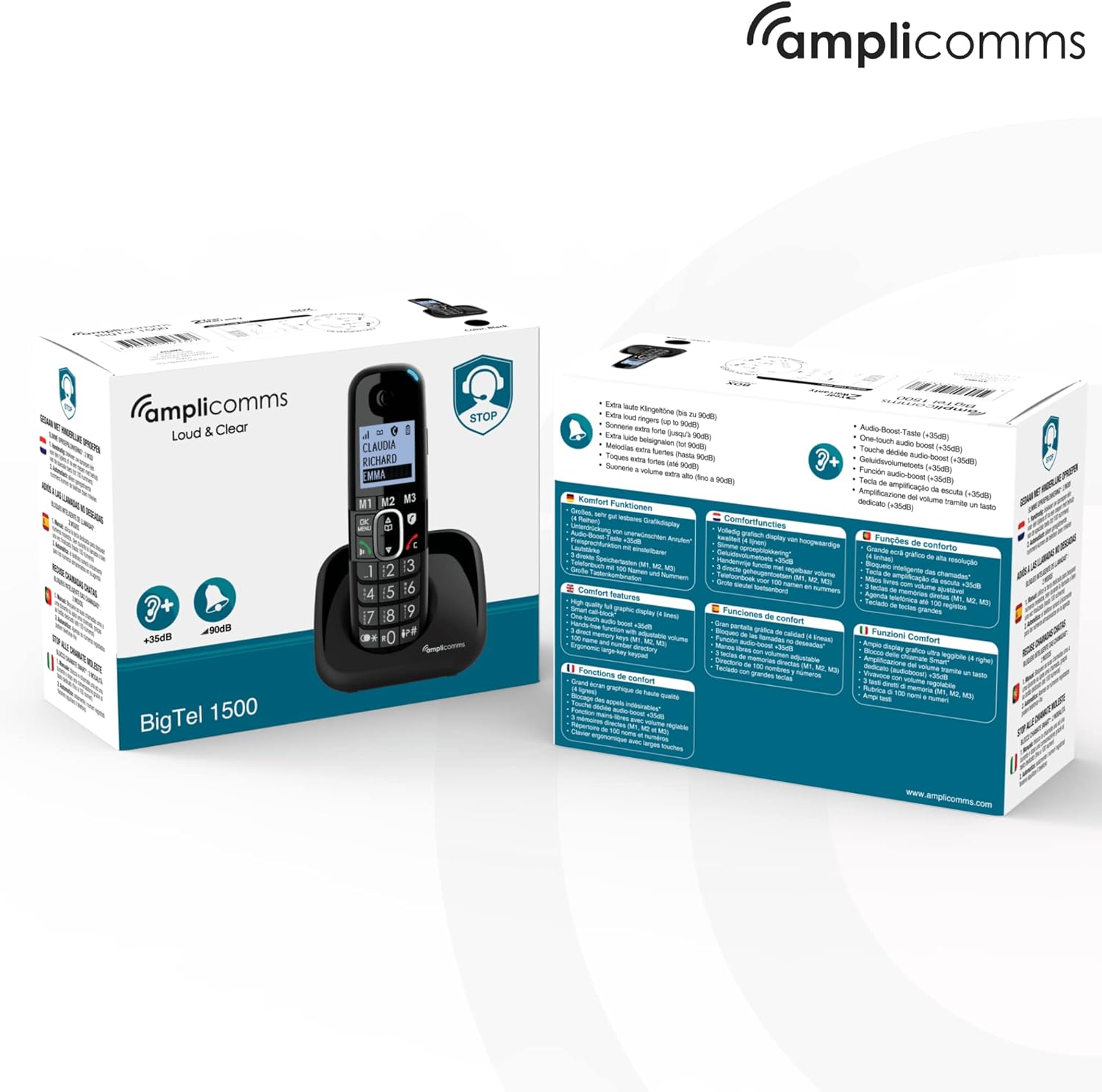
Image: The Amplicomms BigTel 1500 phone and its retail packaging, showing the contents and key features.
Product Overview
The Amplicomms BigTel 1500 is designed for clarity and ease of use. Below are the main components and their functions.

Image: Front view of the Amplicomms BigTel 1500 cordless phone handset docked in its charging base. The handset features a large backlit display and oversized buttons.
Key Features:
- Large Backlit Display: For easy viewing of caller ID and menu options.
- Big Buttons: Oversized dialling keys and memory buttons for improved visibility and tactile feedback.
- Adjustable Ringer Volume: Ringer can be increased up to 90 dB, with a visual ring indicator.
- Increased Audio Volume: Handset audio can be boosted by up to +35 dB during calls.
- 3 Direct Memory Buttons (M1, M2, M3): For quick dialling of frequently called numbers.
- Hands-Free Function: Built-in speakerphone for convenient conversations.
- Call Blocking: Dedicated button to block up to 100 unwanted numbers.
- Hearing Aid Compatible: Reduces interference for hearing aid users.

Image: Diagram highlighting key features of the Amplicomms BigTel 1500: large backlit screen, 3 memory buttons (M1, M2, M3), increased audio up to +35dB, and adjustable ringer volume up to 90dB.

Image: Infographic showing the target users for the Amplicomms BigTel 1500: individuals with unsteady hands, the visually impaired, non-tech savvy users, and those who are hard of hearing.
Setup
1. Battery Installation
- Open the battery compartment cover on the back of the handset.
- Insert the two supplied AAA rechargeable batteries, observing the correct polarity (+/-).
- Close the battery compartment cover securely.
2. Connecting the Base Unit
- Connect one end of the telephone line cord to the LINE port on the base unit.
- Connect the other end of the telephone line cord to your telephone wall socket.
- Connect the small plug of the power adapter to the DC IN port on the base unit.
- Plug the power adapter into a mains electrical outlet.
- Place the handset on the base unit to charge. The battery indicator on the handset display will show charging status. Allow at least 15 hours for the initial charge.
3. Registering Additional Handsets (Optional)
The BigTel 1500 system supports up to 3 additional handsets (BigTel 1501, sold separately). To register an additional handset:
- On the base unit, press and hold the PAGE button until the registration indicator flashes.
- On the new handset, access the menu and select the "Register Handset" option.
- Enter the system PIN (default is 0000).
- Once registered, the handset will display its assigned number (e.g., Handset 2).

Image: The Amplicomms BigTel 1500 base unit and handset, shown alongside three additional BigTel 1501 handsets, illustrating the system's expandability.
Operating Instructions
Making a Call
- Dialling: Enter the phone number using the large keypad.
- Press the Green Call Button to initiate the call.
- To end a call, press the Red End Call Button or place the handset back on the base.
Receiving a Call
- When the phone rings, press the Green Call Button to answer.
- The visual ring indicator will flash during an incoming call.
Using Direct Memory Buttons (M1, M2, M3)
You can store up to three important numbers for quick dialling.
- To Store a Number:
- Press and hold the desired memory button (M1, M2, or M3) until you hear a beep.
- Enter the phone number you wish to store.
- Press the OK/MENU button to save.
- To Dial a Stored Number:
- Simply press the desired memory button (M1, M2, or M3). The phone will automatically dial the stored number.
Adjusting Volume
- Ringer Volume: Access the phone's menu to adjust the ringer volume. It can be set up to 90 dB.
- Handset Audio Volume (during call): During a call, use the Up/Down Navigation Buttons to increase or decrease the earpiece volume. The volume can be boosted by up to +35 dB.
Using Hands-Free (Speakerphone)
- During a call, press the Speakerphone Button (often indicated by a speaker icon) to activate the hands-free function.
- Press it again to switch back to the earpiece.
Call Blocking
The BigTel 1500 allows you to block unwanted numbers.
- To Block a Number:
- During an incoming call from an unwanted number, press the dedicated Call Blocker Button (often indicated by a shield icon).
- Alternatively, you can add numbers to the block list via the phone's menu. The phone can block up to 100 numbers.
Maintenance
- Cleaning: Wipe the handset and base unit with a soft, damp cloth. Do not use abrasive cleaners or solvents.
- Battery Care: Use only the supplied rechargeable batteries. If the phone will not be used for an extended period, remove the batteries.
- Placement: Avoid placing the phone in direct sunlight, near heat sources, or in areas with high humidity.
Troubleshooting
| Problem | Possible Cause / Solution |
|---|---|
| No dial tone |
|
| Handset not charging |
|
| Poor call quality / Static |
|
| Cannot make/receive calls |
|
Specifications
- Model: Amplicomms BigTel 1500
- Dimensions: 5.5 x 3 x 18 cm (Handset)
- Weight: 216 g (Handset)
- Batteries: 2 x AAA rechargeable batteries (included)
- Telephone Type: Cordless DECT Phone
- Ringer Volume: Up to 90 dB
- Handset Audio Boost: Up to +35 dB
- Call Blocking Capacity: Up to 100 numbers
- Manufacturer: Atlinks
- Country of Origin: Hong Kong
Warranty and Support
Amplicomms products are designed for reliability and performance. For warranty information and technical support, please refer to the warranty card included in your package or visit the official Amplicomms website. Keep your proof of purchase for warranty claims.
For further assistance, you may also contact your retailer or the Amplicomms customer service department.
Related documents1500


Ask a question about this manual
Ask about setup, troubleshooting, compatibility, parts, safety, or missing instructions. Manuals+ will review the question and use this page’s manual context to help answer it.