
AOSHIDA RC-15A
Topping RC-15A Remote Control User Manual
Model: RC-15A
Brand: AOSHIDA
1. Introduction
This manual provides detailed instructions for the proper use and maintenance of your Topping RC-15A Remote Control. The RC-15A is designed to provide convenient wireless control over various Topping Digital-to-Analog Converters (DACs) and Headphone Amplifiers, enhancing your audio experience.
Please read this manual thoroughly before operating the device to ensure optimal performance and longevity.
2. Product Overview
The Topping RC-15A is a compact infrared remote control. It features a range of buttons for power, volume adjustment, input selection, and other specific functions depending on the connected Topping device.
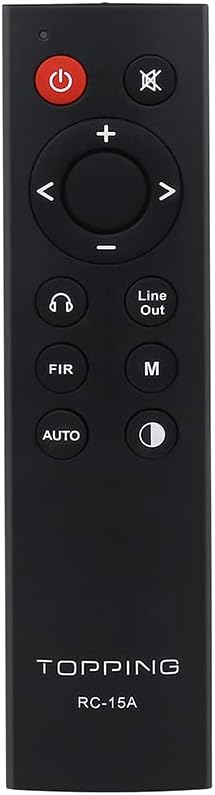
Figure 2.1: Front view of the RC-15A remote control, displaying the button layout including power, mute, volume up/down, navigation, input selection, and mode buttons.
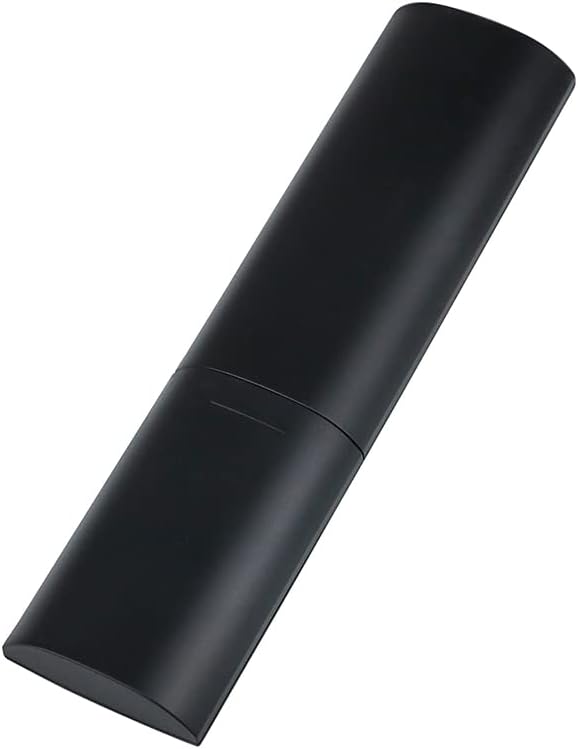
Figure 2.2: Side and back view of the RC-15A remote control, highlighting its sleek, black casing and ergonomic design.
Button Functions:
- Power Button (●): Turns the connected Topping device on or off.
- Mute Button (✕): Mutes or unmutes the audio output.
- Volume Up/Down (+/-): Increases or decreases the volume level.
- Navigation Buttons (◀ ▶ ▲ ▼): Used for menu navigation or input selection, depending on the device.
- Headphone Output Button (♫): Switches to headphone output mode (if supported by the device).
- Line Out Button: Switches to line output mode (if supported by the device).
- FIR Button: Function varies by device, often related to filter settings.
- M Button: Mode or Menu button, function varies by device.
- AUTO Button: Automatic input selection or mode (function varies by device).
- Display Brightness Button (☽): Adjusts the display brightness of the connected device.
3. Setup
Battery Installation:
The RC-15A remote control requires batteries for operation. Batteries are not included and must be purchased separately. It typically uses two AAA batteries (Lithium recommended for longer life).
- Locate the battery compartment on the back of the remote control.
- Slide the battery cover downwards or in the direction indicated by an arrow to open it.
- Insert two AAA batteries, ensuring the positive (+) and negative (-) terminals align correctly with the markings inside the compartment.
- Close the battery cover by sliding it back into place until it clicks securely.
Note: Remove batteries if the remote control will not be used for an extended period to prevent leakage and damage.
4. Operating Instructions
The RC-15A remote control operates via infrared (IR) signals. Ensure there is a clear line of sight between the remote control and the IR receiver on your Topping device.
Compatible Devices:
The RC-15A is pre-programmed to work with a range of Topping DACs and audio devices, including but not limited to:
- Topping E30, E30 II, E50, E70, E70V
- Topping DX3 Pro, DX3 Pro+, DX5, DX5 Lite, DX7 Pro, DX7 Pro+
- Topping D30 Pro, D50s, D90se, D90
Basic Operation:
- Power On/Off: Point the remote at your Topping device and press the Power button.
- Volume Control: Use the + button to increase volume and the - button to decrease volume.
- Mute: Press the Mute button to temporarily silence the audio. Press again to unmute.
- Input Selection: Use the navigation buttons (left/right arrows) or dedicated input buttons (if available on your device) to cycle through available inputs.
- Menu Navigation: For devices with on-screen menus, use the navigation arrows (up/down/left/right) and potentially the 'M' or 'AUTO' button for selection or confirmation. Refer to your specific Topping device's manual for detailed menu operations.
Important: The specific functions of some buttons (e.g., FIR, M, AUTO, Headphone Output, Line Out) may vary depending on the model and firmware version of your Topping DAC or amplifier. Always consult the user manual of your specific Topping audio device for detailed compatibility and functionality.
5. Maintenance
Proper maintenance ensures the longevity and reliable operation of your RC-15A remote control.
- Cleaning: Wipe the remote control with a soft, dry cloth. Do not use abrasive cleaners, waxes, or solvents as they may damage the finish or internal components.
- Battery Replacement: Replace batteries when the remote's range decreases or it becomes unresponsive. Always replace all batteries at the same time with new ones of the same type.
- Storage: Store the remote control in a cool, dry place away from direct sunlight and extreme temperatures.
- Avoid Drops: Protect the remote from physical shocks and drops, which can damage internal circuitry.
6. Troubleshooting
If you encounter issues with your RC-15A remote control, try the following troubleshooting steps:
| Problem | Possible Cause | Solution |
|---|---|---|
| Remote not responding. | Dead or low batteries. | Replace batteries with new ones. |
| Remote not responding. | No clear line of sight to device. | Ensure no obstructions between remote and device's IR receiver. Point directly at the device. |
| Remote range is poor. | Weak batteries. | Replace batteries. |
| Specific button not working. | Button stuck or damaged. | Gently press the button multiple times. If still unresponsive, the remote may be faulty. |
| Remote works for some functions but not others. | Function not supported by your specific Topping device model. | Refer to the user manual of your Topping DAC/amplifier to confirm supported remote functions. |
7. Specifications
| Feature | Detail |
|---|---|
| Model | RC-15A |
| Brand | AOSHIDA (Manufacturer: TOPPING) |
| Connectivity Technology | Infrared (IR) |
| Special Features | Pre-programmed for Topping devices |
| Compatible Devices | Topping E30, E30 II, E50, E70, E70V, DX3 Pro, DX3 Pro+, DX5, DX5 Lite, DX7 Pro, DX7 Pro+, D30 Pro, D50s, D90se, D90 |
| Batteries Required | Yes (2 x AAA, not included) |
| Dimensions (Approx.) | 21.6 x 11.7 x 9.1 cm (Parcel Dimensions) |
| Weight (Approx.) | 40 g |
8. Warranty and Support
Information regarding the specific warranty period and support contact for the Topping RC-15A remote control is typically provided with the original purchase of your Topping audio device or on the manufacturer's official website.
For technical support, warranty claims, or further inquiries, please refer to the documentation included with your Topping DAC/amplifier or visit the official Topping or AOSHIDA website.
Related documentsRC-15A

Ask a question about this manual
Ask about setup, troubleshooting, compatibility, parts, safety, or missing instructions. Manuals+ will review the question and use this page’s manual context to help answer it.