ROTH B09JKWDFTT

ROTH Educational Alarm Clock and Stamp Set User Manual

Model: B09JKWDFTT | Brand: ROTH

Introduction

This manual provides comprehensive instructions for the ROTH Educational Alarm Clock and Stamp Set. Designed to assist children in learning to tell time, this set includes an alarm clock with various features and a complementary stamp set for practice. Please read this manual thoroughly before use to ensure proper operation and safety.

ROTH Educational Alarm Clock and Stamp Set
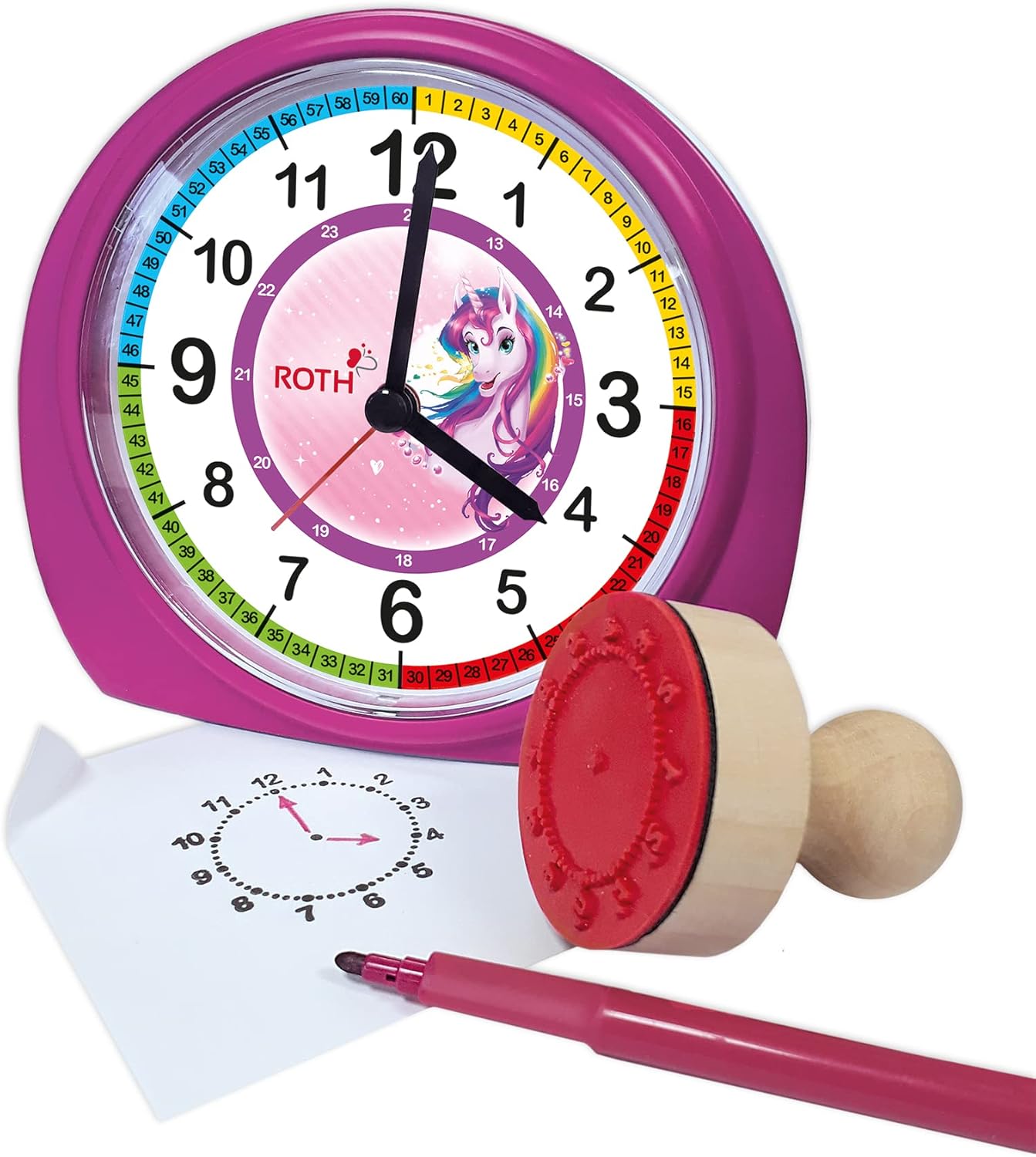
The ROTH Educational Alarm Clock and Stamp Set, featuring a pink unicorn-themed clock and a wooden stamp with an ink pad.

Safety Information

WARNING: CHOKING HAZARD – Small parts. Not suitable for children under 3 years.

  • Always supervise young children during use.
  • Keep batteries out of reach of children.
  • Do not disassemble the product.
  • Dispose of batteries properly according to local regulations.

Package Contents

Please check the package to ensure all items are present:

  • 1 x ROTH Educational Alarm Clock (Unicorn design)
  • 1 x High-quality Wooden Stamp
  • 1 x Ink Pad
ROTH Educational Alarm Clock and Stamp Set in its packaging
The product packaging, showing the alarm clock and stamp set inside.

Setup

Battery Installation

The alarm clock requires 1x AA battery (not included).

  1. Locate the battery compartment on the back of the alarm clock.
  2. Open the battery compartment cover.
  3. Insert one AA battery, ensuring the correct polarity (+ and -) as indicated inside the compartment.
  4. Close the battery compartment cover securely.
Back view of the ROTH alarm clock showing battery compartment
The rear of the alarm clock, displaying the battery compartment and adjustment knobs.

Operating Instructions

Setting the Time

Use the time setting knob located on the back of the clock to adjust the hour and minute hands. Rotate the knob clockwise or counter-clockwise until the correct time is displayed.

Setting the Alarm

Use the alarm setting knob, also on the back, to set the desired alarm time. The alarm will sound a beep when the set time is reached. To activate or deactivate the alarm, use the ON/OFF switch located on the side of the clock.

Side view of the ROTH alarm clock showing the ON/OFF switch
Side view of the alarm clock, highlighting the ON/OFF switch for the alarm function.

Snooze Function

When the alarm sounds, press the large button on the top of the clock to activate the snooze function. The alarm will temporarily stop and sound again after a short interval.

Backlight

The clock features a backlight for visibility in low-light conditions. Press the backlight button, typically located on the top or side, to illuminate the clock face.

Using the Stamp Set

The included wooden stamp and ink pad are designed to help children practice telling time. The stamp creates a clock face outline on paper, allowing children to draw in the hands for various times.

  1. Open the ink pad container.
  2. Gently press the rubber side of the wooden stamp onto the ink pad to coat it evenly with ink.
  3. Press the inked stamp firmly onto a piece of paper.
  4. Lift the stamp to reveal the clock face outline.
  5. Children can then draw the hour and minute hands to represent different times.
Close-up of the wooden stamp and ink pad
A detailed view of the wooden stamp and its accompanying red ink pad.
ROTH alarm clock with stamp and paper showing stamped clock face
The alarm clock alongside the stamp and a piece of paper demonstrating the stamped clock face outline, ready for time-telling practice.

Maintenance and Care

  • Clean the clock and stamp with a soft, dry cloth. Do not use abrasive cleaners or solvents.
  • Avoid exposing the product to extreme temperatures or direct sunlight.
  • If the clock will not be used for an extended period, remove the battery to prevent leakage.
  • Store the ink pad with its lid securely closed to prevent drying.

Troubleshooting

ProblemPossible CauseSolution
Clock not workingBattery is dead or incorrectly inserted.Replace battery (1x AA) or check polarity.
Alarm not soundingAlarm is not activated or set incorrectly.Ensure alarm ON/OFF switch is in the 'ON' position and alarm time is set correctly.
Backlight not workingBattery low or backlight button not pressed.Replace battery or press the backlight button firmly.
Stamp not making clear impressionInk pad is dry or stamp not evenly inked.Ensure ink pad is moist; re-ink stamp evenly. Replace ink pad if necessary.

Specifications

FeatureDetail
Product Dimensions (LxWxH)20 x 21.1 x 7.3 cm
Item Weight350 Grams
Special FeaturesSnooze, Alarm, Backlight
BrandROTH
Age Range (Description)Children
MaterialWood (Stamp), Plastic (Clock)
ColorPink
Power SourceBattery Powered
Battery Type1x AA (not included)

Warranty and Support

This product comes with a standard manufacturer's warranty. For specific warranty details, including duration and coverage, please refer to the product packaging or contact ROTH customer support directly. If you encounter any issues or have questions not covered in this manual, please reach out to the retailer or manufacturer for assistance.

For further support, please visit the official ROTH website or contact their customer service department.

Related Documents - B09JKWDFTT

Preview Roth Touchline® SL Thermostat Installation Guide
Comprehensive installation guide for the Roth Touchline® SL room thermostat and underfloor heating system. Learn how to pair, register, and configure your thermostat with floor sensors and controllers.
Preview Roth Touchline SL Thermostat Installation Guide
Comprehensive installation and setup guide for the Roth Touchline SL and SL Plus thermostats. Covers wall mounting, wiring, sensor connection, pairing with controllers, floor sensor configuration, and advanced functions.
Preview Roth MultiPex® PEX Piping System Installation Guide
This installation guide provides detailed instructions for Roth MultiPex® PEX piping systems. It covers essential steps such as pipe cutting, bending, and fixing, along with warnings about solvent use. The document also includes comprehensive technical data and a list of compatible accessories, presented in English for clarity. Suitable for drinking water and central heating applications.
Preview Roth MultiPex® Installation Guide: Pipes and Fittings
Comprehensive installation guide for Roth MultiPex® pipe systems, covering cutting, bending, fixing, assembly, technical specifications, and accessories. Learn how to install Roth plumbing solutions safely and efficiently.
Preview Roth Touchline® PL Room Thermostat Installation and Operation Guide
This guide provides comprehensive instructions for installing and operating the Roth Touchline® PL wireless room thermostat. It covers setup, pairing with the controller, and detailed explanations of the thermostat's functions and settings.
Preview Roth Vipanel® Asennusdetaljit Märkätiloissa
Yksityiskohtaiset asennusohjeet ja detaljipiirrokset Roth Vipanel® -levyjen asentamiseen märkätiloihin, kattaen lattia- ja kattosaumat eri alustatyypeillä, mukaan lukien muovimattoiset lattiat.