
1. Introduction
The ZHIYUN Crane M3 is a compact and versatile 3-axis handheld gimbal stabilizer designed for mirrorless cameras, smartphones, and action cameras. It features an intuitive touch screen, quick release system, and built-in fill light to enhance your filming experience.

Image: The ZHIYUN Crane M3 gimbal stabilizer shown with different compatible devices, including mirrorless cameras, smartphones, and action cameras, highlighting its compact size and versatility.
Video: An overview of the ZHIYUN Crane M3 3-Axis Handheld Gimbal Stabilizer, demonstrating its features and various applications in different filming scenarios.
2. Setup and Balancing
2.1 Quick Release System
The Crane M3 features an upgraded 3-second super quick release system for efficient assembly and disassembly. This system includes a general quick release plate designed for easier balancing and secure camera attachment. The transverse palm-rejection design helps protect cameras during use.

Image: A close-up view of the ZHIYUN Crane M3's quick release system, illustrating how the camera plate slides into place for rapid mounting and dismounting.
2.2 Balancing Your Device
Proper balancing is crucial for optimal gimbal performance and to prevent motor strain. The Crane M3 is designed for easy balancing. Ensure your camera or smartphone is securely mounted on the quick release plate. Adjust the axes until the device remains level in all directions when the gimbal is powered off.

Image: The ZHIYUN Crane M3 with a mirrorless camera mounted, illustrating its payload capacity and the importance of proper camera placement for balancing.
2.3 Device Compatibility
The Crane M3 is compatible with a range of devices, including mirrorless cameras (e.g., Sony A6600, A6500, A6000, RX100 M7, GX85), action cameras (e.g., GoPro Hero10/9/8 5/6/7), and smartphones (e.g., iPhone 13, 12, XS-Pro Max). An accessory mount (purchased separately) may be required for smartphones and action cameras.
3. Operating Instructions
3.1 Full-Color Touch Screen
The gimbal features a 1.22-inch full-color touch screen with an intuitive user interface. This screen allows for single-hand control, visualized adjustments, and easy access to various modes and settings.

Image: A close-up of the ZHIYUN Crane M3's 1.22-inch OLED touch screen, displaying menu options for mode selection, balancing, information, and settings.
3.2 Built-in Fill Light
The Crane M3 includes a built-in fill light with adjustable brightness and color temperature. This feature provides additional illumination for low-light conditions, ensuring clear and well-lit footage.

Image: The ZHIYUN Crane M3 with its built-in fill light activated, illuminating a subject in a low-light environment.
3.3 Gimbal Modes
The Crane M3 offers several shooting modes to cater to different creative needs:
- Vortex Mode: Rotates the camera 360 degrees on the roll axis, creating a dynamic barrel roll effect.
- Portrait Mode: Orients the camera vertically for social media content.
- Go Mode: Provides rapid follow response for fast-moving subjects.
- Panorama: Captures panoramic shots by automatically stitching multiple images.
- Timelapse: Records time-lapse videos with customizable intervals.

Image: Visual representation of different gimbal modes available on the ZHIYUN Crane M3, including F Mode, L Mode, PF Mode, POV Mode, Go Mode, Vortex Mode, and Portrait Mode.
3.4 Control Wheel and Joystick
The gimbal features a multifunctional control wheel and a joystick for precise control over camera movements and settings. These controls allow for quick adjustments to parameters like aperture, ISO, and shutter speed (depending on camera compatibility and connection).

Image: A detailed view of the ZHIYUN Crane M3's handle, highlighting the full-color touch screen, joystick, photo/video button, mode button, charging/upgrade port, multifunctional control wheel, trigger button, and brightness control wheel.
3.5 Wired Camera Control
The Crane M3 supports wired camera control, allowing you to manage certain camera functions directly from the gimbal. Ensure the correct control cable is connected between the gimbal and your camera's port.
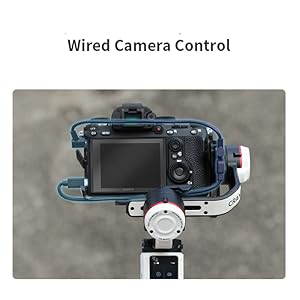
Image: The ZHIYUN Crane M3 connected to a camera via a control cable, demonstrating the wired camera control feature.
4. Maintenance and Care
4.1 Charging
The Crane M3 supports fast charging. Connect the gimbal to a power source using a compatible USB-C cable. The charging indicator will provide status updates. Ensure the gimbal is fully charged before extended use.
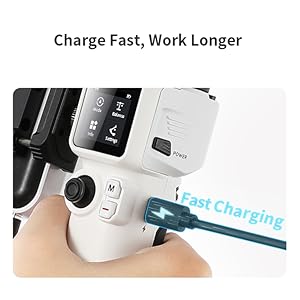
Image: A close-up of the ZHIYUN Crane M3's charging port with a USB-C cable connected, indicating fast charging capability.
4.2 Storage and Packing
For easy transport and protection, the Crane M3 can be packed efficiently. Utilize the axis locks to secure the gimbal's position during storage. Consider using a dedicated camera backpack for safe and convenient travel.

Image: The ZHIYUN Crane M3 shown alongside a stylish backpack, illustrating its portability and ease of packing for travel.
5. Troubleshooting
If you encounter issues with your ZHIYUN Crane M3, consider the following common solutions:
- Gimbal not powering on: Ensure the battery is fully charged.
- Unstable footage: Verify that the camera is correctly balanced on all three axes. Re-calibrate the gimbal if necessary.
- Camera not responding to controls: Check all cable connections between the gimbal and the camera. Ensure your camera model is compatible with the wired control features.
- Touch screen unresponsive: Power off and restart the gimbal. If the issue persists, check for firmware updates.
- Motor vibration or noise: Re-balance the camera. Ensure no obstructions are interfering with the motors.
For further assistance, refer to the official ZHIYUN support resources or contact customer service.
6. Specifications
| Feature | Detail |
|---|---|
| Brand | ZHIYUN |
| Model Name | Crane M3 |
| Manufacturer Part Number | ZY0123 |
| Color | Black, White |
| Compatible Devices | Camera, Cellphone |
| Product Dimensions (D x W x H) | 2.91"D x 6.18"W x 11.02"H |
| Item Weight | 1000 Grams |
| Folded Size | 7 inches (l) x 3 inches (w) x 2 inches (h) |
| Maximum Weight Recommendation | 1000 Grams |
| Image Stabilization | Yes |
| Video Capture Format | MP4 |
| Video Capture Resolution | 4K (3840 x 2160) |
| Audio Recording | No |
| Shooting Modes | Vortex Mode, Portrait Mode, Go Mode, Panorama, Timelapse |
| Water Resistance Level | Not Water Resistant |
7. Warranty and Support Information
This product comes with a standard manufacturer's warranty. Please refer to the warranty card included in your product packaging for specific terms and conditions, including warranty period and coverage details. Keep your proof of purchase for warranty claims.
For technical support, product registration, or to download the latest firmware and user guides, please visit the official ZHIYUN website. You can also contact ZHIYUN customer service for direct assistance with any product-related inquiries.


