
Introduction
The MediAcous Egg Night Light is designed to provide a soft, comforting glow for nurseries, children's rooms, and breastfeeding sessions. Its intuitive touch controls, multiple color options, and timer function make it a versatile and user-friendly lighting solution. Crafted from toy-grade ABS and PC material, it ensures a gentle and flicker-free light experience.

Figure 1: The MediAcous Egg Night Light, emitting a warm, soft glow.
What's in the Box
Please check the package contents to ensure all items are present:
- MediAcous Egg Night Light
- Power Cable (USB)
- User Manual (this document)
Setup
Initial Charging
Before first use, fully charge the night light. Locate the USB charging port on the bottom of the device. Connect the provided USB power cable to the night light and a compatible USB power adapter (not included) or computer USB port. The LED indicator will blink red when the battery is low and will turn off when fully charged.

Figure 2: The bottom of the night light, highlighting the USB charging port and control buttons.
Placement
Place the night light on a stable, flat surface in your desired location, such as a bedside table, dresser, or changing station. Ensure it is out of reach of infants and young children if not supervised.
Operating Instructions
Touch Control Overview
The MediAcous Night Light features intuitive touch controls on its top surface for various functions:

Figure 3: Visual guide to the night light's touch controls.
Power On/Off
- To turn the light ON or OFF, tap the top surface of the light twice.
Adjusting Brightness (Stepless Dimming)
- To adjust the brightness, long press the top surface of the light. The brightness will gradually increase or decrease. Release your finger when the desired brightness is reached.
Color Mode and Selection
- In Color mode, the night light will automatically cycle through 8 velvety colors.
- To fix your favorite color, touch the top surface for 0.5 seconds when that color is displayed.
- The light features a memory function, retaining your last brightness or color setting upon restart.
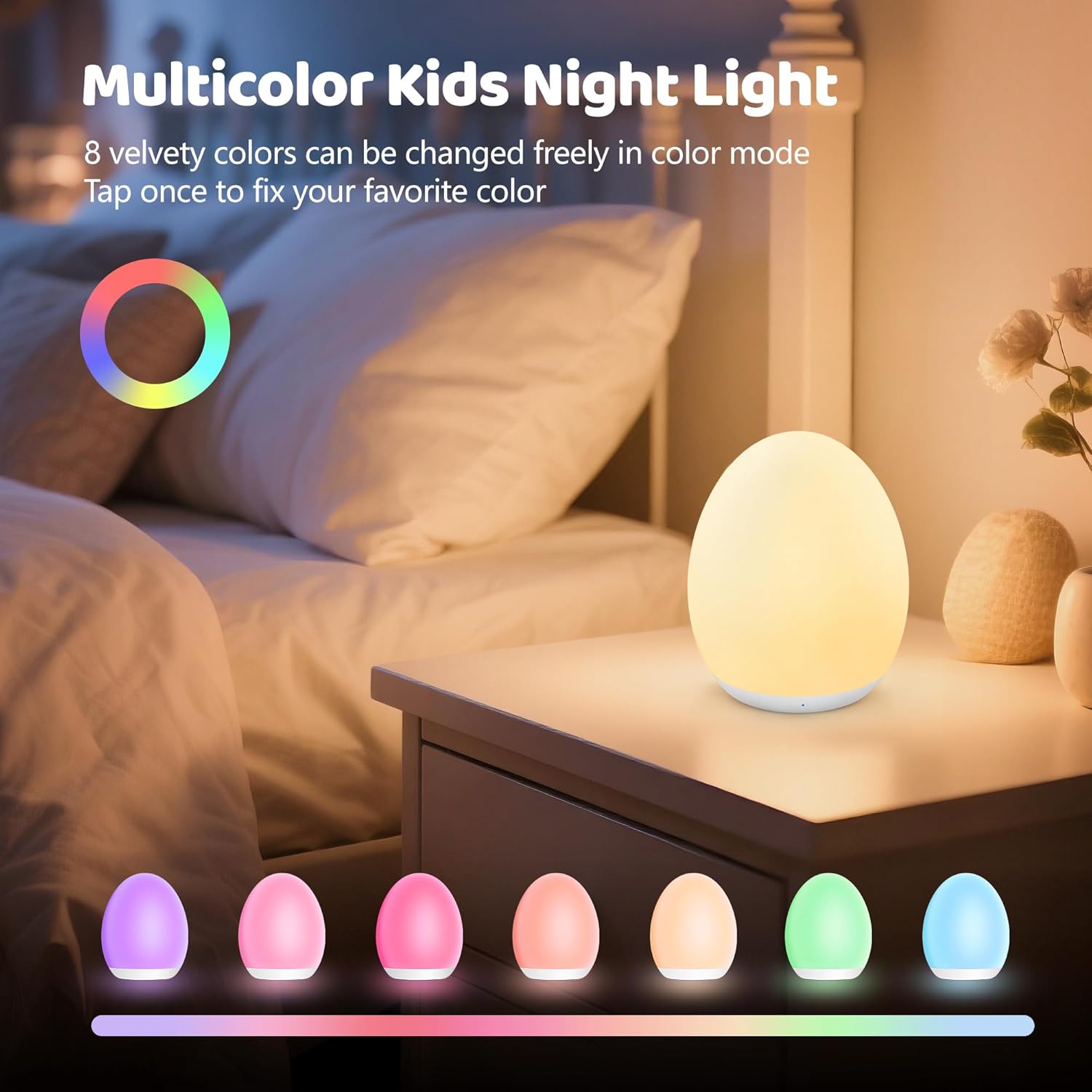
Figure 4: The night light cycling through its 8 vibrant colors.
Night Light Mode (for Feeding/Diaper Changes)
- To enter a soft night light mode, hold the top surface for 1.5 seconds. This provides a gentle illumination suitable for late-night feeding and diaper changes without disturbing sleep.

Figure 5: The night light provides ideal illumination for nighttime care.
1-Hour Timer Function
- To activate the 1-hour timer, press the dedicated 1H timer button located on the bottom of the light. The LED indicator will turn green when the timer is active. The light will automatically turn off after one hour.
- Note: The LED indicator may blink on and off in standby mode to assist in locating the device in the dark.

Figure 6: The 1-hour timer function is ideal for bedtime routines.
Maintenance
- Cleaning: Wipe the surface of the night light with a soft, damp cloth. Do not use abrasive cleaners or immerse the device in water.
- Storage: When not in use for extended periods, store the night light in a cool, dry place away from direct sunlight.
- Battery Care: To prolong battery life, avoid fully discharging the battery frequently. Recharge the light when the LED indicator blinks red.
Troubleshooting
| Problem | Possible Cause | Solution |
|---|---|---|
| Light does not turn on. | Battery is depleted; Incorrect operation. | Charge the night light fully. Ensure you are tapping the top surface twice to turn on. |
| Light does not charge. | Charging cable or adapter issue; Port obstruction. | Check if the USB cable is securely connected. Try a different USB port or adapter. Ensure the charging port is clean and free of debris. |
| Brightness adjustment not working. | Incorrect operation. | Ensure you are performing a long press on the top surface for stepless dimming. |
| Colors are not changing. | Light is in fixed color mode. | Tap the top surface for 0.5 seconds to release the fixed color and allow cycling. |
| 1-hour timer not activating. | Timer button not pressed correctly. | Ensure the 1H timer button on the bottom of the light is pressed firmly. Check for the green LED indicator. |
Specifications
| Feature | Detail |
|---|---|
| Model Number | ME-NL01 |
| Product Dimensions | 3.6"D x 3.6"W x 4.2"H |
| Item Weight | 7.8 Ounces |
| Material | Acrylonitrile Butadiene Styrene (ABS) |
| Light Source Type | LED |
| Power Source | Battery Powered |
| Special Features | 1H Timer, 8 Color Changing, Adjustable Brightness, Cordless |
| Brightness | 100 Lumen |
| Voltage | 5 Volts |
| Connectivity Technology | USB |
| Control Method | Touch |
| Battery Life | Up to 100 hours (dimmest setting), 5 hours (brightest setting) |
Warranty and Support
For warranty information and customer support, please refer to the contact details provided on the product packaging or visit the official MediAcous website. Keep your purchase receipt for warranty claims.
If you encounter any issues not covered in this manual, please contact MediAcous customer service for assistance.
