
DATOUBOSS 2000Z
DATOUBOSS 2000W Pure Sine Wave Power Inverter User Manual
Model: 2000Z
1. Introduction
Thank you for choosing the DATOUBOSS 2000W Pure Sine Wave Power Inverter. This device is designed to convert 12V DC power from your battery into stable 100V/110V AC power, suitable for a wide range of electronic devices. With its high efficiency and advanced protection features, it provides a reliable power solution for various applications, including RVs, car camping, marine use, outdoor activities, solar power systems, and emergency backup.
This manual provides detailed instructions for the safe and efficient operation of your inverter. Please read it thoroughly before use and keep it for future reference.

Image: The DATOUBOSS 2000W Pure Sine Wave Power Inverter shown in different application settings, including night camping, during a power outage, and in an RV, demonstrating its versatility.
2. Safety Information
Please observe the following safety precautions to prevent injury and damage to the inverter or connected devices:
- Do not expose the inverter to water, rain, snow, or spray.
- Do not operate the inverter if it has been dropped or damaged.
- Do not disassemble the inverter. Incorrect reassembly may result in electric shock or fire.
- Ensure proper ventilation around the inverter. Do not block ventilation openings.
- Connect the inverter only to a 12V DC power source. Connecting to a 24V or 48V source will damage the inverter.
- Always ensure the inverter is OFF before connecting or disconnecting cables.
- Connect the positive (+) terminal of the battery to the positive (+) terminal of the inverter, and the negative (-) terminal of the battery to the negative (-) terminal of the inverter. Reverse polarity connection will cause damage.
- Keep children away from the inverter.
- Avoid connecting appliances that exceed the inverter's rated power output (2000W continuous, 4000W peak).

Image: A visual representation highlighting the six multi-protection features of the DATOUBOSS inverter: input overvoltage protection, overload protection, input undervoltage protection, overcurrent protection, overheat protection, and short circuit protection.
3. Package Contents
Please check the box for the following items:
- 1 x DATOUBOSS 2000W Pure Sine Wave Power Inverter
- 1 x Remote Control
- 1 x User Manual (this document)
- 1 x Set of Battery Connection Cables (Red for Positive, Black for Negative)

Image: The main product image showing the DATOUBOSS 2000W Pure Sine Wave Power Inverter along with its battery connection cables (red and black) and the wireless remote control.
4. Product Overview
Familiarize yourself with the components of your DATOUBOSS inverter:
- Front Panel: Features AC output sockets, LCD display, and power switch.
- Rear Panel: Contains DC input terminals (positive and negative), cooling fan vents, and remote control port.
- LCD Display: Provides real-time information on battery status, input voltage, output power, and frequency.
- Cooling Fans: Built-in fans for efficient heat dissipation and stable operation.
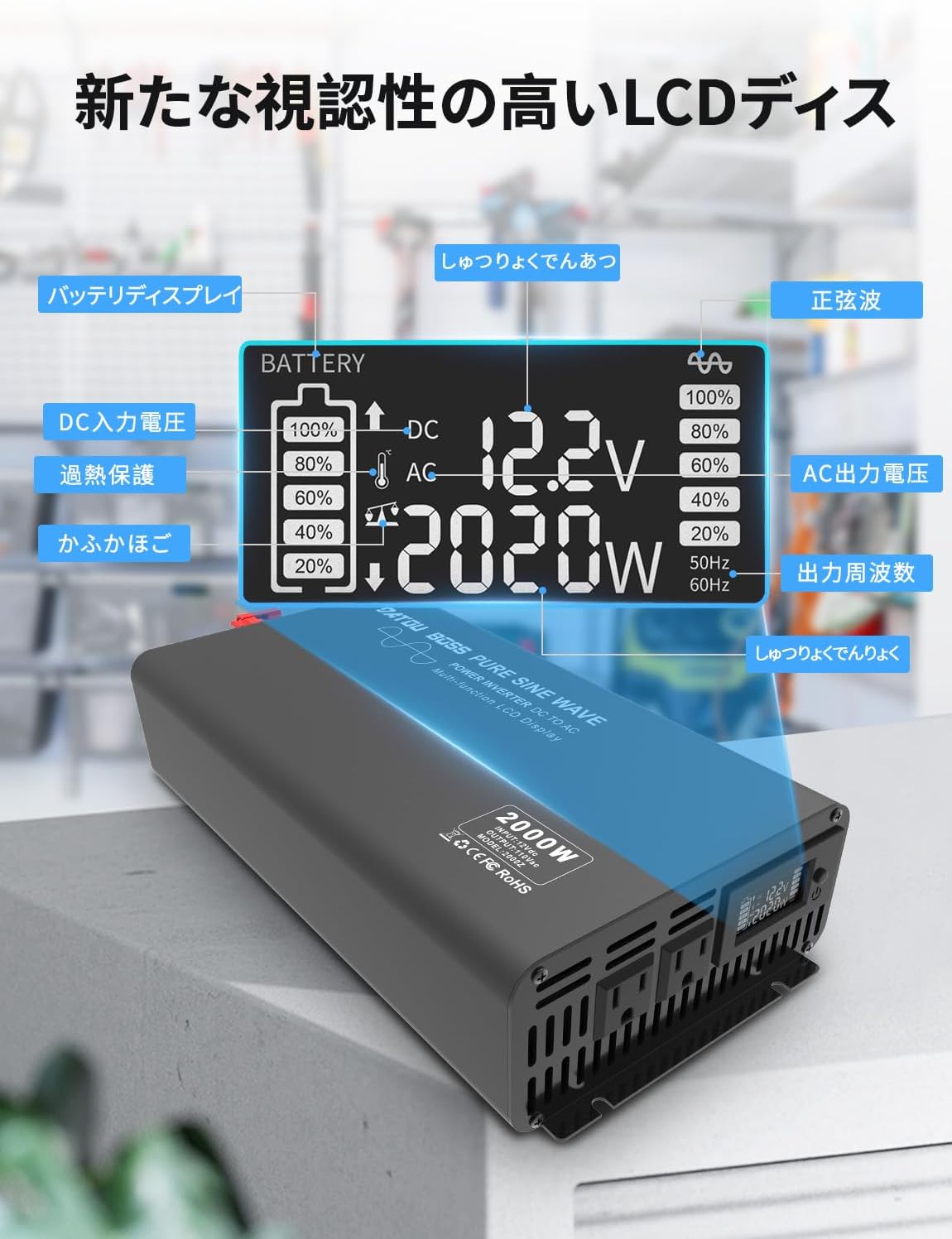
Image: A detailed view of the inverter's LCD display, showing battery level, DC input voltage (12.2V), AC output power (2020W), and frequency (50Hz/60Hz), providing real-time operational status.

Image: An exploded view of the inverter highlighting its internal cooling fans, which are crucial for rapid temperature reduction and ensuring quiet, long-lasting operation.
5. Setup
Follow these steps for initial setup:
- Preparation: Ensure the inverter is turned OFF. Place the inverter in a well-ventilated area, away from direct sunlight, heat sources, and moisture.
- Battery Connection: Connect the red cable (positive) to the positive (+) terminal of your 12V battery and the red terminal of the inverter. Connect the black cable (negative) to the negative (-) terminal of your 12V battery and the black terminal of the inverter. Ensure connections are tight and secure.
- Remote Control Pairing (First Use): If using the wireless remote control for the first time, it needs to be paired with the inverter. Long-press the ON/OFF button on the inverter. A small red dot will flash on the inverter's screen. While it's flashing, press the ON/OFF button on the remote control. The pairing process is complete when the red dot stops flashing.
- Power On: Once all connections are secure, press the power button on the inverter to turn it on. The LCD display will light up, showing the current status.

Image: A visual guide demonstrating the steps to pair the wireless remote control with the DATOUBOSS inverter, showing the long-press action on the inverter and the subsequent press on the remote.

Image: A schematic diagram illustrating how the DATOUBOSS inverter integrates into a solar power system, connecting solar panels, an MPPT controller, a battery, and various AC appliances.
6. Operating Instructions
Once the inverter is set up and powered on, you can begin using it:
- Connecting Appliances: Plug your AC appliances into the output sockets on the front panel of the inverter. Ensure the total power consumption of all connected appliances does not exceed 2000W.
- Monitoring with LCD Display: The LCD display provides real-time data. You can monitor the input DC voltage from your battery, the output AC power being drawn by your appliances, and the battery charge level.
- Frequency Switching (50Hz/60Hz): The inverter automatically adapts to the local power standard. If manual adjustment is needed, refer to the specific instructions in the full manual (if provided separately) or contact support.
- Using the Wireless Remote Control: The remote control allows you to conveniently turn the inverter ON or OFF from a distance, enhancing user convenience, especially in RVs or remote setups.

Image: The DATOUBOSS inverter positioned outdoors with a hand holding the wireless remote control, illustrating the convenience of remote operation.
7. Maintenance
To ensure the longevity and optimal performance of your inverter, follow these maintenance guidelines:
- Cleaning: Regularly clean the exterior of the inverter with a dry, soft cloth. Do not use liquid cleaners or solvents.
- Ventilation: Ensure the cooling fan vents are free from dust and debris. Blocked vents can lead to overheating.
- Connections: Periodically check all cable connections to ensure they are secure and free from corrosion. Loose connections can cause power loss or overheating.
- Storage: If storing the inverter for an extended period, ensure it is turned off and disconnected from the battery. Store it in a cool, dry place.
8. Troubleshooting
If you encounter issues with your inverter, refer to the following common problems and solutions:
| Problem | Possible Cause | Solution |
|---|---|---|
| Inverter not turning on | Loose battery connection; Low battery voltage; Inverter switch off | Check and tighten battery cables; Recharge or replace battery; Turn on inverter switch |
| No AC output | Overload; Overheat; Short circuit; Low/High input voltage | Reduce load; Allow inverter to cool; Check for short circuits in appliance/wiring; Check battery voltage |
| Remote control not working | Not paired; Dead battery in remote | Perform pairing procedure (see Setup section); Replace remote control battery |
| Abnormal noise from inverter | Overload; Fan obstruction | Reduce load; Clear fan vents of any obstructions |
If the problem persists after trying these solutions, please contact customer support.
9. Specifications
| Feature | Description |
|---|---|
| Model Number | 2000Z |
| Rated Power | 2000W |
| Peak Power | 4000W |
| Input Voltage | DC 12V |
| Output Voltage | AC 100V/110V |
| Output Waveform | Pure Sine Wave |
| Frequency | 50Hz/60Hz (Auto-switching) |
| Conversion Efficiency | ≥90% |
| Protection Features | Overload, Overheat, Short Circuit, Low Voltage, High Voltage |
| Dimensions (L x W x H) | 48 x 24.5 x 15 cm |
| Weight | 4 kg |

Image: The DATOUBOSS 2000W Pure Sine Wave Power Inverter with its physical dimensions (length 48cm, width 24.5cm, height 15cm) clearly indicated.
10. Warranty and Support
DATOUBOSS provides a 3-year warranty from the date of purchase. If the product experiences a malfunction due to non-human factors within this period, we will provide a replacement or refund after verification.
For technical support, troubleshooting assistance, or warranty claims, please contact DATOUBOSS customer service through the retailer where you purchased the product or visit the official DATOUBOSS store online. Please have your purchase receipt and product model number ready when contacting support.
DATOUBOSS Store: https://www.amazon.co.jp/stores/DATOUBOSS/page/F26A8A7F-5150-42C5-B566-C118EC9F45FE
Related documents2000Z


Ask a question about this manual
Ask about setup, troubleshooting, compatibility, parts, safety, or missing instructions. Manuals+ will review the question and use this page’s manual context to help answer it.