
1. Product Overview
The Soozier Twist Stair Stepper Machine with Rocking Handlebars is a compact exercise equipment designed for effective home cardio workouts. It provides both up-and-down and side-to-side movements to engage various muscle groups, including calves, glutes, thighs, hips, chest, back, arms, and shoulders. The integrated LCD display helps you monitor your workout progress, while the hydraulic drive system ensures smooth and stable operation.

Image 1.1: The Soozier Twist Stair Stepper Machine with rocking handlebars, shown in a home environment.
2. Important Safety Information
Please read all instructions carefully before using this equipment. Failure to follow these instructions may result in injury or damage to the product.
- Consult a Physician: Before starting any new exercise program, consult with your doctor, especially if you have pre-existing health conditions.
- Weight Limit: Do not exceed the maximum user weight of 220 lbs (100 kg).
- Proper Placement: Place the stepper on a flat, stable surface. Ensure adequate space around the machine for safe operation.
- Secure Footing: The stepper is designed with anti-slip feet pads to prevent movement and protect your floor. Always ensure these are intact and clean before use.
- Handlebar Safety: The rocking handlebars are padded for comfort and grip. Ensure all connections are securely tightened before and during each use to prevent wobbling.
- Hydraulic System: The hydraulic drive system is designed to protect ankles and joints. Periodically check for any signs of leakage or damage.
- Children and Pets: Keep children and pets away from the equipment during operation.
- Proper Attire: Wear appropriate athletic footwear and clothing during your workout.
3. Package Contents
Carefully unpack all components and ensure you have received the following items:
- Main Stepper Unit
- Rocking Handlebars (2 pieces)
- LCD Screen
- Assembly Hardware (bolts, washers, nuts, tools)
- User Manual (this document)
If any parts are missing or damaged, please contact customer support immediately.
4. Setup and Assembly
Follow these steps to assemble your Soozier Twist Stair Stepper Machine:
- Unpack Components: Remove all parts from the packaging and lay them out on a clean, flat surface. Verify all components are present as per the package contents list.
- Attach Handlebars: Insert the rocking handlebars into their designated slots on the main stepper unit. Secure them firmly using the provided bolts and washers. Ensure they are stable and do not wobble.
- Connect LCD Screen: Attach the LCD screen to its mounting bracket, typically located at the top of the main unit. Connect the sensor cable from the stepper to the back of the LCD screen.
- Final Check: Before first use, double-check all bolts and connections to ensure they are securely tightened.

Image 4.1: Detail of a handlebar connection point, illustrating how it attaches to the main unit.

Image 4.2: Detail of a base adjustment knob, which may be used for stability or minor height adjustments.
5. Operating Instructions
5.1 Starting Your Workout
- Step On: Carefully step onto the foot pedals, one foot at a time. Hold onto the handlebars for balance.
- Begin Stepping: Start a rhythmic stepping motion, pushing down on each pedal alternately. The pedals will move up and down, and slightly side-to-side.
- Engage Handlebars: Grip the rocking handlebars. As you step, the handlebars will move, allowing for an upper body workout.
5.2 Using the LCD Display
The integrated LCD screen tracks your workout data:
- TIME: Displays the duration of your current workout.
- CNT (Count): Shows the total number of steps taken.
- CAL (Calories): Estimates the calories burned during your session.
- STRIDES/MIN: Shows your current stepping pace.
- SCAN: Cycles through all display functions automatically.
Press the 'MODE/RESET' button to switch between display modes or to reset the values.
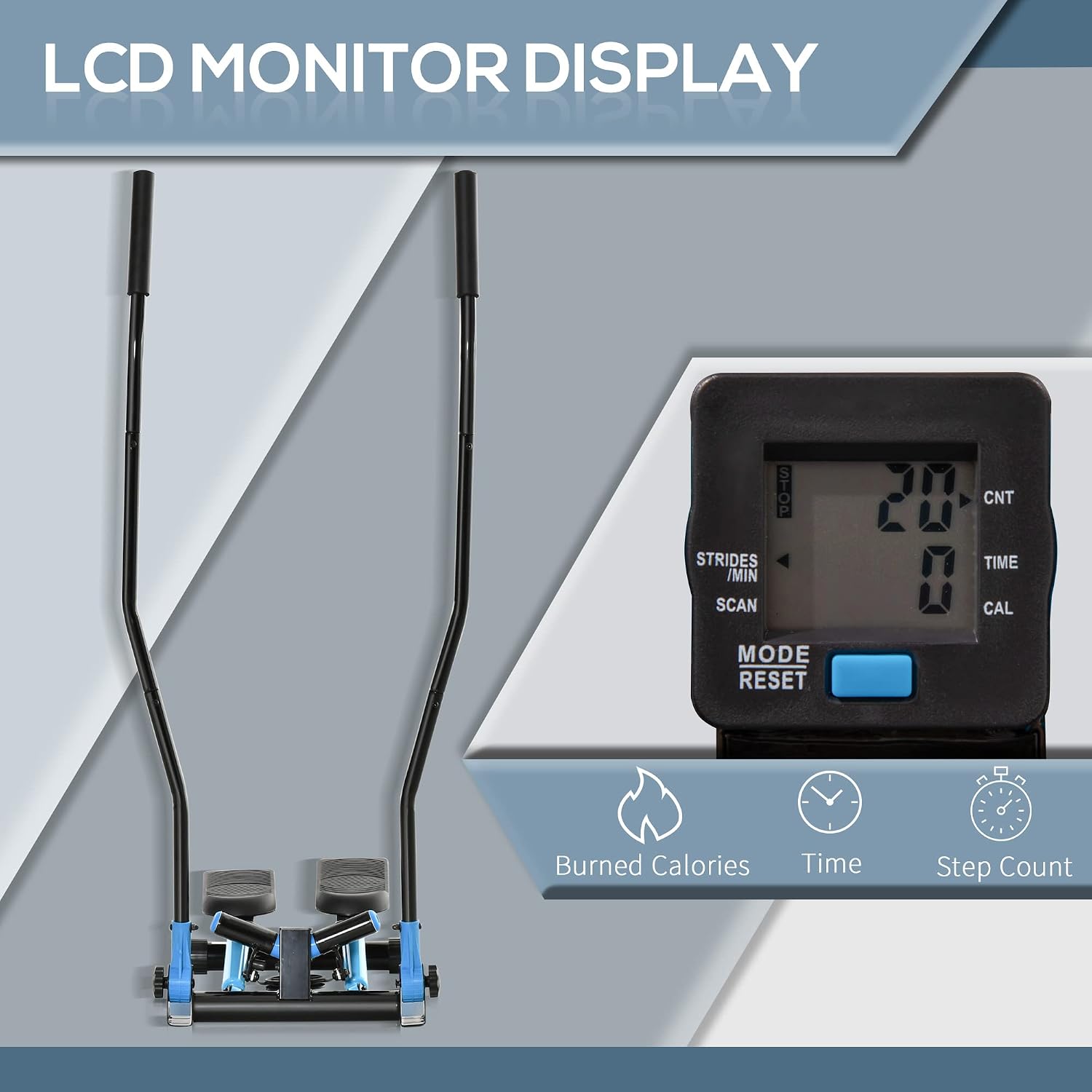
Image 5.1: The LCD monitor display, showing workout metrics.
5.3 Adjusting Resistance
The stepper features adjustable hydraulic resistance. To increase or decrease the stepping difficulty:
- Locate the resistance adjustment knob, typically found near the base of the pedals.
- Turn the knob clockwise to increase resistance, making stepping harder.
- Turn the knob counter-clockwise to decrease resistance, making stepping easier.
Adjust the resistance to match your fitness level and workout goals.

Image 5.2: The adjustable resistance knob, allowing users to customize workout intensity.
5.4 Full Body Workout
The design of this stepper allows for a comprehensive workout targeting multiple muscle groups:
- Legs & Glutes: The primary stepping motion engages your quadriceps, hamstrings, and gluteal muscles.
- Calves: The up-and-down movement effectively works your calf muscles.
- Hips: The side-to-side twist motion helps to tone your hip abductors and adductors.
- Arms, Chest, Back & Shoulders: The rocking handlebars provide resistance for an upper body workout, engaging these muscle groups.

Image 5.3: Visual representation of the muscle groups targeted during a workout on the stepper.

Image 5.4: A user demonstrating the full-body workout on the Soozier Stepping Machine.
6. Maintenance
Regular maintenance ensures the longevity and safe operation of your stepper machine:
- Cleaning: Wipe down the machine with a damp cloth after each use to remove sweat and dust. Avoid abrasive cleaners.
- Check Connections: Periodically inspect all bolts, nuts, and connections, especially those for the handlebars and pedals. Tighten any loose components.
- Hydraulic Cylinders: Inspect the hydraulic cylinders for any signs of oil leakage or damage. If leakage is observed, discontinue use and contact customer support. The hydraulic system is designed for smooth operation and should be free of squeak noises.
- Foot Pads: Ensure the anti-slip foot pads are clean and free from debris to maintain stability and floor protection.

Image 6.1: Detail of the rubber shock-absorb cushion and hydraulic cylinders, highlighting key components for maintenance checks.
7. Troubleshooting
If you encounter issues with your stepper, refer to the following common problems and solutions:
| Problem | Possible Cause | Solution |
|---|---|---|
| Handlebars are wobbly or fall flat. | Loose connection bolts. | Ensure all handlebar connection bolts are securely tightened. Check periodically. |
| No resistance or pedals do not lift automatically. | Resistance knob set too low; hydraulic system issue. | Turn the resistance knob clockwise to increase resistance. If the issue persists, inspect hydraulic cylinders for damage or leakage. Contact support if necessary. |
| LCD display is not working. | Battery drained; loose sensor cable. | Replace the battery in the LCD unit. Check that the sensor cable is firmly connected to both the stepper and the LCD screen. |
| Squeaking noise during operation. | Loose parts; lack of lubrication (rare for sealed hydraulics). | Check and tighten all visible bolts and connections. If the noise persists and seems to come from the hydraulic cylinders, contact customer support. |
8. Product Specifications
- Model Name: Stepping machine
- Part Number: USA90-2810131
- Overall Dimensions (L x W x H): 21.25" x 15.75" x 53.25" (54 cm x 40 cm x 135 cm)
- Item Weight: 19.8 lbs (9 kg)
- Weight Capacity: 220 lbs (100 kg)
- Material: Acrylonitrile Butadiene Styrene (ABS), Alloy Steel
- Color: Blue
- Included Components: LCD Screen, Rocking Handlebars

Image 8.1: Dimensional diagram of the stepper machine.
9. Warranty and Support
9.1 Warranty Information
This Soozier product is covered by a 1 Year Manufacturer Warranty from the date of purchase. This warranty covers defects in materials and workmanship under normal use. It does not cover damage resulting from misuse, accident, modification, or unauthorized repair.
9.2 Customer Support
For technical assistance, warranty claims, or to order replacement parts, please contact Soozier customer support. Refer to your purchase documentation or the official Soozier website for contact details.
When contacting support, please have your model number (USA90-2810131) and proof of purchase readily available.