
1. Introduction
The Walfront ZK-TB21 is a 2.1 channel audio amplifier board designed for DIY home theater speakers. It features a TPA3116D2 chip, Bluetooth 5.0 connectivity, and AUX audio input. This manual provides detailed instructions for setup, operation, and maintenance of your amplifier board.
Key Features:
- 2.1 Channel Output: Provides a maximum output of 2x50W for left/right channels and 100W for the subwoofer.
- Dual Audio Input: Supports Bluetooth 5.0 for wireless streaming and AUX input for wired connections.
- Adjustable Controls: Independent controls for subwoofer frequency, subwoofer volume, treble, bass, and main volume.
- Protection Mechanisms: Includes safeguards against overvoltage, undervoltage, overheating, and short circuits to ensure device longevity.
- Durable Connectors: Equipped with copper connectors and shed-type terminals designed to handle high current without excessive heat, preventing wire damage.
2. Package Contents
Verify that all items listed below are included in your package:
- 1 x Amplifier Board Module
- 2 x Acrylic Board
- 1 x Screwdriver
- 9 x Screw
- 4 x Brass Connecting Rod
- 4 x Brass Terminal
- 5 x Knob
- 1 x Wire Input Socket

Image 2.1: The Walfront ZK-TB21 Audio Amplifier Board along with all components and accessories included in the package.
3. Product Diagram
Familiarize yourself with the various components and connection points of the ZK-TB21 amplifier board:

Image 3.1: Detailed diagram of the ZK-TB21 amplifier board, highlighting the location of controls, input/output ports, and key components.
- Subwoofer Freq Control: Adjusts the cutoff frequency for the subwoofer output.
- Subwoofer Volume Control: Adjusts the volume level of the subwoofer.
- Treble Control: Adjusts the high-frequency response of the left and right channels.
- Bass Control: Adjusts the low-frequency response of the left and right channels.
- Power Switch & Main Volume: Turns the unit on/off and controls the overall output volume.
- LED Indicator: Provides status feedback (e.g., power on, Bluetooth pairing).
- 3.5mm/0.14in AUX Input: Port for wired audio input.
- DC Power Outlet: Connection points for the DC power supply.
- Subwoofer Output: Terminal for connecting the subwoofer speaker.
- Right Speaker Output: Terminal for connecting the right channel speaker.
- Left Speaker Output: Terminal for connecting the left channel speaker.
4. Setup and Installation
Follow these steps to correctly set up your ZK-TB21 amplifier board:
4.1 Speaker Connections
- Identify the subwoofer, left, and right speaker output terminals on the amplifier board.
- Connect your subwoofer speaker wires to the 'S+' and 'S-' terminals. Ensure correct polarity (red wire to '+' and black wire to '-').
- Connect your right channel speaker wires to the 'R+' and 'R-' terminals, observing polarity.
- Connect your left channel speaker wires to the 'L+' and 'L-' terminals, observing polarity.
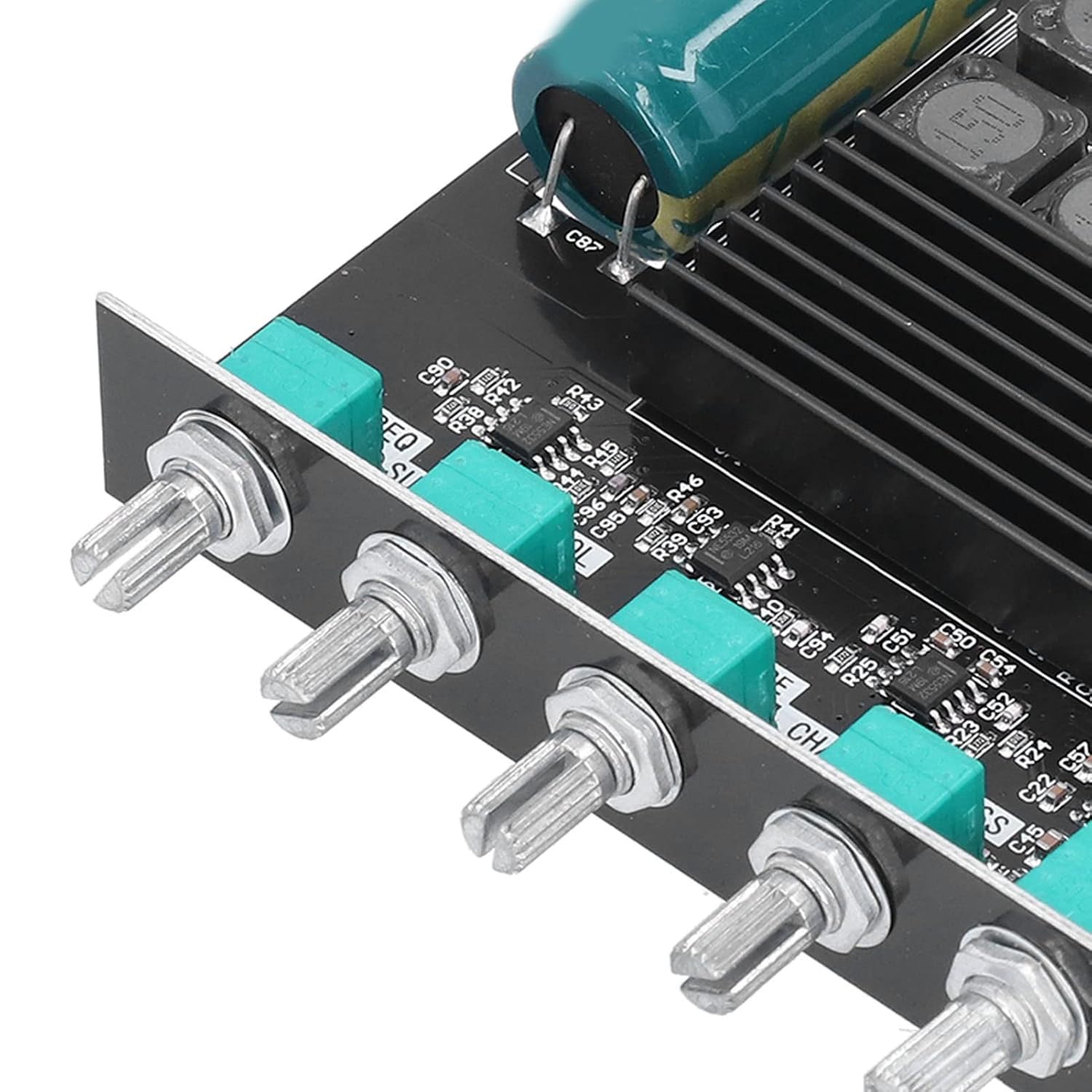
Image 4.1: Close-up view of the speaker output terminals and DC power input on the amplifier board, showing where to connect wires.
4.2 Power Supply Connection
- Connect a DC power supply (12-24V, 5A or more) to the DC power input terminals.
- Ensure correct polarity: '+' to positive, '-' to negative.
- Important: Do not connect a 24V battery pack directly. Use a power adapter with sufficient current capacity to avoid sound distortion.
4.3 Audio Input Connection
The board supports two audio input methods:
- Bluetooth 5.0: Turn on the amplifier. The LED indicator will show pairing mode. On your audio source device (e.g., smartphone), search for Bluetooth devices and select 'BT SZM' to pair.
- AUX Input: Connect your audio source device to the 3.5mm AUX input jack using an audio cable.
Video 4.1: This video demonstrates the process of connecting speakers and power to the ZK-TB21 amplifier board, followed by Bluetooth pairing with a mobile device.
5. Operating Instructions
Once the amplifier board is set up, follow these instructions for operation:
5.1 Power On/Off
- To power on, rotate the Main Volume knob clockwise until the LED indicator illuminates.
- To power off, rotate the Main Volume knob counter-clockwise until it clicks and the LED indicator turns off.
- Note: The power switch on the board is a standby switch. For complete power disconnection, unplug the power adapter.
5.2 Volume and Tone Control
Use the dedicated knobs to adjust audio output:

Image 5.1: Close-up view of the control knobs for subwoofer frequency, subwoofer volume, treble, bass, and main volume.
- Main Volume: Controls the overall output volume of all channels.
- Subwoofer Volume: Adjusts the volume specifically for the subwoofer.
- Subwoofer Freq: Sets the crossover frequency for the subwoofer, determining which low frequencies are sent to it.
- Treble: Increases or decreases the high-frequency sound for the main speakers.
- Bass: Increases or decreases the low-frequency sound for the main speakers.
6. Maintenance
To ensure the longevity and optimal performance of your amplifier board, consider the following maintenance tips:
- Keep the board clean and free from dust. Use a soft, dry cloth for cleaning.
- Avoid exposing the board to moisture or extreme temperatures.
- Ensure adequate ventilation around the board to prevent overheating.
- Regularly check all connections for tightness and ensure no wires are frayed or damaged.
7. Troubleshooting
If you encounter issues with your ZK-TB21 amplifier board, refer to the following common problems and solutions:
- No Sound or Distorted Sound:
- Ensure all speaker wires are correctly connected with proper polarity.
- Verify that the power adapter provides sufficient voltage (12-24V) and current (5A or more). Insufficient power can lead to distortion.
- Check the audio input source and cable for proper connection and functionality.
- Adjust the volume knobs (Main, Subwoofer, Treble, Bass) to appropriate levels.
- Bluetooth Connection Issues:
- Ensure the amplifier is powered on and in pairing mode (LED indicator).
- Confirm that your audio source device's Bluetooth is enabled and searching for devices.
- Make sure the device is within the 10m (32.8ft) unobstructed Bluetooth range.
- Try unpairing and re-pairing the device.
- Overheating:
- Ensure the amplifier board has adequate ventilation and is not covered.
- Verify that the connected speakers match the recommended impedance (4-8Ω) and power rating (20-100W).
- Power Indicator On, No Functionality:
- The power switch is a standby switch. If the unit is unresponsive, fully disconnect power by unplugging the adapter and then reconnect.
8. Specifications
| Feature | Specification |
|---|---|
| Model | ZK-TB21 |
| Chip | TPA3116D2 |
| Bluetooth Version | 5.0 (Unobstructed 10m / 32.8ft) |
| Audio Input | AUX + Bluetooth |
| Number of Channels | 2.1 Channels |
| Input Sensitivity | 500mV |
| Adapted Power Supply Voltage | 12-24V / 5A or More (DC) |
| Speaker Compatibility | 20-100W, 4-8Ω |
| Output Power | Max 50W (Left & Right Channel), Max 100W (Subwoofer) |
| Protection Mechanisms | Overvoltage, Undervoltage, Overheating, Short Circuit, Anti-reverse Connection |
| Material | PCB |
| Parcel Dimensions | 13.5 x 11.6 x 5 cm |
| Weight | 250 g |
9. Safety Information
Please read and adhere to the following safety guidelines:
- Always ensure the power supply is disconnected before making or changing any connections.
- Do not operate the device in wet conditions or expose it to liquids.
- Avoid placing the device near heat sources or in direct sunlight.
- Only use power adapters that meet the specified voltage and current requirements.
- Do not attempt to modify or repair the amplifier board yourself. Refer to qualified personnel for service.
10. Warranty and Support
Specific warranty details and direct support contact information are not provided in the product data. For warranty claims or technical assistance, please refer to the retailer or manufacturer's official website where the product was purchased.
