
powkey R1000
powkey Portable Power Station R1000 User Manual
Model: R1000
Brand: powkey
Introduction
The powkey R1000 Portable Power Station is a versatile and reliable power source designed for various applications, including outdoor activities, travel, RV trips, camping, and emergency backup. Equipped with a 740Wh lithium-ion battery, it provides stable and clean pure sine wave power to protect your sensitive electronic devices. This manual provides essential information for the safe and efficient operation of your power station.

Figure 1: Front view of the powkey R1000 Portable Power Station, showing the control panel and various output ports.
What's in the Box
Upon unboxing, please verify that all the following components are included:
- 1 x powkey R1000 Portable Power Station
- 1 x AC Adapter (for wall charging)
- 1 x Car Charger Cable (for car charging)
- 1 x User Manual (this document)

Figure 2: All items included with the powkey R1000 Portable Power Station.
Product Features
The powkey R1000 is designed with multiple features to provide reliable power wherever you need it:
Versatile Output Ports:
The power station features 11 versatile output ports to power a wide range of devices:
- 3 x AC Outlets (110V, 800W total)
- 2 x USB-A Ports
- 2 x USB-C Ports
- 2 x 10W Wireless Chargers (on top surface)
- 2 x 12V DC Ports (including 1 car port)

Figure 3: Detailed view of the 11 output ports available on the power station.

Figure 4: Illustration of the power station simultaneously charging multiple devices.

Figure 5: The two 10W wireless charging pads located on the top of the unit.
High Capacity and Power Output:
Equipped with a 740 watt-hour (200,000mAh, 3.7V) lithium-ion battery pack, it can power devices less than 800W. The pure sine wave output (110V 800W) protects sensitive electronics from damage.

Figure 6: Examples of appliances the power station can power, such as laptops, mini-fridges, and TVs.

Figure 7: Overview of the power station's 800W output power, 740WH capacity, and 11 output ports.

Figure 8: Important note on devices not supported (power over 800W), including heating devices and certain kitchen appliances.
Portability:
Designed with a flexible handle, the R1000 is easy to carry, weighing approximately 18.3 pounds.

Figure 9: The power station's compact dimensions (12.6"L x 9"W x 7.7"H) and weight (18.3 lbs) for easy transport.
Emergency LED Light:
Features an emergency LED light with 4 modes: Soft Light, Hard Light, Strobe, and SOS mode for help.

Figure 10: The integrated LED light with its four distinct modes for various lighting needs.

Figure 11: Visual representation of the LED light's functionality in an outdoor setting.
Safe Protection System:
Built-in safety mechanisms protect against over-temperature, short circuit, overcharge, overload, over-discharge, and overvoltage.
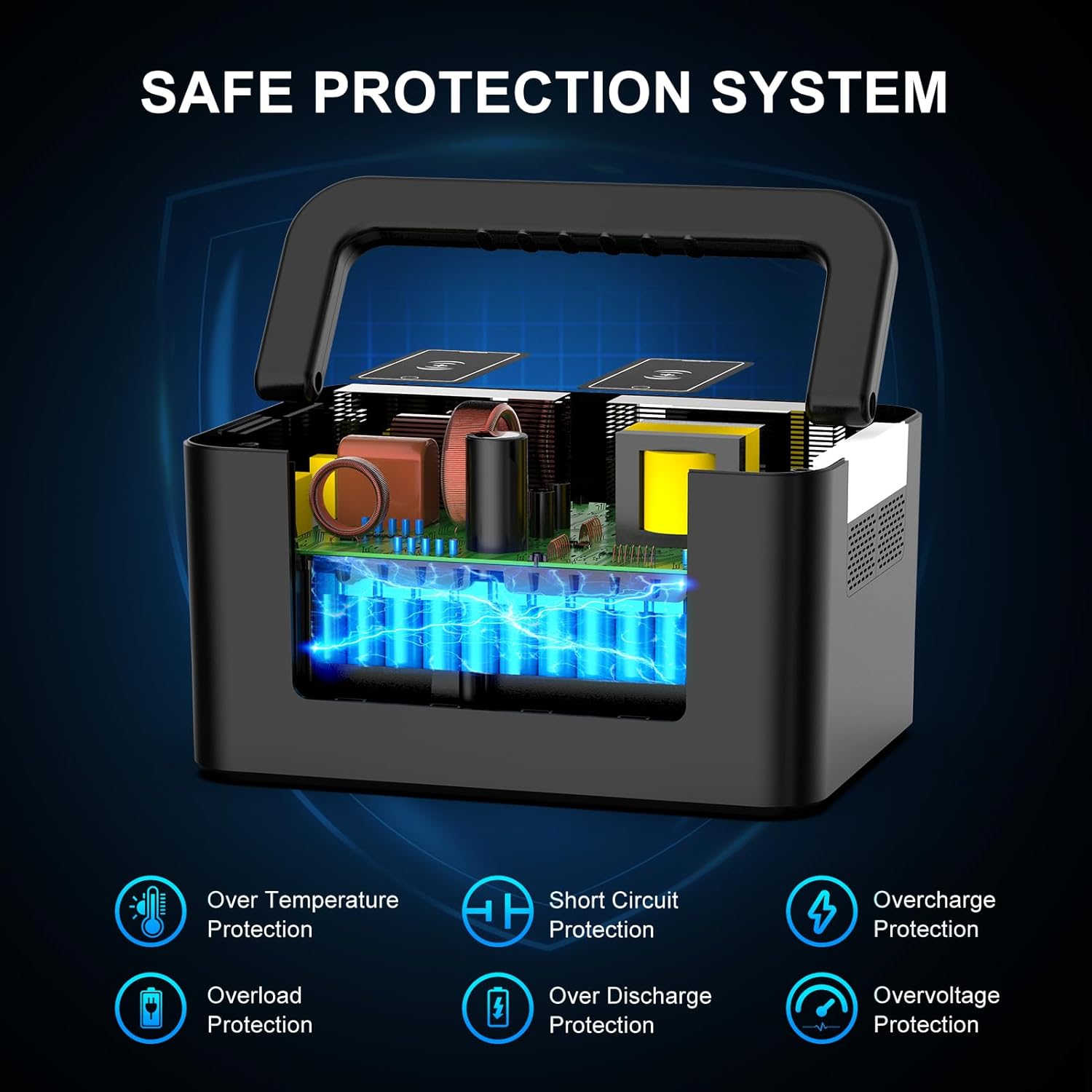
Figure 12: Diagram illustrating the internal components and various safety protections of the power station.

Figure 13: Another view of the internal safety features, highlighting protection against over-temperature, short circuit, overcharge, overload, over-discharge, and overvoltage.
Setup
Before first use, it is recommended to fully charge your powkey R1000 Portable Power Station.
- Initial Charge: Use the included AC adapter to charge the unit from a standard wall power socket. Alternatively, use the car charger cable to charge from your vehicle's cigarette lighter port.
- Solar Charging (Optional): If you have a compatible solar panel (not included, 13-28V, 100W+ recommended), connect it to the designated solar input port on the power station.
- Monitor Charge Level: The digital display on the power station will show the current battery level and input wattage during charging.

Figure 14: The three primary methods for recharging the power station: solar panel (optional), AC wall outlet, and 12V car charging.

Figure 15: Visual guide to the four charging methods: 100W Solar Panel (10 hours), 12V Car Outlet (7-8 hours), Wall Outlet (6-7 hours), and Gas Generator (6-7 hours).
Operating Instructions
- Powering On/Off: Press the main power button on the control panel to turn the unit on or off. The digital display will activate upon power-on.
- Using AC Outlets: Press the "AC" button to activate the AC outlets. Plug your 110V devices (up to 800W total) into the three AC ports. Remember to turn off the AC output when not in use to conserve battery.
- Using DC/USB Ports: Press the "DC" button to activate the DC and USB ports. Plug your 12V DC devices, USB-A, or USB-C devices into the respective ports.
- Wireless Charging: Place your Qi-compatible mobile devices on the wireless charging pads located on the top surface of the power station. Ensure the device is properly aligned for optimal charging.
- Using the LED Light: Press the dedicated light button to cycle through the four LED light modes: Soft Light, Hard Light, Strobe, and SOS.

Figure 16: The power station's utility in both power outage emergencies (charging phones, iPads, laptops) and outdoor camping scenarios (powering cameras, drones, lanterns).
Maintenance
To ensure the longevity and optimal performance of your powkey R1000 Portable Power Station, follow these maintenance guidelines:
- Regular Charging: Fully charge the power station at least once every 3-6 months, even if not in use, to maintain battery health.
- Storage: Store the unit in a cool, dry place away from direct sunlight, moisture, and corrosive materials. Avoid extreme temperatures.
- Cleaning: Use a soft, dry cloth to clean the exterior of the unit. Do not use abrasive cleaners or immerse the unit in water.
- Ventilation: Ensure the ventilation openings are clear and unobstructed during operation to prevent overheating.
Troubleshooting
If you encounter issues with your power station, refer to the following common troubleshooting steps:
- Unit Not Turning On:
- Ensure the power button is pressed firmly.
- Check the battery level on the display. If low, recharge the unit.
- Devices Not Charging:
- Verify that the specific output (AC, DC, USB) is activated by pressing its respective button.
- Check if the device's power consumption exceeds the power station's output limit (800W for AC).
- Ensure cables are securely connected.
- For wireless charging, confirm device compatibility and proper alignment on the charging pad.
- Overload Protection Activated:
- If the unit shuts down due to overload, disconnect the device(s) and restart the power station.
- Reduce the total power draw by connecting fewer or lower-wattage devices.
- Unusual Noise or Smell:
- Immediately turn off the unit and disconnect all devices.
- Contact customer support for assistance.
Specifications
| Feature | Detail |
|---|---|
| Brand | powkey |
| Model Name | R1000 |
| Battery Capacity | 740Wh (200,000mAh, 3.7V) Lithium-ion |
| AC Output | 110V, 800W (Pure Sine Wave) |
| Starting Wattage | 2000 Watts |
| Total Power Outlets | 11 (3x AC, 2x USB-A, 2x USB-C, 2x Wireless, 2x 12V DC) |
| Charging Input | AC Adapter, Car Charger, Solar Panel (13-28V, 100W+ recommended) |
| Item Weight | 18.3 Pounds |
| Product Dimensions | 12.6"L x 9"W x 7.7"H |
| Special Features | Digital Display, Extra-Long Run Time, Foldable Handle, Overload Protection, Short Circuit Protection, Emergency LED Light (4 modes) |
Warranty and Support
The powkey R1000 Portable Power Station comes with a 12-month manufacturer's warranty from the date of purchase. This warranty covers defects in materials and workmanship under normal use.
For warranty claims, technical support, or any questions regarding your power station, please contact powkey customer service. Refer to the contact information provided in your product packaging or visit the official powkey website for the most up-to-date support details.
Related documentsR1000

Ask a question about this manual
Ask about setup, troubleshooting, compatibility, parts, safety, or missing instructions. Manuals+ will review the question and use this page’s manual context to help answer it.