
1. Introduction
The HanRongDa HRD-900 is a compact, multi-functional emergency radio designed for various situations, including disaster preparedness, outdoor activities, and daily use. It integrates a radio receiver, flashlight, power bank for mobile devices, and an SOS siren, making it an essential tool for communication and safety. This manual provides detailed instructions on how to set up, operate, and maintain your HRD-900 radio.
2. Product Features
- Multi-Band Reception: Supports FM (64-108 MHz), AM (522-1710 KHz), and Shortwave (SW: 3.00-18.00 MHz) with high sensitivity.
- Digital Signal Processing (DSP): Enhances reception clarity and stability.
- Automatic Station Search & Storage: Automatically searches and stores up to 120 stations (30 for FM, 30 for AM, 60 for SW).
- Emergency Power Options: Features a built-in 2000mAh rechargeable lithium battery, USB charging, and a hand-crank generator for power in emergencies.
- Mobile Phone Charging: Can be used as a power bank to charge smartphones and other USB devices via its 2000mAh battery.
- Integrated Lighting: Equipped with a bright LED flashlight and a side LED light for illumination in dark environments.
- SOS Siren Function: Activates a loud siren and flashing light for emergency signaling.
- Digital Clock & Alarm: Displays time and includes an alarm clock function.
- Sleep Timer: Allows setting an automatic shutdown time (10-90 minutes).
- LCD Display with Backlight: Clear display shows time, frequency, battery level, volume, and band mode, with a backlight for low-light conditions.
- Headphone Jack: 3.5mm stereo mini jack for private listening.
- Lock Function: Prevents accidental operation.

Figure 2.1: Front view of the HanRongDa HRD-900 emergency radio, showing the display, speaker, and control buttons.
3. Package Contents
Upon opening the package, please verify that all the following items are included:
- 1 x HanRongDa HRD-900 Multi-Functional Emergency Radio
- 1 x 2000 mAh Lithium Battery (pre-installed or separate)
- 1 x Wrist Strap
- 1 x USB Charging Cable (approx. 80cm)
- 1 x Japanese Instruction Manual & Warranty Card
- 1 x Outdoor Accessory (e.g., Carabiner)

Figure 3.1: All items included in the HRD-900 package.
4. Setup
4.1. Initial Charging
Before first use, it is recommended to fully charge the internal 2000mAh lithium battery. The radio supports multiple charging methods:
- USB Charging: Connect the provided USB charging cable to the radio's Micro USB port and a standard USB power adapter (not included) or a computer USB port. The charging indicator on the LCD will show charging status.
- Hand-Crank Charging: Extend the hand-crank handle located on the side of the radio. Rotate the handle clockwise or counter-clockwise at a steady pace (approximately 120-150 RPM) to generate power. This method is ideal for emergency situations when other power sources are unavailable.

Figure 4.1: The HRD-900 can charge mobile devices via USB.
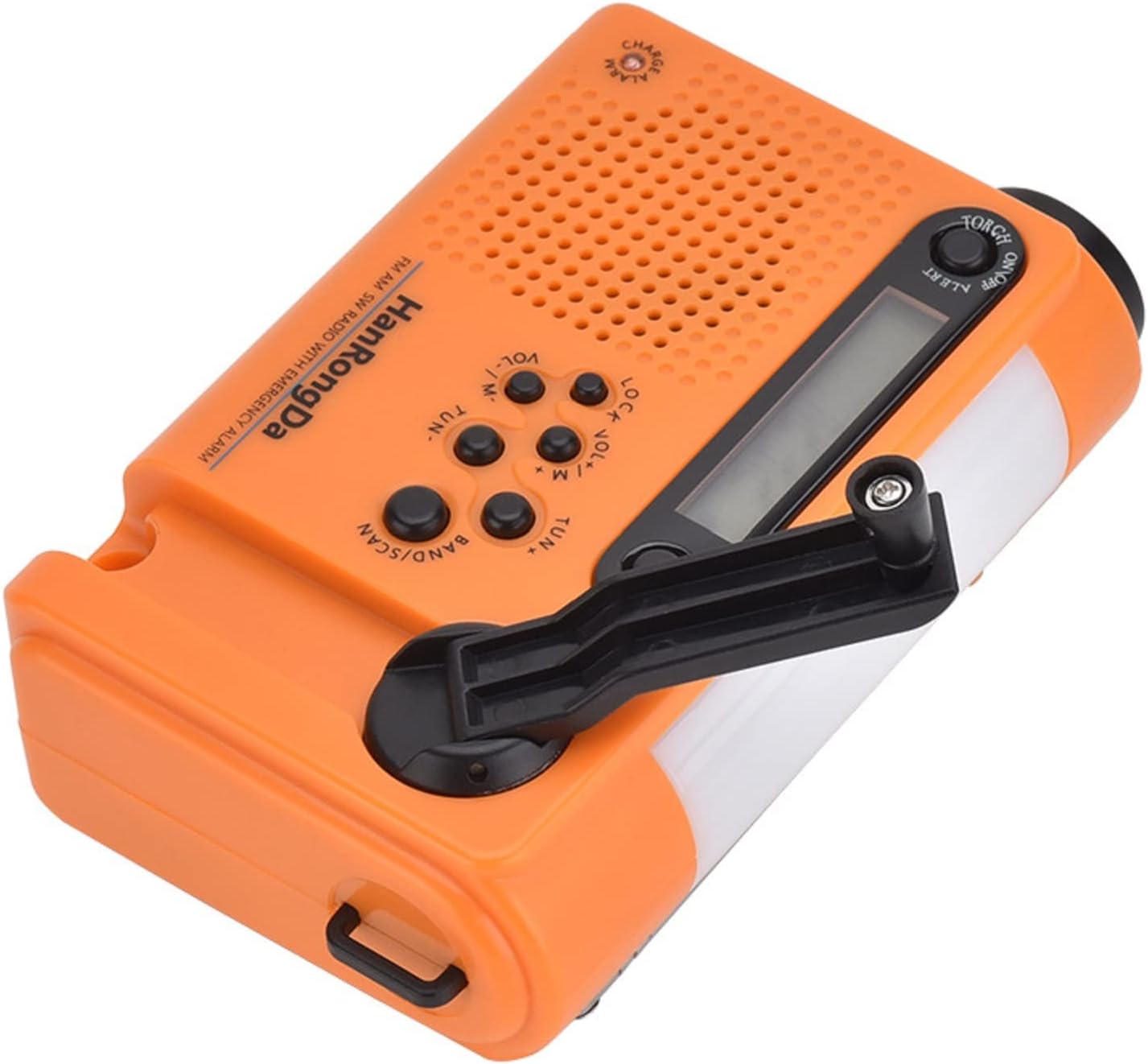
Figure 4.2: Hand-crank for emergency power generation.
4.2. Antenna Extension
For optimal radio reception, fully extend the telescopic antenna. The antenna can be rotated 360 degrees to find the best signal.
5. Operating Instructions
5.1. Power On/Off
Press the POWER button to turn the radio on or off.
5.2. Band Selection
Press the BAND/SCAN button repeatedly to cycle through FM, AM, SW1, and SW2 bands.
5.3. Tuning and Station Memory
- Manual Tuning: Use the TUN+ and TUN- buttons to manually adjust the frequency.
- Automatic Scan: Press and hold the BAND/SCAN button to automatically scan for available stations and store them in memory. The radio can store up to 120 stations.
- Memory Recall: Use the M+ and M- buttons to navigate through stored stations.
5.4. Volume Control
Adjust the volume using the VOL+ and VOL- buttons.
5.5. Flashlight Operation
Slide the TORCH ON/OFF switch to activate the front LED flashlight. The side LED light can be activated by a separate switch (if available, check physical unit).

Figure 5.1: The integrated flashlight provides illumination in dark environments.

Figure 5.2: The side LED light provides broader illumination.
5.6. SOS Siren Activation
Press the ALERT button to activate the SOS siren and flashing light. Press it again to deactivate.
5.7. Mobile Phone Charging
Connect your mobile phone or other USB-powered device to the radio's USB output port using your device's charging cable. The radio's internal battery will provide power. This function is primarily for emergency charging.
5.8. Clock, Alarm, and Sleep Timer
Refer to the detailed instructions in the included Japanese Instruction Manual for setting the digital clock, alarm function, and sleep timer (automatic shutdown from 10 to 90 minutes).
5.9. Headphone Use
Insert 3.5mm stereo headphones into the headphone jack for private listening. When headphones are connected, the radio may output in FM stereo mode.
5.10. Lock Function
Press the LOCK button to prevent accidental button presses. Press it again to unlock.
6. Maintenance
- Cleaning: Wipe the radio with a soft, dry cloth. Do not use abrasive cleaners or solvents.
- Battery Care: To prolong battery life, avoid fully discharging the battery frequently. If storing for a long period, charge the battery to about 50% every 3-6 months. The internal lithium battery is replaceable by a qualified technician if needed.
- Storage: Store the radio in a cool, dry place away from direct sunlight and extreme temperatures.
- Antenna: Retract the telescopic antenna when not in use to prevent damage.
7. Troubleshooting
| Problem | Possible Cause / Solution |
|---|---|
| Radio does not power on. |
|
| Poor radio reception. |
|
| Mobile phone not charging. |
|
| LCD display is dim or incomplete. |
|
| Hand-crank is stiff or not charging. |
|
8. Specifications
| Feature | Detail |
|---|---|
| Model | HRD-900 |
| Brand | HanRongDa |
| FM Frequency Range | 64 - 108 MHz |
| AM Frequency Range | 522 - 1710 KHz |
| SW Frequency Range | 3.00 - 18.00 MHz |
| Power Source | Built-in 2000mAh 3.7V Lithium Battery |
| Charging Methods | USB (Micro USB), Hand-Crank |
| Dimensions (L x W x H) | 120mm x 36mm x 76mm (approx. 4.72 x 1.42 x 2.99 inches) |
| Weight (with battery) | Approx. 210g (0.46 lbs) |
| Speaker | Φ40mm Monaural |
| Headphone Jack | 3.5mm Stereo Mini Jack |
| Display Type | LCD with Backlight |
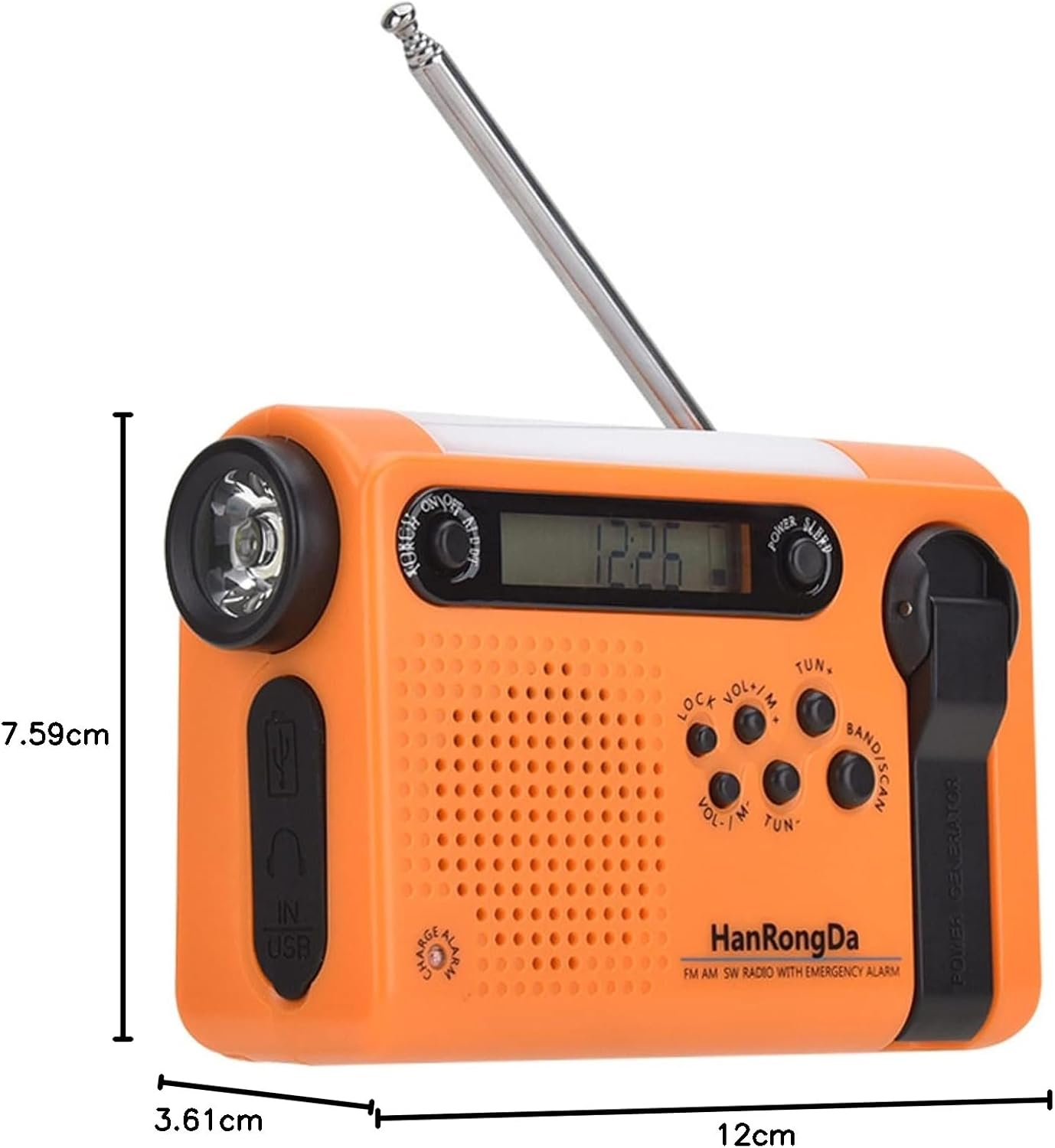
Figure 8.1: Dimensions of the HRD-900 radio.

Figure 8.2: Back view showing frequency ranges and model number.
9. Warranty and Support
This product comes with a warranty. Please refer to the included Japanese Instruction Manual and Warranty Card for detailed information regarding warranty terms, conditions, and duration.
For technical support, troubleshooting assistance, or any inquiries not covered in this manual, please contact the seller or manufacturer directly. Contact information can typically be found on the product packaging or the warranty card.


