
Introduction
This manual provides comprehensive instructions for the assembly, operation, and maintenance of your GreenForest L Shaped Desk with 2 Monitor Stand. Designed for versatility and space-saving, this desk is suitable for home offices, study areas, gaming setups, and crafting spaces. Please read all instructions carefully before beginning assembly or use.
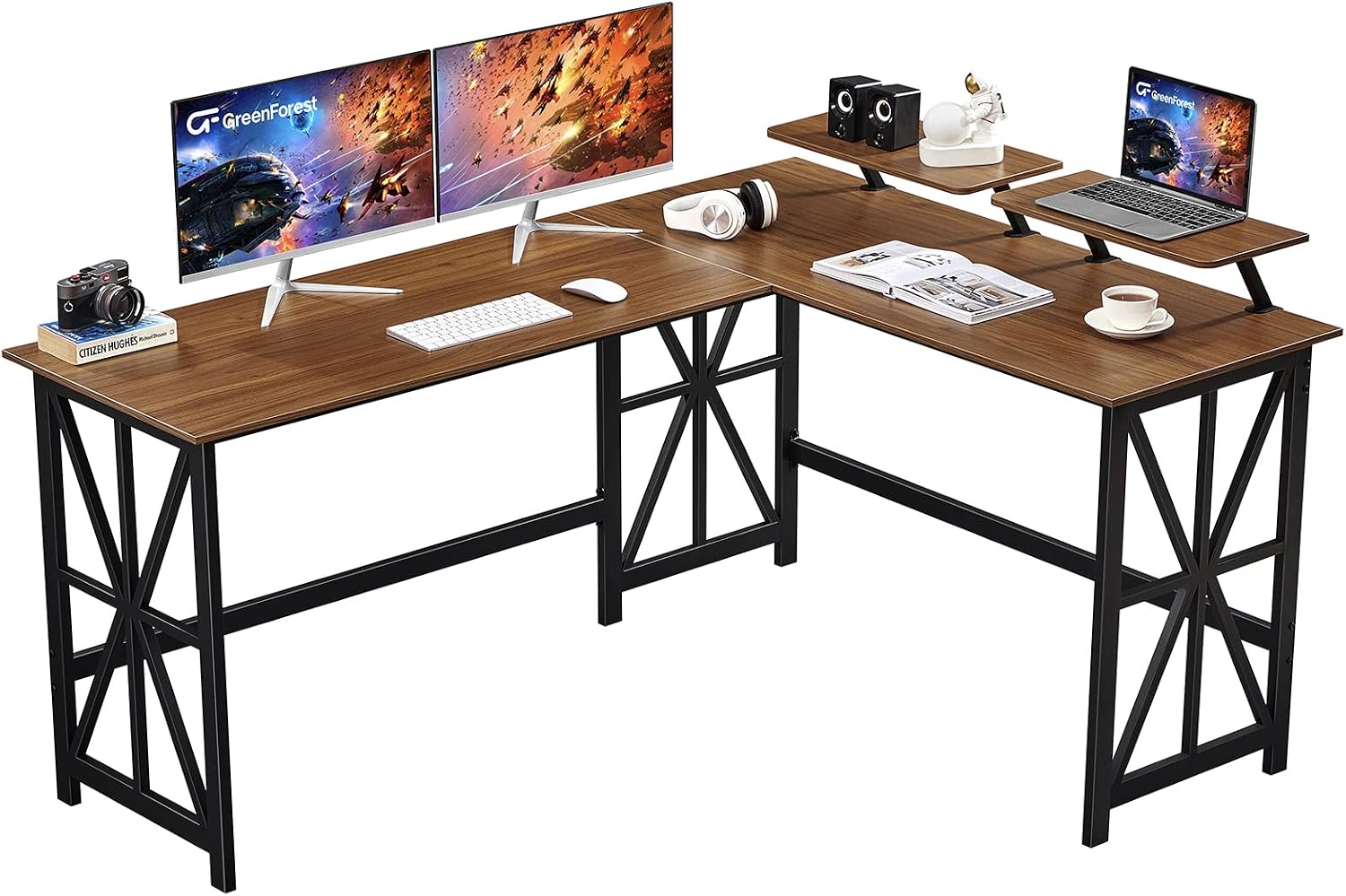
Image: The GreenForest L Shaped Desk, showcasing its spacious design with two monitor stands, suitable for multiple setups.
Setup and Assembly
The GreenForest L Shaped Desk is designed for easy assembly, typically taking about 25 minutes. All necessary tools and clearly labeled parts are included. Follow the step-by-step instructions provided in the packaging for a smooth setup.
Key Assembly Features:
- Reversible Design: The L-shaped computer desk features two different length desktops that can be switched to either side (left or right) to fit your space and preference. This allows for flexible configuration, including forming a large U-shaped workspace with two identical desks.
- Adjustable Monitor Stands: Two monitor shelves (18.9 x 9.5 x 5.1 inches each) are included and can be installed on either the left or right side. These stands provide ample space for monitors or laptops and can also serve as storage shelves or bookshelves.

Image: Illustration demonstrating the reversible assembly options for the L-shaped desk, allowing for right-hand or left-hand configurations.
Video: An official GreenForest video demonstrating the reversible feature and monitor shelf adjustment of the L Shaped Desk.
Operating the Desk
Once assembled, your GreenForest L Shaped Desk provides a versatile and spacious workspace. The design allows for optimal organization and comfort.
Features for Use:
- Spacious Desktop: The 63.8 (Long Side) x 50 inch (Short Side) desktop offers ample room for multiple monitors (3-4), laptops, and accessories, supporting two workstations simultaneously.
- Ample Legroom: With a height of 29.5 inches, the desk provides generous legroom for comfortable seating and space for under-desk storage.
- Cable Management: The open design allows for easy routing and organization of device cables and power cords, helping to maintain a clean and organized workspace.

Image: A visual summary of the desk's key features, including its spacious desktop, movable monitor shelves, strong X-shape legs, and ample legroom.
Maintenance
To ensure the longevity and appearance of your GreenForest L Shaped Desk, follow these simple maintenance guidelines:
- Cleaning: Wipe the desk surfaces with a dry cloth to remove dust and spills. Avoid abrasive cleaners or harsh chemicals that may damage the finish.
- Spill Management: The upgraded particleboard is water-resistant. In case of spills, wipe them immediately to prevent moisture absorption.
- Regular Checks: Periodically check all screws and connections to ensure they remain tight. Retighten if necessary to maintain stability.
Troubleshooting
If you encounter any issues with your desk, consider the following common solutions:
- Wobbling Desk: Ensure all assembly screws are securely tightened. Verify that the desk is placed on a flat, level surface. Adjust any leveling feet if present.
- Difficulty with Reversible Setup: Double-check the assembly instructions for the reversible desktop configuration. Ensure the correct panels are being used for the desired orientation.
- Monitor Stand Stability: Confirm that the monitor stands are properly attached and their screws are tightened. Ensure the weight placed on them does not exceed their capacity.
For further assistance, please contact GreenForest customer support.
Specifications
| Feature | Detail |
|---|---|
| Brand | GreenForest |
| Product Dimensions | 50"D x 63.8"W x 29.5"H |
| Color | Walnut |
| Style | Industrial |
| Base Material | Wood |
| Top Material Type | Engineered Wood |
| Special Feature | Reversible |
| Maximum Weight Recommendation | 300 Pounds |
| Item Weight | 58 Pounds |
| Number of Shelves | 2 (Monitor Stands) |
| Assembly Required | Yes |

Image: Detailed dimensions of the L Shaped Desk, including the main desktop and monitor stands.
Safety Information
Please observe the following safety precautions:
- Always assemble the desk strictly according to the included instructions.
- Do not exceed the maximum weight limit of 300 lbs (136 kg) on the desk surface.
- Keep small parts and assembly tools out of reach of children to prevent choking hazards.
- Always use the desk on a stable, level surface to prevent tipping or instability.
- Avoid placing hot items directly on the desk surface without protective padding.
Warranty and Support
For warranty information or technical support, please refer to the documentation included with your purchase or visit the official GreenForest website. You may also contact GreenForest customer service directly for assistance with product inquiries, parts replacement, or troubleshooting beyond this manual.
Customer Support information can often be found on the product packaging or the brand's official online presence.