
1. Introduction
The BAOFENG UV-9R Pro is a high-power, dual-band, handheld two-way radio designed for reliable communication in various environments, including outdoor sports, camping, hunting, and survival scenarios. It features enhanced waterproof and dustproof capabilities (IP67 rated) and offers flexible charging options, including Type-C direct charging.
2. Safety Information
Please read and understand all safety precautions before operating the radio. Failure to do so may result in injury or damage to the device.
- Battery Safety: Use only the specified 2800mAh Li-ion battery. Do not short-circuit, incinerate, or disassemble the battery. Avoid exposing the battery to extreme temperatures.
- Charging: Use only the provided charger and Type-C cable. Ensure the charging port is dry before connecting the cable.
- Waterproof Rating: The radio is IP67 waterproof and dustproof, meaning it can withstand immersion in up to 1 meter of water for 30 minutes. It is not designed for diving. Ensure all ports and covers are securely sealed before exposure to water.
- Antenna: Do not touch the antenna during transmission.
- Hearing Protection: Avoid prolonged exposure to loud volumes, which may cause hearing damage.
- Interference: Turn off the radio in areas where radio devices are prohibited or may cause interference (e.g., hospitals, aircraft).
3. Package Contents
Verify that all items are present in your package:
- 1 x Portable Radio (BAOFENG UV-9R Pro)
- 1 x 2800mAh Li-ion Battery
- 1 x Desktop Charger
- 1 x Type-C Charging Cable
- 1 x Antenna
- 1 x Belt Clip
- 1 x User Manual
- 1 x Baofeng Rope (Lanyard)

Figure 3.1: The BAOFENG UV-9R Pro radio with its complete set of accessories, including the battery, charger, Type-C cable, antenna, belt clip, and lanyard.
4. Product Overview
Familiarize yourself with the main components and controls of your UV-9R Pro radio.
- Antenna: For transmitting and receiving signals.
- Volume/Power Knob: Rotates to adjust volume and turns to power the radio on/off.
- PTT (Push-to-Talk) Button: Press and hold to transmit, release to receive.
- Function Buttons: Dedicated buttons for various features like FM radio, flashlight, and menu navigation.
- Keypad: Numeric and function keys for frequency input and menu selection.
- LCD Display: Shows frequency, channel, battery status, and other indicators. Features a bold backlit screen for high visibility.
- Microphone (MIC): For voice input during transmission.
- Speaker: For audio output.
- Battery Pack: Removable 2800mAh Li-ion battery.
- Type-C Charging Port: Located on the battery for direct charging.
- Headset Jack: Waterproof port for external audio accessories.
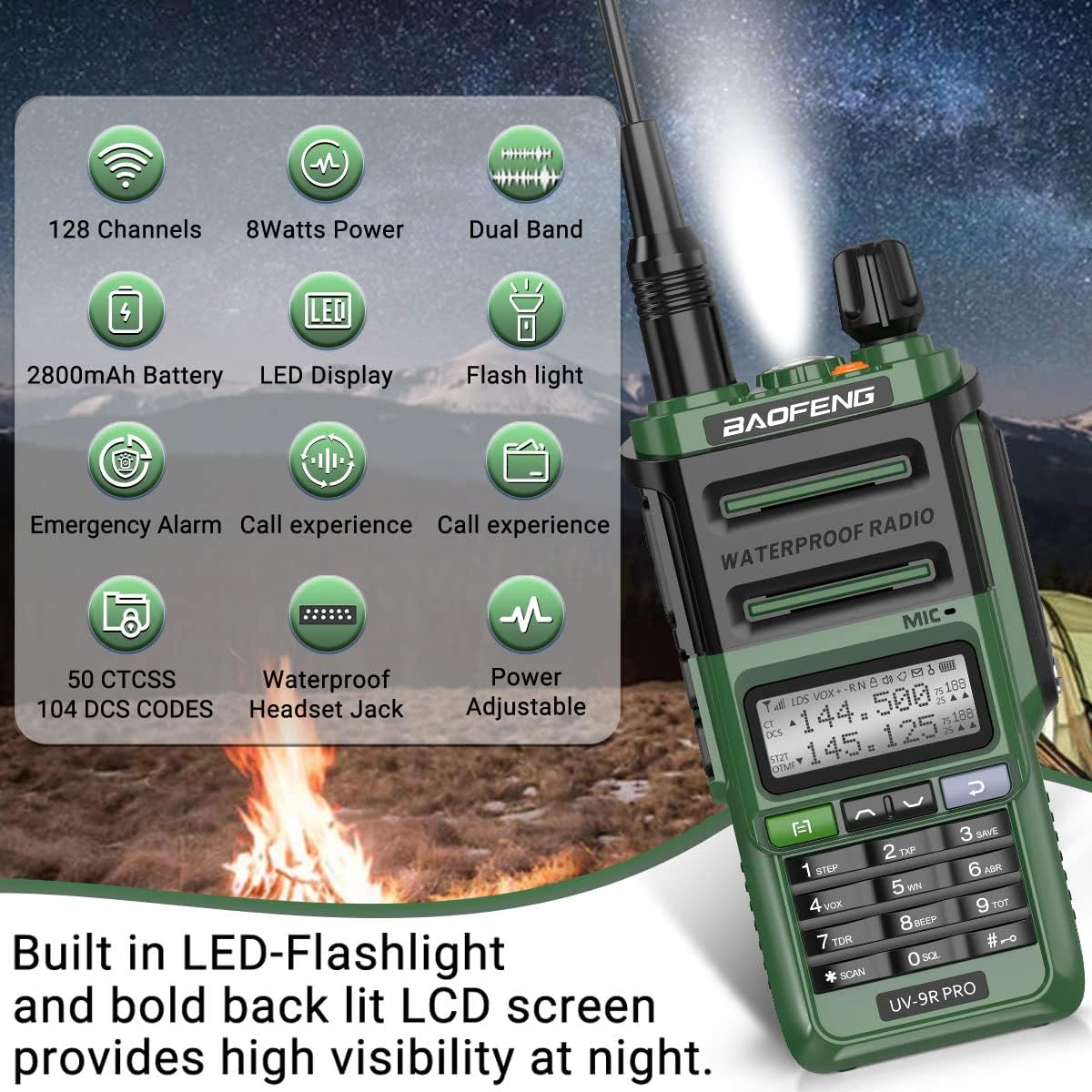
Figure 4.1: Overview of the BAOFENG UV-9R Pro's main features and components.
5. Setup
5.1 Battery Installation
- Align the battery pack with the grooves on the back of the radio.
- Slide the battery upwards until it clicks securely into place.
- To remove, press the battery release latch (usually at the bottom of the battery) and slide the battery downwards.
5.2 Charging the Battery
The UV-9R Pro battery supports two charging methods:
- Desktop Charger: Place the radio with the battery attached into the charging cradle. Ensure the charging contacts align. The indicator light will show charging status.
- Type-C Direct Charging: Connect the provided Type-C charging cable directly to the Type-C port on the battery pack. This allows for convenient charging from various USB power sources.

Figure 5.1: The 2800mAh Li-ion battery with its integrated Type-C charging port, demonstrating its waterproof design.
5.3 Antenna Attachment
Screw the antenna clockwise onto the connector at the top of the radio until it is finger-tight. Do not overtighten.
5.4 Belt Clip Installation
Attach the belt clip to the designated slot on the back of the radio using the provided screws. This allows for easy carrying.
6. Operating Instructions
6.1 Power On/Off and Volume Control
Rotate the volume/power knob clockwise to turn the radio on. Continue rotating clockwise to increase volume, and counter-clockwise to decrease volume. Rotate counter-clockwise until it clicks to turn the radio off.
Video 6.1: Demonstrates the power-on sequence and basic functionality of the BAOFENG UV-9R Pro, including the display and button presses.
6.2 Frequency Mode and Channel Mode
The radio operates in two main modes: Frequency Mode (VFO) and Channel Mode (MR). You can switch between these modes using the appropriate function key (refer to your radio's specific key mapping, often labeled VFO/MR).
- Frequency Mode (VFO): Allows direct input of frequencies for immediate use.
- Channel Mode (MR): Accesses pre-programmed channels.
6.3 Transmitting and Receiving
To transmit, press and hold the PTT (Push-to-Talk) button on the side of the radio. Speak clearly into the microphone. Release the PTT button to return to receive mode.
6.4 FM Radio Function
The UV-9R Pro includes an FM radio function. Press the dedicated FM button to activate it. Use the arrow keys or keypad to tune to desired FM stations.
6.5 Flashlight Function
The radio features a built-in LED flashlight for convenience in low-light conditions. Activate it using the designated flashlight button.
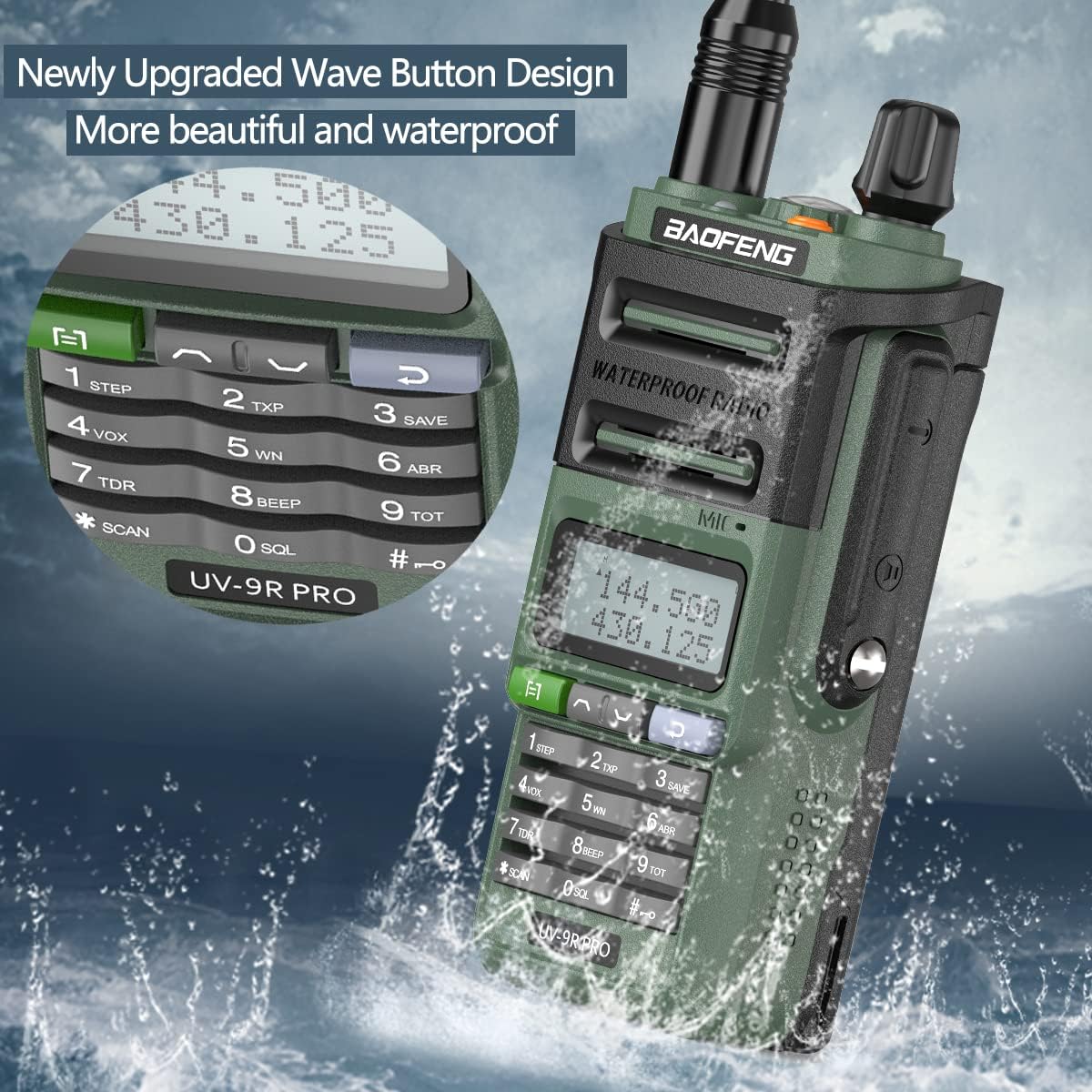
Figure 6.1: The radio's keypad and display, showcasing the upgraded button design which contributes to its waterproof nature.
6.6 Power Adjustment (High/Mid/Low)
The UV-9R Pro offers three power output levels: High, Mid, and Low. Adjusting the power level can help conserve battery life or extend communication range as needed.

Figure 6.2: Visual representation of the radio's adjustable power output settings.
7. Waterproof and Dustproof Features (IP67)
The BAOFENG UV-9R Pro is designed with an IP67 rating, providing excellent protection against water and dust ingress. This makes it suitable for use in challenging outdoor conditions.
- IP67 Rating: Indicates the device is fully protected against dust and can withstand immersion in water up to 1 meter (3.3 feet) for up to 30 minutes.
- Enhanced Durability: The rugged, seamless shell and upgraded wave button design contribute to its robust construction, preventing the invasion of dust and water.
- Usage Note: While highly resistant, ensure all ports (like the headset jack and charging port) are properly sealed when exposed to wet environments. The radio is not intended for prolonged submersion or diving.
Video 7.1: Official demonstration of the BAOFENG UV-9R Pro's IP67 waterproof capabilities, showing the radio functioning after being submerged and exposed to water.
8. Long Range Communication
The UV-9R Pro radio is designed for long-range communication, with a maximum talking distance of up to 5 miles, depending on environmental conditions:
- Open Areas (Flat Ground, Suburban): Can achieve a communication range of 4-5 miles without significant obstructions.
- Forest Environments: The call distance typically ranges from 3-4 miles due to tree density.
- Urban Areas: Communication range can be 2-3 miles, affected by buildings and other structures.
Optimal range is achieved in line-of-sight conditions. Obstacles such as hills, dense foliage, and large buildings will reduce the effective communication distance.
9. Maintenance
- Cleaning: Wipe the radio with a soft, damp cloth. Do not use harsh chemicals or abrasive cleaners. Ensure the radio is dry before charging or opening any ports.
- Battery Care: Store the battery in a cool, dry place when not in use. Avoid fully discharging the battery for extended periods.
- Antenna: Regularly check the antenna connection for tightness.
- Storage: If storing the radio for a long time, remove the battery and store both separately.
10. Troubleshooting
| Problem | Possible Cause | Solution |
|---|---|---|
| Radio does not power on. | Low or dead battery; improperly installed battery. | Charge the battery; ensure battery is correctly installed. |
| Cannot transmit or receive. | Incorrect frequency/channel; antenna not connected; PTT button not pressed correctly. | Verify frequency/channel settings; ensure antenna is securely attached; press PTT firmly. |
| Poor audio quality or static. | Weak signal; interference; low volume; damaged antenna. | Move to an area with better signal; adjust volume; check antenna for damage. |
| Battery not charging. | Charger/cable faulty; poor contact; battery issue. | Check charger/cable; ensure battery is properly seated in cradle or Type-C cable is fully inserted. |
11. Specifications
| Feature | Detail |
|---|---|
| Model Number | 2AJGM-UV9RPRO |
| Brand | BAOFENG |
| Color | Green |
| Item Weight | 1.15 pounds |
| Package Dimensions | 7.24 x 5.94 x 4.06 inches |
| Batteries | 1 Lithium Ion battery required (included) |
| Number of Channels | 128 |
| Special Feature | Waterproof (IP67) |
| Frequency Range | 136-174 MHz (VHF), 400-520 MHz (UHF) |
| Talking Range Maximum | 5 Miles |
| Tuner Technology | VHF UHF |
| Voltage | 3.7 Volts (DC) |
| Water Resistance Level | Waterproof (IP67) |
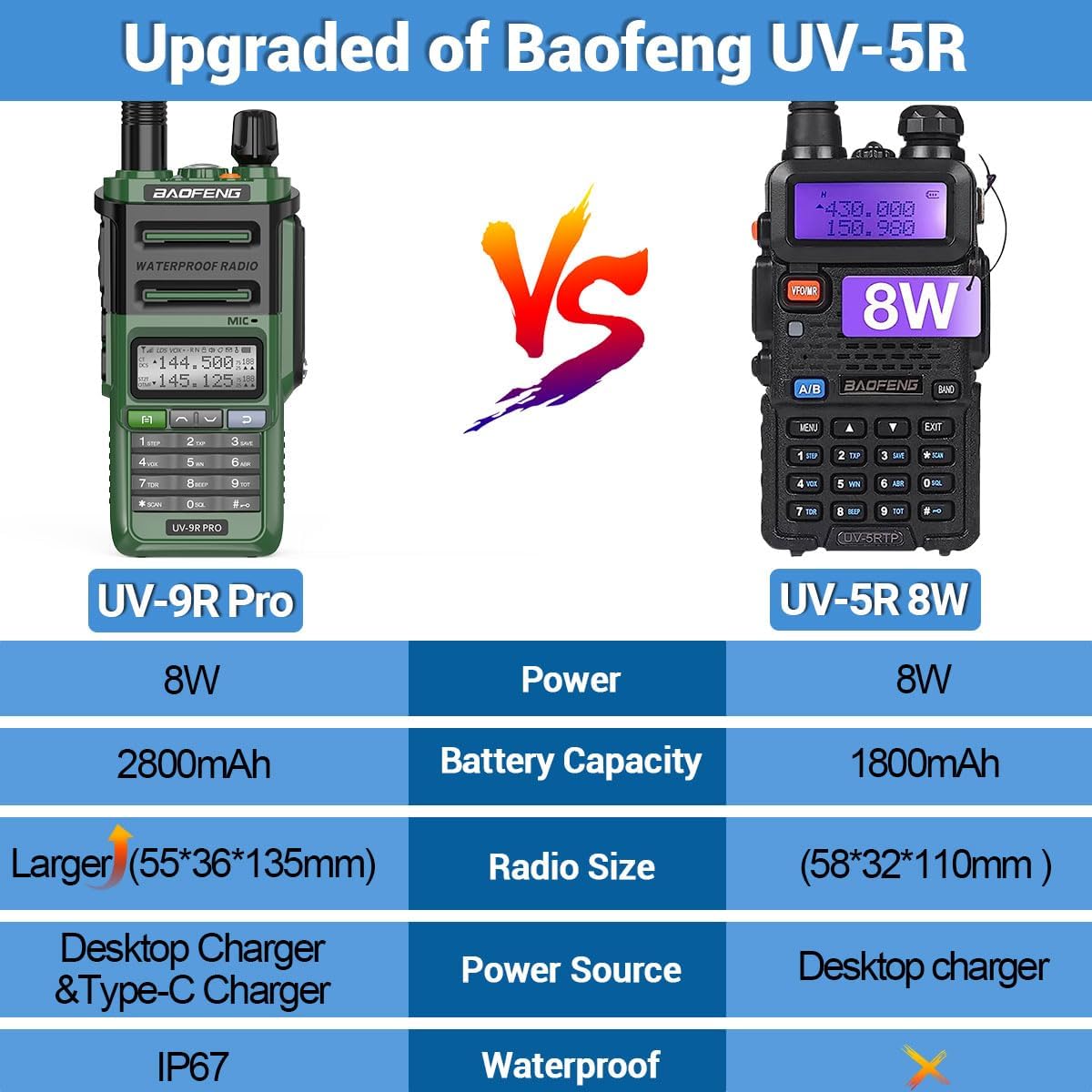
Figure 11.1: Comparison of key specifications between the UV-9R Pro and the UV-5R models.
12. Warranty and Support
For warranty information and technical support, please refer to the contact details provided by your retailer or visit the official BAOFENG website. Keep your purchase receipt as proof of purchase for any warranty claims.
For additional resources and community support, consider searching for online forums or groups dedicated to BAOFENG radios, where experienced users often share tips and troubleshooting advice.


