
DJI CP.MA.00000427.01
DJI Mavic 3 Series Battery Charging Hub Instruction Manual
Model: CP.MA.00000427.01
Overview
When connected to a 65W portable charger or car charger, the DJI Mavic 3 Battery Charging Hub can be expanded to charge three batteries. The Battery Charging Hub enhances efficiency by charging batteries in sequence according to their remaining power level, with more fully charged batteries receiving power first.
Product Features
- Charges three batteries in sequence.
- Compatible with DJI Mavic 3 Intelligent Flight Battery, DJI 65W Portable Charger, DJI 65W Car Charger.
- Intelligent charging based on remaining power level.
Setup
To set up your DJI Mavic 3 Battery Charging Hub, ensure you have a compatible 65W portable charger or car charger. Connect the charging hub to the power source using the appropriate cable. The hub is designed to accommodate up to three DJI Mavic 3 Intelligent Flight Batteries.
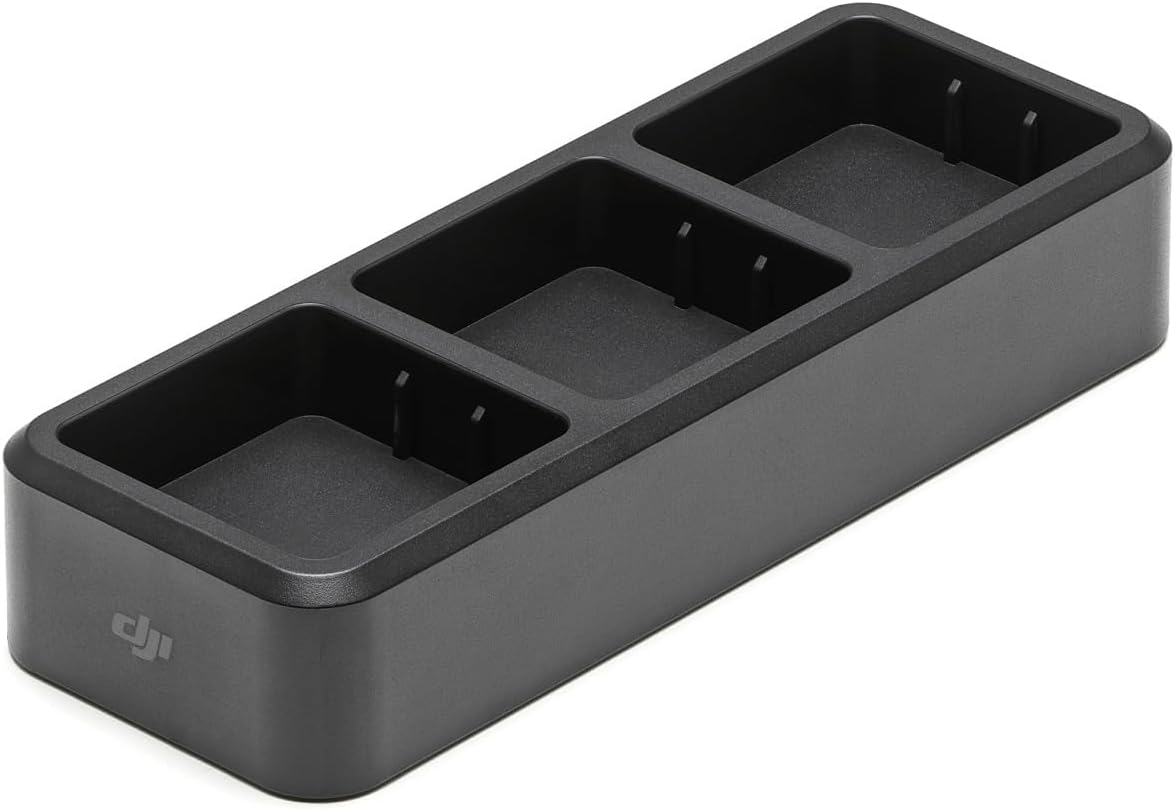
Figure 1: The DJI Mavic 3 Battery Charging Hub with three battery slots.
Operating Instructions
- Connect Power: Plug the DJI Mavic 3 Battery Charging Hub into a compatible DJI 65W Portable Charger or DJI 65W Car Charger.
- Insert Batteries: Insert up to three DJI Mavic 3 Intelligent Flight Batteries into the designated slots on the charging hub. Ensure they are securely seated.
- Intelligent Charging: The hub will automatically detect the charge level of each inserted battery. It will prioritize charging the battery with the lowest remaining power first to optimize efficiency. Once one battery is fully charged, it will proceed to charge the next battery in sequence until all inserted batteries are fully charged.
- Charging Time: Approximately 1 hour and 36 minutes (actual time may vary based on remaining power and charger output).
Maintenance
- Keep the charging hub clean and free from dust and debris. Use a soft, dry cloth for cleaning.
- Store the hub in a dry environment, away from direct sunlight and extreme temperatures (Operating Temperature: 5° to 40° C / 41° to 104° F).
- Avoid dropping or subjecting the hub to strong impacts.
Troubleshooting
| Problem | Possible Cause | Solution |
|---|---|---|
| Batteries not charging. | Loose connection, incompatible charger, or faulty battery. | Ensure the charging hub is securely connected to a compatible 65W charger. Re-insert batteries firmly. Test with a different battery or charger if available. |
| Slow charging. | Charger not providing sufficient power (less than 65W PD), or high ambient temperature. | Use a DJI 65W Portable Charger or a compatible 65W Power Delivery (PD) charger. Ensure the operating environment is within the specified temperature range. |
Specifications
| Feature | Detail |
|---|---|
| Model | CHX260-65 |
| Compatible Batteries | DJI Mavic 3 Intelligent Flight Battery (BWX260-5000-15.4) |
| Compatible Chargers | DJI 65W Portable Charger, DJI 65W Car Charger (or any 65W Power Delivery compatible charger) |
| Operating Temperature | 5° to 40° C (41° to 104° F) |
| Input | 5-20 V, max 5 A |
| Charging Time (per battery) | Approx. 1 hour and 36 minutes |
| Product Dimensions | 3.5 x 2.2 x 5.22 inches (8.9 x 5.6 x 13.2 cm) |
| Item Weight | 1.92 ounces (54.4 g) |
Warranty and Support
For detailed warranty information and technical support, please refer to the official DJI website or contact DJI customer service. Keep your proof of purchase for warranty claims.
You can also visit the DJI Store on Amazon for additional product information and accessories.
Important Safety Information
- Use only DJI-approved batteries and chargers.
- Do not attempt to disassemble or modify the charging hub.
- Keep out of reach of children.
- Do not expose to water or excessive humidity.
Related documentsCP.MA.00000427.01


Ask a question about this manual
Ask about setup, troubleshooting, compatibility, parts, safety, or missing instructions. Manuals+ will review the question and use this page’s manual context to help answer it.