
Beninca KPONY
Beninca KPONY Sliding Gate Opener Kit User Manual
Model: KPONY
Introduction
This manual provides essential information for the safe and efficient installation, operation, and maintenance of your Beninca KPONY Sliding Gate Opener Kit. Please read this manual thoroughly before beginning any installation or operation procedures. Keep this manual in a safe place for future reference.
The Beninca KPONY sliding gate motorization is designed for automating sliding gates weighing up to 350 kg. It features an energy-saving standby mode and includes a photoelectric barrier for enhanced safety, along with a 2-channel manual transmitter for convenient control.
Safety Information
Always prioritize safety during installation, operation, and maintenance. Failure to follow safety instructions can result in serious injury or property damage.
- Installation must be performed by qualified personnel in accordance with local electrical and building codes.
- Disconnect power before performing any maintenance or repair work.
- Ensure the gate area is clear of obstructions and people before operating the gate.
- The motor features crush protection with power stop; however, always exercise caution.
- Regularly inspect the photoelectric sensors for proper alignment and cleanliness.
- Do not allow children to play with or operate the gate opener controls.
Package Contents
Verify that all components are present and undamaged upon unpacking:
- 1 x Beninca KPONY Drive Unit
- 1 x Beninca TO-GO 2VA Manual Transmitter (with battery)
- 1 x Beninca Pupilla Photoelectric Sensor Pair
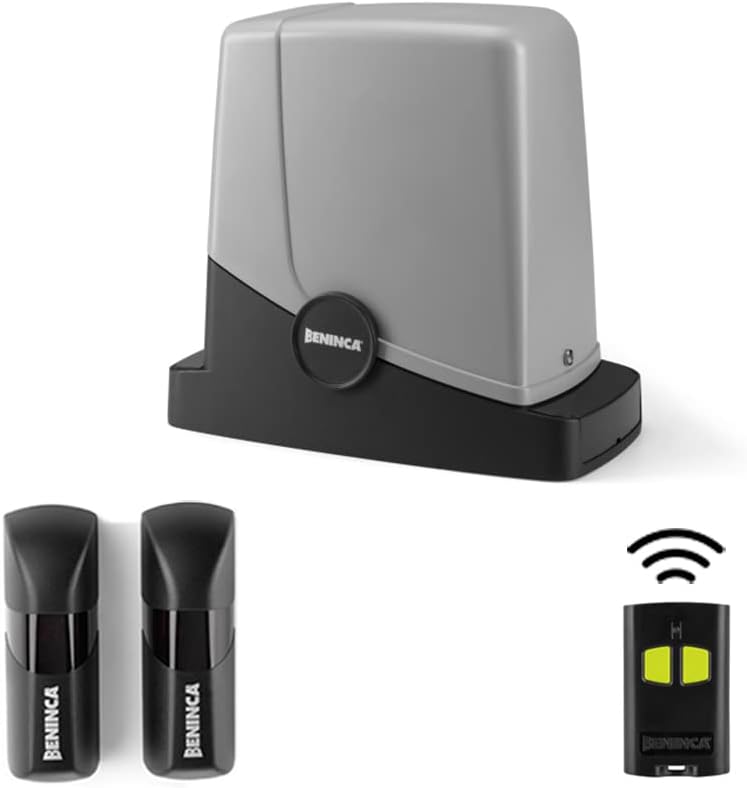
Figure 1: Overview of the Beninca KPONY Sliding Gate Opener Kit, including the main motor unit, two photoelectric safety sensors, and the handheld remote control.
Setup and Installation
Installation of the Beninca KPONY system requires electrical and mechanical expertise. It is highly recommended that installation be performed by a certified professional.
1. Mounting the Drive Unit
Securely mount the KPONY drive unit on a stable, level concrete base next to the sliding gate. Ensure proper alignment with the gate's rack.

Figure 2: The Beninca KPONY drive unit, showing its compact design suitable for outdoor installation.
2. Electrical Connections
Connect the main power supply (230V AC) and motor supply (24V DC) to the control board inside the drive unit. Refer to the wiring diagram provided with the product for detailed connections.

Figure 3: Internal view of the Beninca KPONY motor, highlighting the integrated control board and connection terminals for power and accessories.
3. Installing Photoelectric Sensors
Mount the Beninca Pupilla photoelectric sensors on opposite sides of the gate opening, ensuring they are aligned and at an appropriate height to detect obstructions. Connect them to the control unit as per the wiring instructions.

Figure 4: The Beninca Pupilla photoelectric sensors, crucial for detecting obstacles in the gate's path and enhancing safety.
4. Programming the Remote Control
The Beninca TO-GO 2VA manual transmitter needs to be programmed to the control unit. Follow the specific programming steps outlined in the detailed installation manual (not included in this summary). This typically involves pressing a button on the control board and then on the remote.

Figure 5: The Beninca TO-GO 2VA manual transmitter, featuring two control buttons and Beninca's ARC 128-bit security for reliable gate operation.
Operating Instructions
Once installed and configured, operating the Beninca KPONY gate opener is straightforward.
Opening/Closing the Gate
- Press one of the programmed buttons on the Beninca TO-GO 2VA remote control.
- The gate will begin to open or close. Pressing the button again during operation will stop the gate.
- The photoelectric sensors will detect any obstruction in the gate's path and stop or reverse the gate's movement for safety.
Manual Release
In case of power failure or malfunction, the gate can be operated manually. Locate the manual release mechanism on the drive unit (refer to the detailed product manual for exact location and procedure). This typically involves using a key or lever to disengage the motor, allowing the gate to be moved by hand.
Maintenance
Regular maintenance ensures the longevity and safe operation of your Beninca KPONY gate opener.
- Monthly: Inspect the gate's movement for any unusual noises or resistance. Clean the gate track and ensure it is free of debris.
- Quarterly: Check the photoelectric sensors for cleanliness and proper alignment. Wipe them with a soft, damp cloth if dirty. Test the safety reversal mechanism by placing an object in the gate's path.
- Annually: Have a qualified technician inspect the motor, electrical connections, and mechanical components for wear and tear. Lubricate moving parts as recommended by Beninca.
Important: Always disconnect power to the unit before performing any maintenance.
Troubleshooting
This section provides solutions to common issues. For more complex problems, contact a qualified technician.
| Problem | Possible Cause | Solution |
|---|---|---|
| Gate does not respond to remote. |
|
|
| Gate stops or reverses unexpectedly. |
|
|
| Gate moves slowly or with difficulty. |
|
|
Specifications
| Parameter | Value |
|---|---|
| Input Voltage | 230 V (50-60 Hz) |
| Motor Supply Voltage | 24 V |
| Max. Current Consumption | 0.6 A |
| Standby Consumption | 8 mA |
| Max. Thrust | 321 N |
| Opening Speed | 10 m/min |
| Duty Cycle (ED) | 30% |
| Protection Class | IP44 |
| Operating Temperature | -20 °C to +50 °C |
| Max. Gate Weight | 350 kg |
| Pinion | M4 Z14 |
| Drive Unit Weight | 8.5 kg |
| Color | Black/Grey |
Warranty and Support
For warranty information, please refer to the documentation provided with your purchase or contact Beninca customer support directly. Beninca products are designed for durability and reliability.
For technical support, spare parts, or professional assistance with installation and maintenance, please contact your authorized Beninca dealer or visit the official Beninca website. Ensure you have your product model (KPONY) and serial number ready when contacting support.
Related documentsKPONY


Ask a question about this manual
Ask about setup, troubleshooting, compatibility, parts, safety, or missing instructions. Manuals+ will review the question and use this page’s manual context to help answer it.