1. Introduction
This user manual provides detailed instructions for the operation and maintenance of your Fuzion HIVE-200-BLK Gram Scale. This precision pocket scale is designed for accurate measurements up to 200g with 0.01g readability, making it suitable for various applications including weighing food, spices, powders, and jewelry. Please read this manual thoroughly before using the device to ensure proper function and longevity.

Figure 1: Fuzion HIVE-200-BLK Gram Scale and included accessories.
2. Package Contents
Verify that all items listed below are included in your package:
- Fuzion HIVE-200-BLK Gram Scale
- USB-C Charging Cable
- 50g Calibration Weight
- Small Container/Tray
- Double-ended Spoon
- Silicone Mat
- Drawstring Velvet Bag
- User Manual (this document)

Figure 2: All items included in the Fuzion Gram Scale package.
3. Specifications
| Feature | Detail |
|---|---|
| Model Number | HIVE-200-BLK |
| Capacity | 200g |
| Readability | 0.01g |
| Units of Measurement | g, oz, gn, dwt, ct, ozt |
| Power Source | USB-C Rechargeable Battery |
| Display | Backlit LCD |
| Dimensions | 5.5 x 3.5 x 0.75 inches |
| Weight | 10.55 ounces |
4. Setup
4.1 Initial Use
- Carefully remove the scale and all accessories from the packaging.
- Locate the protective film on the weighing platform and gently peel it off before first use.
- Ensure the scale is placed on a flat, stable, and level surface to guarantee accurate readings. Avoid surfaces prone to vibration or air currents.
4.2 Charging the Battery
The Fuzion HIVE-200-BLK Gram Scale features a rechargeable battery.
- Connect the provided USB-C charging cable to the scale's USB-C port.
- Plug the other end of the cable into any standard USB power source (e.g., computer, wall adapter).
- The display will indicate charging status. A full charge typically takes approximately one hour.
5. Operating Instructions
5.1 Power On/Off
- To turn the scale ON, press the POWER button (). The display will light up and show "0.00g".
- To turn the scale OFF, press and hold the POWER button for a few seconds until the display turns off. The scale also features an automatic shut-off after 60 seconds of inactivity to conserve battery.
5.2 Unit Conversion
The scale supports 6 different weighing modes.
- Press the MODE (M) button to cycle through the available units: grams (g), ounces (oz), grains (gn), pennyweights (dwt), carats (ct), and troy ounces (ozt).
- Select the desired unit before weighing.
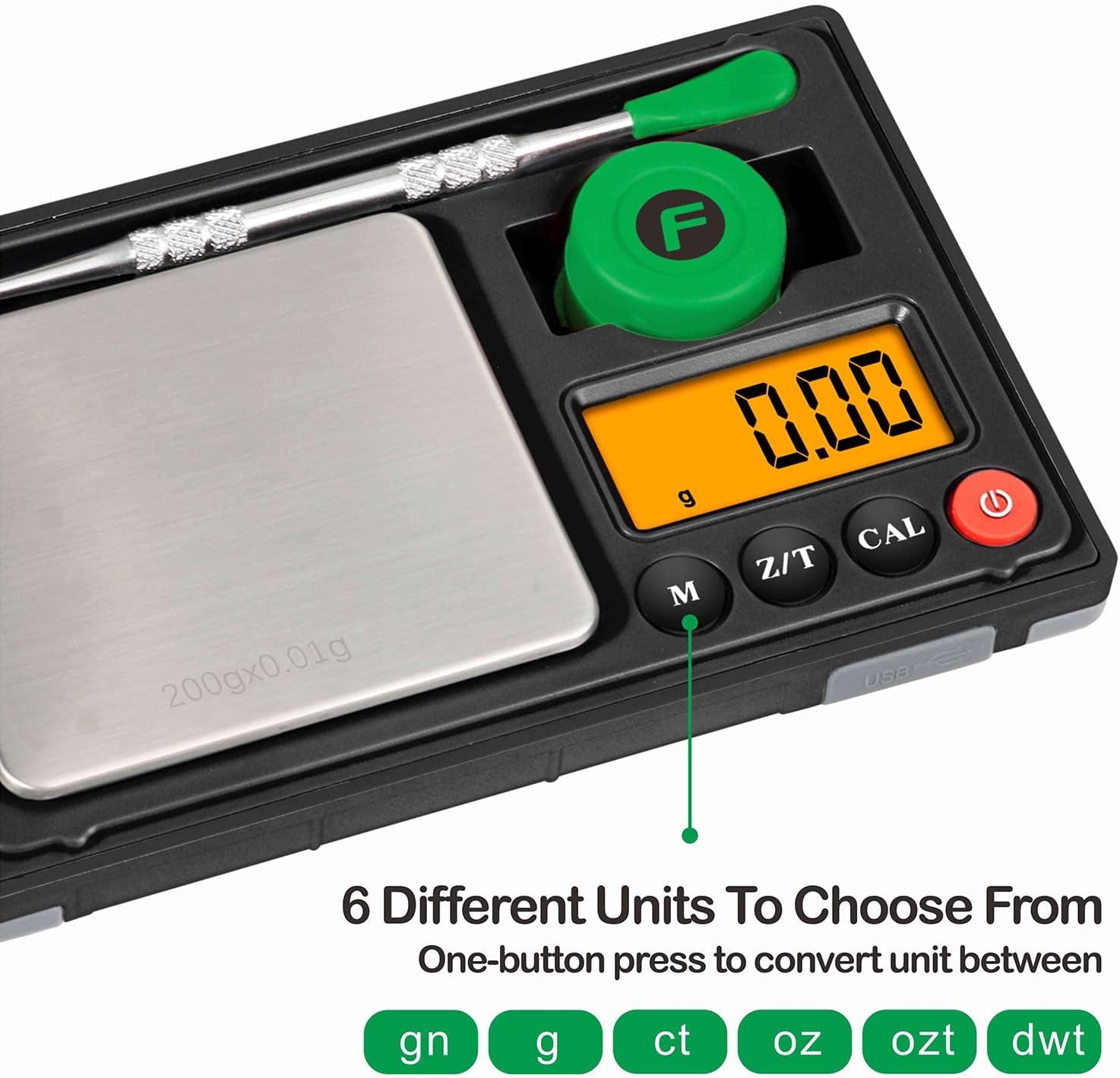
Figure 3: The scale's display indicating various measurement units.
Video 1: Demonstration of unit conversion on a similar digital scale.
5.3 Tare Function
The Tare function allows you to subtract the weight of a container, ensuring only the weight of the contents is measured.
- Place an empty container on the weighing platform.
- Press the Z/T (TARE) button. The display will reset to "0.00g".
- Add the items you wish to weigh into the container. The display will now show only the net weight of the items.
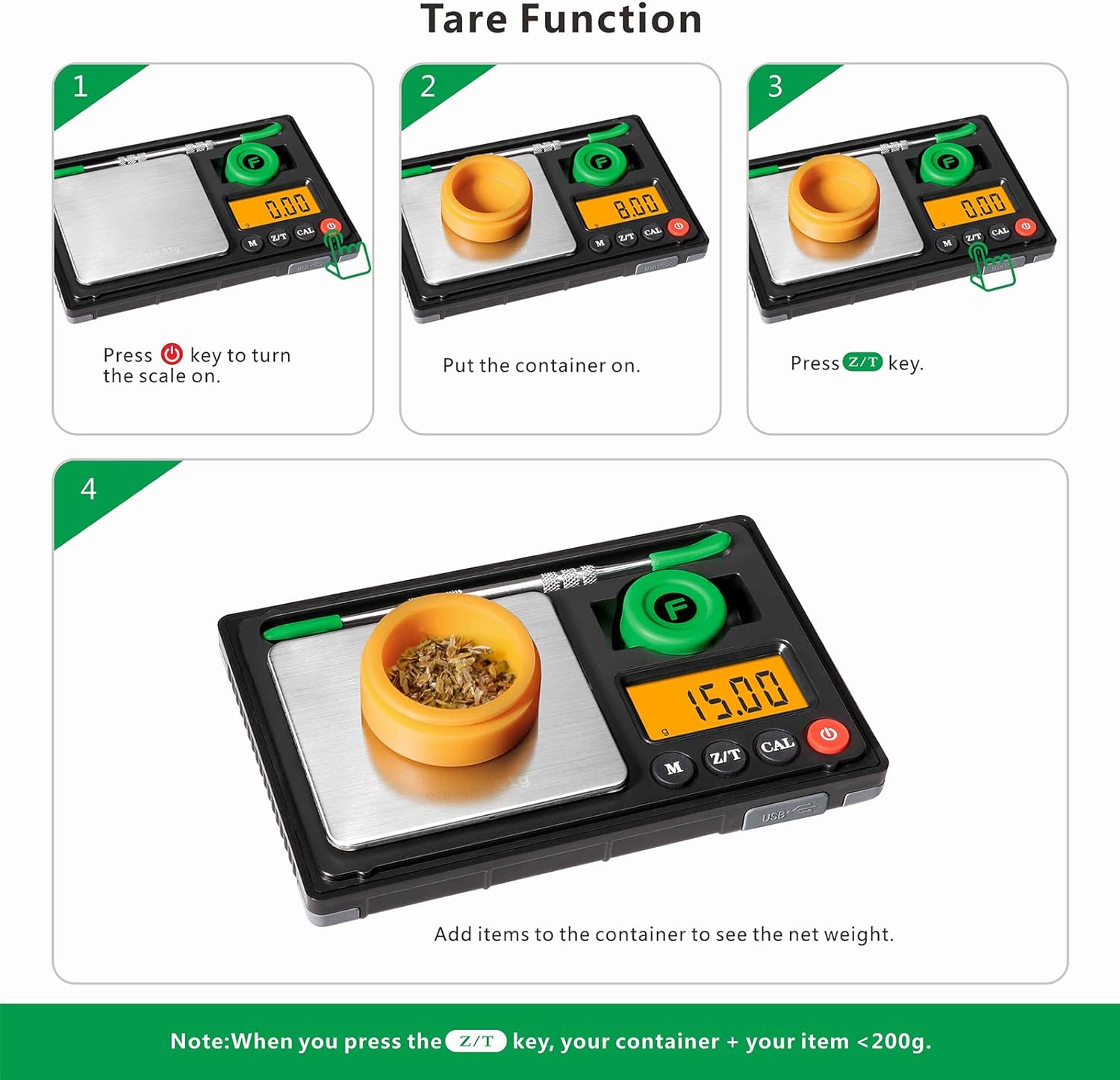
Figure 4: Step-by-step guide for using the Tare function.
5.4 Calibration
Calibration ensures the accuracy of your scale. It is recommended to calibrate the scale periodically or if you suspect inaccurate readings.
- Turn the scale ON.
- Press and hold the CAL button until the display shows "CAL", then release.
- The display will then flash "50.00" (or the required calibration weight).
- Place the provided 50g calibration weight precisely on the center of the weighing platform.
- The display will show "PASS" and then return to normal weighing mode, indicating successful calibration.

Figure 5: Visual guide for calibrating the Fuzion Gram Scale.
Video 2: How to calibrate a digital gram scale (TOPWEIGH brand, similar operation).
5.5 Weighing Tips
- Always place items gently on the center of the weighing platform.
- Avoid placing items that exceed the maximum capacity of 200g.
- For best accuracy, allow the scale to warm up for a few seconds after turning it on.
- Keep the scale away from strong electromagnetic fields, extreme temperatures, and drafts.

Figure 6: High precision measurement using the Fuzion Gram Scale.
6. Maintenance
6.1 Cleaning
- Wipe the scale with a slightly damp cloth. Do not immerse the scale in water.
- Avoid using abrasive cleaners or harsh chemicals, as these can damage the finish and internal components.
- Use the provided brush to gently clean any residue from the weighing platform.
6.2 Storage
- Store the scale in a cool, dry place.
- Use the provided drawstring velvet bag to protect the scale from scratches and dust when not in use.
- Keep the scale away from areas with high humidity or extreme temperature fluctuations.

Figure 7: The compact design allows for easy storage and portability.
7. Troubleshooting
| Problem | Possible Cause / Solution |
|---|---|
| Scale does not turn on. | Battery is low or depleted. Recharge the scale using the USB-C cable. |
| Inaccurate readings. |
|
| "OUT2" or "UNST" displayed. | Indicates an unstable reading. Ensure the scale is on a stable surface and free from vibrations. |
| "EEEE" displayed. | Overload indication. Remove the item immediately to prevent damage. The maximum capacity is 200g. |
8. Warranty & Support
8.1 Warranty Information
The Fuzion HIVE-200-BLK Gram Scale comes with a 2-year warranty. This warranty covers defects in materials and workmanship under normal use.
8.2 Customer Support
For any questions, concerns, or warranty claims, please contact Fuzion customer support. Refer to the product packaging or the official Fuzion website for the most current contact information.
9. Safety Information
- Do not attempt to disassemble or repair the scale yourself. This will void the warranty.
- Keep the scale out of reach of children.
- Avoid dropping the scale or subjecting it to strong impacts, as this can damage the internal sensors.
- Do not use the scale in hazardous environments.


