
VEIERSIA bone conduction
VEIERSIA Bone Conduction Headphones User Manual
Model: bone conduction
1. Introduction
Thank you for purchasing the VEIERSIA Bone Conduction Headphones. This manual provides detailed instructions on how to set up, operate, and maintain your new headphones. Please read this manual carefully before use to ensure proper functionality and longevity of the product.

Image 1.1: Overview of the VEIERSIA Bone Conduction Headphones. These headphones feature an open-ear design, allowing users to remain aware of their surroundings while listening to audio.
2. What's in the Box
Please check the contents of your package to ensure all items are present:
- VEIERSIA Wireless Bone Conduction Headphones
- Special Earbuds (2 pairs)
- Exquisite Headphones Bag
- User Manual (this document)
- Charging Cable
3. Product Features
- Bone Conduction Technology: Transmits sound through cheekbones, leaving ears open to ambient sounds.
- IP68 Waterproof Rating: Fully submersible, suitable for swimming and other water sports.
- Bluetooth 5.1 Connectivity: Provides stable and fast wireless connection up to 50 feet.
- Built-in 16GB MP3 Player: Allows direct music playback without a connected device.
- Integrated Microphone: For hands-free calling.
- Voice Assistant Function: Compatible with intelligent voice assistants like Siri.
- Lightweight Design: Weighs approximately 30 grams for comfortable wear.
- Flexible Structure: Designed for durability and a secure fit during various activities.
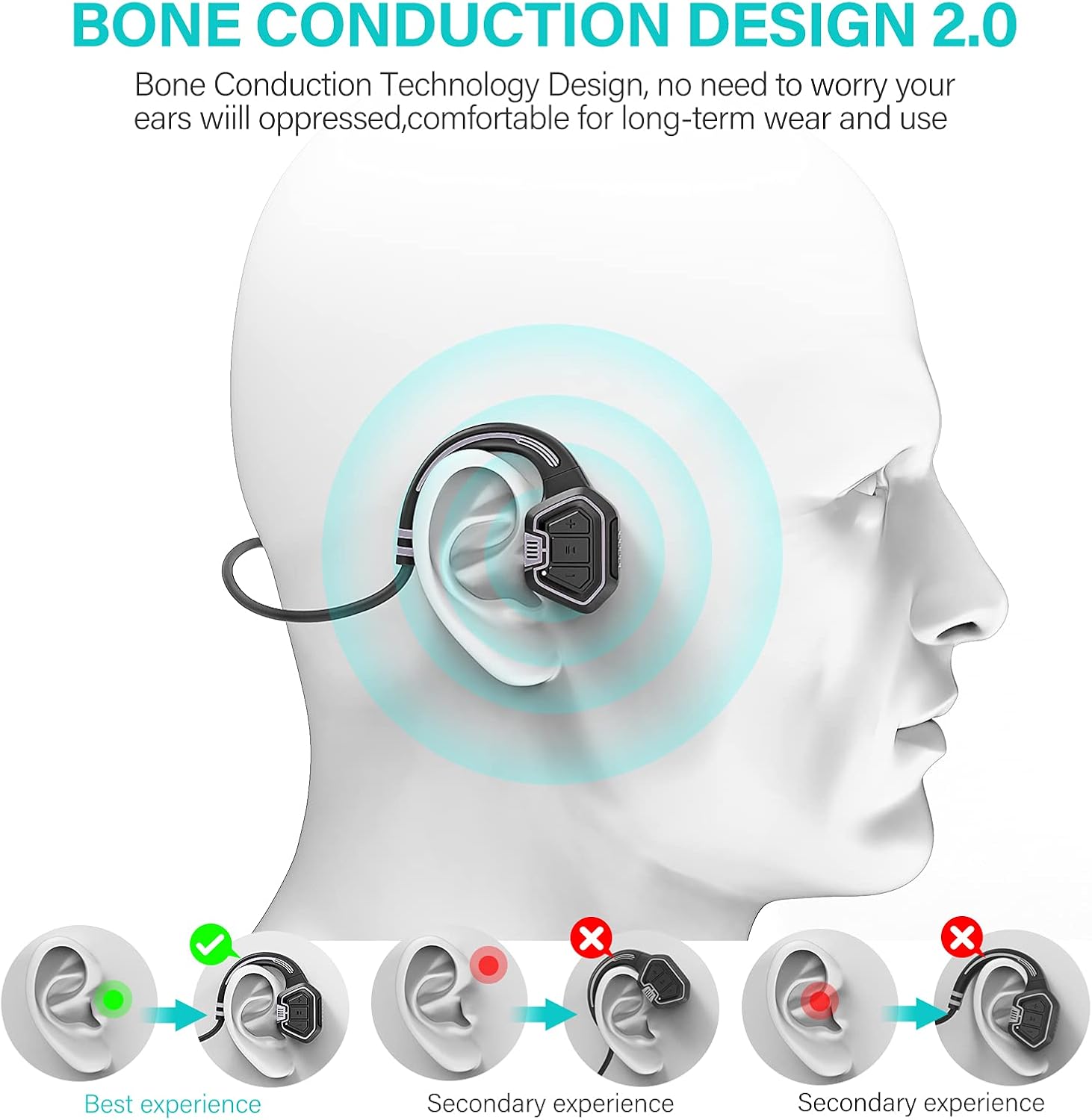
Image 3.1: Visual representation of how bone conduction technology works, showing sound transmission through the cheekbones to the inner ear.

Image 3.2: The headphones are IP68 waterproof, suitable for use during swimming and other water activities, as demonstrated by a person swimming underwater.
4. Controls and Functions
Familiarize yourself with the control buttons on your headphones:

Image 4.1: Detailed view of the headphone controls, including volume buttons, power button, and the magnetic charging port.
- Power Button:
- Long press to power on/off.
- Click to play/pause music.
- Volume Up (+) / Next Song:
- Short press for Volume Up.
- Long press for Next Song.
- Volume Down (-) / Previous Song:
- Short press for Volume Down.
- Long press for Previous Song.
- Charging Port: Magnetic connection for charging and data transfer.
5. Setup
5.1. Charging the Headphones
Before first use, fully charge your headphones. A full charge takes approximately 1.5 hours.
- Connect the magnetic charging cable to the charging port on the headphones.
- Connect the USB end of the cable to a USB power adapter (not included) or a computer's USB port.
- The indicator light will show charging status (refer to LED indicator section for details, if available).
- Once fully charged, disconnect the cable.
5.2. Uploading Music (MP3 Mode)
The headphones have a built-in 16GB memory for MP3 playback. To upload music:
- Connect the headphones to your computer using the provided charging cable. The computer should recognize the headphones as a removable disk.
- Drag and drop your desired MP3 audio files into the recognized disk folder.
- Once files are transferred, safely eject the device from your computer before disconnecting the cable.

Image 5.1: Visual guide demonstrating how to charge the headphones and upload music files to the built-in 16GB memory, as well as mode switching.
6. Operating Instructions
6.1. Power On/Off
- To power on, long press the Power button until you hear a prompt.
- To power off, long press the Power button again until you hear a prompt.
6.2. Bluetooth Mode
To connect via Bluetooth:
- Ensure the headphones are powered on and in Bluetooth mode (indicated by a specific LED light or voice prompt).
- On your device (smartphone, tablet, etc.), enable Bluetooth and search for available devices.
- Select "VEIERSIA Headphones" (or similar name) from the list to pair.
- Once paired, you can play audio from your device through the headphones.
6.3. MP3 Mode (Local Player)
To use the built-in MP3 player:
- Switch the headphones to MP3 mode. This is typically done by a short press of the mode switch button (refer to Image 5.1 for visual).
- Note: For optimal performance in MP3 mode, especially during swimming, ensure your mobile phone's Bluetooth connection to the headphones is off. Water can interfere with Bluetooth signals.
6.4. Switching Between Modes
The headphones support switching between Bluetooth and MP3 modes. Refer to the control diagram (Image 5.1) for the specific button. A short press of the mode button will toggle between Bluetooth and MP3 playback.
6.5. Making and Receiving Calls
When connected via Bluetooth to a smartphone:
- Answer/End Call: Short press the Power button.
- Reject Call: Long press the Power button.
6.6. Voice Assistant
To activate your device's voice assistant (e.g., Siri, Google Assistant), double-click the Power button.

Image 6.1: The open-ear design allows for safe driving by enabling awareness of surrounding sounds while listening to audio.
7. Maintenance and Care
- Cleaning: Wipe the headphones with a soft, damp cloth. Do not use harsh chemicals or abrasive cleaners.
- Storage: Store the headphones in the provided bag when not in use to protect them from dust and scratches.
- Water Exposure: While IP68 waterproof, it is recommended to rinse the headphones with fresh water after use in chlorinated or saltwater environments to prevent corrosion. Ensure the charging port is dry before charging.
- Temperature: Avoid exposing the headphones to extreme temperatures (hot or cold) or direct sunlight for prolonged periods.
- Charging: Use only the provided charging cable. Do not attempt to charge if the headphones or cable are wet.
8. Troubleshooting
| Problem | Possible Cause | Solution |
|---|---|---|
| Headphones do not power on. | Low battery. | Charge the headphones for 1.5 hours. |
| Cannot connect via Bluetooth. | Headphones not in pairing mode; device Bluetooth off; too far from device. | Ensure headphones are in Bluetooth mode. Turn device Bluetooth off/on. Move closer to device (within 50 ft). |
| No sound in MP3 mode. | No music files loaded; headphones in Bluetooth mode. | Upload MP3 files to the internal memory. Switch to MP3 mode. |
| Sound quality is poor or intermittent. | Low battery; interference; water affecting Bluetooth signal (in water). | Charge headphones. Move away from sources of interference. Use MP3 mode when swimming. |
| Headphones not recognized by computer. | Faulty cable; driver issue; improper connection. | Try a different USB port or computer. Ensure cable is securely connected. |
9. Specifications
| Feature | Detail |
|---|---|
| Model Name | bone conduction |
| Connectivity Technology | Wireless (Bluetooth) |
| Bluetooth Version | 5.1 |
| Bluetooth Range | Up to 50 feet (approx. 15 meters) |
| Internal Memory | 16GB (for MP3 playback) |
| Water Resistance Level | IP68 Waterproof |
| Battery Life | Up to 5 hours (playback time) |
| Charging Time | Approx. 1.5 hours |
| Item Weight | 30 Grams (1.06 ounces) |
| Dimensions | 3.94 x 3.15 x 0.39 inches |
| Material | Plastic |
| Frequency Range | 20 Hz - 20,000 Hz |
| Control Type | Media Control, Touch |

Image 9.1: Summary of key specifications and benefits, including Bluetooth version, battery life, charging time, and control features.
10. Safety Information
- Do not disassemble, repair, or modify the product. This may cause fire, electric shock, or complete damage to the product.
- Keep the product away from extreme temperatures, humidity, and corrosive substances.
- Avoid listening at high volume levels for extended periods to prevent hearing damage.
- When using the headphones in environments requiring attention (e.g., driving, cycling, walking near traffic), ensure the open-ear design allows you to hear surrounding sounds for safety.
- Dispose of the product and batteries responsibly according to local regulations.
11. Warranty and Support
VEIERSIA provides a 360-day after-sales service for its products. If you encounter any issues or have questions regarding your headphones, please contact VEIERSIA customer support through the retailer where you purchased the product or visit the official VEIERSIA store page on Amazon for contact information.
For more information, visit the VEIERSIA Store on Amazon.
Ask a question about this manual
Ask about setup, troubleshooting, compatibility, parts, safety, or missing instructions. Manuals+ will review the question and use this page’s manual context to help answer it.