
ACWOO 2997387
ACWOO Electric Lady Shaver User Manual
Model: 2997387
1. Introduction
Thank you for choosing the ACWOO 4-in-1 Electric Lady Shaver. This versatile grooming kit is designed to provide a smooth and comfortable hair removal experience for various body parts, including the face, arms, legs, bikini line, nose, and eyebrows. This manual provides essential information on safe operation, setup, maintenance, and troubleshooting to ensure optimal performance and longevity of your device.
2. Safety Information
Please read all safety instructions carefully before using the ACWOO Electric Lady Shaver. Failure to follow these instructions may result in injury or damage to the device.
- Keep out of reach of children: This device is not a toy and should be stored away from children.
- Do not use while charging: Always disconnect the shaver from the power source before use.
- Avoid using on broken or irritated skin: Do not use the shaver on cuts, sores, rashes, or any irritated skin areas. Consult a dermatologist if you have sensitive skin conditions.
- Store in a dry place: Although the shaver heads are waterproof, the main body should not be immersed in water. Store the device in a dry environment when not in use.
- Proper disposal: Do not dispose of the device with household waste. Follow local regulations for proper disposal of electronic devices and batteries.
- Use only specified accessories: Only use the original charging cable and attachments provided with the device.
3. Product Components
The ACWOO 4-in-1 Electric Lady Shaver comes with multiple interchangeable heads for various grooming needs.
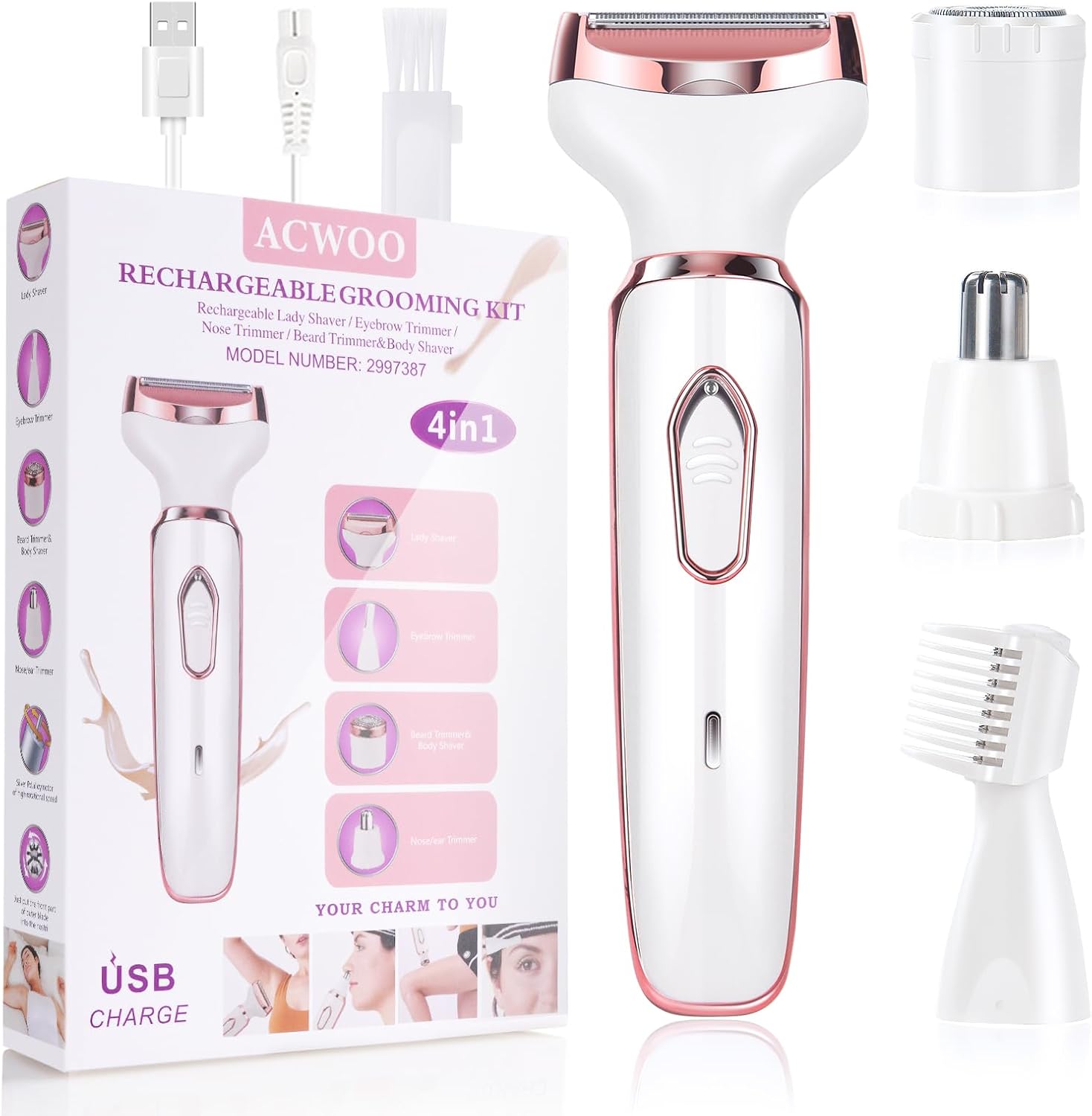
Figure 3.1: Overview of the ACWOO 4-in-1 Electric Lady Shaver and its accessories, including the main shaver body, four interchangeable heads, USB charging cable, and cleaning brush.

Figure 3.2: The four main interchangeable heads: Facial Hair Remover, Bikini Series Razor, Nose Hair Trimmer, and Eyebrow Trimmer, shown attached to the shaver body.
Included Attachments:
- Lady Shaver Head: For general body hair removal on legs, arms, and underarms.
- Bikini Trimmer Head: Specifically designed for the bikini area.
- Nose Hair Trimmer Head: For safe and effective removal of nose hair.
- Eyebrow Trimmer Head: For precise shaping and trimming of eyebrows.
- USB Charging Cable: For recharging the device.
- Cleaning Brush: For maintaining the hygiene of the shaver heads.
4. Setup
4.1 Charging the Device
Before first use, fully charge the shaver. The device features USB fast recharging for convenience.

Figure 4.1: The shaver can be charged via USB from various sources like a power bank, power adapter, or PC/laptop. A full charge provides approximately 60 minutes of run time.
- Connect the USB charging cable to the charging port at the bottom of the shaver.
- Plug the other end of the USB cable into a compatible USB power source (e.g., computer, power bank, or wall adapter).
- The charging indicator light will illuminate during charging. Once fully charged, the light may change color or turn off, depending on the model.
- A full charge typically provides up to 60 minutes of continuous use.
4.2 Attaching and Detaching Heads
To change the shaver head:
- Ensure the device is turned off.
- Grip the shaver body firmly with one hand and the attached head with the other.
- Gently twist the head counter-clockwise and pull it upwards to detach.
- Align the desired head with the shaver body, push it down, and twist clockwise until it clicks securely into place.
5. Operating Instructions
The ACWOO Electric Lady Shaver is designed for both wet and dry use, offering flexibility for your grooming routine.

Figure 5.1: The shaver head features straight blades for longer hair and a 3D floating foil blade for short hair, ensuring a close and smooth shave.

Figure 5.2: For best results, first shave longer hair with the straight or round blade, then shave short remaining hair with the shaving foil head. Avoid prolonged use of the shaving foil to prevent irritation.
General Usage Tips:
- Turn on the shaver by pressing the power button.
- Hold the razor at an angle of 30-45 degrees to your skin.
- Trim the hair against the direction of hair growth for the most effective shave.
- Apply a little moisturizer after shaving to hydrate the skin.
Using Specific Heads:
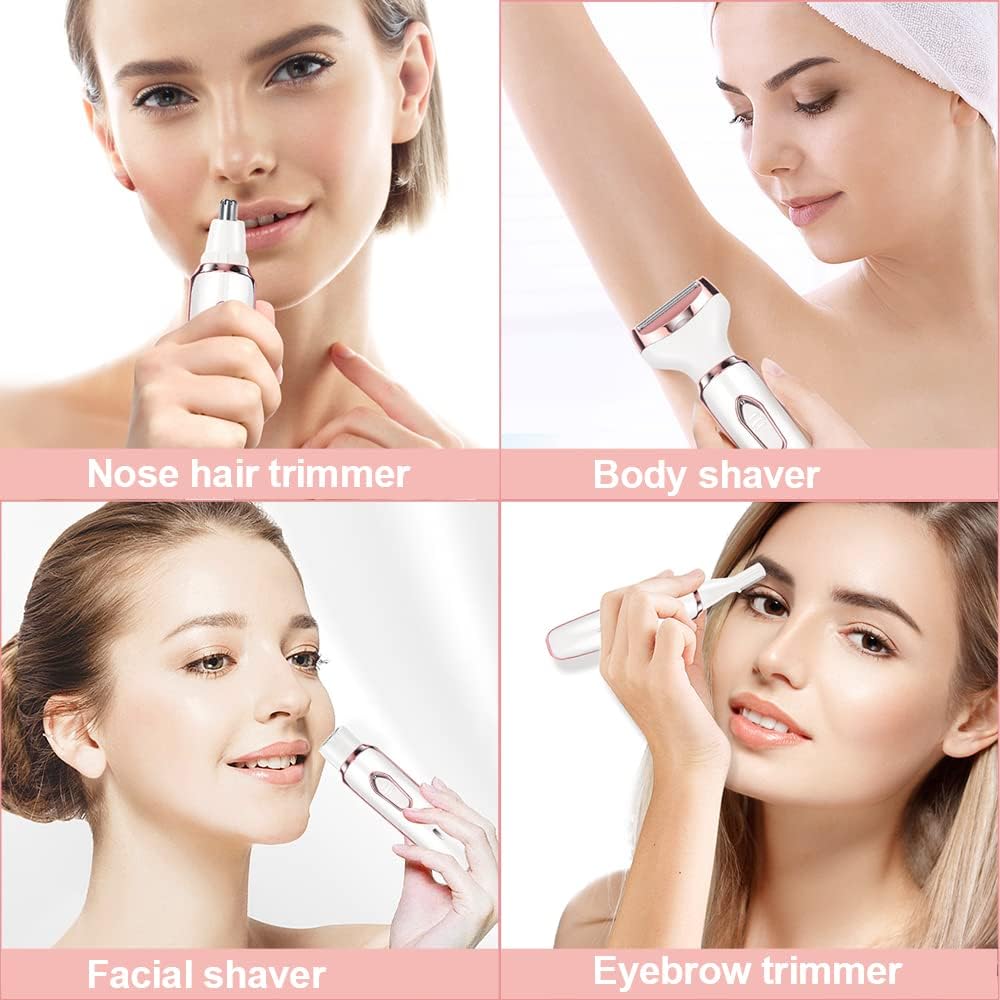
Figure 5.3: The shaver is suitable for various areas including nose, body, face, eyebrows, armpits, and legs.
- Lady Shaver Head (for arms, legs, underarms): This head is ideal for larger areas. Use gentle, even strokes. For longer hair, it is recommended to trim first with the straight blade, then use the floating foil for a closer shave.
- Bikini Trimmer Head (for bikini area): Use this head for sensitive areas. The floating film is designed to ensure a close yet safe shave, minimizing nicks and irritation.
- Nose Hair Trimmer Head (for nose hair): Carefully insert the trimmer tip into the nostril, ensuring not to insert too deeply. Move the trimmer in a circular motion to cut unwanted hair.
- Eyebrow Trimmer Head (for eyebrows): Use the precision trimmer to shape and define eyebrows. For best results, trim against the direction of hair growth.
6. Maintenance and Cleaning
Regular cleaning ensures optimal performance and hygiene of your ACWOO Electric Lady Shaver.

Figure 6.1: The shaver heads are waterproof and can be rinsed under running water for easy cleaning. Do not immerse the main shaver body in water.
- Turn off the device: Always ensure the shaver is turned off and disconnected from any power source before cleaning.
- Remove the shaver head: Detach the head you wish to clean.
- Rinse the head: All four interchangeable heads are waterproof and can be rinsed directly under running water.
- Clean with brush: Use the provided cleaning brush to remove any trapped hairs from the blades and foil.
- Dry thoroughly: Shake off excess water and allow the heads to air dry completely before reattaching them to the shaver body or storing.
- Clean the shaver body: Wipe the main shaver body with a dry or slightly damp cloth. Do not immerse the body in water.
- Lubrication (if applicable): If your shaver head feels less smooth over time, a small drop of clipper oil (not included) can be applied to the blades.
7. Troubleshooting
If you encounter any issues with your ACWOO Electric Lady Shaver, please refer to the following common solutions:
| Problem | Possible Cause | Solution |
|---|---|---|
| Shaver does not turn on. | Battery is low or depleted. | Charge the shaver fully using the provided USB cable. |
| Shaver pulls hair or does not shave effectively. | Blades are dull or clogged with hair. Incorrect shaving angle. | Clean the shaver head thoroughly. Ensure you are holding the shaver at a 30-45 degree angle against the skin and shaving against hair growth. |
| Skin irritation after shaving. | Excessive pressure. Using on dry or sensitive skin without preparation. | Use gentle pressure. Consider using the shaver wet with shaving cream/gel. Apply moisturizer after shaving. Avoid using on broken or irritated skin. |
| Device gets warm during use. | Normal operation. Prolonged use. | This is normal. If it becomes excessively hot, turn off the device and allow it to cool down before resuming use. |
If the problem persists after trying these solutions, please contact customer support.
8. Specifications
| Feature | Specification |
|---|---|
| Model Number | 2997387 |
| Brand | ACWOO |
| Power Source | Battery Powered (Rechargeable via USB) |
| Battery Life | Approx. 60 minutes (fully charged) |
| Blade Material | Stainless Steel |
| Special Features | Cordless, Rechargeable, Water Resistant (Heads only) |
| Product Dimensions | 20 x 13.5 x 3.5 cm |
| Item Weight | 0.18 Kilograms |
9. Warranty and Support
For warranty information or technical support, please refer to the product packaging or contact ACWOO customer service through the retailer where the product was purchased. Keep your proof of purchase for any warranty claims.
Ask a question about this manual
Ask about setup, troubleshooting, compatibility, parts, safety, or missing instructions. Manuals+ will review the question and use this page’s manual context to help answer it.