
QCY T17
QCY T17 Wireless Earbuds User Manual
Model: T17 | Brand: QCY
Your comprehensive guide to setting up, operating, and maintaining your QCY T17 Wireless Bluetooth Earbuds.
Introduction
The QCY T17 Wireless Bluetooth Earbuds offer a premium audio experience with crisp, clear sound and intuitive touch controls. Designed for comfort and durability, these earbuds are perfect for daily use, workouts, and calls, providing extended battery life and a waterproof build. This manual will guide you through all the essential functions to maximize your listening experience.
What's Included
- QCY T17 Earbuds (Left and Right)
- Charging Case
- Type-C Charging Cable
- Ear-tips (Various Sizes: S, M, L)
- User Manual (this document)

Image: The QCY T17 earbuds, their charging case, and included accessories like the Type-C charging cable and various ear-tip sizes.
Setup
1. Charging the Earbuds and Case
Before first use, fully charge the earbuds and the charging case. Connect the provided Type-C charging cable to the charging case and a power source. The indicator light on the case will show charging status. A full charge takes approximately 2 hours.

Image: The QCY T17 earbuds in their charging case, illustrating the 7.5 hours of playback on a single charge and 26 hours total with the 400mAh charging case.
2. Pairing with Your Device (One Step Pairing)
- Open the charging case and take out both earbuds. They will automatically power on and enter pairing mode.
- On your smartphone or Bluetooth-enabled device, go to Bluetooth settings.
- Select "QCY-T17" from the list of available devices to connect.
- Once connected, you will hear a confirmation tone, and the earbuds' indicator lights will turn off.
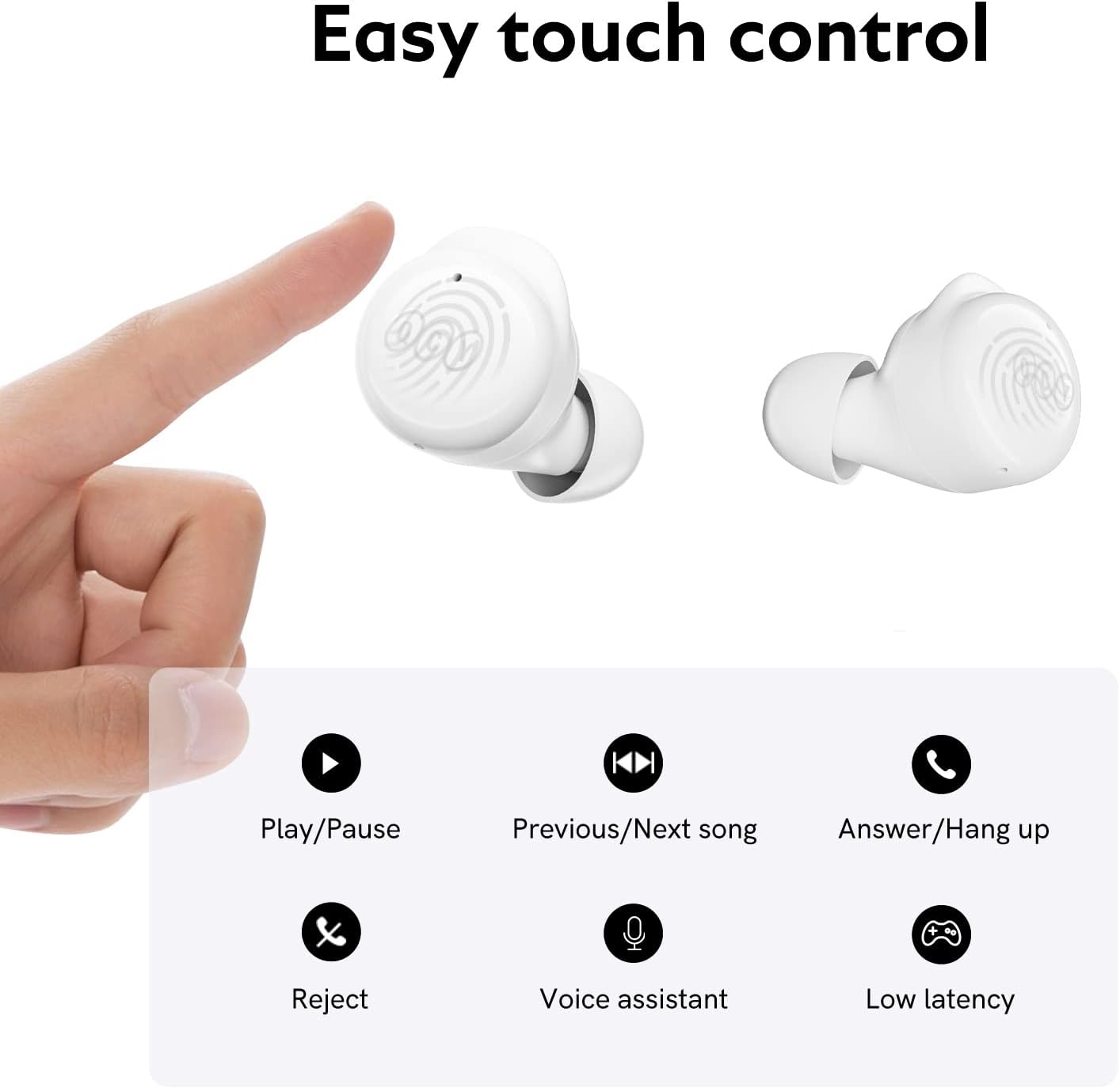
Image: A visual representation of the one-step pairing process, showing the earbuds connecting to a smartphone's Bluetooth settings.
Video: An official QCY video demonstrating how to operate and pair the QCY T17 wireless earbuds, including connection steps.
3. Fitting the Earbuds
For optimal sound quality and comfort, choose the ear-tips that best fit your ears. The QCY T17 comes with various sizes (S, M, L). Insert the earbud into your ear canal and gently twist to secure it in place.

Image: Illustration showing the different sizes of ear-tips (Large, Medium, Small) included with the earbuds.

Image: A four-step diagram illustrating the correct way to select ear-tips, insert the earbud, and twist to lock it for a secure fit, along with an example of an incorrect fit.
Operating Instructions
The QCY T17 earbuds feature smart touch controls for easy management of your audio and calls.

Image: A visual guide to the touch controls, showing actions like Play/Pause, Previous/Next song, Answer/Hang up, Reject, Voice Assistant, and Low Latency mode.
1. Music Control
- Play/Pause: Double-touch either earbud.
- Previous Song: Keep touching the left earbud for 1.5 seconds.
- Next Song: Keep touching the right earbud for 1.5 seconds.
Video: An official QCY video demonstrating music control functions, including play/pause and skipping tracks.
2. Call Control
- Answer/End Call: Double-touch either earbud.
- Ignore Call: Keep touching either earbud for 1.5 seconds.
3. Voice Assistant
- Summon Voice Assistant: Triple-touch the left earbud.
4. Low-Latency Mode
- Activate/Deactivate Low-Latency Mode: Triple-touch the right earbud. This mode is ideal for gaming to reduce audio delay.
5. Master-Slave Switch
The QCY T17 earbuds support a master-slave switch, allowing you to use either earbud independently. If one earbud is placed back into the charging case, the other will continue to function. To re-pair them, simply pick up the earbud from the case, and it will automatically connect.
Maintenance
1. Cleaning Your Earbuds
Regular cleaning helps maintain sound quality and hygiene. Use an alcohol pad to clean the charging contacts, ear-tips, and mesh of the earbuds.

Image: An illustration detailing the parts of the earbud to clean: charging contacts, ear-tips, and mesh.
Troubleshooting
1. Resetting the Earbuds
If you experience pairing issues or other malfunctions, try resetting the earbuds:
- Place both earbuds back into the charging case and ensure they are charging (indicator lights should be on).
- Keep the charging case open.
- Press and hold the touch control area on both earbuds for 10 seconds until the white LED indicator flashes 5 times. This indicates a successful reset.

Image: An illustration demonstrating the process of resetting the earbuds by holding the touch areas for 10 seconds until the LED flashes.
2. Common Issues
- No Sound/Low Volume: Check device volume, earbud battery, and ensure earbuds are properly seated in ears.
- Intermittent Connection: Ensure no obstacles between earbuds and device, and that you are within the Bluetooth range (approx. 30 feet).
- Earbuds Not Charging: Ensure charging contacts on both earbuds and case are clean and dry.
Specifications
| Feature | Detail |
|---|---|
| Model Name | T17 |
| Connectivity Technology | Wireless (Bluetooth 5.1) |
| Wireless Communication Technology | Bluetooth |
| Bluetooth Version | 5.1 |
| Bluetooth Range | 30+ Feet |
| Battery Life (Earbuds) | 7.5 Hours (normal use) |
| Total Playtime (with Charging Case) | 26 Hours |
| Charging Time | 2 Hours |
| Audio Driver Type | Dynamic Driver (6mm) |
| Frequency Response | 20Hz - 20kHz |
| Impedance | 16 Ohm |
| Control Type | Touch Control |
| Water Resistance Level | Water Resistant |
| Item Weight (single earbud) | 4.2g |
| Product Dimensions | 2.11 x 2.13 x 1.11 inches |
| Material | Plastic |
Warranty and Support
QCY products come with a standard manufacturer's warranty. For detailed warranty information, technical support, or service inquiries, please refer to the official QCY website or contact their customer service directly. Keep your purchase receipt for warranty claims.
For further assistance, visit the QCY Official Store on Amazon.
Ask a question about this manual
Ask about setup, troubleshooting, compatibility, parts, safety, or missing instructions. Manuals+ will review the question and use this page’s manual context to help answer it.