
Introduction
Thank you for choosing the Brookstone Ultra Soft Plush Electric Heated Throw. This manual provides essential information for the safe and efficient operation, maintenance, and care of your heated throw. Please read all instructions carefully before use and retain this manual for future reference.
This electric heated throw is designed to provide warmth and comfort with its ultra-plush fabric and adjustable heat settings. It features a built-in remote for easy control and an automatic shut-off function for safety.
Important Safety Instructions
When using electrical appliances, basic precautions should always be followed to reduce the risk of fire, electric shock, and injury to persons, including the following:
- Read all instructions before using this heated throw.
- Do not use this heated throw with an infant, child, incapacitated person, or anyone insensitive to heat.
- Do not use this heated throw in conjunction with another heating appliance.
- Do not use if wet.
- Do not use if the power cord or plug is damaged.
- Do not use pins or other metallic objects with this heated throw. They may damage the wiring.
- Do not tuck in the heated throw.
- Do not use for pets.
- Always disconnect the power cord from the outlet when not in use.
- Do not dry clean this product. Cleaning solvents may damage the wiring insulation.
- Do not use bleach.
Setup
Before first use, ensure the heated throw is unfolded completely and free from any creases or folds. Do not use the throw if it is bunched up or folded, as this can cause overheating.
- Unpack the heated throw and all components.
- Lay the throw flat on a bed, sofa, or other desired surface. Ensure there are no objects covering the control unit or power cord.
- Locate the connector on the throw and the power cord. Firmly plug the power cord into the connector on the throw.
- Plug the power cord into a standard 120V AC electrical outlet.

Figure 1: The Brookstone Ultra Soft Plush Electric Heated Throw in Grey, draped over a white armchair, ready for use. This image shows the throw's texture and how it appears in a home setting.
Operating Instructions
The Brookstone Electric Heated Throw features an easy one-touch built-in remote for convenient operation.

Figure 2: A close-up view of the built-in remote control. The remote features a power button (left) and a heat setting button (right) with four wavy lines indicating heat levels.
Powering On/Off
- To turn on the heated throw, press the Power button (indicated by a circle with a vertical line) on the built-in remote. The indicator light will illuminate.
- To turn off the heated throw, press the Power button again. The indicator light will turn off.
Adjusting Heat Settings
- The heated throw has 4 heat settings.
- After turning on the throw, press the Heat Setting button (indicated by wavy lines) to cycle through the heat levels. Each press will advance to the next heat setting.
- The indicator lights on the remote will show the current heat level.
Automatic Shut-Off
For safety and energy conservation, the heated throw is equipped with a 4-hour automatic shut-off feature. The throw will automatically turn off after 4 hours of continuous use. To resume heating, simply press the Power button again.
Maintenance and Care
Proper care ensures the longevity and safe operation of your heated throw. Always follow these instructions carefully.
Washing Instructions
- Disconnect Power: Before washing, always disconnect the power cord from the heated throw and then from the electrical outlet. Do not submerge cords, power supply, or the control unit in water.
- Machine Wash: Machine wash the throw on a gentle cycle in cold water.
- Detergent: Use a mild detergent. Do not use bleach or harsh chemicals.
- Rinse: Rinse thoroughly.
- Drying: Tumble dry on low heat or line dry. Ensure the throw is completely dry before reconnecting the power cord and using it again. Do not iron.
- Do Not Dry Clean: Do not dry clean this product, as cleaning solvents may damage the wiring insulation.
Storage
When not in use, store the heated throw in a cool, dry place. Avoid folding it tightly or placing heavy objects on top, which could damage the internal wiring.
Troubleshooting
| Problem | Possible Cause | Solution |
|---|---|---|
| Heated throw does not turn on. |
|
|
| Throw is not heating sufficiently. |
|
|
| Indicator light is flashing or off unexpectedly. |
|
|
Specifications
- Model: B09J1LM6KW
- Dimensions: 50 inches x 60 inches (127 cm x 152 cm)
- Material: 100% Polyester, Ultra-Plush Fabric
- Heat Settings: 4 levels
- Automatic Shut-off: 4 hours
- Power: Standard 120V AC
- Care: Machine Washable (Gentle Cycle, Cold Water)
- Color: Grey (Charcoal)
- Item Weight: Approximately 3.63 pounds
Warranty and Support
The product description mentions a "5 YEAR warranty" on the packaging image. Based on this, the following information is provided:
Warranty Information
This Brookstone Electric Heated Throw is covered by a 5-year limited warranty. Please refer to the warranty card included with your product packaging for specific terms and conditions, including coverage details and how to make a claim.
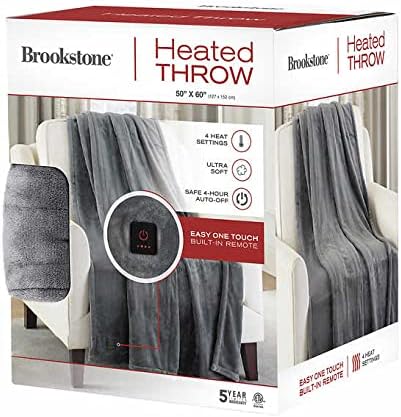
Figure 3: The product packaging for the Brookstone Heated Throw, highlighting features like 4 heat settings, ultra-soft material, 4-hour auto-off, and a 5-year warranty.
Customer Support
For further assistance, troubleshooting not covered in this manual, or warranty claims, please contact Brookstone customer support. Contact information can typically be found on the product packaging or on the official Brookstone website.
Please have your model number (B09J1LM6KW) and proof of purchase ready when contacting support.