
Introduction
This manual provides detailed instructions for the setup, operation, and maintenance of your OCTAGON SX887 HD WL H.265 IP HEVC Smart TV Box. The SX887 HD WL is an advanced Full HD streaming client designed for convenient media consumption, offering a sharp 1080p resolution at 60 frames per second. It features an ARM Cortex-A7 32-bit DualCore CPU for enhanced performance and HDMI CEC support.
Package Contents
Please check the box for the following items:
- OCTAGON SX887 HD WL H.265 IP Smart TV Box with integrated 150 Mbits WiFi
- Remote Control
- IR Receiver
- Power Supply Unit
- User Manual (German and English)
- Batteries (2 x AAA)
Product Overview
Familiarize yourself with the device and its components.
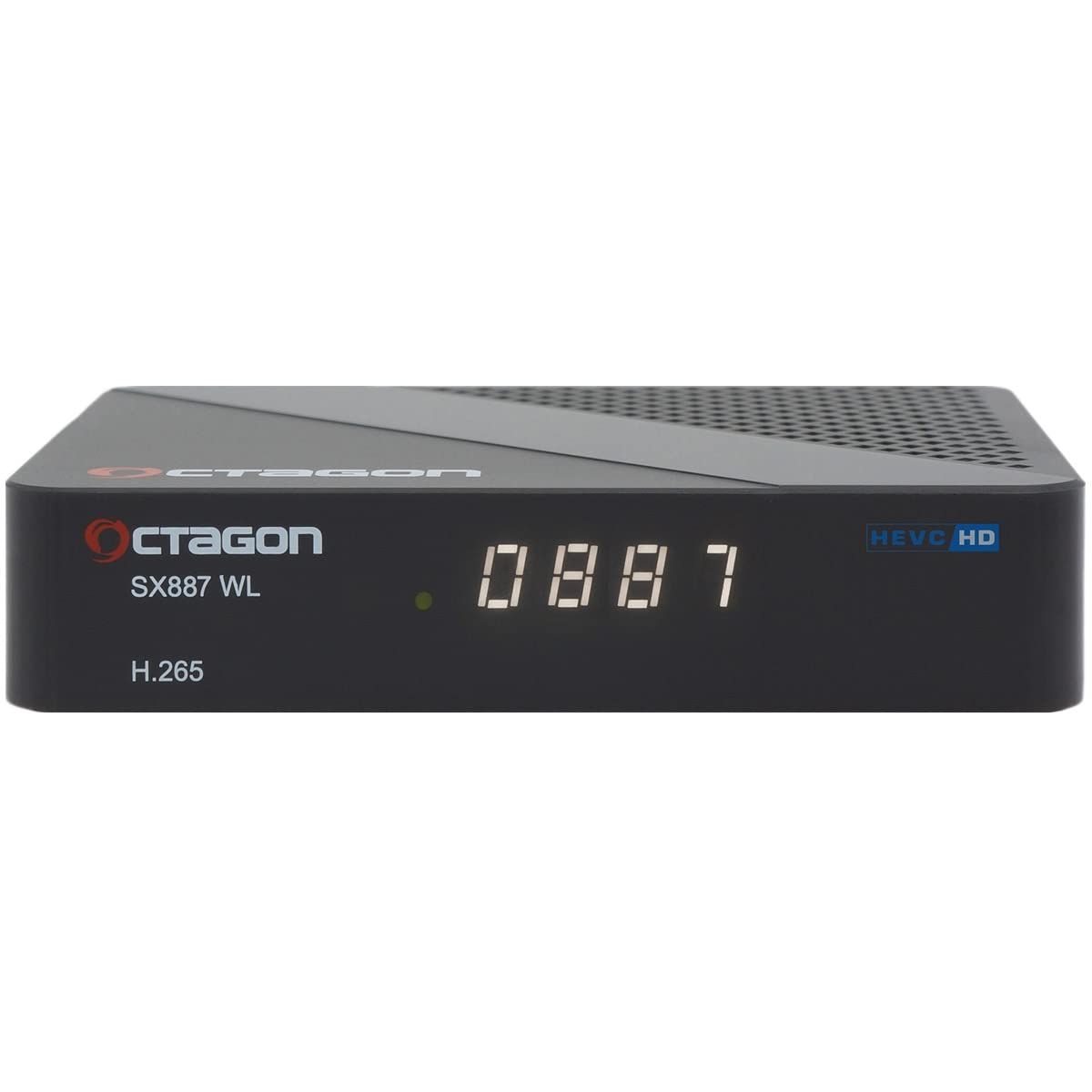
Figure 1: Front-top view of the Octagon SX887 HD WL Smart TV Box. The device is black with the Octagon logo and model number "SX887 WL" visible on the top surface. "HEVC HD" and "H.265" are also printed on the device.
Front Panel

Figure 2: Front panel of the Octagon SX887 HD WL. It features one USB 2.0 port and a connection for the external IR receiver. A small "Recovery" button is also present.
- USB 2.0 Port: For connecting USB storage devices (e.g., USB flash drives, external hard drives) for media playback.
- IR Receiver Connection: Connect the included external IR receiver here to allow the remote control to operate the hidden device.
- Recovery Button: Used for maintenance and service purposes.
Rear Panel

Figure 3: Rear panel of the Octagon SX887 HD WL, showing various connectivity ports. From left to right: Digital Audio (S/PDIF), AV (Audio Video) Jack, HDMI Out, LAN, and DC 5V Power Input.
- Digital Audio Socket (S/PDIF): For connecting to an external audio system for digital sound output.
- AV (Audio Video) Socket: Jack to RCA connection for older TVs or audio systems.
- HDMI 1.4b Out: Connects to your TV or display for high-definition video and audio. Supports HDCP1.4 with CEC.
- LAN 10/100 Mbit: Ethernet port for wired network connection.
- DC 5V Power Supply: Connect the included power adapter here.
Remote Control

Figure 4: The learning multifunctional remote control for the Octagon SX887 HD WL. It features standard navigation, number keys, media controls, and four programmable buttons.
The included remote control is multifunctional and features four programmable buttons for learning functions from your TV remote. Insert the two AAA batteries into the remote control before use.
Setup Instructions
- Connect the IR Receiver: If you plan to hide the TV box, connect the external IR receiver to the "IR" port on the front panel. Position the IR receiver in a location where it has a clear line of sight to your remote control.
- Connect to TV: Connect one end of an HDMI cable (not included) to the HDMI OUT port on the rear of the SX887 HD WL and the other end to an available HDMI input on your television. Note the HDMI input number (e.g., HDMI 1, HDMI 2).
- Connect to Network (Optional):
- Wired: Connect an Ethernet cable (not included) from your router or network switch to the LAN port on the rear of the TV box.
- Wireless: The device has integrated 150 Mbits WiFi. You will configure the wireless connection during the initial software setup.
- Connect Power: Connect the included power adapter to the DC 5V Power Supply port on the rear of the TV box, then plug the adapter into a wall outlet.
- Power On: Turn on your television and select the correct HDMI input using your TV's remote control. The Octagon SX887 HD WL should power on automatically.
- Initial Setup Wizard: Follow the on-screen instructions to complete the initial setup, which typically includes language selection, network configuration (if using Wi-Fi), and time zone settings.
Operating Instructions
Basic Navigation
- Use the Arrow keys on the remote control to navigate through menus and options.
- Press the OK button to confirm a selection.
- Press the MENU button to access the main menu.
- Press the EXIT button to go back to the previous screen or exit a menu.
Media Playback
The SX887 HD WL supports playback of MP3 files, photos, and videos from external USB storage devices.
- Connect USB Device: Insert your USB flash drive or external hard drive into the USB 2.0 port on the front panel.
- Access Media Player: Navigate to the "Media Player" application from the main menu.
- Select Content: Browse the files on your USB device and select the desired MP3, photo, or video file to play.
Internet Features
The device provides access to various internet services.
- YouTube: Access the YouTube application for video streaming.
- Internet Radio: Enjoy various internet radio stations.
- DLNA Player: Utilize DLNA (DMS, DMR) for streaming content from compatible devices on your network.
- WebIF & FTP Access: Advanced users can access the device via WebIF and FTP for configuration and file management.
Maintenance
- Cleaning: Use a soft, dry cloth to clean the exterior of the device. Do not use liquid cleaners or abrasive materials.
- Software Updates: Periodically check for software updates through the device's settings menu to ensure optimal performance and access to the latest features.
- Ventilation: Ensure the device is placed in a well-ventilated area to prevent overheating. Do not block the ventilation holes.
Troubleshooting
| Problem | Possible Cause | Solution |
|---|---|---|
| No power/Device not turning on | Power adapter not connected properly; power outlet not working. | Check power cable connections. Try a different power outlet. Ensure the power adapter is the original one supplied. |
| No picture on TV | Incorrect HDMI input selected on TV; loose HDMI cable connection. | Ensure your TV is set to the correct HDMI input. Check HDMI cable connections at both the TV box and the TV. Try a different HDMI cable. |
| Remote control not working | Batteries are dead or inserted incorrectly; IR receiver blocked or not connected. | Replace batteries in the remote control. Ensure batteries are inserted with correct polarity. Check if the external IR receiver is properly connected and has a clear line of sight to the remote. |
| No internet connection | Incorrect network settings; router issue; Wi-Fi signal too weak. | Check network cable (if wired). Reconfigure Wi-Fi settings in the device menu. Restart your router. Ensure the device is within range of your Wi-Fi router. |
| Device freezes or crashes | Software issue; overheating; insufficient memory. | Restart the device by unplugging and replugging the power. Ensure the device has adequate ventilation. Check for and install any available software updates. |
Specifications
| Model Number | SX887-WL-IP |
| Processor | ARM Cortex-A7 Dual-Core (2 x 800 MHz), 3000 DMIPS - GX6613H2 GX-National |
| GPU | High-performance multi-core GPU |
| Flash Memory | 128 MB |
| RAM | 256 MB DDR3 |
| Operating System | Linux OS (Octagon Define Linux OS) |
| Video Resolution | FHD 1080P H.265 HEVC |
| Connectivity |
|
| Power Supply | DC 5V |
| Standby Power Consumption | 0.5W |
| Supported Audio Formats | Dolby Digital, DTS, AAC, MP3, PCM |
| Compatible Devices | Television |
Warranty Information
Specific warranty details are not provided in the product information. Please refer to the warranty card included in your package or contact your retailer for information regarding the warranty period and terms.
Support
For technical support or further assistance, please refer to the contact information provided in the included user manual or visit the official Octagon website.


