
Introduction
Thank you for choosing the LARKSOUND 2.1 Soundbar with Subwoofer. This manual provides essential information for setting up, operating, and maintaining your new audio system. Please read it thoroughly before use and retain it for future reference.
What's in the Box
Carefully unpack all components and ensure you have the following items:
- LARKSOUND 2.1 Soundbar
- Wired Subwoofer
- Remote Control
- High-quality HDMI(ARC) cable (4.92ft)
- Optical cable (4.92ft)
- AUX cable (4.92ft)
- Power Adapter
- Wall Mount Template
- Screw Bag (for wall mounting)
- User Manual (this document)

Image: All components included in the LARKSOUND 2.1 Soundbar with Subwoofer package.
Setup
Placement Options
The soundbar can be placed directly on a flat surface below your TV or mounted on a wall. Its slim design ensures it fits discreetly without obstructing your TV screen.
Wall Mounting
If wall mounting, use the included wall mount template to mark the drilling positions. Secure the mounting screws into the wall, ensuring they are firmly anchored, then hang the soundbar. Refer to the detailed instructions in the included wall mounting kit for precise steps.
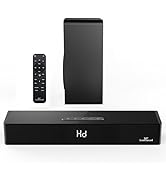
Image: Soundbar installed on a wall below a television, demonstrating a common setup.
Connecting the Subwoofer
Connect the wired subwoofer to the soundbar using the dedicated SUB output port on the soundbar's rear panel.
Audio Connections
The soundbar supports multiple connection types to ensure compatibility with various devices:
- HDMI (ARC): For optimal audio quality and TV remote control (if your TV supports HDMI-CEC). Connect the HDMI(ARC) cable from the soundbar's HDMI(ARC) port to your TV's HDMI(ARC) port.
- Optical: Connect the optical cable from the soundbar's OPT port to your TV's optical output.
- AUX: Connect the AUX cable from the soundbar's AUX IN port to your device's 3.5mm audio output.
- USB: Insert a USB drive into the USB port to play audio files directly.

Image: Close-up of the soundbar's rear connection panel, highlighting various input options.
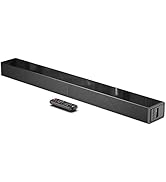
Image: The high-quality HDMI (ARC), Optical, and AUX cables provided with the soundbar.
Operating Instructions
Power On/Off
Press the Power button on the soundbar or the remote control to turn the unit on or off.
Input Selection
Press the 'Input' button on the remote control or the corresponding button on the soundbar to cycle through available input sources: Bluetooth (BT), HDMI (ARC), Optical (OPT), AUX, and USB.
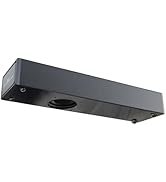
Image: The soundbar's user-friendly LED display and integrated control buttons.
Volume Control
Adjust the volume using the 'VOL+' and 'VOL-' buttons on the remote control or the soundbar. If connected via HDMI (ARC) with CEC enabled, you may be able to control the soundbar volume with your TV remote.

Image: The soundbar remote control and an example of TV remote integration via HDMI-CEC.
Sound Modes
Select from three specialized sound modes using the 'EQ' button on the remote control:
- Music: Provides an immersive sound effect, ideal for listening to your favorite tracks.
- Movie: Delivers a full-range, theater-level sound with powerful bass for an enhanced cinematic experience.
- Dialog: Enhances the clarity of spoken words, making dialogue easier to hear during TV shows and movies.

Image: The soundbar's display showing 'Hd' and descriptions of the three available sound modes.
Bluetooth Pairing
To connect via Bluetooth:
- Turn on the soundbar and select Bluetooth input (BT).
- Enable Bluetooth on your device (smartphone, tablet, etc.).
- Search for 'LARKSOUND' in your device's Bluetooth settings and select it to pair.
- Once paired, the soundbar will indicate a successful connection, and you can stream audio wirelessly.
Bluetooth 5.0 technology ensures stable and fast transmission up to 33 feet.

Image: Wireless music streaming via Bluetooth 5.0, showing the soundbar and a connected smartphone.
3D Surround Sound
Activate the 3D Surround Sound mode for an immersive audio experience that enhances the sound field positioning.

Image: Visual representation of 3D surround sound filling a living room space from the soundbar.
Enhanced Bass
The soundbar and subwoofer system is designed to deliver deep and powerful bass, enhancing your audio experience. The built-in reflex tubes further improve the bass effect.

Image: Internal view of the soundbar and subwoofer, illustrating the components responsible for ultra bass enhancement.
Official Product Video
Video: An official LARKSOUND video demonstrating the soundbar's features and sound quality. This video is provided by the seller.
Maintenance
To ensure the longevity and optimal performance of your LARKSOUND Soundbar:
- Keep the soundbar and subwoofer in a dry, clean environment, away from direct sunlight, heat sources, and moisture.
- Clean the surfaces with a soft, dry cloth. Do not use liquid cleaners or abrasive materials.
- Avoid blocking the ventilation openings on the units.
- Do not attempt to open or service the units yourself. Refer to qualified service personnel for any repairs.
Troubleshooting
If you encounter any issues with your soundbar, please refer to the following common solutions:
- No Sound: Ensure the soundbar is powered on, the correct input source is selected, and the volume is turned up. Check all cable connections (HDMI, Optical, AUX) are secure. Verify your TV's audio output settings are configured correctly for the chosen input.
- No Bass from Subwoofer: Ensure the subwoofer is properly connected to the soundbar and powered on. Check the subwoofer's volume level.
- Bluetooth Pairing Issues: Make sure the soundbar is in Bluetooth pairing mode (BT displayed). Disable and re-enable Bluetooth on your device, then try searching and pairing again. Ensure your device is within the 33-foot range.
- Remote Control Not Working: Check the batteries in the remote control and replace them if necessary. Ensure there are no obstructions between the remote and the soundbar's sensor.
- Distorted Sound: Reduce the volume on both the soundbar and the connected device. Check for loose connections. Try a different audio source or cable.
If the problem persists, please contact customer support.
Specifications
| Brand | LARKSOUND |
| Model | 2.1 Soundbar with Subwoofer |
| Speaker Type | Soundbar |
| Surround Sound Channel Configuration | 2.1 |
| Speaker Maximum Output Power | 150 Watts |
| Connectivity Technology | Bluetooth, HDMI (ARC), Optical, AUX, USB |
| Wireless Communication Technology | Bluetooth 5.0 |
| Control Method | Remote, On-unit buttons |
| Mounting Type | Wall Mount, Tabletop |
| Color | Black |
| Material | Wood |
| Soundbar Dimensions | 35.4 x 2.36 x 3.54 inches |
| Subwoofer Dimensions | 15.75 x 3.54 x 11.81 inches |
| Item Weight | 11.53 pounds |
Warranty
The LARKSOUND 2.1 Soundbar with Subwoofer comes with a 1-Year Warranty from the date of purchase. This warranty covers manufacturing defects and ensures reliable craftsmanship. Please retain your proof of purchase for warranty claims.
Support
For any questions, technical assistance, or warranty inquiries, please contact our customer support team:
- Email: support@larksound.com
Our dedicated team is ready to assist you.


