
Introduction
Thank you for choosing the LEKATO Guitar Looper Effect Pedal. This compact and robust pedal is designed to provide guitarists with a simple yet powerful tool for looping, practice, and creative expression. Featuring high-quality audio, unlimited overdubbing, and USB connectivity for file management, this manual will guide you through its features and operation.
Package Contents
- LEKATO Guitar Looper Effect Pedal
- USB Cable
- 9V 0.6A Pedal Power Supply Adapter
- Instruction Manual
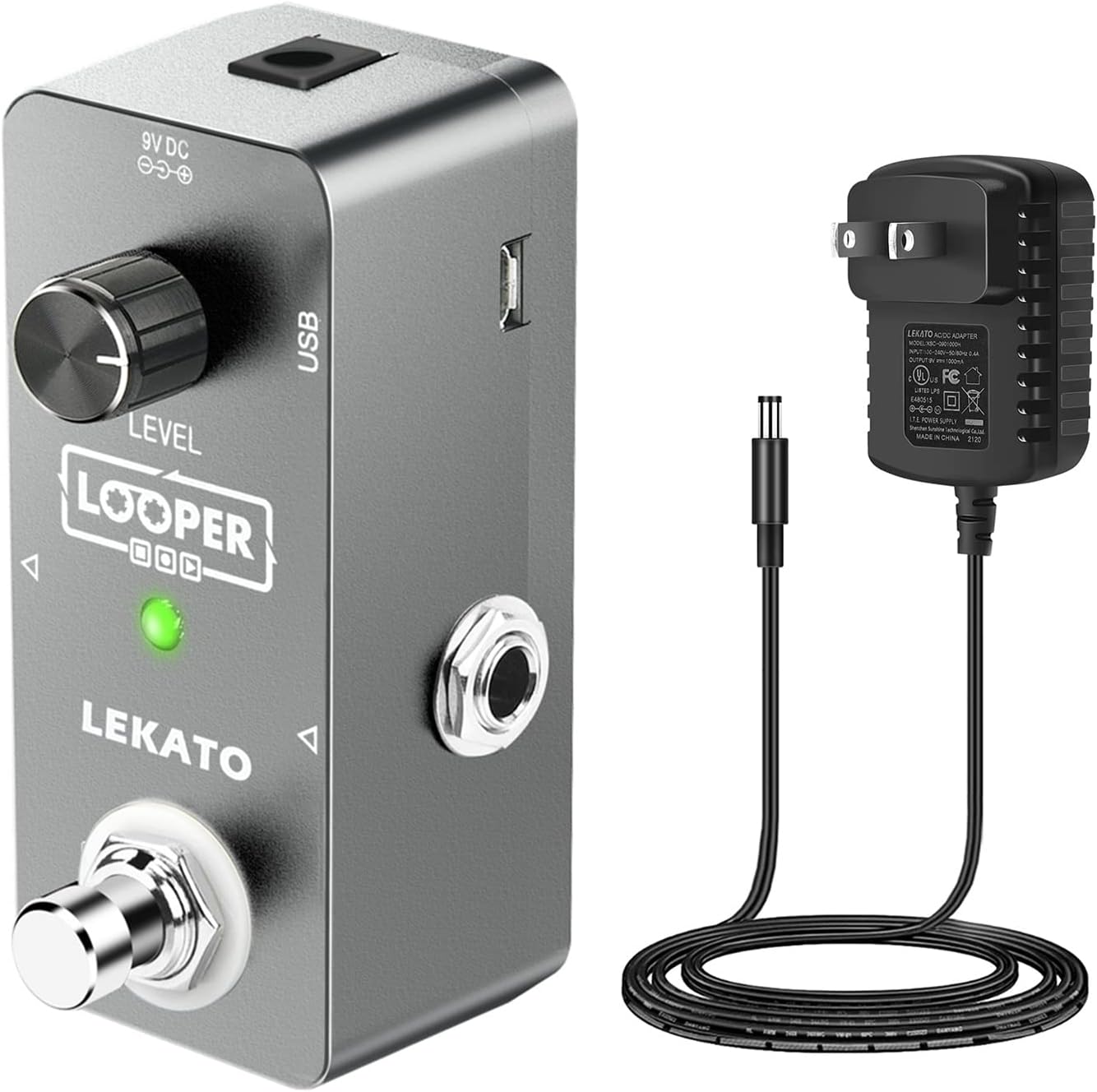
Figure 1: LEKATO Guitar Looper Effect Pedal with included USB cable and 9V power adapter.
Product Overview
The LEKATO Guitar Looper is a mini-sized pedal constructed from durable aluminum alloy. It features a single footswitch for primary control, a level knob, and an LED display for status indication. It supports 24-bit uncompressed high-quality audio and offers an Analog-Dry-Through design for pure sound.
Key Features:
- 5 Minutes Looping Time: Provides ample time for recording loops.
- Unlimited Overdubbing: Allows for layering multiple tracks without limit.
- Undo/Redo Functionality: Easily correct or restore your last recorded layer.
- USB Connectivity: Supports import and export of lossless WAV files to/from Windows/Mac OS.
- Intuitive Single-Knob Operation: Simplifies volume control for loop playback.
- Built-in Tuner: Integrated tuning function for convenience.
- Durable Construction: Made of aluminum alloy for reliability.

Figure 2: Top view of the looper pedal, highlighting the Level knob and footswitch.

Figure 3: Side view of the looper pedal, illustrating the input/output jacks and USB port.
Setup
- Power Connection: Connect the included 9V DC power adapter to the DC 9V input jack on the pedal. Ensure the adapter is a central negative DC 9V type.
- Instrument Connection: Connect your guitar or other electronic musical instrument to the 'IN' jack on the pedal using a standard 1/4-inch instrument cable.
- Amplifier Connection: Connect the 'OUT' jack of the pedal to your amplifier or audio interface using another standard 1/4-inch instrument cable.
- Power On: Once all connections are secure, plug the power adapter into a wall outlet. The pedal's LED display will illuminate, indicating it is powered on and ready for use.

Figure 4: Detailed view of the power adapter specifications, showing central negative DC 9V requirement.
Operating Instructions
Basic Looping Functions:
- Record: Press the footswitch once to start recording. The LED will turn red.
- Play: Press the footswitch once again to stop recording and start playback. The LED will turn blue.
- Overdub: During playback, press the footswitch once to start overdubbing. The LED will turn red and blue simultaneously. Press again to stop overdubbing and continue playback (LED blue).
- Undo Last Overdub: During playback, press and hold the footswitch for 2 seconds. The last overdub will be removed.
- Redo Last Overdub: After undoing an overdub, press and hold the footswitch for 2 seconds again to restore it.
- Stop Playback: Double-tap the footswitch quickly during playback.
- Clear Loop: While playback is stopped, press and hold the footswitch for 2 seconds. The loop will be cleared.
Volume Control:
The 'LEVEL' knob controls the playback volume of your recorded loops. Adjust clockwise to increase volume and counter-clockwise to decrease volume.
Bank Switching:
The pedal features multiple banks to store your loops. To switch between banks, briefly press the small button located above the footswitch. The LED display will show the current bank number.
Using the Tuner:
To activate the built-in tuner, press and hold the small button above the footswitch for approximately 3 seconds. The display will change to tuner mode. Play a single note on your instrument, and the LEDs will indicate if the note is flat, sharp, or in tune. To exit tuner mode, press and hold the same button again for 3 seconds.
USB Import/Export:
The pedal supports importing and exporting lossless WAV audio files. Connect the pedal to your computer (Windows/Mac OS) using the provided USB cable. The pedal will appear as a removable drive, allowing you to drag and drop WAV files. Ensure files are in WAV format for compatibility.

Figure 5: The looper pedal connected to a computer via USB for managing audio files.
Official Product Videos:
Video 1: Overview of the LEKATO Guitar Looper Pedal Set, demonstrating its compact size and basic functionality. This video is provided by the seller.
Video 2: Demonstration of the LEKATO Loop Pedal's SYNC recording and Tuner functions, showcasing how to use these advanced features. This video is provided by the seller.
Maintenance
- Cleaning: Use a soft, dry cloth to clean the pedal's surface. Avoid using abrasive cleaners or solvents.
- Storage: Store the pedal in a dry environment, away from extreme temperatures and direct sunlight.
- Handling: Avoid dropping the pedal or subjecting it to strong impacts, as this may damage internal components.
Troubleshooting
| Problem | Possible Cause | Solution |
|---|---|---|
| No sound output | Incorrect cable connections; Power issue; Amplifier off | Check all instrument and power cables; Ensure power adapter is correctly connected; Verify amplifier is on and volume is up. |
| Poor sound quality/noise | Faulty cables; Incorrect power supply; Interference | Try different cables; Ensure correct 9V DC central negative power supply is used; Move away from other electronic devices. |
| Loop not recording/playing | Incorrect footswitch operation; Loop memory full | Refer to 'Basic Looping Functions' for correct footswitch commands; Clear existing loops if memory is full. |
| USB transfer issues | Incorrect file format; USB cable issue | Ensure files are lossless WAV format; Try a different USB cable or port. |
Specifications
- Item Weight: 14.4 ounces
- Product Dimensions: 1.57 x 1.57 x 1.95 inches
- Hardware Interface: USB
- Signal Format: Analog
- Power Source: Corded Electric
- Voltage: 9 Volts (DC 9V, central negative)
- Material: Aluminum Alloy
- Looping Time: 5 minutes
- Overdubs: Unlimited
- Audio Quality: 24-bit uncompressed
Warranty and Support
LEKATO products are designed for reliability and performance. For warranty information, technical support, or service inquiries, please refer to the contact details provided with your purchase or visit the official LEKATO website. Please retain your proof of purchase for any warranty claims.