
1. Introduction
Thank you for choosing the Intenso Twist Line Dual USB Flash Drive. This device offers a convenient and efficient solution for data storage and transfer between various devices. With its dual USB-A and USB-C connectors and USB 3.2 Gen 1 interface, it provides fast and versatile connectivity for your digital needs.
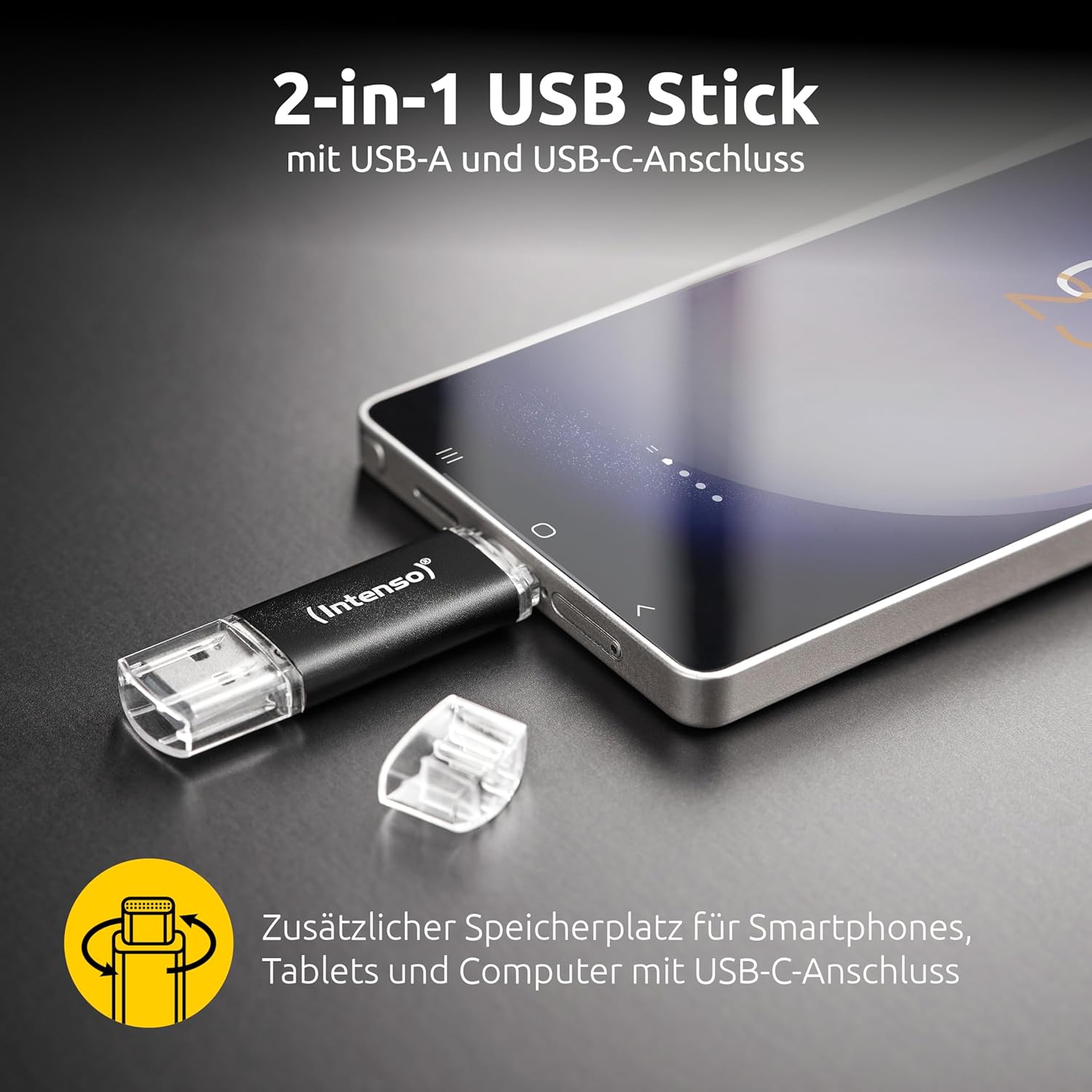
Figure 1: The Intenso Twist Line features both USB-A and USB-C connectors for versatile device compatibility.
2. Setup and Compatibility
The Intenso Twist Line USB Flash Drive is designed for plug-and-play functionality, requiring no special drivers or software installation for basic use. It is compatible with a wide range of devices and operating systems.
2.1 Device Compatibility
- USB-A Devices: Computers, Smart TVs, Projectors, and other devices with a standard USB-A port.
- USB-C Devices: Smartphones, Tablets, Laptops, and other host devices with a USB Type-C port that supports OTG (On-The-Go) functionality.
2.2 System Compatibility
- Windows 10 or newer
- macOS 10.x or newer
- Android devices with USB-C and OTG support

Figure 2: Universal compatibility with various USB-A and USB-C devices.

Figure 3: The drive is compatible with Windows 10+ and macOS 10.x+ operating systems.
3. Operating Instructions
3.1 Connecting the Drive
- Identify the correct connector (USB-A or USB-C) for your device.
- Gently twist the protective cap to expose the desired connector.
- Insert the connector firmly into the corresponding port on your computer, smartphone, or tablet.
- The device should automatically detect the flash drive. On computers, it will appear as a removable drive. On mobile devices, you may need to access a file manager application.
3.2 Transferring Files
To transfer files, simply drag and drop them to or from the flash drive icon in your operating system's file explorer (Windows/macOS) or file manager app (Android).

Figure 4: The USB 3.2 Gen 1 interface enables fast data transfer rates up to 70 MB/s.
3.3 Safe Removal
Always safely eject the USB flash drive before physically removing it from your device to prevent data corruption. This can typically be done by right-clicking the drive icon and selecting 'Eject' (Windows) or dragging it to the Trash (macOS).
4. Maintenance
Proper care ensures the longevity and reliability of your Intenso Twist Line USB Flash Drive.
- Physical Protection: Always use the integrated twist mechanism to protect the unused connector from dust and damage.
- Cleaning: Keep the connectors clean and free from debris. Use a soft, dry cloth if necessary. Avoid liquid cleaners.
- Temperature: Store the drive in a cool, dry place, away from extreme temperatures and direct sunlight.
- Data Backup: Regularly back up important data stored on the flash drive to another storage medium.
5. Troubleshooting
5.1 Drive Not Recognized
- Check Connection: Ensure the drive is fully inserted into the USB port.
- Try Another Port: Connect the drive to a different USB port on your device.
- Restart Device: Restart your computer, smartphone, or tablet.
- Check Device Manager (Windows): In Windows, open Device Manager to see if the drive is listed, even if it's not assigned a drive letter.
- Check File Manager (Mobile): On mobile devices, ensure your file manager app has permissions to access external storage.
5.2 Slow Transfer Speeds
- USB 3.2 Port: Ensure you are connecting the drive to a USB 3.2 Gen 1 (or higher) port on your computer for optimal speeds. Older USB 2.0 ports will result in slower transfers.
- File Size/Type: Transferring many small files can be slower than transferring a few large files.
- Other USB Devices: Disconnect other USB devices that might be consuming bandwidth.
- Drive Format: Ensure the drive is formatted appropriately for your operating system (e.g., exFAT for cross-platform compatibility).
5.3 Data Corruption
- Safe Ejection: Always safely eject the drive before removal.
- Reformat: If data corruption persists, you may need to reformat the drive. Warning: This will erase all data on the drive. Back up any important files before proceeding.
6. Specifications
| Feature | Detail |
|---|---|
| Brand | Intenso |
| Model Name | Twist Line |
| Model Number | 3539490 (W128271221) |
| Memory Storage Capacity | 64 GB |
| Hardware Interface | USB 3.2 Gen 1 |
| Connectivity Technology | USB |
| Special Feature | Dual USB Connector (USB-A and USB-C) |
| Read Speed | Up to 70 MB/s |
| Write Speed | Up to 70 MB/s |
| Compatible Devices | Smartphones, Tablets, Computers, Smart TVs, Projectors with USB-A or USB-C ports |
| Compatible Phone Models | Samsung, iPhone (with USB-C models), and other compatible Android devices |
| Color | Charcoal |
| Item Dimensions (D x W x H) | 0.33" x 0.71" x 2.48" (approx. 8.4mm x 18mm x 63mm) |
| Item Weight | 20 Grams |
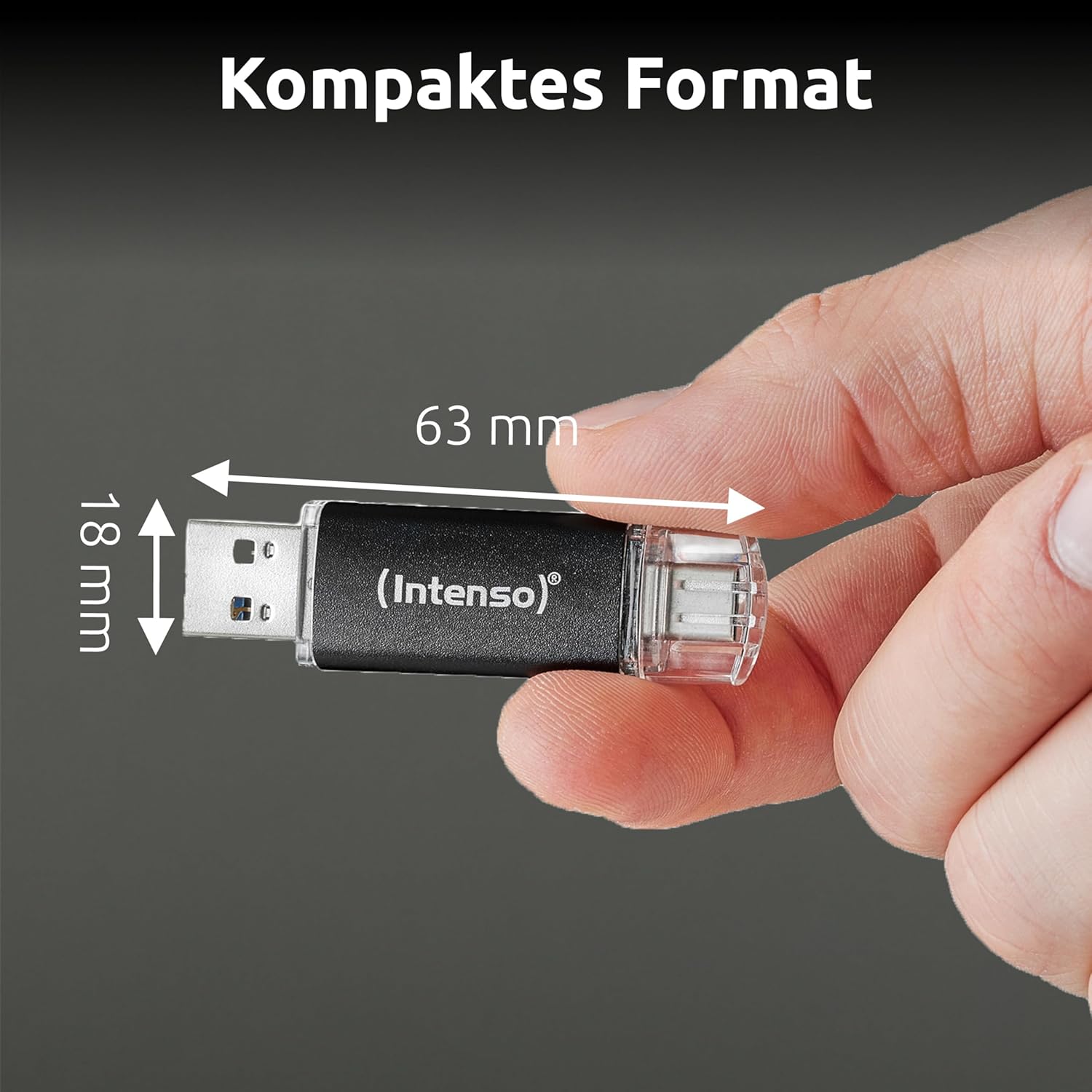
Figure 5: Compact dimensions for easy portability.
7. Warranty Information
Intenso products are developed and tested in Germany, adhering to high standards of quality, reliability, and security. For specific warranty terms and conditions, please refer to the warranty card included with your product or visit the official Intenso website. Keep your proof of purchase for any warranty claims.

Figure 6: Intenso products are developed and tested in Germany for quality assurance.
8. Support
For further assistance, frequently asked questions, or to download the latest drivers (if applicable), please visit the official Intenso support website:
You may also contact Intenso customer service directly through the contact information provided on their website.


