
1. Introduction
The GoolRC Flysky Noble NB4 Pro+ is an advanced 2.4GHz 18-channel radio transmitter system, utilizing the third-generation Automatic Frequency Hopping Digital System (AFHDS 3). This system is engineered for precise control and high performance in RC cars, boats, and other compatible models.
Key features include:
- 18-Channel Output: Supports extensive control options, with extreme-speed output on 2 channels.
- 3.5-inch IPS HB Outdoor Display: A high-brightness 320*480 IPS screen ensures clear visibility even in strong sunlight.
- Dual Battery System: Equipped with two batteries (one removable in the handle, one power bank in the base) providing over 18 hours of endurance.
- Innovative USB Type-C Interface: Offers optimized data interface and supports functions like a USB simulator and coach mode.
- High-Density Competition Grade Handwheel Sponge: Provides delicate and comfortable grip with precise feedback.
- WS2A Wireless System & New 2.4GHz Chip: Allows dynamic setting of channels, resolution, range, anti-interference, and latency.

Figure 1.1: GoolRC Flysky Noble NB4 Pro+ Remote Controller with included accessories and carrying case.

Figure 1.2: Overview of Noble NB4 Pro+ key performance characteristics.
2. What's in the Box
Upon opening your GoolRC Flysky Noble NB4 Pro+ package, you should find the following components:
- 1x Flysky Noble NB4 Pro+ RC Transmitter
- 1x Aluminum Alloy Steering + Thin Hand Glue + Large Hand Grip
- 1x Flysky FGr4B+FGr8B Receiver + Cable
- 1x Wireless Charging Dock
- 1x Quick Operation Guide
- 2x Screwdriver
- 1x USB Cable
- 1x Strap
- 2x Logo Sticker
- 1x Aluminum Box

Figure 2.1: All components included in the product package.
3. Setup
3.1 Battery Installation and Charging
The Noble NB4 Pro+ is equipped with two batteries for extended operation. One battery is removable and located in the handle, while the other is a power bank integrated into the base. The base charges the handle battery when connected. The power bank can also be used to charge other devices.
- Handle Battery: The built-in battery in the handle supports quick-detachment. It comes with a high-quality 18650 battery (3450mAh) as standard.
- Base Power Bank: The base contains a power bank (4300mAh) that charges the handle battery when connected.
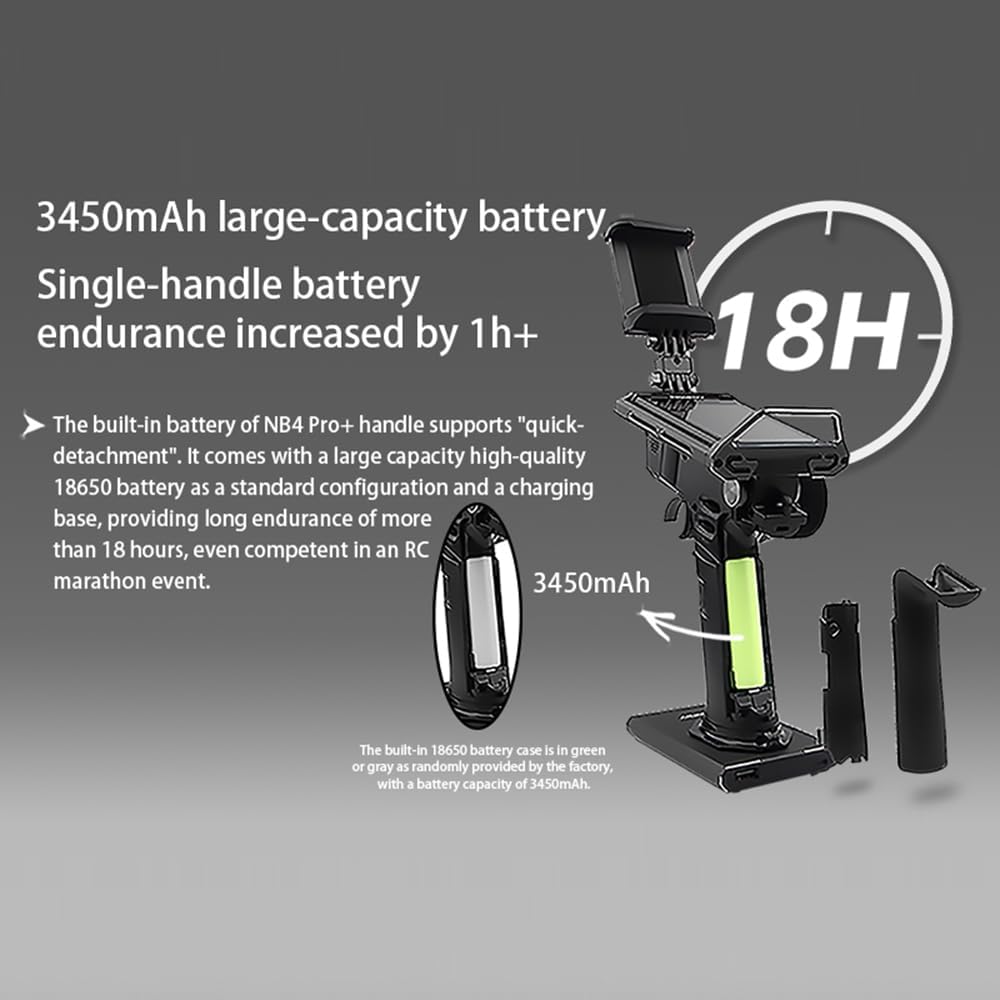
Figure 3.1: Battery locations and capacities for the Noble NB4 Pro+.
3.2 Receiver Binding
The system includes FGr4B and FGr8B receivers. Refer to the Quick Operation Guide for detailed instructions on binding the receivers to the transmitter. Ensure proper connection and power supply to both the transmitter and receiver during the binding process.
3.3 USB Simulator Function
The Noble NB4 Pro+ supports a USB simulator function, which is enabled by default. This allows you to connect the transmitter to a computer for use with RC simulation software, enhancing your practice and skill development without needing to operate a physical RC model.
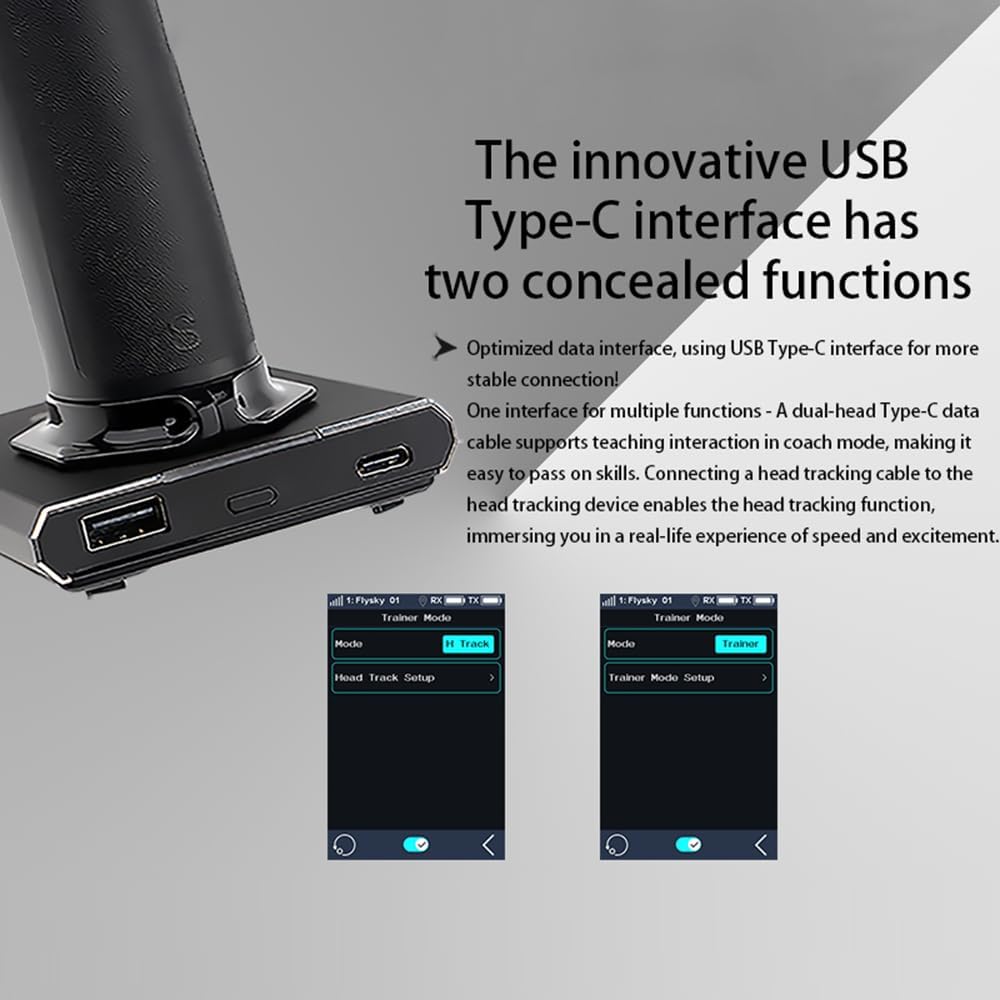
Figure 3.2: The innovative USB Type-C interface on the base of the transmitter.
4. Operating Instructions
4.1 Display Screen and Navigation
The 3.5-inch IPS HB outdoor display screen provides a clear and vibrant interface for accessing all transmitter functions. Navigate through menus and settings using the touch screen and physical controls.

Figure 4.1: The high-brightness display screen for outdoor use.
4.2 Channel Output and Performance
The Noble NB4 Pro+ supports output in 18 channels, allowing for complex control setups. It also features extreme-speed output on 2 channels for critical functions requiring minimal latency. The system's rapid response and delicate precision are crucial for competitive RC driving.
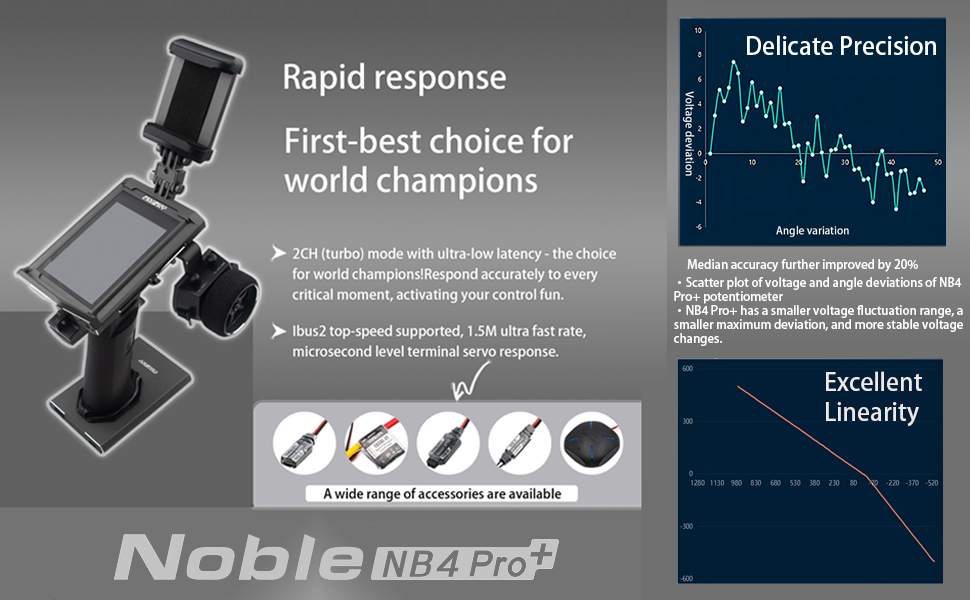
Figure 4.2: Performance characteristics of the Noble NB4 Pro+, including rapid response and linearity.
4.3 Handwheel and Ergonomics
The transmitter features a special surface treatment and a high-density competition-grade handwheel sponge, providing a more delicate and comfortable grip. This design contributes to more precise feedback and improved control during operation.

Figure 4.3: Detail of the ergonomic handwheel.
4.4 Software Features and Settings
The Noble NB4 Pro+ offers a comprehensive suite of software features accessible via the touch screen. These include:
- Data Recording: Robust function for tracking performance data.
- i-BUS2 Parameter Settings: Convenient adjustments for various parameters.
- Fuel Consumption Calculation: Helps monitor and manage fuel usage.
- Customized Condition Mode: Allows real-time switching of settings.
- Advanced Logic Switch Settings: For intelligent regulation.
- Cross-border Game Controller Functions: To meet diverse user needs.
- Rich GPS Functions: For enhanced gameplay and tracking.
- Gyroscope Parameter Adjustment: For stronger and more delicate vehicle posture control.
- New Port Function: Doubles performance and enhances features.
- Rich Adaptability: Fully compatible with MiniZ EVO and EVO2.

Figure 4.4: Software features for data recording, parameter settings, and fuel consumption.

Figure 4.5: Software features for customized conditions, logic switches, and game controller functions.

Figure 4.6: Software features for gyroscope adjustment, new port functions, and RF standard settings.
4.5 Official Product Video
Video 4.1: An official product video showcasing the Flysky Noble NB4 Pro+ Radio Transmitter with FGr4B+FGr8B Receiver, highlighting its features and design.
5. Maintenance
Proper maintenance ensures the longevity and optimal performance of your Noble NB4 Pro+ transmitter.
- Cleaning: Use a soft, dry cloth to clean the transmitter and screen. Avoid abrasive cleaners or solvents.
- Storage: Store the transmitter in a cool, dry place, away from direct sunlight and extreme temperatures. Use the provided aluminum case for protection during transport and storage.
- Battery Care: For optimal battery life, avoid fully discharging the batteries frequently. Charge them regularly, especially before long periods of storage. If storing for an extended time, charge to approximately 50% capacity.
- Firmware Updates: Periodically check the GoolRC or Flysky official website for any available firmware updates to ensure your transmitter has the latest features and bug fixes.
6. Troubleshooting
This section addresses common issues you might encounter with your Noble NB4 Pro+ transmitter.
| Problem | Possible Cause | Solution |
|---|---|---|
| Transmitter does not power on. | Low or depleted battery. | Charge both the handle battery and the base power bank. Ensure proper connection to the charging dock or USB cable. |
| Lost signal message / Short range. | Interference, antenna obstruction, or receiver placement. | Ensure no large metal objects are obstructing the signal path. Check receiver antenna placement on your model. Avoid operating in areas with high radio frequency interference. Re-bind the receiver if necessary. |
| Screen is difficult to see in bright sunlight. | Extreme glare. | While the screen is high-brightness, in direct, intense sunlight, some glare may occur. Try adjusting your viewing angle or finding a slightly shaded area. |
| Controls are unresponsive or erratic. | Improper binding, low receiver battery, or interference. | Verify receiver is properly bound and has sufficient power. Check for sources of interference. Perform a system calibration if available in the software settings. |
7. Specifications
| Feature | Detail |
|---|---|
| Brand | GoolRC |
| Model | Noble NB4 Pro+ |
| Frequency | 2.4GHz AFHDS 3 |
| Channels | 18CH |
| Display Screen | 3.5-inch 320*480 IPS HB Outdoor Display |
| Batteries | 2 Lithium Polymer batteries required (included) |
| Battery Capacity (Handle) | 3450mAh (18650) |
| Battery Capacity (Base) | 4300mAh (Power Bank) |
| Endurance | More than 18 hours |
| Receivers Included | FGr4B, FGr8B |
| USB Interface | Type-C |
| Item Weight | 5.19 pounds |
| Package Dimensions | 12.71 x 11.46 x 5.24 inches |
| Manufacturer Recommended Age | 14 years and up |
| Country of Origin | China |
8. Warranty and Support
For warranty information and customer support, please refer to the documentation included with your product or visit the official GoolRC brand store. The brand store may provide details on warranty coverage, return policies, and contact information for technical assistance.


