
MSI MPG VELOX 100R
MSI MPG Velox 100R Mid-Tower Gaming PC Case Instruction Manual
Brand: MSI
Model: MPG VELOX 100R
1. Introduction
This manual provides comprehensive instructions for the setup, operation, and maintenance of your MSI MPG Velox 100R Mid-Tower Gaming PC Case. The MPG VELOX 100 Series is designed to enhance your gaming experience with its advanced features and optimized airflow. Please read this manual thoroughly before beginning assembly or operation to ensure proper use and longevity of your product.

Figure 1.1: MSI MPG Velox 100R Mid-Tower Gaming PC Case
2. Key Features
The MSI MPG Velox 100R PC Case incorporates several design and functional features to provide an optimal building and gaming experience:
2.1 Tempered Glass Front Panel
The front panel is constructed from tempered glass, allowing for a clear view of the internal components and the vibrant ARGB lighting of the pre-installed fans. This design also contributes to the case's aesthetic appeal.

Figure 2.1: Tempered Glass Front Panel showcasing fans.
2.2 ARGB Showroom
Create a personalized lighting setup with the integrated ARGB system, fully supported by MSI Mystic Light software. The case comes with four pre-installed 120mm ARGB fans.

Figure 2.2: Internal view with ARGB lighting active.
2.3 Vertical GPU Mount
A dedicated vertical GPU bracket is included, allowing you to mount your graphics card vertically to showcase its design and lighting. This requires a compatible PCIe riser cable (sold separately).

Figure 2.3: Graphics card mounted vertically.
2.4 Side Air Vents
An additional side air vent is present, providing support for up to two fans or a 240mm radiator, further enhancing the case's cooling capabilities.

Figure 2.4: Internal view highlighting side air vents.
2.5 USB Type-C Support
The front I/O panel includes a USB 3.2 Gen2 Type-C port with 10 Gbps transfer speeds, offering convenient and high-speed connectivity for modern peripherals.

Figure 2.5: Detailed view of the Front I/O Ports.
2.6 Spacious Interior
The MPG Velox 100R offers excellent component clearance, supporting up to a 360mm radiator or three 120mm fans on both the top and front panels, accommodating various high-performance builds.
3. Setup and Installation
Follow these steps to set up your MSI MPG Velox 100R PC case and install your components.
3.1 Unboxing and Included Components
Carefully remove the case from its packaging. Verify that all included accessories are present, including the user manual, quick installation guide, hardware kit (screws, zip ties, fan extenders), and the vertical GPU bracket.
3.2 Panel Removal and Access
The tempered glass side panel is hinged for easy access. Gently open it to access the interior. The front tempered glass panel can also be removed by pulling from the bottom for fan or radiator installation. The top magnetic dust filter can be easily removed for cleaning. The rear side panel can be removed by unscrewing the two thumb screws at the back and sliding the panel off.
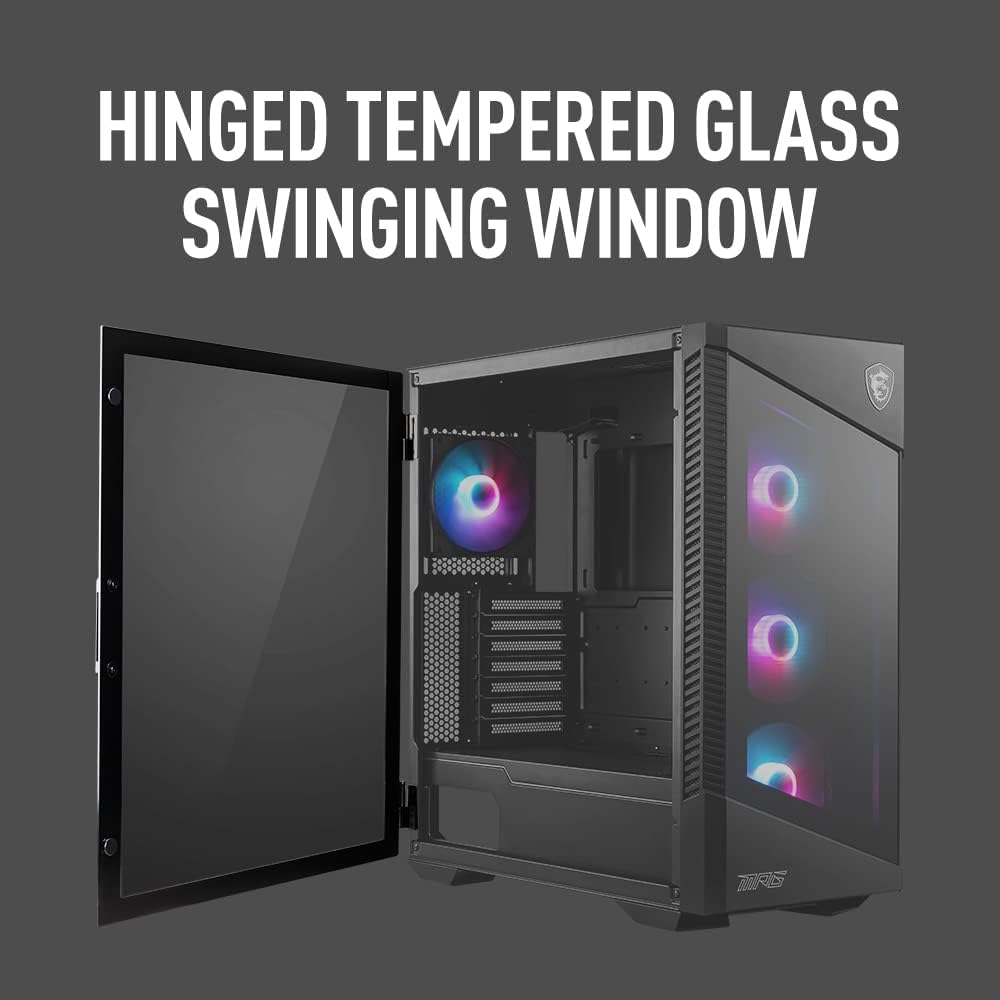
Figure 3.1: Hinged tempered glass side panel for easy access.
3.3 Component Installation Guidelines
- Motherboard: Install your ATX motherboard onto the pre-installed standoffs. Ensure proper alignment with the I/O shield.
- Power Supply: Install the power supply unit (PSU) at the bottom of the case. The PSU shroud has a cutout to showcase your PSU.
- Storage Drives: Utilize the dedicated slots for 2.5-inch SSDs on the backside of the motherboard tray and the HDD cage at the bottom.
- Cooling: The case supports various cooling configurations.
- Pre-installed 120mm ARGB fans: Three at the front (intake) and one at the rear (exhaust).
- Radiator Support: Up to 360mm radiators can be mounted on the top and front panels. A 240mm radiator can be mounted on the side vent.
- Graphics Card: Install your graphics card horizontally into the PCIe slot. For vertical mounting, use the included bracket and a compatible riser cable.
3.4 Cable Management
The case features ample space and grommets behind the motherboard tray for efficient cable routing. Use the included zip ties to secure cables and maintain optimal airflow and a clean aesthetic.
4. Operation
Once all components are installed and connected, you can begin operating your PC.
4.1 Front I/O Panel Functions
- Power Button: Press to power on or off the system.
- Reset Button: Press to restart the system.
- LED Control Button: Cycle through various ARGB lighting effects for the case fans and integrated lighting strips.
- USB Ports: Connect USB devices to the available USB 3.2 Gen 1 Type-A ports (x2) and USB 3.2 Gen 2x2 Type-C port (x1).
- Audio Jacks: Connect headphones/speakers to the 3.5mm audio out jack and microphones to the 3.5mm mic in jack.
5. Maintenance
Regular maintenance ensures optimal performance and longevity of your PC case.
5.1 Dust Filter Cleaning
The MSI MPG Velox 100R features magnetic dust filters on the top and a removable filter at the bottom (for the PSU fan intake). Regularly clean these filters to prevent dust buildup and maintain efficient airflow.
- Gently remove the magnetic dust filters from the top and the slide-out filter from the bottom.
- Clean the filters using compressed air or by rinsing them with water. Ensure they are completely dry before re-installing.
- Re-attach the magnetic filters and slide the bottom filter back into place.
6. Troubleshooting
If you encounter issues with your PC case, refer to the following common troubleshooting tips:
- No Power:
- Ensure the power supply is properly connected to the wall outlet and the PC components.
- Check that the power button cable from the front I/O is correctly connected to the motherboard's front panel header.
- Fans Not Spinning/RGB Not Working:
- Verify that all fan power cables and ARGB cables are securely connected to the fan hub/controller and the motherboard.
- Ensure the fan hub/controller is receiving power (e.g., via SATA power connector).
- Check MSI Mystic Light software settings for ARGB control.
- Poor Airflow/High Temperatures:
- Clean all dust filters and internal components.
- Ensure fans are oriented correctly for optimal intake and exhaust.
- Verify no cables are obstructing airflow paths.
- Side Panel Not Closing Properly:
- Check for any cables or components obstructing the panel's closure.
- Ensure the hinges are free from debris.
7. Specifications
| Feature | Detail |
|---|---|
| Brand | MSI |
| Model Name | MPG VELOX 100R |
| Case Type | Mid Tower |
| Motherboard Compatibility | ATX |
| Material | Tempered Glass |
| Color | Black |
| Item Dimensions (LxWxH) | 18.66 x 9.09 x 19.29 inches |
| Item Weight | 19.05 pounds |
| Number of USB 3.0 Ports | 2 |
| Number of USB 2.0 Ports | 4 |
| Cooling Method | Water, Air |
| Light Color | RGB |
8. Warranty and Support
For detailed warranty information and technical support, please refer to the official MSI website or contact MSI customer service. Keep your proof of purchase for warranty claims.
- Online Support: Visit www.msi.com for drivers, FAQs, and support resources.
- Customer Service: Refer to your product packaging or the MSI website for regional contact information.