
1. Introduction
This manual provides essential information for the safe and efficient use of your XIAOMI Mi 40-inch Horizon Edition Full HD Android LED TV 4A (Model L40M6-EI). Please read these instructions thoroughly before operating the television and retain them for future reference.

Image: Front view of the XIAOMI Mi 40-inch Horizon Edition Full HD Android LED TV 4A, showcasing its immersive display.
2. Safety Information
Observe the following safety precautions to prevent fire, electric shock, or injury:
- Power Source: Connect the TV only to an AC power supply within the specified voltage range (240 Volts).
- Ventilation: Ensure adequate ventilation around the TV. Do not block ventilation openings.
- Water and Moisture: Do not expose the TV to rain or moisture. Do not place objects filled with liquids, such as vases, on the TV.
- Cleaning: Unplug the TV before cleaning. Use a soft, dry cloth. Do not use liquid cleaners or aerosol cleaners.
- Mounting: Follow instructions carefully when mounting the TV on a wall or using the table stand. Ensure the mounting surface can support the TV's weight.
- Cables: Route all cables safely to prevent tripping hazards and damage.
- Servicing: Do not attempt to service the TV yourself. Refer all servicing to qualified service personnel.
3. What's in the Box
Upon unpacking, verify that all components are present:
- 1 LED TV
- 2 Table Stand Base
- 1 Remote Control
- 4 Screws (for stand assembly)
4. Setup
4.1 Physical Installation
Table Stand Assembly:
- Carefully place the TV screen-down on a soft, flat surface to prevent damage.
- Attach each table stand base to the designated slots on the bottom of the TV.
- Secure each stand with the provided screws.
- Carefully lift the TV to its upright position on a stable surface.
Wall Mounting:
If wall-mounting, refer to the specific instructions provided with your wall-mount kit. Ensure the wall mount is compatible with the TV's VESA mounting pattern and weight.

Image: Diagram illustrating the dimensions of the XIAOMI Mi 40-inch TV, including width, height, and depth.
4.2 Connecting Peripherals
The TV features various ports for connecting external devices:
- HDMI Ports (x3): For connecting set-top boxes, Blu-Ray players, gaming consoles, and other HDMI-enabled devices.
- USB Ports (x2): For connecting hard drives, USB flash drives, and other USB devices.
- 3.5mm Audio Jack: For connecting headphones.
- S/PDIF Port: For connecting external speakers or sound systems.
- Ethernet Port: For wired network connection.
- AV In (Mini): For connecting older analog devices.
- Antenna Input: For connecting a terrestrial antenna.

Image: Close-up view of the various input and output ports located on the rear of the XIAOMI Mi TV.
4.3 Initial Power On and Network Configuration
- Connect the power cord to the TV and a power outlet.
- Press the power button on the remote control or the TV.
- Follow the on-screen instructions to complete the initial setup, including language selection, network connection (Wi-Fi or Ethernet), and Google account sign-in.
- The TV runs on Android TV 9 and features Chromecast built-in. Connect to your Wi-Fi network to access smart features and applications.
5. Operating Instructions
5.1 Remote Control
The minimalist remote control provides easy access to key functions:
- Voice Assistant: Use the dedicated button for voice commands (Ok Google).
- Quick Wake: Turn on the TV in less than 5 seconds.
- Quick Mute: Double-tap the volume down button to mute the audio.
- Quick Settings: Long press the Mi button to access quick settings.
- Dedicated buttons for Netflix and Prime Video for direct access.
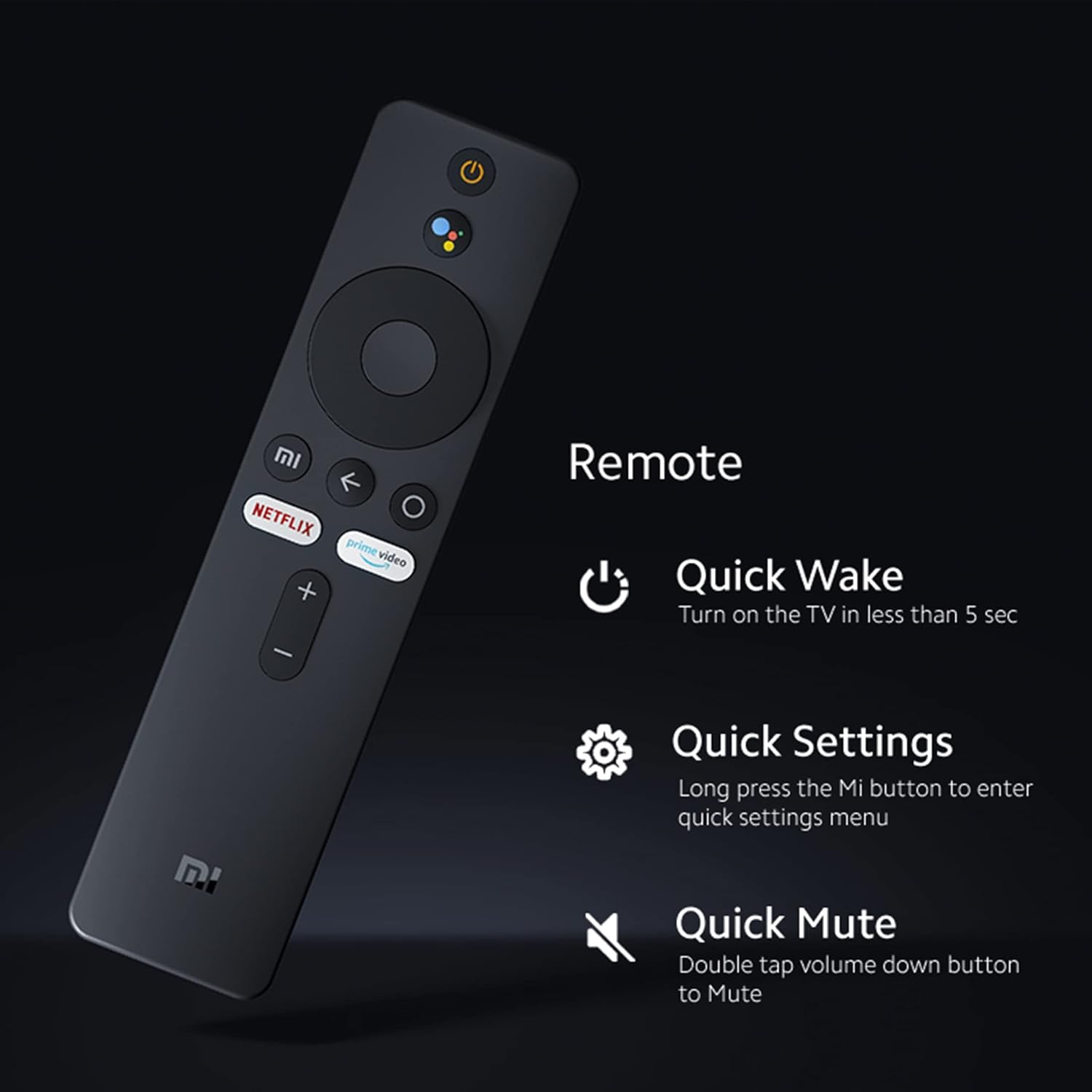
Image: The remote control for the XIAOMI Mi TV, highlighting its minimalist design and quick access buttons for features like Quick Wake, Quick Settings, and Quick Mute.
5.2 Smart TV Features
Your Mi TV is powered by Android TV 9 and features PatchWall 4:
- Android TV: Access Google Play Store for over 5000+ apps, including Prime Video, Netflix, Disney+ Hotstar, and YouTube.
- PatchWall 4: Features IMDb integration, universal search, and curated content.
- Chromecast built-in: Cast content directly from your smartphone or tablet to the TV.
- Miracast: Wirelessly mirror your device's screen to the TV.
- Quad-core processor: Ensures smooth performance and navigation.

Image: Screen display showing the Android TV interface with Google Play, Chromecast built-in, and Ok Google functionalities.
5.3 Picture and Sound Settings
Optimize your viewing and listening experience:
- Vivid Picture Engine: Enhances color, contrast, and brightness for a detailed picture.
- Display Controls: Adjust backlight, brightness, contrast, and saturation through the TV settings menu.
- Sound Output: The TV features 20 Watts stereo speakers with DTS-HD for clear audio.
- Audio Settings: Access the sound settings to adjust equalizer presets or custom settings for optimal audio balance.

Image: A vibrant landscape displayed on the XIAOMI Mi TV, illustrating the capabilities of the Vivid Picture Engine for enhanced visual quality.

Image: A visual representation of sound waves emanating from the XIAOMI Mi TV, emphasizing its 20W Stereo Speakers with DTS-HD audio technology.
6. Maintenance
Proper maintenance ensures the longevity of your TV:
- Screen Cleaning: Gently wipe the screen with a soft, lint-free cloth. For stubborn marks, slightly dampen the cloth with water or a specialized screen cleaner (apply to cloth, not directly to screen).
- Cabinet Cleaning: Wipe the TV cabinet with a soft, dry cloth.
- Dust Removal: Use a soft brush or vacuum cleaner with a brush attachment to remove dust from ventilation openings.
- Power Off: Unplug the TV from the power outlet when not in use for extended periods.
7. Troubleshooting
If you encounter issues, refer to the following common solutions:
| Problem | Possible Cause / Solution |
|---|---|
| No power / TV does not turn on | Check if the power cord is securely connected. Ensure the power outlet is functioning. Try pressing the power button on the TV itself. |
| No picture / Poor picture quality | Verify the correct input source is selected. Check cable connections (HDMI, antenna). Adjust picture settings (brightness, contrast, backlight). |
| No sound / Low sound | Check volume level and mute status. Ensure external audio devices are connected correctly. Check audio output settings. |
| Remote control not working | Replace batteries (2 AAA batteries required). Ensure there are no obstructions between the remote and the TV. Re-pair the Bluetooth remote if necessary. |
| Smart TV apps not loading / Network issues | Check Wi-Fi or Ethernet connection. Restart your router. Ensure TV software is up to date. Clear app cache or reinstall problematic apps. |
| TV does not automatically go to previous input source | Go to Settings > Inputs > Enable 'Stay on the previous source' option. |
| Screen off option not available | Long press the Power button on the remote to access the Screen Off option. Ensure TV software is updated. |
If the issue persists, contact customer support.
8. Specifications
| Feature | Specification |
|---|---|
| Brand | XIAOMI |
| Model | L40M6-EI |
| Model Name | Mi TV 4A 40 Horizon |
| Screen Size | 40 Inches (100 cm) |
| Resolution | Full HD (1920 x 1080 Pixels) |
| Refresh Rate | 60 Hz |
| Viewing Angle | 178 Degrees |
| Display Technology | LED, Bezel-less Design |
| Operating System | Android TV 9 |
| RAM Memory | 1 GB |
| Storage | 8 GB |
| Graphics Coprocessor | Mali-450 |
| Audio Output | 20 Watts, DTS-HD Stereo Speakers |
| HDMI Ports | 3 |
| USB Ports | 2 |
| Connectivity | Wi-Fi, Ethernet, Bluetooth |
| Power Source | AC, 240 Volts |
| Power Consumption | 75 Watts |
| Product Dimensions (LxWxH) | 89.2 x 8.7 x 55.9 cm |
| Item Weight | 5.48 kg |
| Remote Control Batteries | 2 AAA batteries required (not included) |
9. Warranty and Support
Your XIAOMI Mi TV comes with a comprehensive warranty and dedicated support:
- Warranty Period: Enjoy 2 Years of Warranty - 1st Year Comprehensive Warranty + 1 Additional Year of Free Warranty on the Display Panel. Physical damages are not covered.
- Warranty Claim: Brand Warranty can be availed using your Amazon invoice.
- Service Centers: XIAOMI has over 750+ service centers across India.
- Extended Warranty: Options for extended warranty are available to keep your product in optimal condition. Key benefits include zero documentation, genuine spare parts, cashless repairs, authorized service centers, and on-site support.

Image: Information detailing the benefits of Mi Extended Warranty, including zero documentation, genuine spare parts, cashless repairs, authorized service centers, and on-site support.
For further assistance, refer to the official XIAOMI website or contact customer support.


