
Introduction
This manual provides essential instructions for the safe and effective installation, operation, and maintenance of your CUB CADET 59A30063150 Pro PCS 1900 Fan-Assist Kit. This kit is designed to enhance the performance of your Pro PCS 1900 Power Collection System on compatible Cub Cadet Pro Z series zero-turn mowers.
Safety Information
Always read and understand the safety warnings and instructions in this manual and the original equipment owner's manual before installing or operating the Fan-Assist Kit. Failure to follow these instructions can result in serious injury or property damage.
- Ensure the mower engine is off and the spark plug wire is disconnected before performing any installation or maintenance.
- Wear appropriate personal protective equipment (PPE), including safety glasses and gloves.
- Keep hands, feet, and clothing away from moving parts.
- Do not modify the Fan-Assist Kit or any part of the mower.
- Refer to the original mower and Power Collection System manuals for additional safety guidelines.
Package Contents
Verify that all components are present before beginning installation:
- Fan Kit (CUB CADET Part Number: 59A30063150)
- Note: Additional components of the PRO PCS 1900 Power Collection System (e.g., Three Bag Collection System, Deck Mounting Kits, Frame Weight Kit) are sold separately and are required for full system functionality.
Compatibility
This Fan-Assist Kit is compatible with the following Cub Cadet Pro Z series zero-turn mowers when used with the PRO PCS 1900 Power Collection System:
- All Pro Z 500 models with 54" or 60" Cutting Decks (e.g., Pro Z 554-L, Pro Z 554-L EFI, Pro Z 554-S, Pro Z 560-L, Pro Z 560-S)
- All Pro Z 700 models with 54" or 60" Cutting Decks (e.g., Pro Z 760-L, Pro Z 760-L EFI, Pro Z 760-S)
- All Pro Z 900 models with 54" or 60" Cutting Decks (e.g., Pro Z 960-L, Pro Z 960-L EFI, Pro Z 960-S, Pro Z 960-S EFI, Pro Z 960-S SurePath)
Refer to your original equipment owner's manual to verify compatibility.
Setup and Installation
The Fan-Assist Kit is an integral part of the PRO PCS 1900 Power Collection System. Installation typically involves integrating the fan unit with the collection system's housing and connecting it to the mower's power source. Specific steps may vary based on your mower model and existing Power Collection System components.
- Preparation: Ensure the mower is turned off, the engine is cool, and the spark plug wire is disconnected. Park the mower on a flat, stable surface.
- Access the Collection System: If the PRO PCS 1900 Power Collection System is already installed, you may need to partially disassemble it to access the fan housing area. The built-in impeller handles allow for easy removal from the unit.
- Install Fan Unit: Carefully position the Fan-Assist Kit (impeller housing) into the designated area of the Power Collection System. Ensure it is securely mounted according to the instructions provided with the full PRO PCS 1900 system. The 19-inch diameter impeller housing and 15-inch impeller should be correctly oriented.
- Electrical Connection: Connect the 3-Pin power connector from the Fan-Assist Kit to the corresponding power outlet on your Cub Cadet mower. Refer to your mower's electrical diagram if necessary.
- Secure Components: Reassemble any parts of the Power Collection System that were removed. Ensure all bolts, clamps, and fasteners are tightened to the manufacturer's specifications.
- Final Check: Before starting the mower, visually inspect all connections and mounting points to ensure the Fan-Assist Kit is securely installed and there are no loose components.
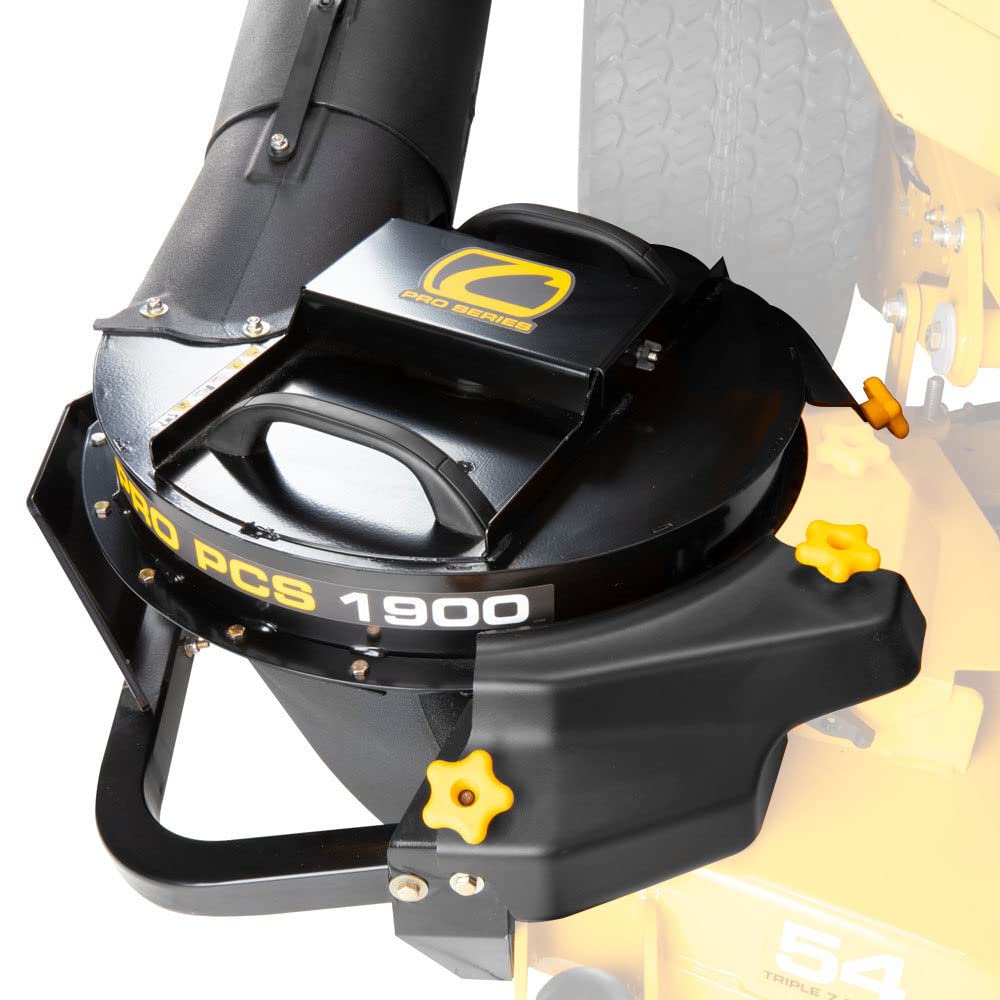
Figure 1: Side view of the Fan-Assist Kit integrated with the Power Collection System on a Cub Cadet Pro Z mower. Note: The mower itself is not included with the Fan-Assist Kit.

Figure 2: Another side view illustrating the Fan-Assist Kit's placement on a Cub Cadet Pro Z series mower. Note: The mower itself is not included with the Fan-Assist Kit.

Figure 3: Rear view of the Fan-Assist Kit and Power Collection System attached to a Cub Cadet Pro Z mower. Note: The mower itself is not included with the Fan-Assist Kit.
Operating Instructions
The Fan-Assist Kit operates in conjunction with your Cub Cadet Pro Z series mower and the PRO PCS 1900 Power Collection System. Once properly installed and connected, the fan automatically engages when the mower's power take-off (PTO) is activated for cutting.
- Ensure the Fan-Assist Kit is securely attached and all connections are tight before each use.
- Start the mower and engage the PTO as you normally would for mowing. The fan will begin to rotate, creating suction to direct grass clippings into the collection bags with optimal performance.
- Monitor the collection bags and empty them when full to maintain efficient operation.
- Disengage the PTO and turn off the mower before performing any checks or adjustments to the collection system.
Maintenance
Regular maintenance ensures the longevity and optimal performance of your Fan-Assist Kit.
- After Each Use:
- Turn off the mower and disconnect the spark plug wire.
- Inspect the impeller housing and impeller for any grass buildup, debris, or damage. Clean as necessary.
- Check all mounting hardware for tightness.
- Seasonal Maintenance:
- Thoroughly clean the entire unit, removing any caked-on dirt or grass.
- Inspect the impeller for wear or damage. Replace if necessary.
- Check electrical connections for corrosion or damage.
- Store the unit in a clean, dry place when not in use for extended periods.
Troubleshooting
| Problem | Possible Cause | Solution |
|---|---|---|
| Fan does not operate. |
|
|
| Reduced suction/poor collection. |
|
|
| Excessive vibration or noise. |
|
|
Specifications
| Model Number | 59A30063150 |
| Part Number | 59A30063150 |
| Brand | CUB CADET |
| Product Dimensions (L x W x H) | 38"L x 30"W x 21"H |
| Item Weight | 179 Pounds |
| Material | Metal |
| Power Connector Type | 3-Pin |
| Cooling Method | Forced Air |
| Maximum Rotational Speed | 1900 RPM |
| Included Components | Fan Kit |
| UPC | 037049971947 |
Warranty Information
This CUB CADET 59A30063150 Pro PCS 1900 Fan-Assist Kit comes with a 3-month warranty from the date of purchase. This warranty covers defects in materials and workmanship under normal use. For specific terms, conditions, and to initiate a warranty claim, please refer to the official Cub Cadet warranty policy or contact customer support.
Customer Support
For technical assistance, replacement parts, or further information regarding your CUB CADET Pro PCS 1900 Fan-Assist Kit, please contact Cub Cadet customer support or visit their official website.
- Official Website: www.cubcadet.com (Note: This is a generic link, please refer to your product packaging or official Cub Cadet documentation for the most accurate support contact information.)
- When contacting support, please have your model number (59A30063150) and purchase date available.