
1. Safety Information
The ATOMSTACK X7 Pro 50W Laser Engraver is a Class 4 laser product. Always prioritize safety during operation. Failure to follow safety guidelines can result in serious injury or damage.
- Eye Protection: The laser module features a panoramic filter glass design that filters 97% of UV light. However, it is highly recommended that all users and bystanders wear the provided safety goggles (or equivalent) during operation to protect against direct or scattered laser radiation.
- Fire Hazard: Laser engraving and cutting can generate heat and sparks, potentially causing fires. Never leave the machine unattended during operation. Ensure a fire extinguisher is readily available.
- Ventilation: Operate the engraver in a well-ventilated area to dissipate smoke and fumes produced during the engraving/cutting process.
- Emergency Stop: The machine is equipped with an emergency stop button. Press it immediately in case of any malfunction or unsafe condition.
- Material Safety: Only engrave or cut materials recommended by the manufacturer. Some materials can produce toxic fumes or catch fire easily.
2. Package Contents
Verify all components are present upon unboxing:
- Main Engraver Frame (pre-assembled components)
- Laser Head (M50 module, 9.5-10W output)
- Control Box with Display Screen
- Power Adapter and Power Cable
- USB Cable
- TF Card and Card Reader
- Safety Goggles
- Focus Shims
- Installation Toolkit (screws, wrenches, zip ties)
- Product Manual
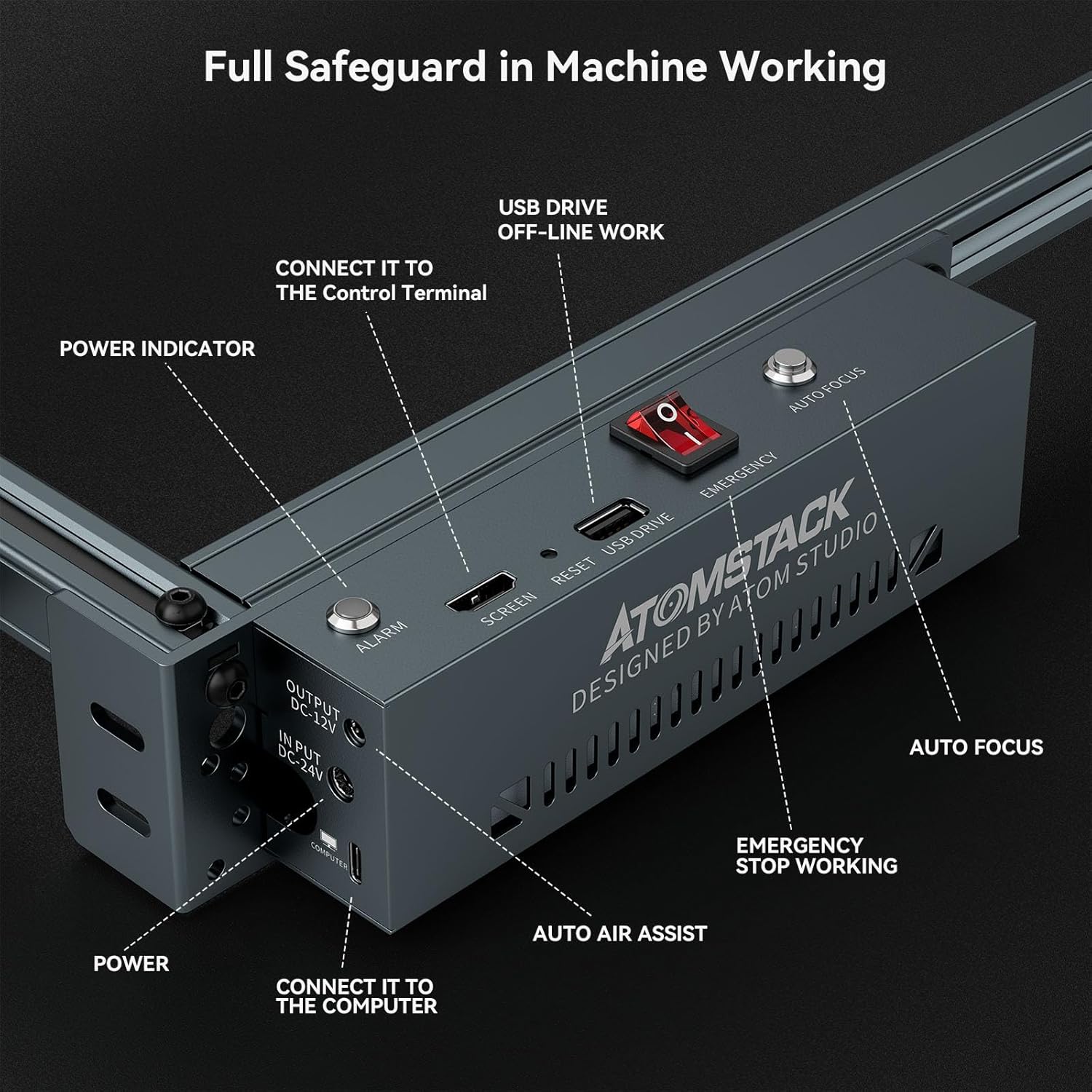
Image: Detailed view of the ATOMSTACK X7 Pro 50W Engraver's complete packing list, including the main frame, laser head, control box, cables, safety goggles, and tools.
3. Setup and Assembly
The ATOMSTACK X7 Pro is designed for quick assembly, typically within 10-20 minutes. Follow the steps below for proper setup.
3.1 Mechanical Assembly
- Assemble the Outer Frame: Connect the aluminum alloy profiles to form the rectangular frame using the provided screws and tools.
- Install the X-axis Assembly: Attach the X-axis module, which includes the laser head carriage, to the main frame.
- Install Support Feet and Control Box: Secure the support feet to the base of the frame and mount the control box.
- Install Timing Belt: Carefully route and secure the timing belt for smooth movement of the laser head.
- Install Profile End Caps: Place the protective end caps on the aluminum profiles.
- Install the Laser Head: Mount the M50 laser head onto the X-axis carriage.
- Install Cables: Connect all necessary cables (power, USB, motor cables) to their respective ports on the control box and laser head.
- Bind Cables: Use the provided cable ties to neatly manage and secure all cables, preventing interference with machine movement.
For a visual guide, please refer to the installation video below:
Video: Step-by-step installation guide for the ATOMSTACK X7 Pro laser engraver, demonstrating mechanical assembly and cable connections.
3.2 Initial Power-Up and Focus Adjustment
- Connect Power: Plug the power adapter into the control box and then into a power outlet.
- Power On: Press the power button on the control box to turn on the engraver.
- Adjust Focus: The X7 Pro features a fixed-focus laser. Use the provided focus shims or the knob on the laser module to adjust the laser head's height until the laser dot is at its smallest and sharpest point on the material surface.

Image: Main view of the ATOMSTACK X7 Pro 50W Laser Engraver, showcasing its robust aluminum alloy structure and the laser module.
4. Operating Instructions
The ATOMSTACK X7 Pro offers both online (computer-connected) and offline (TF card) operation modes.
4.1 Offline Operation (TF Card)
- Prepare File: Save your engraving/cutting file (NC, BMP, JPG, PNG, DXF, etc.) to the TF card.
- Insert TF Card: Insert the TF card into the slot on the control box.
- Select File: Use the display screen to navigate and select your desired file.
- Positioning: Use the directional keys on the display to move the laser head to the desired starting position on your material. The machine supports precise cross-cursor alignment for accurate placement.
- Set Parameters: Adjust power and speed settings directly on the display screen.
- Start Engraving: Confirm settings and start the engraving/cutting process.
Watch this tutorial for TF card usage:
Video: Tutorial demonstrating how to use the TF card for offline operation, including file selection and parameter adjustment.
4.2 Online Operation (USB Connection)
Connect the engraver to your computer via the USB cable. Use compatible software such as LaserGRBL or LightBurn to control the machine. These software options allow for advanced design and control features.

Image: Illustrates the wide software compatibility of the ATOMSTACK X7 Pro, including LaserGRBL and LightBurn, for various file formats and operating systems.
4.3 Key Features and Functions
- High-Performance Fixed Focus Laser: The M50 laser module offers 9.5-10W laser power with an ultra-fine 0.06*0.06 mm focusing area, providing precision engraving and efficient cutting.
- Air Assist: The machine supports an automatically controlled air assist system (kit may be purchased separately) to ensure cleaner cuts and prevent charring.
- Emergency Stop Button: A prominent red emergency stop button is located on the control box for immediate shutdown in critical situations.
- Reset Switch: Allows for quick resetting of the machine.
- Limit Switches: Integrated limit switches on X and Y axes prevent the laser head from crashing into the frame, ensuring smooth and safe operation.
- Resume Engraving: The machine can resume engraving or cutting after unexpected power outages or machine faults, minimizing material waste.
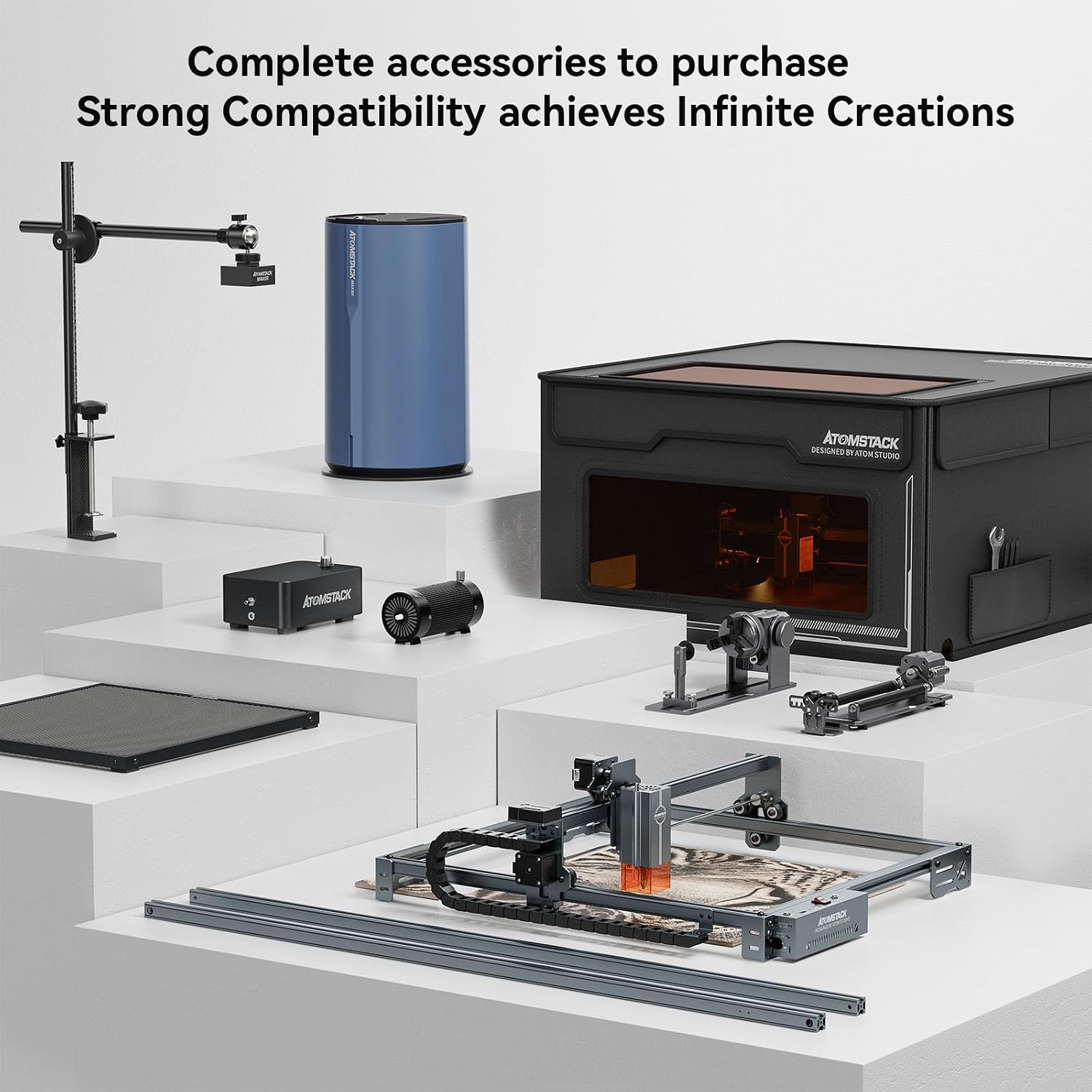
Image: Close-up view of the ATOMSTACK X7 Pro 50W Engraver's control panel, highlighting the power indicator, USB drive, reset switch, emergency stop button, and auto-focus/air assist controls.
5. Maintenance
Regular maintenance ensures the longevity and optimal performance of your ATOMSTACK X7 Pro engraver.
- Clean the Laser Lens: Periodically clean the laser lens with a soft cloth and lens cleaning solution to maintain laser power and accuracy.
- Clean the Machine: Keep the machine free from dust and debris, especially on the rails and belts, to ensure smooth movement.
- Check Belt Tension: Ensure the timing belts are properly tensioned. Loose belts can lead to engraving inaccuracies.
- Inspect Cables: Regularly check all cables for any signs of wear or damage.
6. Troubleshooting
If you encounter issues, refer to the following common troubleshooting tips:
- Poor Engraving/Cutting Quality:
- Check laser focus.
- Adjust power and speed settings for the specific material.
- Ensure the material surface is clean and flat.
- Verify timing belt tension.
- Machine Not Responding:
- Check all cable connections (power, USB).
- Ensure the power switch is ON.
- Try pressing the reset button.
- If using offline mode, ensure the TF card is inserted correctly and the file is valid.
- Irregular Engraving Circle/Movement Issues:
- Check for any obstructions in the movement path of the laser head.
- Verify that the timing belts are properly tensioned and not slipping.
- Ensure the frame is stable and on a flat surface.
For specific issues related to irregular engraving or structure adjustment, refer to the video below:
Video: Guide on how to address irregular engraving patterns and perform necessary structure adjustments on the ATOMSTACK X7 Pro.
7. Specifications
- Product Dimensions: 22.44 x 23.62 x 10.63 inches
- Item Model Number: X7 Pro 50W
- Item Weight: 13.47 pounds
- Manufacturer: ATOMSTACK
- Laser Power: 9.5~10W (M50 module)
- Ultra-fine Laser Focusing Area: 0.06*0.06 mm
- Engraving Area: 410 x 400 mm
- Laser Class: 4
- Supported Materials: Paper, bamboo, wood, plastic, leather, PCB board, alumina, lacquered metal, etc.
- Data Transmission Method: USB connection, TF card (offline operation)
- Operating Software: LaserGRBL, LightBurn
8. Warranty and Support
ATOMSTACK provides customers with a one-year warranty for free parts replacement and permanent professional technical customer service. If you have any questions or require assistance during use, please contact ATOMSTACK customer support.

