
1. Introduction
Thank you for choosing the SHW Mission 32-Inch Home Office Computer Desk. This manual provides essential information for the safe assembly, proper use, and maintenance of your new desk. Please read these instructions carefully before beginning assembly and retain them for future reference.

Image 1.1: The SHW Mission 32-Inch Home Office Computer Desk in a home office setting.
2. Important Safety Information
WARNING:
- Always assemble the desk according to the provided instructions.
- Do not exceed the maximum weight recommendation of 65 pounds (29.5 kg).
- Ensure the desk is stable and secure before use to prevent tipping or collapse.
- Keep small parts and packaging materials away from children to prevent choking hazards.
3. Package Contents
Before assembly, please verify that all components listed below are present and undamaged. If any parts are missing or damaged, please contact SHW customer support.
Parts:
- Desk Top (Engineered Wood)
- Leg Frames (Alloy Steel) - 2 units
Hardware:
- Assembly Screws
- Allen Wrench (or similar assembly tool)
- Anti-Skid Pads (pre-attached or separate)
4. Assembly Instructions
Assembly is designed to be quick and straightforward. It is recommended for one person to assemble this desk.
Step-by-Step Guide:
- Unpack Components: Carefully remove all parts from the packaging and lay them out on a clean, soft surface to prevent scratches.
- Attach Leg Frames: Align the leg frames with the pre-drilled holes on the underside of the desk top.
- Secure Screws: Insert the provided screws into the aligned holes. Using the included Allen wrench, tighten all screws securely. Do not overtighten.
- Verify Stability: Once all screws are tightened, gently lift and place the desk upright. Ensure all legs are level and the desk is stable. Adjust anti-skid pads if necessary.
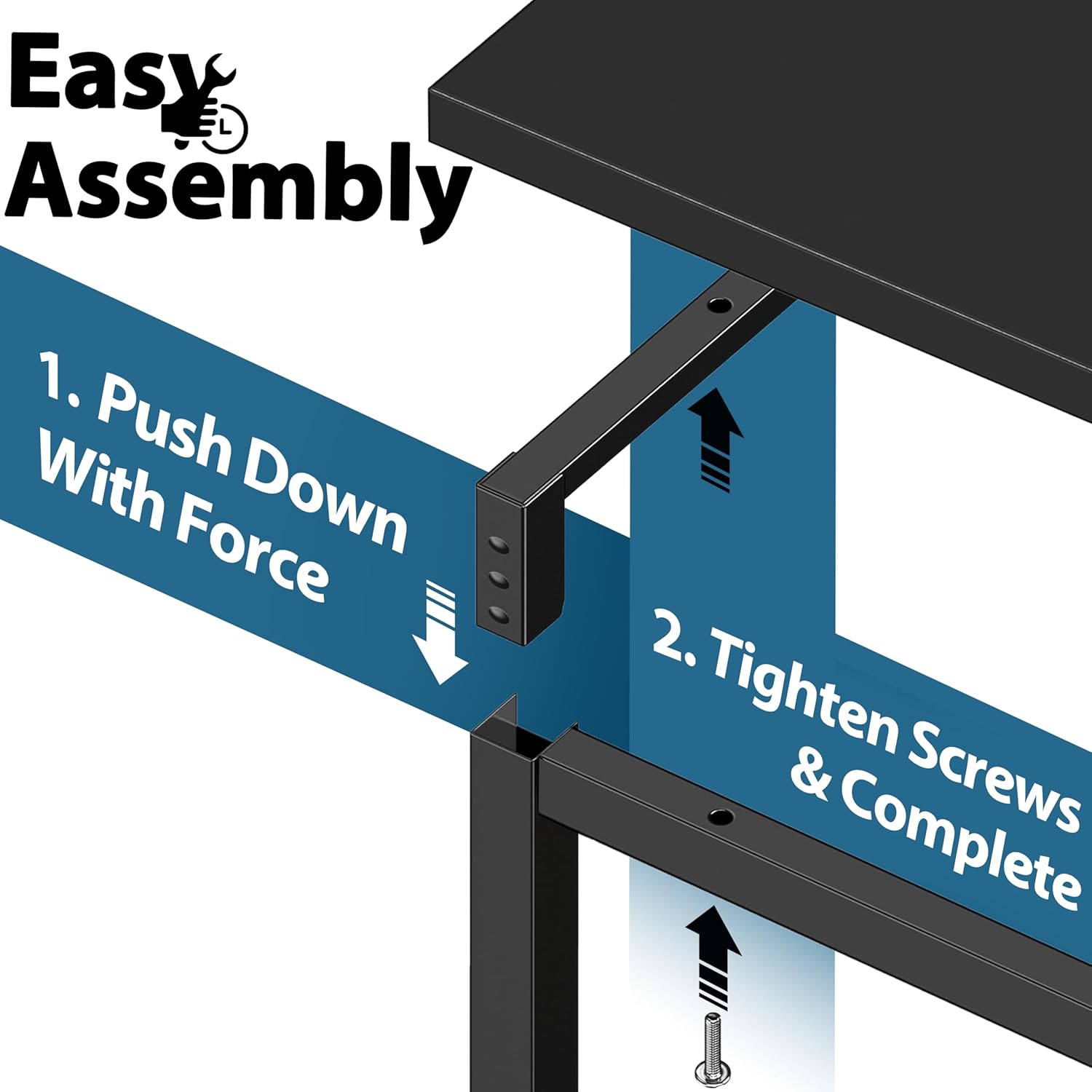
Image 4.1: Visual guide for connecting the leg frames to the desk top and tightening screws.
Image 4.2: Detail of the secure bolted frame joint for enhanced stability.
Video 4.1: An official product video demonstrating the assembly and features of the SHW Mission Home Office 32-Inch Computer Desk.
5. Usage Guidelines
The SHW Mission 32-Inch Computer Desk is designed for versatile use in various settings.
- Home Office: Provides a compact and functional workspace for laptops, monitors, and essential accessories.
- Dormitory/Small Spaces: Its space-saving design makes it ideal for areas with limited room.
- Working Surface: Suitable for general working, studying, or creative tasks.

Image 5.1: The desk configured for a computer setup, demonstrating its functional design.
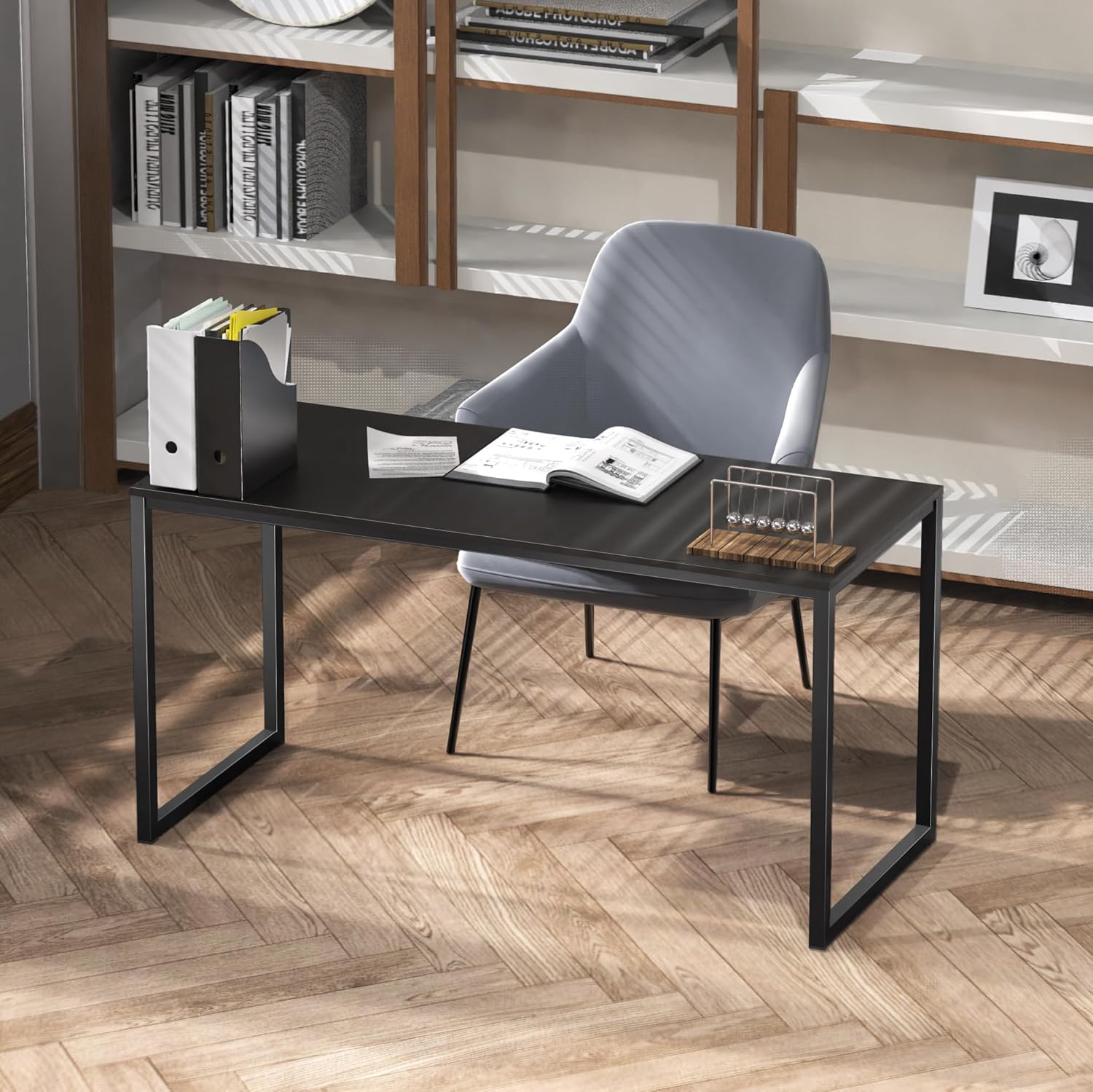
Image 5.2: The desk integrated into a contemporary home office environment.
6. Maintenance
To ensure the longevity and appearance of your SHW Mission Desk, follow these simple maintenance guidelines:
- Cleaning: The engineered wood top features a waterproof finish, making it easy to clean. Wipe spills immediately with a soft, damp cloth. Avoid abrasive cleaners or harsh chemicals.
- Durability: The powder-coated steel frame is designed for durability. Periodically check all screws and connections to ensure they remain tight.
- Protection: The desk is equipped with anti-skid pads to protect your floors and ensure stability.

Image 6.1: Overview of the desk's durable and easy-to-maintain features.

Image 6.2: Close-up of the waterproof surface and anti-skid pads.

Image 6.3: The desk's waterproof surface repelling spilled liquid.

Image 6.4: Detail of the anti-skid pads on the desk legs.
7. Troubleshooting
If you encounter any issues with your SHW Mission Desk, please refer to the following common solutions:
- Wobbly Desk: Ensure all screws are tightened securely. Check that the desk is placed on a flat, even surface. Adjust the anti-skid pads if they are uneven.
- Scratches/Damage: While the desk is designed for durability, avoid dragging sharp objects across the surface. For minor scratches, touch-up pens matching the black finish may be used.
- Missing Parts: If any parts were missing upon delivery, please contact customer support immediately for replacements.
8. Specifications
| Feature | Detail |
|---|---|
| Brand | SHW |
| Model Number | OD-10A-K |
| Product Dimensions | 16"D x 32"W x 28"H (40.6 cm D x 81.3 cm W x 71.1 cm H) |
| Color | Black |
| Top Material Type | Engineered Wood |
| Base Material | Alloy Steel |
| Finish Type | Powder Coated |
| Maximum Weight Recommendation | 65 Pounds (29.5 kg) |
| Required Assembly | Yes |
| Recommended Number of People for Assembly | 1 |
| Item Weight | 13.2 Pounds (6 kg) |
| Special Feature | Lightweight |

Image 8.1: Key dimensions of the SHW Mission 32-Inch Computer Desk.
Image 8.2: Detail of the tabletop thickness.
9. Warranty & Support
5-Year Limited Warranty: The SHW Mission 32-Inch Home Office Computer Desk is covered by a 5-year limited warranty, ensuring long-term reliability against manufacturing defects.
For customer support, missing parts, or warranty claims, please contact SHW directly through their official website or the retailer where the product was purchased.