Introduction
This manual provides instructions for the operation and maintenance of your Crosley Medley CR7015A-GY 8-in-1 Entertainment System. This system integrates a 3-speed turntable, AM/FM radio, CD player, cassette deck, Bluetooth receiver, and Aux-in functionality. Please read this manual thoroughly before use to ensure proper operation and to maximize your enjoyment of the product.
Important Safety Instructions
Please read and understand all safety instructions before using this product. Keep these instructions for future reference.
- Do not block any ventilation openings. Install in accordance with the manufacturer's instructions.
- Do not install near any heat sources such as radiators, heat registers, stoves, or other apparatus (including amplifiers) that produce heat.
- Protect the power cord from being walked on or pinched, particularly at plugs, convenience receptacles, and the point where they exit from the apparatus.
- Only use attachments/accessories specified by the manufacturer.
- Unplug this apparatus during lightning storms or when unused for long periods of time.
- Refer all servicing to qualified service personnel. Servicing is required when the apparatus has been damaged in any way, such as power-supply cord or plug is damaged, liquid has been spilled or objects have fallen into the apparatus, the apparatus has been exposed to rain or moisture, does not operate normally, or has been dropped.
- This product contains chemicals known to the State of California to cause cancer and birth defects or other reproductive harm.
Product Overview
The Crosley Medley CR7015A-GY is an integrated audio system designed for versatile music playback.

Image: Top-down view of the Crosley Medley CR7015A-GY with the lid open, revealing the turntable and the central control panel.

Image: A diagram illustrating the various components and functions of the Crosley Medley CR7015A-GY, including the turntable, radio, Bluetooth, cassette, CD, Aux-in, headphone jack, and speakers.
Setup Instructions
Unpacking
Carefully remove the unit from its packaging. Retain the packaging materials for future transport or storage.
Placement
- Place the unit on a flat, stable surface.
- Ensure adequate ventilation around the unit.
- Avoid placing the unit near direct sunlight, heat sources, or areas with high humidity.
Power Connection
Connect the power cord to the AC inlet on the rear of the unit and then to a standard wall outlet.

Image: The rear panel of the unit, displaying the power input, FM antenna connection, and regulatory labels.
Included Components
- CR7015A-GY Turntable Unit
- 45 RPM Adapter
- 3.5mm Aux In Cable
Operating Instructions
General Controls

Image: A detailed view of the central control panel, including the volume and tuning knobs, mode selection buttons, and CD/cassette playback controls.
- Power Button: Press to turn the unit on or off.
- Volume Knob: Rotate to adjust the audio output level.
- Mode Selector: Use to switch between Turntable, AM/FM Radio, CD, Cassette, and Bluetooth modes.
- Tuning Knob: For AM/FM radio, rotate to select desired frequency.
Turntable Operation
- Open the dust cover.
- Place a record on the turntable platter. If playing a 45 RPM single, use the included 45 RPM adapter.
- Select the appropriate speed (33 1/3, 45, or 78 RPM) using the speed selector switch.
- Release the tone arm lock.
- Use the cueing lever to gently raise the tone arm.
- Position the stylus over the desired track of the record.
- Lower the tone arm using the cueing lever. The record will begin to play.
- At the end of the record, the turntable may stop automatically depending on the auto-stop switch setting.
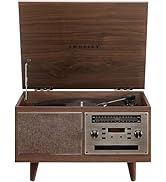
Image: A close-up of the turntable section, showing a vinyl record on the platter and the tone arm in position.
Bluetooth Operation
- Turn on the unit and select Bluetooth mode. The Bluetooth indicator will flash.
- Enable Bluetooth on your mobile device and search for "Crosley Medley".
- Select "Crosley Medley" to pair. Once paired, the indicator will stop flashing.
- You can now stream audio from your device to the Medley system.

Image: The Crosley Medley unit with a smartphone nearby, illustrating its Bluetooth streaming function.
AM/FM Radio Operation
- Select AM or FM radio mode.
- Use the Tuning knob to select your desired radio station.
- Extend the FM antenna on the rear of the unit for better reception.
CD Player Operation
- Select CD mode.
- Press the "Open/Close" button to open the CD tray.
- Place a CD with the label side facing up into the tray.
- Press "Open/Close" again to close the tray. The CD will begin to play automatically or display track information.
- Use the Play/Pause, Skip, and Repeat buttons for playback control.
Cassette Deck Operation
- Select Cassette mode.
- Insert a cassette tape into the cassette slot on the side of the unit.
- The tape will begin to play automatically.
- Use the playback controls (Play, Stop, Fast Forward, Rewind) as needed.
Aux-in Operation
- Connect an external audio device (e.g., MP3 player) to the AUX IN port using the 3.5mm Aux In cable.
- Select Aux-in mode.
- Play audio from your external device. The sound will be output through the Medley system's speakers.

Image: A close-up view of the Aux In port and Power button located on the front panel.
Maintenance
Cleaning
- Gently wipe the unit with a soft, dry cloth.
- Do not use abrasive cleaners or solvents.
- Keep the dust cover closed when the turntable is not in use to prevent dust accumulation.
Stylus Replacement
The stylus (needle) should be replaced after approximately 500 hours of playback to maintain optimal sound quality and prevent damage to your records.
Replacement Needle Type: NP6
To replace the stylus:
- Carefully remove the old stylus by pulling it downwards and forwards.
- Insert the new stylus by pushing it upwards and backwards until it clicks into place.
Cassette Deck Care
- Clean the tape heads and pinch rollers periodically with a cotton swab lightly dampened with isopropyl alcohol.
- Avoid using damaged or tangled cassette tapes.
Troubleshooting Guide
| Problem | Possible Cause | Solution |
|---|---|---|
| No Power | Power cord not connected securely. | Ensure power cord is firmly plugged into the unit and a working outlet. |
| No Sound | Volume too low. Incorrect mode selected. | Increase volume. Select the correct input mode (Turntable, CD, etc.). |
| Turntable Not Spinning | Auto-stop engaged. Belt dislodged. | Check auto-stop switch. Contact customer support if belt is dislodged. |
| Poor Radio Reception | Antenna not extended. Interference. | Extend the FM antenna. Reposition the unit away from other electronic devices. |
| Bluetooth Not Connecting | Device not in pairing mode. Unit not in Bluetooth mode. | Ensure unit is in Bluetooth mode and your device's Bluetooth is enabled and searching. |
| CD Skipping | CD dirty or scratched. Unit vibrating. | Clean the CD. Place the unit on a stable surface. |
| Cassette Tape Not Playing | Tape incorrectly inserted. Tape tangled. | Ensure tape is inserted correctly. Do not use damaged tapes. |
Technical Specifications
- Model: CR7015A-GY
- Power Input: AC 120V ~ 60Hz
- Power Consumption (On-mode): 12 watts
- Turntable Speeds: 33 1/3, 45, 78 RPM
- Included Components: CR7015A-GY Turntable, 45 RPM Adapter, 3.5mm Aux In Cable
- Dimensions (W x D x H): 17.83 x 12.99 x 10.08 inches (Lid Closed)
- Weight: 14.15 pounds
- Material: Plastic, Wood
- Special Features: Built-in Stereo Speakers, Bluetooth Receiver, AM/FM Radio, CD Player, Cassette Deck, Aux-in
- Replacement Stylus: NP6

Image: A technical drawing indicating the width, depth, and height dimensions of the Crosley Medley CR7015A-GY.
Warranty and Customer Support
For warranty information or technical assistance, please refer to the official Crosley website or contact Crosley customer support.
Crosley products are proudly designed in the USA and come with USA-based customer support.


