
1. Introduction
This manual provides essential information for the proper setup, operation, and maintenance of your HCDZ replacement remote control. This remote is designed to function as a direct replacement for original Panasonic remote controls, specifically models N2QAYB000093 and N2QAYB000094, compatible with various Panasonic DVD Home Theater Sound Systems.
No programming is required for this replacement remote control. Once batteries are correctly installed, the remote is ready for immediate use with your compatible Panasonic device.
2. Setup
2.1 Battery Installation
The remote control requires two (2) AA batteries (not included). Follow these steps to install the batteries:
- Locate the battery compartment on the back of the remote control.
- Slide the battery compartment cover downwards or press the latch and lift to open it.
- Insert two new AA batteries, ensuring that the positive (+) and negative (-) terminals align correctly with the markings inside the compartment.
- Close the battery compartment cover by sliding it back into place until it clicks securely.

Figure 1: Back of the remote control with the battery cover closed.

Figure 2: Side view illustrating how to open the battery compartment.

Figure 3: Battery compartment with batteries correctly installed.
Important: Ensure batteries are inserted with correct polarity. The remote will not function if batteries are installed incorrectly.
3. Operating the Remote Control
This HCDZ replacement remote control is designed for immediate use with compatible Panasonic DVD Home Theater Sound Systems. No complex programming or setup codes are required.
- After installing fresh batteries, point the remote control directly at your Panasonic DVD Home Theater Sound System.
- Press the desired function button (e.g., Power, Volume, Play, Stop) to control your device.
- Ensure there are no obstructions between the remote control and the device's infrared (IR) sensor.
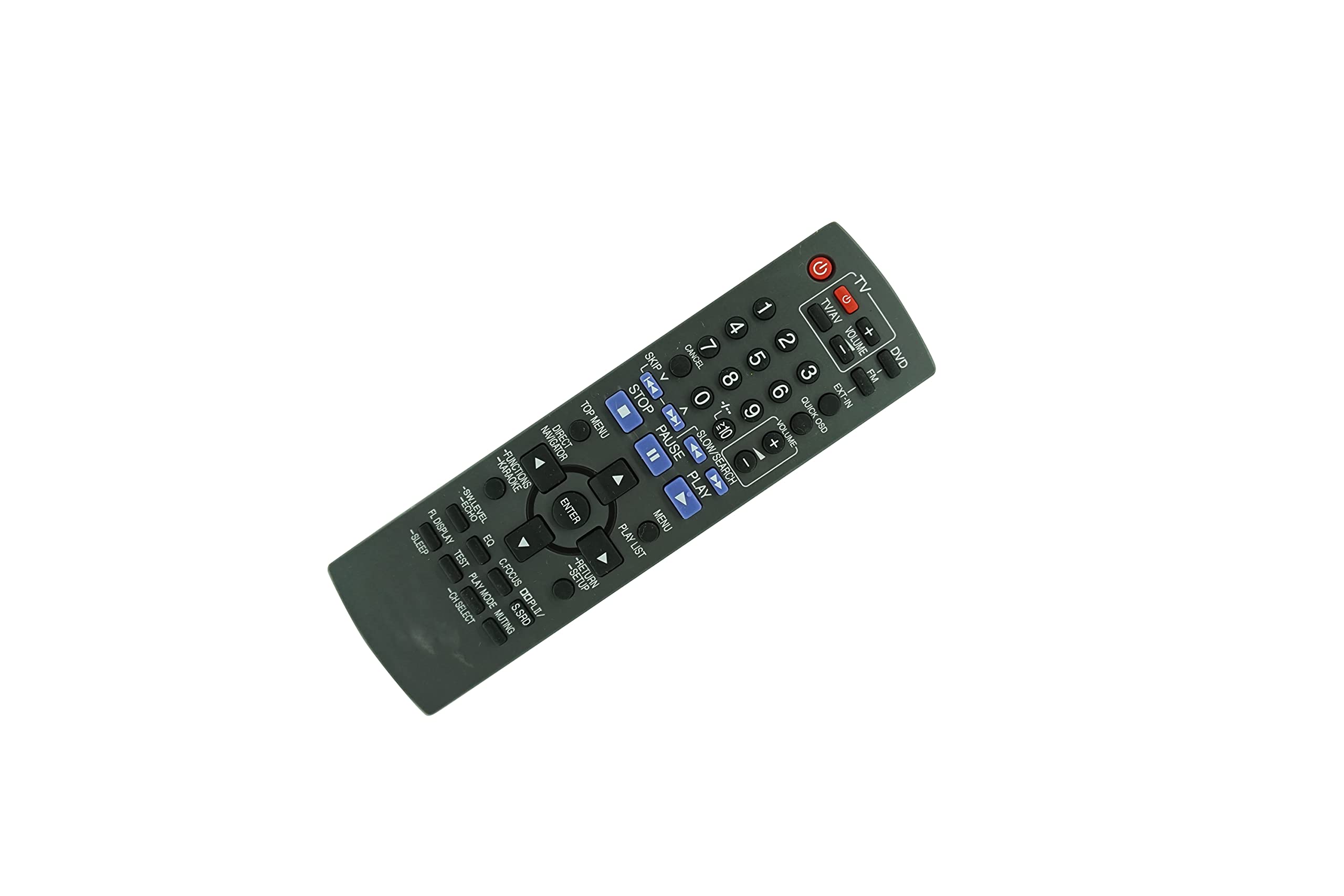
Figure 4: Front view of the remote control.
4. Maintenance and Care
To ensure the longevity and proper functioning of your remote control, please observe the following care guidelines:
- Avoid Extreme Conditions: Do not expose the remote control to extremely hot or humid environments. High temperatures or moisture can damage internal components.
- Battery Handling: When replacing batteries, always use new batteries of the same type. Do not mix new batteries with old ones, as this can lead to leakage or malfunction.
- Direct Sunlight/Lighting: Do not expose the remote control's sensor to direct sunlight or strong artificial lighting. This may interfere with its operation.
- Long-Term Storage: If the remote control will not be used for an extended period, remove the batteries to prevent potential damage from battery leakage and corrosion.
- Cleaning: Clean the remote control with a soft, dry cloth. Do not use liquid cleaners or abrasive materials.
5. Troubleshooting
If you experience issues with your remote control, please refer to the following common troubleshooting steps:
- Remote Not Responding:
- Check if the batteries are inserted correctly with the correct polarity (+/-).
- Replace old batteries with a fresh pair of AA batteries.
- Ensure there are no obstructions between the remote control and the device's IR sensor.
- Verify that the remote control is pointed directly at the device.
- Intermittent Functionality:
- This could indicate low battery power. Replace the batteries.
- Ensure the remote's IR emitter is clean and free from dirt or debris.
- Device Not Powering On/Off:
- Confirm that your Panasonic DVD Home Theater Sound System is powered and not in standby mode.
- Ensure the remote is compatible with your specific Panasonic model (N2QAYB000093, N2QAYB000094, SA-PT550, SA-PT350, SA-PT450, SC-PT550, SC-PT350, SC-PT450).
If the issue persists after following these steps, please contact HCDZ customer support for further assistance.
6. Specifications
| Feature | Detail |
|---|---|
| Brand | HCDZ |
| Compatible Models | Panasonic N2QAYB000093, N2QAYB000094, SA-PT550, SA-PT350, SA-PT450, SC-PT550, SC-PT350, SC-PT450 |
| Connectivity Technology | Infrared (IR) |
| Power Source | 2 x AA Batteries (not included) |
| Special Feature | No programming needed, works out of package |
| Max Number of Supported Devices | 1 (Specific Panasonic Home Theater System) |
| Compatible Devices | Home Theater |
7. Warranty and Support
For any questions, concerns, or support regarding your HCDZ replacement remote control, please refer to the seller's return policy or contact HCDZ customer service through your purchase platform. Please have your order details available when contacting support.
This product is typically covered by a standard return/replacement policy. Please check the specific terms and conditions provided at the time of purchase for details on warranty coverage and duration.