
JBL JBLT230NCTWSSAN
JBL Tune 230 NC TWS Wireless Earbuds User Manual
Model: JBLT230NCTWSSAN
Brand: JBL
Product Overview
The JBL Tune 230 NC TWS earbuds are true wireless in-ear headphones designed to deliver exceptional JBL Pure Bass Sound with active noise cancellation. They offer a comfortable, water-resistant design and extended battery life for all-day listening.

Image: JBL Tune 230 NC TWS earbuds in their open charging case.
Key Features:
- JBL Pure Bass Sound: Experience deep, powerful bass from 6mm drivers.
- Active Noise Cancellation (ANC) with Smart Ambient: Block out distractions or stay aware of your surroundings.
- Up to 40 Hours of Playback: Enjoy extended listening with the charging case.
- Speed Charge: Get 2 hours of playback with just 10 minutes of charging.
- IPX4 Water and Sweat Resistant: Designed to withstand splashes and sweat.
- 4 Microphones for Clear Calls: Ensure optimal call quality by eliminating ambient noise.
- JBL Headphones App: Customize your listening experience.
Setup
1. Initial Charging
Before first use, fully charge the earbuds and the charging case. Connect the supplied USB-C cable to the charging case and a power source. The LED indicators on the case will show the charging status.

Image: Earbuds in charging case, indicating charging status.
2. Bluetooth Pairing
- Open the charging case. The earbuds will automatically enter pairing mode.
- On your device (smartphone, tablet, etc.), enable Bluetooth.
- Select "JBL Tune 230 NC TWS" from the list of available Bluetooth devices.
- Once connected, you will hear an audible confirmation.
3. Fitting the Earbuds
For optimal sound quality and noise cancellation, ensure a proper fit. The earbuds come with multiple ear tip sizes. Try different sizes to find the most comfortable and secure fit for your ears.
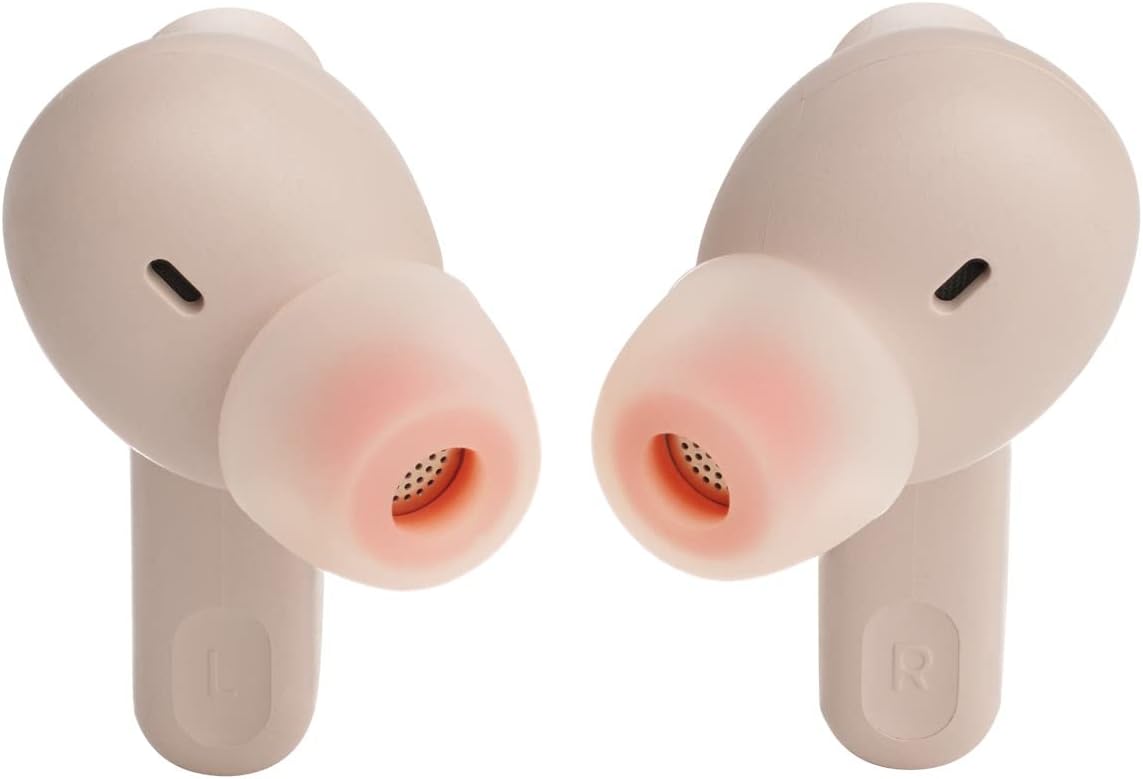
Image: Close-up of earbud tips for proper fitting.
Operating Instructions
Touch Controls:
The JBL Tune 230 NC TWS earbuds feature intuitive touch controls on each earbud. Functions can be customized via the JBL Headphones App.
- Single Tap: Play/Pause music, Answer/End call.
- Double Tap: Skip forward, Reject call.
- Triple Tap: Skip backward.
- Tap and Hold: Toggle Active Noise Cancellation (ANC) / Smart Ambient modes.
Active Noise Cancellation (ANC) and Smart Ambient:
These modes allow you to control how much of your surroundings you hear.
- ANC On: Reduces external noise for immersive listening.
- Smart Ambient: Allows you to hear your surroundings while listening to music, useful for awareness.
- Off: Standard listening mode without noise control.
Making and Receiving Calls:
The earbuds are equipped with 4 microphones for clear hands-free calls.
- Answer Call: Single tap on either earbud.
- End Call: Single tap on either earbud.
- Reject Call: Double tap on either earbud.

Image: User wearing the earbuds for daily use.
Care and Maintenance
Proper care ensures the longevity of your JBL Tune 230 NC TWS earbuds.
- Cleaning: Regularly clean the earbuds and charging case with a soft, dry, lint-free cloth. Do not use harsh chemicals or abrasive materials.
- Ear Tips: Remove and clean the ear tips periodically with water and mild soap, then dry thoroughly before reattaching.
- Water Resistance: The earbuds are IPX4 water and sweat resistant, meaning they can withstand splashes. Do not submerge them in water. Ensure they are dry before placing them back in the charging case.
- Storage: When not in use, store the earbuds in their charging case to protect them and keep them charged. Store in a cool, dry place away from extreme temperatures.
Troubleshooting
If you encounter issues with your JBL Tune 230 NC TWS earbuds, refer to the table below for common problems and solutions.
| Problem | Solution |
|---|---|
| Earbuds not pairing with device. | Ensure earbuds are in pairing mode (open case). Turn off and on Bluetooth on your device. Forget the device in your Bluetooth settings and try pairing again. |
| No sound or low volume. | Check volume levels on both earbuds and your connected device. Ensure earbuds are properly seated in your ears. Clean ear tips if necessary. |
| One earbud not working. | Place both earbuds back in the charging case, close the lid, wait a few seconds, then open again. Ensure both earbuds are charged. |
| Charging case not charging. | Check the USB-C cable and power adapter. Try a different cable or power source. |
| Active Noise Cancellation not effective. | Ensure earbuds are properly fitted in your ears. Select the correct ear tip size for a good seal. |
Technical Specifications
Detailed specifications for the JBL Tune 230 NC TWS earbuds.
| Feature | Specification |
|---|---|
| Wireless Technology | Bluetooth 5.2 |
| Driver Size | 6mm Dynamic Drivers |
| Frequency Response | 20Hz - 20kHz |
| Impedance | 16 ohms |
| Sensitivity | 105 dB |
| Battery Life (Earbuds) | Up to 10 hours (BT on, ANC off) / Up to 8 hours (BT on, ANC on) |
| Total Battery Life (with Case) | Up to 40 hours |
| Charging Time | Approx. 2 hours for full charge (earbuds and case) |
| Quick Charge | 10 minutes charge for 2 hours playback |
| Water Resistance Rating | IPX4 (earbuds only) |
| Weight | 5.1g per earbud, 57.5g total (earbuds + case) |
| Microphone | 4 microphones for clear calls |
Warranty and Support
JBL products are designed for durability and performance. Your JBL Tune 230 NC TWS earbuds come with a manufacturer's warranty.
- Manufacturer's Warranty: 12 Months.
- Spare Parts Availability: 2 Years.
- For detailed warranty information, product registration, or technical support, please visit the official JBL support website or contact their customer service.
- You can also visit the JBL Brand Store on Amazon for more information and products.
Important Safety Information
Please read and follow all safety instructions to prevent damage to your device or injury to yourself.
- Do not expose earbuds to extreme temperatures or humidity.
- Avoid dropping or subjecting the earbuds to strong impacts.
- Do not disassemble or attempt to repair the earbuds yourself. This will void the warranty.
- Use only certified chargers and cables.
- Prolonged exposure to high volume levels may cause hearing damage. Listen at moderate volumes.
Video Resources
Based on the provided data, no official product videos from the seller were found to be embedded directly in this manual. Please refer to the official JBL website or authorized channels for video tutorials and demonstrations.
Related documentsJBLT230NCTWSSAN


Ask a question about this manual
Ask about setup, troubleshooting, compatibility, parts, safety, or missing instructions. Manuals+ will review the question and use this page’s manual context to help answer it.