
1. Product Overview
The Turbionaire Senso 25 WIFI is a portable dehumidifier designed to efficiently remove excess moisture from indoor environments. It helps prevent mold, mildew, unpleasant odors, and allergens, contributing to a healthier and more comfortable living space. This unit is suitable for various rooms including living areas, offices, basements, and bathrooms.
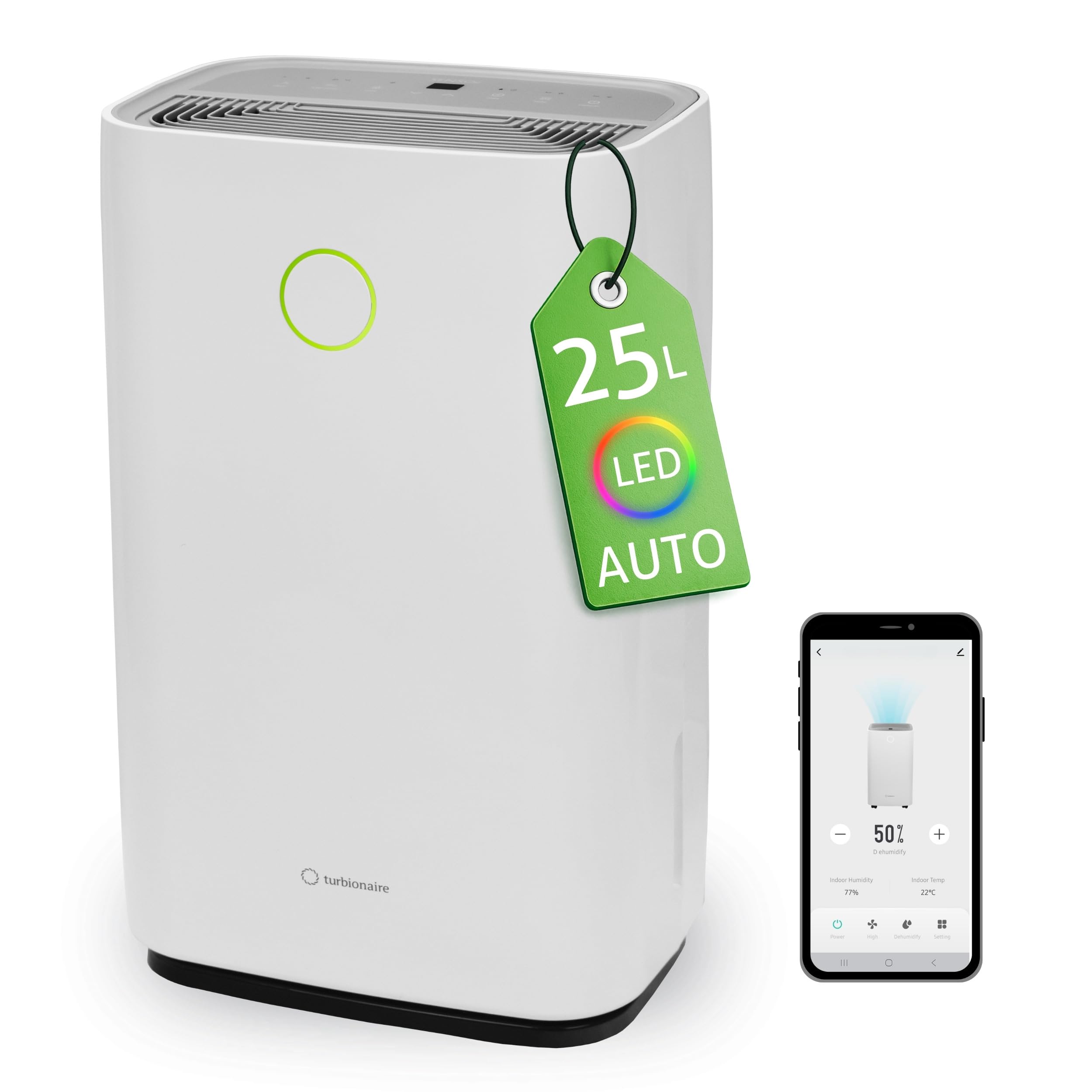
Figure 1: Front view of the Turbionaire Senso 25 WIFI Dehumidifier.
Key Features:
- Powerful Dehumidification: Extracts up to 25 liters of water per 24 hours with an airflow of 180 m³/h, ideal for spaces up to 97 m³.
- WIFI Connectivity: Remote control via a dedicated smart application, compatible with Amazon Alexa and Google voice assistant.
- Intuitive Control Panel: Features a TOUCH PAD, LED display for humidity, two fan speeds, timer, and child lock mode.
- LED Humidity Indicator: A round display on the front changes color based on room humidity: Blue (<45%), Green (45-65%), Red (>65%).
- Large Water Tank: 4-liter capacity, easily accessible, with a level indicator. Includes a 0.6 m flexible hose for continuous drainage.
- High Portability: Compact design with 4 multi-directional wheels and a top handle for easy movement.
- Auto-Restart: Automatically resumes operation with previous settings after a power outage.
- Economical Operation: Consumes only 310 W when the compressor is running.

Figure 2: The dehumidifier effectively controls moisture in various rooms such as bathrooms, living rooms, bedrooms, laundry areas, and kitchens.

Figure 3: The dehumidifier helps mitigate issues like mold formation, excessive humidity, unpleasant odors, slow-drying clothes, and degradation of books or furniture.
2. Safety Instructions
Please read all safety instructions carefully before operating the appliance. Failure to follow these instructions may result in electric shock, fire, or injury.
- Always connect the unit to a grounded power outlet with the correct voltage.
- Do not operate the dehumidifier if the power cord or plug is damaged.
- Keep the appliance away from heat sources and direct sunlight.
- Ensure adequate ventilation around the unit; do not block air inlets or outlets.
- Do not insert objects into the air vents.
- Unplug the unit before cleaning, maintenance, or when not in use for extended periods.
- Do not use the appliance in areas where flammable gases or liquids are stored.
- This appliance is not intended for use by persons (including children) with reduced physical, sensory or mental capabilities, or lack of experience and knowledge, unless they have been given supervision or instruction concerning use of the appliance by a person responsible for their safety.
- Children should be supervised to ensure that they do not play with the appliance.
3. Product Components
Familiarize yourself with the main components of your Turbionaire Senso 25 WIFI Dehumidifier:
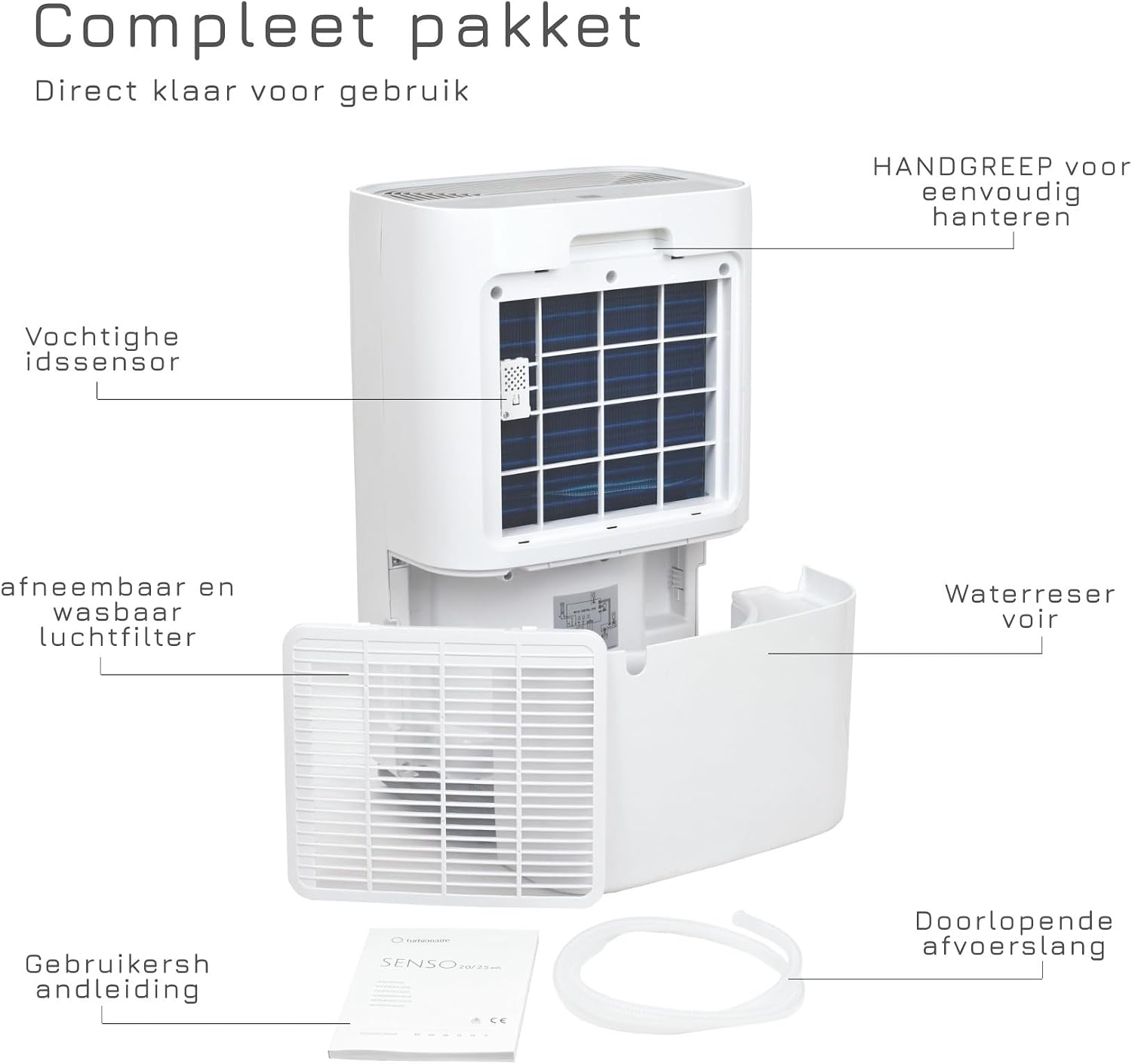
Figure 4: Key components of the dehumidifier, including the top handle, humidity sensor, removable and washable air filter, 4-liter water reservoir, and continuous drainage hose.
- Control Panel: Located on the top, for setting and monitoring.
- Air Inlet/Outlet: For air circulation.
- Washable Dust Filter: Located at the rear, for air purification.
- Water Tank: 4-liter capacity, located at the bottom rear, for collecting condensed water.
- Continuous Drainage Outlet: For connecting a hose for continuous water removal.
- Multi-directional Wheels: For easy movement.
- Top Handle: For convenient carrying.
4. Setup
Placement:
- Place the dehumidifier on a flat, stable surface.
- Ensure there is at least 20 cm (8 inches) of space around the unit for proper airflow.
- Avoid placing the unit near heat sources or in direct sunlight.
- For optimal performance, close all doors and windows in the room where the dehumidifier is operating.
Power Connection:
- Plug the power cord into a grounded 220-240V AC electrical outlet.
Continuous Drainage Setup (Optional):
For continuous operation without needing to empty the water tank, you can set up continuous drainage.
- Locate the continuous drainage outlet at the back of the unit.
- Connect the provided 0.6 m flexible hose to this outlet.
- Ensure the hose is directed downwards to a drain or a larger container, allowing water to flow out by gravity.
- Make sure the hose is not kinked or blocked.

Figure 5: Rear view illustrating the continuous drainage connection point and the 4-liter water reservoir with a fill sensor.
5. Operating Instructions
Control Panel:
The intuitive TOUCH PAD control panel allows you to manage all functions of the dehumidifier.

Figure 6: The control panel features an LED display showing humidity, and touch buttons for speed, sleep, child lock, timer, and mode selection.
- Power Button: Turns the unit on or off.
- LED Display: Shows the current or set humidity level.
- Humidity Setting Buttons (Up/Down): Adjusts the desired humidity level.
- Speed Button: Selects between two fan speeds (High/Low).
- Mode Button: Cycles through operating modes: Auto, Continuous, and Sleep.
- Timer Button: Sets the operating duration (e.g., 1-24 hours).
- Child Lock Button: Activates/deactivates the child lock to prevent accidental changes.
Operating Modes:
- Auto Mode: The unit automatically adjusts its operation based on the set humidity level.
- Continuous Mode: The unit operates continuously regardless of the humidity level. Ideal for very damp conditions or drying laundry.
- Sleep Mode: Operates at a lower fan speed and with reduced display brightness for quiet operation during sleep.
LED Humidity Indicator:
The round LED light on the front of the unit provides a quick visual indication of the room's humidity level:
- Blue: Humidity is below 45% (dry).
- Green: Humidity is between 45% and 65% (normal/optimal).
- Red: Humidity is above 65% (high/damp).

Figure 7: The Senso 25 WIFI operates quietly, indicated by the LED light, and can be controlled via a smartphone app.
WIFI and App Control:
The Turbionaire Senso 25 WIFI can be controlled remotely using a dedicated smart application on your smartphone or tablet. It is compatible with Amazon Alexa and Google voice assistant for convenient operation.
- Download the 'Smart Life' app from Google Play Store or Apple App Store.
- Follow the in-app instructions to connect your dehumidifier to your home WIFI network.
- Once connected, you can set desired humidity levels, change modes, set timers, and monitor the unit from anywhere.

Figure 8: Remote control of the dehumidifier via the Smart Life app, compatible with Google Assistant and Amazon Alexa.
6. Maintenance
Regular maintenance ensures optimal performance and extends the lifespan of your dehumidifier.
Emptying the Water Tank:
- When the water tank is full, the unit will automatically stop operating and an indicator light will illuminate.
- Carefully pull out the water tank from the rear of the unit.
- Empty the collected water.
- Slide the empty tank back into place until it clicks securely. The unit will resume operation.
Cleaning the Dust Filter:
The washable dust filter should be cleaned regularly (every 2-4 weeks, depending on usage) to maintain efficiency.
- Turn off and unplug the dehumidifier.
- Open the filter cover at the rear of the unit.
- Remove the dust filter.
- Clean the filter with a vacuum cleaner or wash it gently with warm water and mild detergent.
- Ensure the filter is completely dry before reinserting it.
- Close the filter cover.
Figure 9: Accessing the removable and washable air filter and the water reservoir for cleaning and maintenance.
Cleaning the Unit Exterior:
- Wipe the exterior with a soft, damp cloth. Do not use harsh chemicals or abrasive cleaners.
Storage:
- If storing the unit for an extended period, ensure the water tank is empty and clean, and the filter is clean and dry.
- Store the unit upright in a cool, dry place, away from direct sunlight.
7. Troubleshooting
If you encounter issues with your dehumidifier, refer to the following common problems and solutions:
| Problem | Possible Cause | Solution |
|---|---|---|
| Unit does not turn on | No power; Power cord not plugged in; Water tank full or incorrectly placed. | Check power supply; Ensure power cord is securely plugged in; Empty and correctly reinsert water tank. |
| No dehumidification | Room temperature too low; Air filter clogged; Doors/windows open; Humidity setting too high. | Ensure room temperature is above 5°C (41°F); Clean air filter; Close doors and windows; Lower the desired humidity setting. |
| Unit is noisy | Unit not on a level surface; Air filter clogged; Obstruction in fan. | Place unit on a flat, stable surface; Clean air filter; Check for and remove any obstructions. |
| Water leaks | Water tank incorrectly placed; Continuous drainage hose loose or kinked. | Ensure water tank is securely in place; Check continuous drainage hose for proper connection and no kinks. |
| WIFI connection issues | Incorrect WIFI password; Router too far; App not updated. | Verify WIFI password; Move unit closer to router; Update the Smart Life app. |
If the problem persists after trying these solutions, please contact customer support.
8. Specifications
| Feature | Specification |
|---|---|
| Model Number | SENSO25WIFI |
| Dehumidification Capacity | 25 Liters per day |
| Water Tank Volume | 4 Liters |
| Airflow Capacity | 180 m³/h |
| Recommended Floor Area | Up to 42 m² (97 m³ volume) |
| Voltage | 220 Volt AC |
| Wattage | 315 Watts |
| Number of Speeds | 2 |
| Product Dimensions (D x W x H) | 23.7 x 34.3 x 57 cm |
| Weight | 14.6 Kilograms |
| Special Features | Wifi control, LED humidity indicator, Auto-restart, Removable water reservoir with level indicator |
| Included Components | Continuous drainage hose, User manual |
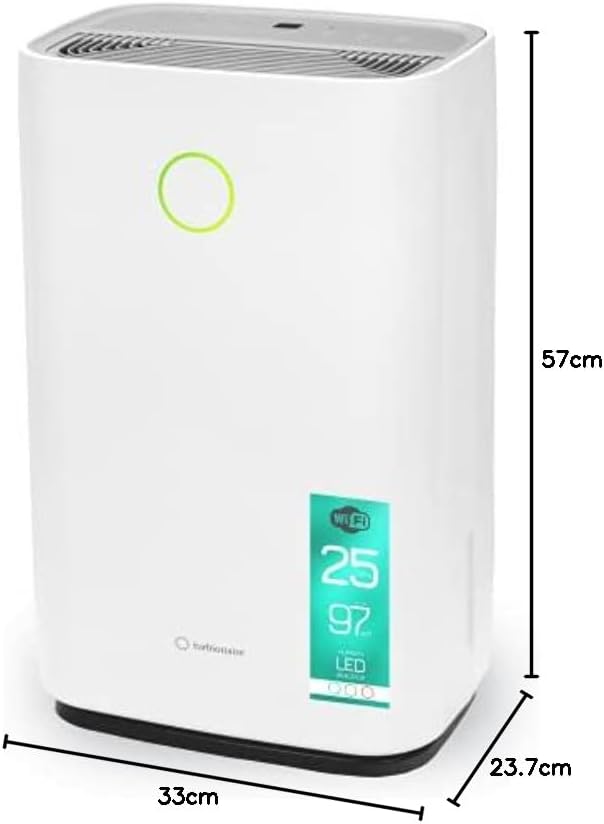
Figure 10: Dimensions of the Turbionaire Senso 25 WIFI Dehumidifier.
9. Warranty and Support
For warranty information and customer support, please refer to the documentation included with your product or visit the official Turbionaire website. You can typically find details regarding warranty periods, terms, and contact information for technical assistance and service requests there.
