
1. Introduction
This manual provides detailed instructions for the safe and efficient installation, operation, and maintenance of the VENTS-US VKM 150 Metal Inline Duct Fan. The VKM 150 is a centrifugal impeller fan designed for boosting airflow in 6-inch ducts, suitable for various ventilation applications including bathrooms, kitchens, living areas, workshops, and warehouses. Please read this manual thoroughly before installation and operation.
2. Safety Information
Always observe the following safety precautions to reduce the risk of fire, electric shock, or injury:
- Disconnect power before servicing or cleaning.
- Installation must comply with all local electrical and safety codes.
- Do not use this fan with any solid-state speed control device unless specifically designed for it.
- Ensure proper grounding to reduce the risk of electric shock.
- Mount the unit with the lowest moving parts at least 8 feet (2.5 meters) above the floor or grade level.
- Install behind shutters for protection from rain if used in an exposed location.
- This fan is designed for indoor usage only.
3. Package Contents
Verify that all components are present and undamaged:
- VENTS-US VKM 150 Inline Duct Fan
- Mounting Brackets
- Power Cord
- Instruction Manual (this document)
4. Product Overview
The VKM 150 is a robust metal inline duct fan featuring a centrifugal impeller for high static pressure applications. Its durable polymer-coated steel housing ensures longevity, and the permanently lubricated ball bearing motor provides maintenance-free operation.

Figure 4.1: Front view of the VENTS-US VKM 150 Metal Inline Duct Fan, showcasing its blue housing and power connection box.

Figure 4.2: Rear view of the VKM 150 fan, showing the internal impeller and mounting bracket attachment points.
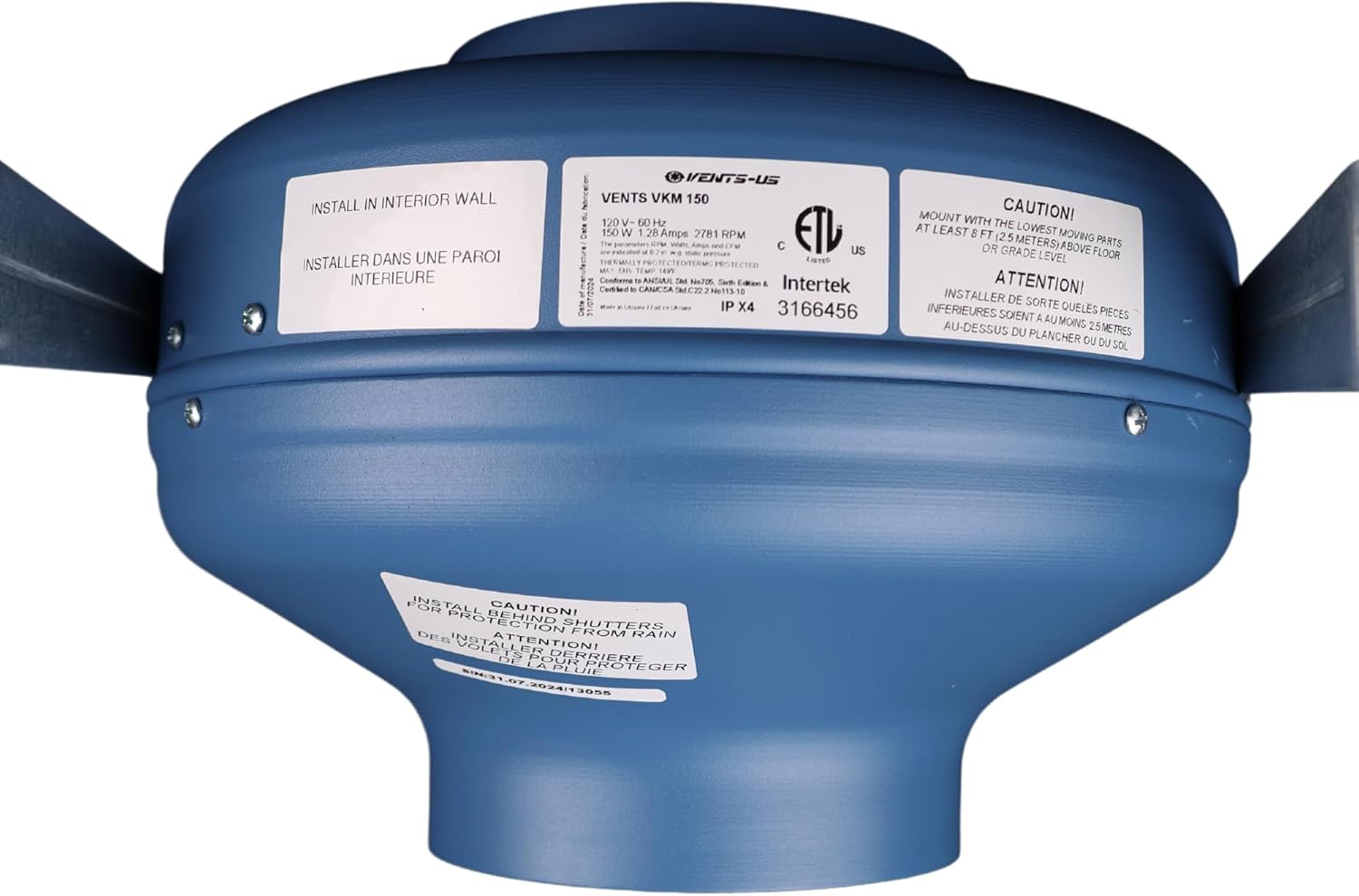
Figure 4.3: Top view of the VKM 150 fan, displaying product labels with electrical specifications and safety warnings.

Figure 4.4: Close-up side view of the electrical connection box on the VKM 150 fan.

Figure 4.5: Angled view of the VKM 150 fan, showing the pre-wired power cord and mounting brackets.
Video 4.1: Overview of the VKM Inline Centrifugal Metal Fan Series, highlighting its features and applications.
5. Specifications
| Feature | Specification |
|---|---|
| Model Name | VKM 150 |
| Brand | VENTS-US |
| Duct Diameter | 6 inches |
| Air Flow Capacity | 460 CFM (at 0" static pressure) / 422 CFM (at 0.2" static pressure) |
| Wattage | 152 watts |
| Voltage | 120 Volts |
| Speed | 3287 RPM |
| Noise Level | 3.2 Sones |
| Motor Type | Single-phase external rotor motor with backward curved centrifugal impellers, permanently lubricated ball bearings |
| Housing Material | Polymer-coated steel |
| Product Dimensions | 8.69"D x 13.75"W x 11.94"H |
| Item Weight | 12.07 pounds |
| Installation Type | Inline |
| Indoor/Outdoor Usage | Indoor |
| Certification | ETL |

Figure 5.1: Dimensional drawing of the VKM 150 fan, showing key measurements for installation planning.
6. Setup and Installation
The VKM 150 fan is designed for straightforward installation in 6-inch ducting. It comes pre-wired with a power cord and includes mounting brackets for convenience.
6.1 Mounting the Fan
- Select Location: Choose a suitable location within your duct system. Ensure there is enough space for the fan and access for future maintenance. Remember to mount the fan with the lowest moving parts at least 8 feet (2.5 meters) above the floor or grade level.
- Attach Brackets: Secure the included mounting brackets to a stable surface (e.g., ceiling joist, wall stud) using appropriate fasteners (not included).
- Position Fan: Place the fan onto the mounting brackets and secure it firmly.
6.2 Duct Connection
- Connect Ducting: Connect the 6-inch ductwork to both inlet and outlet ports of the fan.
- Secure Connections: Use duct clamps or aluminum tape to create airtight seals at all connections. This prevents air leakage and ensures optimal performance.
6.3 Electrical Connection
- Power Off: Ensure the main power supply to the installation area is turned off at the circuit breaker before making any electrical connections.
- Plug In: The VKM 150 comes with a pre-wired power cord. Plug the power cord into a standard 120V AC outlet.
- Verify Grounding: Confirm that the outlet provides proper grounding.
Note: All electrical work should be performed by a qualified electrician and comply with local codes.
7. Operating Instructions
The VKM 150 fan operates at a single speed. Once properly installed and connected to power, it is ready for operation.
- Power On: Restore power to the circuit at the breaker.
- Activate Fan: If connected to a wall switch or other control device, turn it on to activate the fan.
- Verify Operation: Listen for the fan to start and feel for airflow through the duct system.
The fan is designed for continuous operation in appropriate environments. Control methods can include a simple on/off switch or more advanced app-based controls if integrated into a smart home system (requires compatible third-party devices, not included).
8. Maintenance
The VKM 150 fan features a permanently lubricated ball bearing motor, requiring minimal maintenance. However, periodic cleaning is recommended to ensure optimal performance and longevity.
8.1 Cleaning Instructions
- Disconnect Power: WARNING: Always disconnect power to the fan at the circuit breaker before attempting any cleaning or maintenance.
- Access Impeller: Carefully remove any duct connections to access the fan's impeller.
- Clean Impeller and Housing: Use a soft brush or vacuum cleaner to remove dust and debris from the impeller blades and the interior of the fan housing. Avoid using harsh chemicals or abrasive materials.
- Reassemble: Reconnect ducting and ensure all connections are secure before restoring power.
Frequency: Cleaning frequency depends on the operating environment. In dusty or greasy environments, more frequent cleaning may be necessary.
9. Troubleshooting
If you experience issues with your VKM 150 fan, consult the following table before contacting support.
| Problem | Possible Cause | Solution |
|---|---|---|
| Fan does not turn on. | No power supply. Faulty switch/control. Loose wiring. | Check circuit breaker. Test switch/control. Inspect wiring connections (ensure power is off). |
| Reduced airflow. | Clogged impeller/ducts. Duct leakage. Incorrect duct size. | Clean impeller and ducts. Seal all duct connections. Ensure 6-inch ducting is used. |
| Excessive noise or vibration. | Loose mounting. Debris in impeller. Damaged impeller. | Tighten mounting hardware. Clean impeller. Contact VENTS-US support if impeller is damaged. |
| Fan runs intermittently. | Overheating (thermal overload). Loose electrical connection. | Ensure adequate ventilation around the fan. Check electrical connections (power off). |
10. Warranty and Support
VENTS-US products are manufactured to high-quality standards. For specific warranty details, please refer to the warranty card included with your product or visit the official VENTS-US website. If you require technical assistance or have questions not covered in this manual, please contact VENTS-US customer support.
VENTS-US Contact Information:
- Website: Visit the VENTS Store on Amazon
- Customer Service: Refer to your product packaging or the VENTS-US website for the most current contact details.


