
Introduction
Thank you for choosing the HOMCOM Toddler Tower Kitchen Helper. This versatile step stool is designed to safely elevate your child to counter height, allowing them to participate in various household activities. Featuring a 3-level adjustable height platform and robust construction, it promotes independence and engagement in a secure environment. Please read this manual thoroughly before assembly and use to ensure proper function and safety.
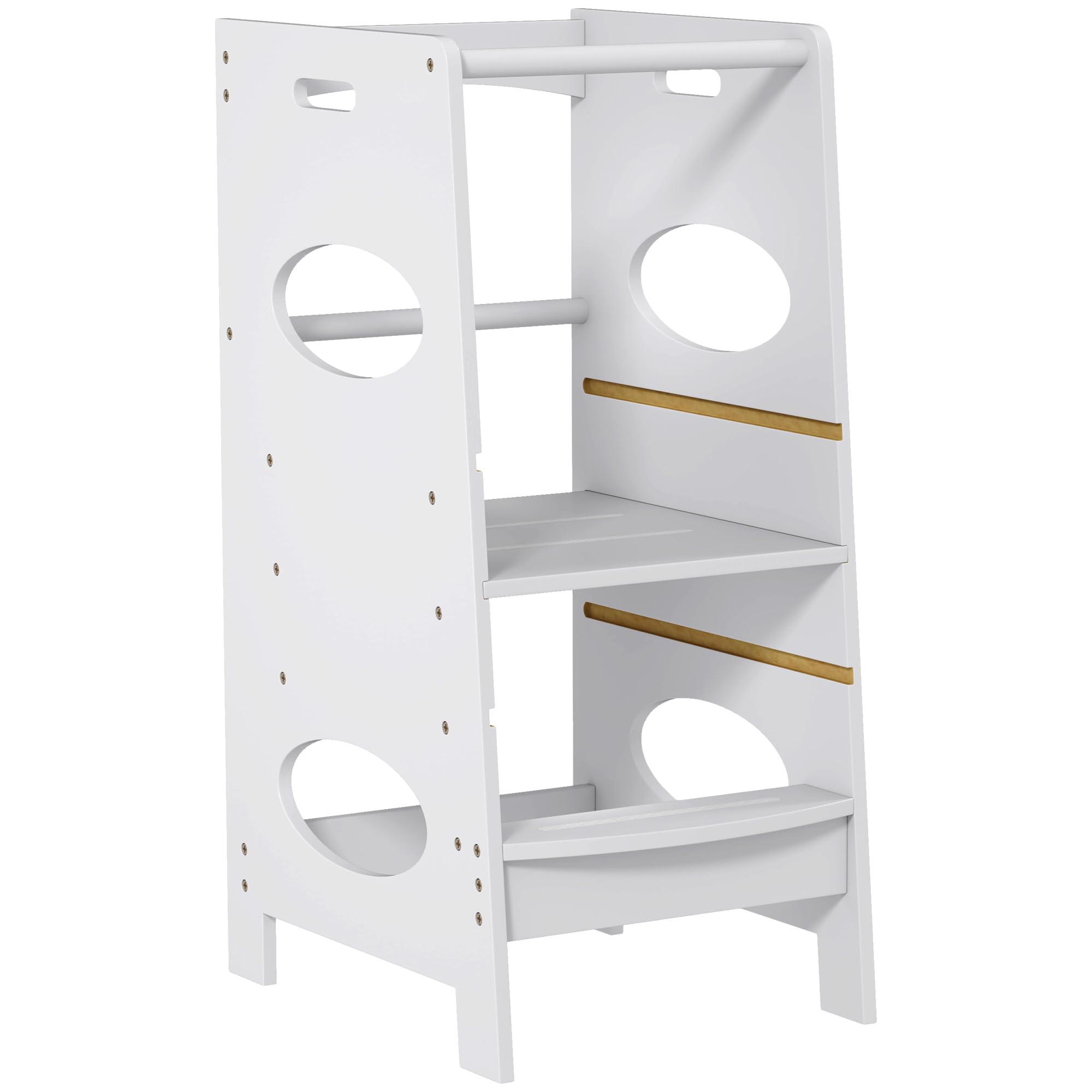
Image: A child standing on the HOMCOM Toddler Tower at a bathroom sink, brushing teeth, with an adult nearby.
Safety Information
- Always supervise your child when they are using the toddler tower.
- Ensure the tower is placed on a flat, stable, and dry surface.
- Do not allow children to climb on the outside of the tower or stand on the top rail.
- Verify that all screws and fasteners are securely tightened before each use.
- Do not exceed the maximum weight capacity of 110 lbs (50 kg).
- Keep hands and fingers clear when adjusting the platform height.
- This product is suitable for children aged 3-6 years old.
Package Contents
Please check that all components are present and undamaged before assembly. If any parts are missing or damaged, contact customer support.
- Side Panels (2)
- Adjustable Platform (1)
- Fixed Steps (2)
- Top Safety Rail (1)
- Hardware Pack (screws, nuts, etc.)
- Assembly Tool (e.g., Allen wrench)
Setup and Assembly
Follow these steps to assemble your HOMCOM Toddler Tower. It is recommended to have two adults for assembly.
- Unpack all components and lay them out on a clean, soft surface to prevent scratches.
- Attach the fixed steps to one of the side panels using the provided hardware. Ensure they are oriented correctly.
- Slide the adjustable platform into the desired height slot on the assembled side panel. Do not secure it yet.
- Attach the second side panel, aligning it with the fixed steps and the adjustable platform. Secure all connections with the remaining hardware.
- Install the top safety rail between the two side panels.
- Tighten all screws firmly, but do not overtighten.
- Before first use, gently shake the assembled tower to ensure it is stable.

Image: The toddler tower highlighting its features, including assembly required.
Operating Instructions
The HOMCOM Toddler Tower is designed for safe and interactive use in various home environments.
General Use
- Place the tower securely against a counter or surface where your child will be assisting.
- Guide your child to climb the steps and stand on the adjustable platform. The safety rails provide secure support.
- Ensure your child remains within the confines of the tower while in use.
Adjusting Platform Height
The footboard is removable and can be adjusted to 3 different height levels to accommodate your child's growth.
- Ensure no child is on the tower before adjustment.
- Carefully slide the adjustable platform out from its current slot.
- Re-insert the platform into the desired height slot. The available heights are approximately 12.2 inches (31 cm), 16.5 inches (42 cm), and 20.5 inches (52 cm) from the ground.
- Confirm the platform is fully seated and stable in its new position before allowing your child to use it.

Image: Diagram illustrating the three adjustable height settings for the platform.
Video: Demonstration of a child using the toddler tower in a kitchen and bathroom, and how to adjust the platform height.
Maintenance
- Clean the tower with a damp cloth and mild soap. Avoid abrasive cleaners.
- Wipe dry immediately after cleaning to prevent moisture damage to the engineered wood.
- Regularly check all screws and fasteners for tightness and re-tighten as necessary.
- Inspect the tower for any signs of wear or damage. Discontinue use if any structural integrity issues are found.
Troubleshooting
Issue: Tower feels wobbly after assembly.
Solution: Ensure all screws are fully tightened. Check that the tower is on a level surface. If the issue persists, disassemble and reassemble, paying close attention to the alignment of parts.
Issue: Adjustable platform is difficult to move.
Solution: Ensure the platform is not jammed or misaligned. Apply a small amount of furniture wax or silicone spray to the sliding grooves if friction is high. Do not force the platform.
Specifications
| Feature | Detail |
|---|---|
| Brand | HOMCOM |
| Model Number | CA312-053GY0231 |
| Colour | Grey |
| Material | Engineered Wood (MDF) |
| Overall Dimensions (L x W x H) | 15.7" x 19.7" x 35.4" (40 x 50 x 90 cm) |
| Adjustable Platform Heights | 12.2" (31 cm), 16.5" (42 cm), 20.5" (52 cm) |
| Weight Capacity | 110 lbs (50 kg) |
| Item Weight | 10.5 kg |
| Recommended Age | 3-6 years old |
| Special Features | Adjustable Platform, Heavy Duty Structure, Non-Skid Feet, Safety Rail |

Image: Detailed dimensions of the toddler tower.
Warranty and Support
HOMCOM products are designed for quality and durability. For warranty information, product support, or to order replacement parts, please contact HOMCOM customer service directly. Keep your purchase receipt for warranty claims.
Manufacturer: Aosom Canada
Place of Business: Markham, Ontario, CA
Telephone: 1-416-792-6088