
Introduction
Thank you for purchasing the Audio To Go Fyre 66 Portable Bluetooth Party Speaker and Karaoke Machine. This manual provides essential information for the safe and efficient operation of your device. Please read it thoroughly before use and retain it for future reference.
Product Overview
The Fyre 66 is a versatile portable speaker designed for dynamic sound and entertainment. It features dual 6.5-inch woofers, LED lights, Bluetooth connectivity, and karaoke functions. Its rechargeable battery and portable design make it ideal for various settings.

Figure 1: Front view of the ATG Fyre 66 speaker with illuminated red LED woofers.
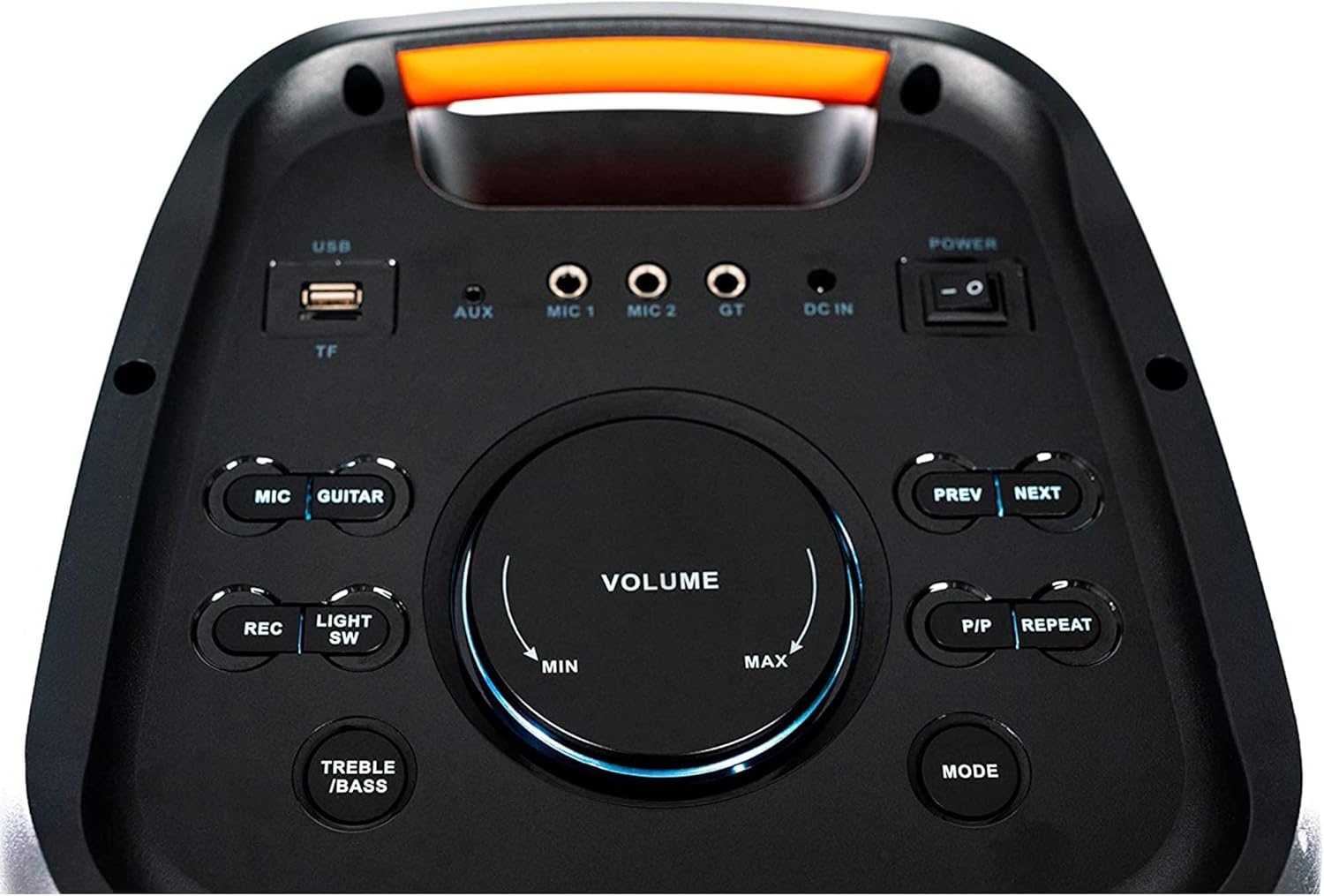
Figure 2: Top control panel showing various input ports and control buttons.
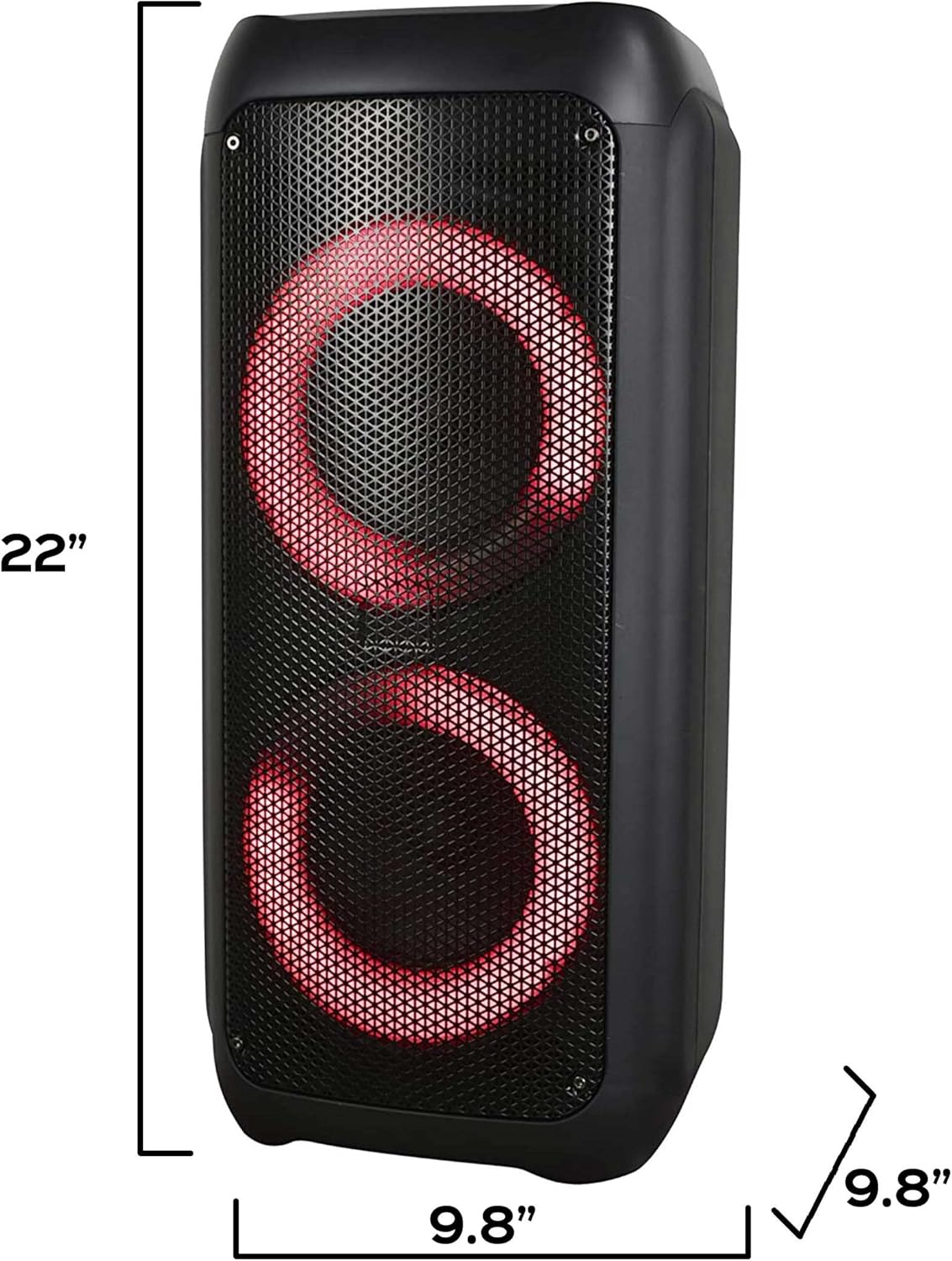
Figure 3: Side view of the ATG Fyre 66 speaker illustrating its dimensions (approximately 22.52 inches tall, 10.04 inches wide, 9.65 inches deep).
Setup
- Unpacking: Carefully remove the speaker and all accessories from the packaging. Ensure all components are present: speaker, microphone, power adapter.
- Charging the Battery: Before first use, fully charge the speaker. Connect the DC 9V 1.5A power adapter to the DC 9V input port on the speaker and plug it into a power outlet. The charging time is approximately 4-5 hours.
- Power On/Off: Locate the power switch on the control panel and slide it to the "ON" position to power on the speaker. Slide to "OFF" to power off.
Operating Instructions
Bluetooth Connection
- Ensure the speaker is powered on.
- Press the "MODE" button on the control panel until "Bluetooth" mode is selected (indicated on the display).
- On your Bluetooth-enabled device (smartphone, tablet, etc.), search for available Bluetooth devices.
- Select "ATG Fyre 66" from the list to pair. A confirmation sound will indicate successful pairing.
- You can now stream audio wirelessly from your device. The operating range is up to 10 meters.
USB/Micro TF Card Playback
- Insert a USB disk or Micro TF card into the corresponding slot on the control panel.
- The speaker will automatically switch to USB/TF mode and begin playing audio files. If not, press the "MODE" button to select the correct input.
- Use the "PREV" and "NEXT" buttons to navigate tracks. Use the "P/P" button to play or pause.
AUX Input
- Connect an external audio device (PC, TV, etc.) to the "AUX IN" 3.5mm jack using an audio cable (not included).
- Press the "MODE" button until "AUX" mode is selected.
- Audio from your connected device will now play through the speaker.
Karaoke Function
- Connect the included wireless microphone to the "MIC 1" or "MIC 2" input jack.
- Adjust the microphone volume using the "MIC VOL" knob.
- Apply echo effects using the "ECHO" knob for enhanced vocal performance.
- To record your performance, press the "REC" button to start recording to a connected USB or TF card. Press "REC" again to stop.
LED Lights Control
- The speaker features multiple LED light patterns.
- Press the "LIGHT SW" button to cycle through different light modes or turn them off.
Volume and Tone Adjustment
- Use the "VOLUME" knob to adjust the master volume of the speaker.
- Adjust the treble and bass levels using the dedicated "TREBLE" and "BASS" controls for personalized sound.
Maintenance
- Cleaning: Wipe the speaker's exterior with a soft, dry cloth. Do not use abrasive cleaners or solvents.
- Storage: When not in use for extended periods, store the speaker in a cool, dry place away from direct sunlight and extreme temperatures.
- Battery Care: To prolong battery life, avoid fully discharging the battery frequently. Recharge the speaker regularly, even if not in use.
- Water Exposure: This speaker is not waterproof. Avoid exposure to water or high humidity.
Troubleshooting
| Problem | Possible Cause | Solution |
|---|---|---|
| No power | Battery discharged; Power cable not connected. | Charge the battery; Ensure power cable is securely connected. |
| No sound | Volume too low; Incorrect input mode; Device not paired (Bluetooth). | Increase volume; Select correct input mode (Bluetooth, USB, AUX); Re-pair Bluetooth device. |
| Bluetooth pairing failed | Speaker not in pairing mode; Device too far; Interference. | Ensure speaker is in Bluetooth mode; Move device closer (within 10m); Turn off other Bluetooth devices. |
| Microphone not working | Microphone volume too low; Microphone not connected properly. | Increase "MIC VOL"; Ensure microphone is securely plugged into the correct jack. |
Specifications
- Model: Fyre 66
- Brand: Audio To Go
- Output Power: 140 Watts
- Woofers: Dual 6.5 inches
- Tweeters: Dual 2 inches Horn Tweeters
- Connectivity: Bluetooth (A2DP/AVRCP), USB, Micro SD card reader, Aux-in (3.5mm jack), Microphone input jack
- Bluetooth Range: Up to 10 meters (33 feet)
- Power Source: Built-in rechargeable Lithium battery (3000mAh)
- Recharge Power: DC 9V 1.5A
- Play Time: Approximately 5 hours (at 50% volume)
- Charge Time: Approximately 4-5 hours
- Product Dimensions (L x W x H): 10.04 x 9.65 x 22.52 inches
- Item Weight: 9 pounds
- Mounting Type: Tabletop
- Compatible Devices: Smartphone, Tablet
- UPC: 786468907715
Official Product Video
Video 1: An overview of ATG Portable Bluetooth Party Speakers, including the Fyre 66 model, demonstrating key features and connectivity options. This video is provided by Creative Audio.
Warranty and Support
For warranty information and customer support, please refer to the documentation included with your purchase or visit the official Audio To Go website. Keep your proof of purchase for any warranty claims.
Manufacturer: Audio To Go
Website: Audio To Go Store on Amazon