
1. Introduction
Thank you for choosing the Radiant RAS10504 Smartwatch. This manual provides essential information for setting up, operating, and maintaining your device. Please read it carefully to ensure optimal performance and longevity of your smartwatch.
The Radiant RAS10504 is a stylish and functional smartwatch designed for daily use. It features a 41mm white case, a soft white silicone strap, and a black dial with a mineral crystal. The device comes with a branded case for protection.
2. Product Overview
2.1 Key Features
- Elegant Design: Minimalist aesthetic with a 41mm white case and soft white silicone strap.
- Smart Notifications: Receive call and message notifications (e.g., WhatsApp, Facebook). View message text and reject calls directly from the watch.
- Health Monitoring: Includes heart rate, blood pressure, and blood oxygen measurement capabilities.
- Activity Tracking: Monitors steps, calories burned, and other fitness data.
- Reminders: Sedentary reminders, alarm clock, low battery alerts, and water intake prompts.
- Long Battery Life: Up to 5 days of autonomy with only 2 hours of charging.
- Compatibility: Works with iOS 8.4+ and Android 4.4+ devices.
2.2 Package Contents
- Radiant RAS10504 Smartwatch
- Charging Cable
- User Manual (this document)
- Branded Case
2.3 Device Components
Familiarize yourself with the main components of your smartwatch:
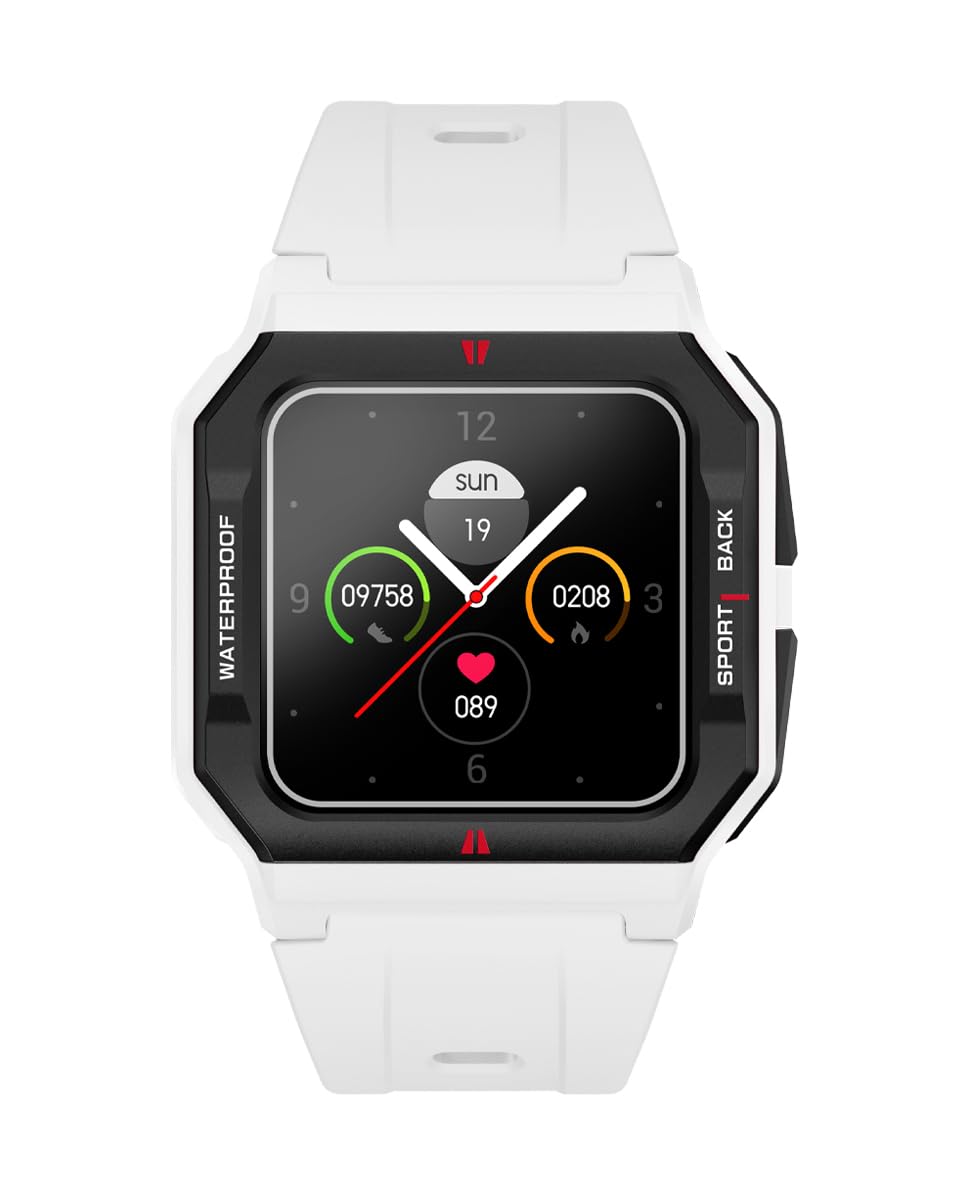
Figure 1: Front view of the Radiant RAS10504 Smartwatch. This image shows the square watch face with a digital display and the white silicone strap.

Figure 2: A woman wearing the Radiant RAS10504 Smartwatch on her wrist, demonstrating its elegant fit and design.
3. Setup
3.1 Charging the Smartwatch
Before first use, fully charge your smartwatch. Connect the charging cable to the charging port on the back of the watch and plug the USB end into a power adapter (not included) or a computer's USB port.
- A full charge takes approximately 2 hours.
- The battery indicator on the screen will show charging status.
3.2 Installing the Companion App
To unlock all features and synchronize data, you need to install the dedicated companion app on your smartphone.
- Scan the QR code provided in the quick start guide (if available) or search for the "Radiant Smartwatch" app in your smartphone's app store (Google Play Store for Android, Apple App Store for iOS).
- Download and install the app.
- Ensure your smartphone's Bluetooth is enabled.
3.3 Pairing with Your Smartphone
Follow these steps to pair your smartwatch with the companion app:
- Open the Radiant Smartwatch app on your smartphone.
- Create an account or log in if prompted.
- Navigate to the "Device" or "Add Device" section within the app.
- Select your smartwatch from the list of available devices (it may appear as "RAS10504" or a similar name).
- Confirm the pairing request on both your smartphone and the smartwatch.
- Once paired, the watch will synchronize time and data with your phone.
4. Operating Instructions
4.1 Basic Navigation
The smartwatch features a touchscreen interface for navigation:
- Swipe Up/Down: Scroll through menus and notifications.
- Swipe Left/Right: Access different functions or widgets (e.g., heart rate, steps, weather).
- Tap: Select an item or confirm an action.
- Press Side Button: Usually returns to the home screen or turns the screen on/off.
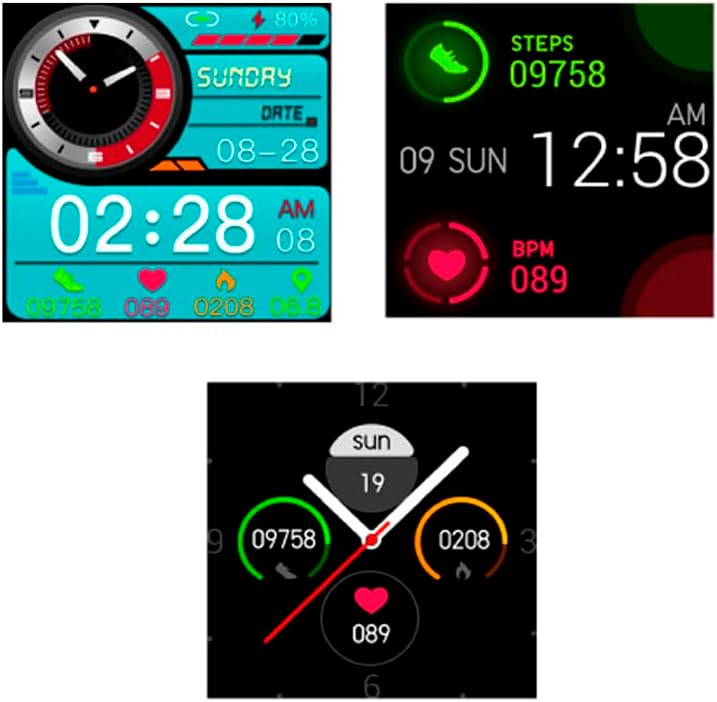
Figure 3: Examples of different watch faces available on the Radiant RAS10504 Smartwatch, showing various data displays like time, date, steps, and heart rate.
4.2 Receiving Notifications and Calls
- When a notification arrives, the watch will vibrate and display the message content.
- For incoming calls, the watch will display the caller ID. You can reject the call directly from the watch screen.
- Ensure Bluetooth is connected and app permissions are granted for notifications to function correctly.
4.3 Health Monitoring
Access health features by swiping through the watch interface or selecting them from the main menu.
- Heart Rate: Tap the heart rate icon to initiate a measurement. Keep your wrist still.
- Blood Pressure/Blood Oxygen: Similar to heart rate, tap the respective icon to start a measurement.
- Note: The health data provided by this device is for reference only and should not be used for medical diagnosis or treatment. Consult a medical professional for health-related concerns.
4.4 Activity Tracking
The smartwatch automatically tracks your daily steps, distance, and calories burned. You can view your progress on the watch face or in the companion app.
- Steps: Displays your daily step count.
- Calories: Estimates calories burned based on your activity.
- Sleep Monitoring: Tracks your sleep patterns when worn during sleep.
5. Maintenance
5.1 Cleaning Your Smartwatch
- Wipe the watch screen and strap regularly with a soft, damp cloth.
- Avoid using harsh chemicals or abrasive materials, as they can damage the device.
- Ensure the charging contacts are clean and dry before charging.
5.2 Water Resistance
The Radiant RAS10504 Smartwatch has an IPX7 rating, meaning it can withstand immersion in water up to 1 meter for 30 minutes. However, it is not recommended for swimming, showering, or prolonged water exposure. Avoid contact with hot water, steam, and corrosive liquids.
5.3 Storage
When not in use for extended periods, store the smartwatch in a cool, dry place. Ensure it is partially charged to prevent deep discharge of the battery.
6. Troubleshooting
6.1 Device Not Turning On
- Ensure the watch is fully charged. Connect it to the charger for at least 30 minutes.
- Press and hold the side button for 10-15 seconds to attempt a forced restart.
6.2 Unable to Pair with Smartphone
- Make sure Bluetooth is enabled on your smartphone.
- Ensure the smartwatch is within range of your smartphone (typically 10 meters).
- Restart both your smartphone and the smartwatch.
- Check if the companion app has all necessary permissions (location, Bluetooth, notifications).
- If previously paired, try unpairing the device from your phone's Bluetooth settings and then re-pairing through the app.
6.3 Inaccurate Health Data
- Ensure the watch is worn snugly on your wrist, not too loose or too tight.
- Keep your wrist still during measurements.
- Clean the sensor on the back of the watch.
- Remember that this device is not a medical instrument; readings are for general wellness and fitness purposes.
6.4 Notifications Not Appearing
- Verify that the smartwatch is successfully paired with your smartphone via Bluetooth.
- Check the notification settings within the companion app to ensure desired apps are enabled.
- Ensure your smartphone's notification permissions are granted to the companion app.
- Make sure "Do Not Disturb" mode is not active on either the watch or your phone.
7. Specifications
| Model Number | RAS10504 |
| Brand | Radiant |
| Case Diameter | 41 mm |
| Strap Material | Silicone |
| Case Material | Stainless Steel |
| Display Type | Digital, Touchscreen |
| Connectivity | Bluetooth |
| Battery Type | Lithium Ion |
| Average Battery Life | Up to 10 days (standby), up to 5 days (typical use) |
| Charging Time | Approximately 2 hours |
| Water Resistance Rating | IPX7 (Splash resistant, brief immersion up to 1m for 30 min) |
| Compatible OS | Android 4.4+ / iOS 8.4+ |
| Product Weight | 100 Grams |
8. Warranty and Support
The product specifications state "Tipo de garantía: No aplica" (Warranty type: Not applicable). Please refer to your point of purchase or the official Radiant website for specific warranty information and customer support details, as warranty terms may vary by region and retailer.
For further assistance, please visit the Radiant Brand Store on Amazon or contact their customer service.


