
1. Safety Information
Please read all safety instructions carefully before assembling and using the Galax GC-01 RGB Gaming Chair. Failure to follow these instructions may result in injury or damage to the product.
- Maximum Weight Capacity: Do not exceed the maximum weight recommendation of 300 pounds (approximately 136 kg). Exceeding this limit can compromise the chair's stability and structural integrity.
- Assembly Caution: Exercise caution during the assembly process. Ensure all components are correctly aligned and securely fastened. Keep small parts away from children.
- Stable Surface: Always use the chair on a flat, stable, and hard floor surface to prevent tipping.
- Avoid Standing: Do not stand on the chair or use it as a step stool.
- Regular Inspection: Periodically check all bolts and screws to ensure they remain tight. Retighten as necessary.
- Electrical Safety (RGB): If the RGB lighting is powered via USB, ensure the power source is appropriate and avoid exposing electrical components to liquids.
2. Setup and Assembly
The Galax GC-01 RGB Gaming Chair requires assembly. It is recommended to have two people for easier and safer assembly. Ensure all parts are present before beginning.
2.1 Unpacking and Part Identification
Carefully remove all components from the packaging. Lay them out on a clean, soft surface to prevent scratches. Verify that all parts listed in the included parts list are present.
2.2 Assembly Steps (General Guide)
- Attach Casters to Base: Insert the five casters into the holes on the star-shaped chair base.
- Insert Gas Lift: Place the gas lift cylinder into the center hole of the star base.
- Assemble Seat Mechanism: Attach the seat mechanism to the underside of the seat cushion using the provided screws. Ensure the front of the mechanism faces the front of the seat.
- Connect Backrest to Seat: Secure the backrest to the seat cushion using the side brackets and screws.
- Attach Armrests: Fasten the armrests to the seat base.
- Place Assembled Top onto Gas Lift: Carefully place the assembled seat and backrest onto the gas lift cylinder.
- Attach Lumbar and Headrest Pillows: Position the lumbar support and headrest pillows as desired.
- Connect RGB Lighting: Connect the RGB lighting cable to a suitable USB power source (e.g., a USB port on your computer or a USB power adapter).

Figure 2.2.1: Front view of the fully assembled Galax GC-01 RGB Gaming Chair.

Figure 2.2.2: Angled view highlighting the RGB lighting on the chair's edges.
3. Operating Instructions
Familiarize yourself with the chair's adjustment features to optimize your comfort and posture.
3.1 Height Adjustment
To adjust the chair's height, locate the lever on the right side, beneath the seat. While seated, pull the lever up to lower the chair. To raise the chair, stand up slightly and pull the lever up. Release the lever at the desired height.
3.2 Backrest Recline
The backrest can be reclined to various angles. Locate the recline lever on the right side of the chair, near the backrest. Pull the lever up and lean back to recline. Release the lever to lock the backrest in position. To return to an upright position, pull the lever and lean forward.

Figure 3.2.1: Chair with backrest reclined.
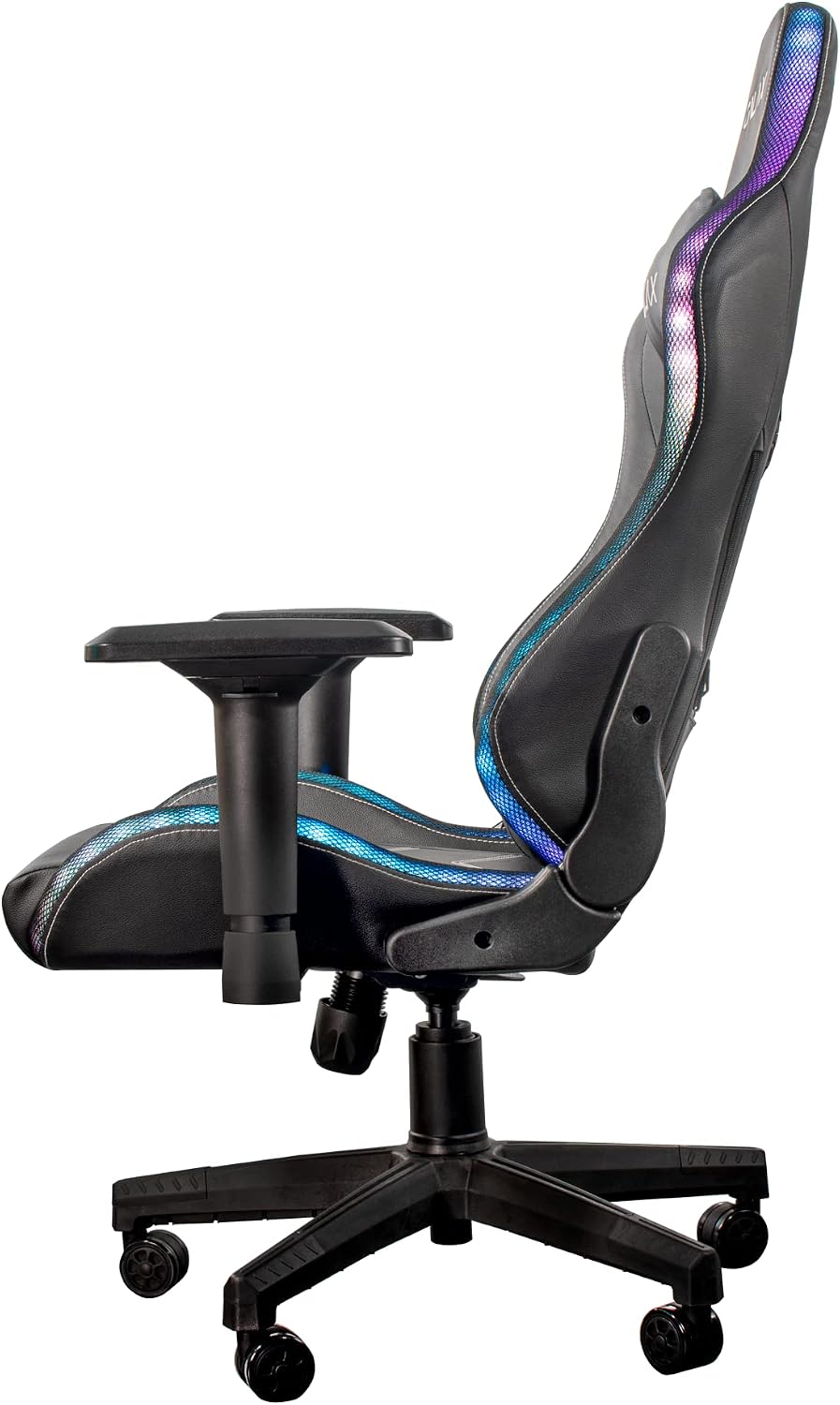
Figure 3.2.2: Chair with backrest in an upright position.
3.3 Armrest Adjustment
The armrests are adjustable. Locate the button or lever on the side of each armrest. Press or lift it to adjust the armrest height. Release to lock.

Figure 3.3.1: Close-up of armrest and adjustment lever.
3.4 RGB Lighting Operation
The RGB lighting feature requires a USB power source. Connect the chair's USB cable to any standard USB port (e.g., on your computer, a USB wall adapter, or a power bank). The lighting will activate. Depending on the model, there may be an inline controller on the USB cable to change lighting modes or colors. Refer to the specific controller for detailed instructions.
4. Maintenance
Proper maintenance ensures the longevity and optimal performance of your gaming chair.
- Cleaning: Wipe clean with a damp cloth. For stubborn stains, use a mild soap solution and a soft cloth, then wipe dry. Avoid harsh chemicals or abrasive cleaners.
- Fastener Check: Periodically inspect all screws and bolts. Tighten any loose fasteners to maintain stability and prevent squeaking.
- Caster Care: Keep the casters clean from hair and debris to ensure smooth movement.
- Avoid Direct Sunlight: Prolonged exposure to direct sunlight can fade upholstery materials.
5. Troubleshooting
This section addresses common issues you might encounter with your Galax GC-01 RGB Gaming Chair.
- Chair is Wobbly:
Solution: Check all assembly screws and bolts, especially those connecting the seat to the mechanism and the backrest. Tighten any loose fasteners. Ensure the gas lift is properly seated in the base. - Chair Does Not Adjust Height:
Solution: Ensure the height adjustment lever is fully engaged. Check if the gas lift cylinder is damaged or if there's any obstruction. If the gas lift is faulty, it may need replacement. - Backrest Does Not Recline/Lock:
Solution: Verify that the recline lever is functioning correctly and not obstructed. Check the connection points of the backrest to the seat mechanism. - RGB Lighting Not Working:
Solution: Ensure the USB cable is securely connected to a working USB power source. Try a different USB port or power adapter. Check for any damage to the USB cable or inline controller. - Squeaking Noises:
Solution: Lubricate moving parts, such as the recline mechanism and gas lift, with a silicone-based lubricant. Tighten all screws and bolts.
6. Specifications
| Brand | Galax |
| Model Name | GLX RG01P4DBY0 GXLG |
| Model Number | RG01P4DBY0 |
| Product Type | Gaming Chair |
| Color | Space RGB |
| Frame Material | Solid Alloy |
| Seat Material | Stainless Steel |
| Material Filling | Foam |
| Back Style | Comfortable Back |
| Arm Style | With Arm |
| Special Feature | Comfortable |
| Product Dimensions (D x W x H) | 85 cm x 53 cm x 140 cm |
| Item Weight | 21 kg |
| Maximum Weight Recommendation | 300 pounds (approx. 136 kg) |
| Assembly Required | Yes |
| Recommended Uses | Gaming |
| Room Type | Gaming Room |
| Age Range Description | Adult |
| Surface Recommendation | Hard Floor |
| Indoor/Outdoor Usage | Indoor |
| Care Instructions | Wipe clean with a damp cloth |
7. Warranty and Support
For warranty information, technical support, or to inquire about replacement parts, please contact Galax customer service or refer to the warranty card included with your purchase. Keep your proof of purchase for warranty claims.