
Hifree Touch Control
Hifree Touch Lamp User Manual
Model: Touch Control
Brand: Hifree
Product Overview
The Hifree Touch Lamp is a versatile and dimmable LED table lamp designed for various settings, including bedrooms, kids' rooms, and offices. It features intuitive touch control, multiple lighting modes, and smart connectivity options for enhanced user experience. The spherical design is inspired by natural forms, providing soothing warm white light or vibrant colors.

Image: Hifree Touch Lamp emitting a warm white light, showcasing its spherical design.
What's in the Box
- Hifree Touch Lamp
- Power Cable
- User Manual
Setup
Initial Setup
- Unpack the Hifree Touch Lamp and all its components from the box.
- Connect the provided power cable to the lamp's power input port.
- Plug the power adapter into a standard electrical outlet. The lamp will illuminate in its default warm white mode.
App Connection (for Smart Features)
To unlock the full smart features of your Hifree Touch Lamp, including advanced color control, scheduling, and voice assistant integration, download the companion app.
- Locate the QR code in the user manual or on the product packaging.
- Scan the QR code with your smartphone to download the "Smart Life" app from your device's app store.
- Open the app and follow the on-screen instructions to register an account or log in.
- Ensure your lamp is powered on and your phone's Bluetooth and Wi-Fi are enabled.
- In the app, select "Add Device" or use the "Auto Scan" feature to find your Hifree Touch Lamp (model LT-T16).
- Follow the prompts to connect the lamp to your home Wi-Fi network. Ensure your phone is close to the lamp and router during this process.
- Once connected, you can control the lamp via the app.
Video: A demonstration of the Hifree LT-T16 lamp's functions and how to use them, including app connectivity.
Operating Instructions
Touch Control
- Power On/Off: Lightly tap the touch-sensitive panel on the top of the lamp to turn it on or off.
- Adjust Brightness: Long press the touch panel to dim the light from 5% to 100% brightness. Release to set the desired brightness level.
- Change Lighting Mode: Use the mode button located at the back of the lamp to cycle through the four primary lighting modes: Warm White, Cool White, RGB Color Changing Cycle, and Sleep Night Light Mode.
- Lock RGB Color: While in RGB Color Changing Cycle mode, double-click the touch panel to lock the current color. Double-click again to unlock and resume cycling.
Video: A short demonstration of the Hifree Small Touch LT-T16 Table Lamp, highlighting its touch control and color changing capabilities.
App Control
Once connected to the "Smart Life" app, you can access a wider range of controls:
- Brightness Control: Precisely adjust brightness from 0-100% for all modes.
- Color Wheel: Select any color from a full RGB spectrum to customize your ambiance.
- Scenes: Choose from pre-set scenes (e.g., Night, Read, Working, Leisure) or create custom scenes to match your mood or activity.
- Schedules & Timers: Set schedules for the lamp to automatically turn on/off at specific times. You can also set timers for automatic shut-off.
- Rhythms (Wake-up/Sleep Aid): Program the lamp to gradually brighten in the morning to simulate a natural sunrise, or slowly dim at night to aid in falling asleep.
Voice Control
Integrate your Hifree Touch Lamp with voice assistants like Amazon Alexa or Google Assistant for hands-free control. Follow the instructions within the "Smart Life" app to link your lamp to your preferred voice assistant. Once linked, you can use voice commands to turn the lamp on/off, change colors, and adjust brightness.
Lighting Modes
- Warm White Mode: Provides a soft, cozy light ideal for relaxation, winding down, or reading before bed. This mode helps avoid blue light exposure.
- Cool White Mode: Offers a bright, clear light suitable for tasks requiring focus, such as applying makeup or starting your day.
- RGB Color Changing Cycle: Cycles through a full spectrum of colors, perfect for creating a vibrant atmosphere or party mood. Colors can be locked by double-tapping the touch panel.
- Sleep Night Light Mode: A very dim, warm light setting designed to provide minimal illumination for navigating in the dark without disturbing sleep.
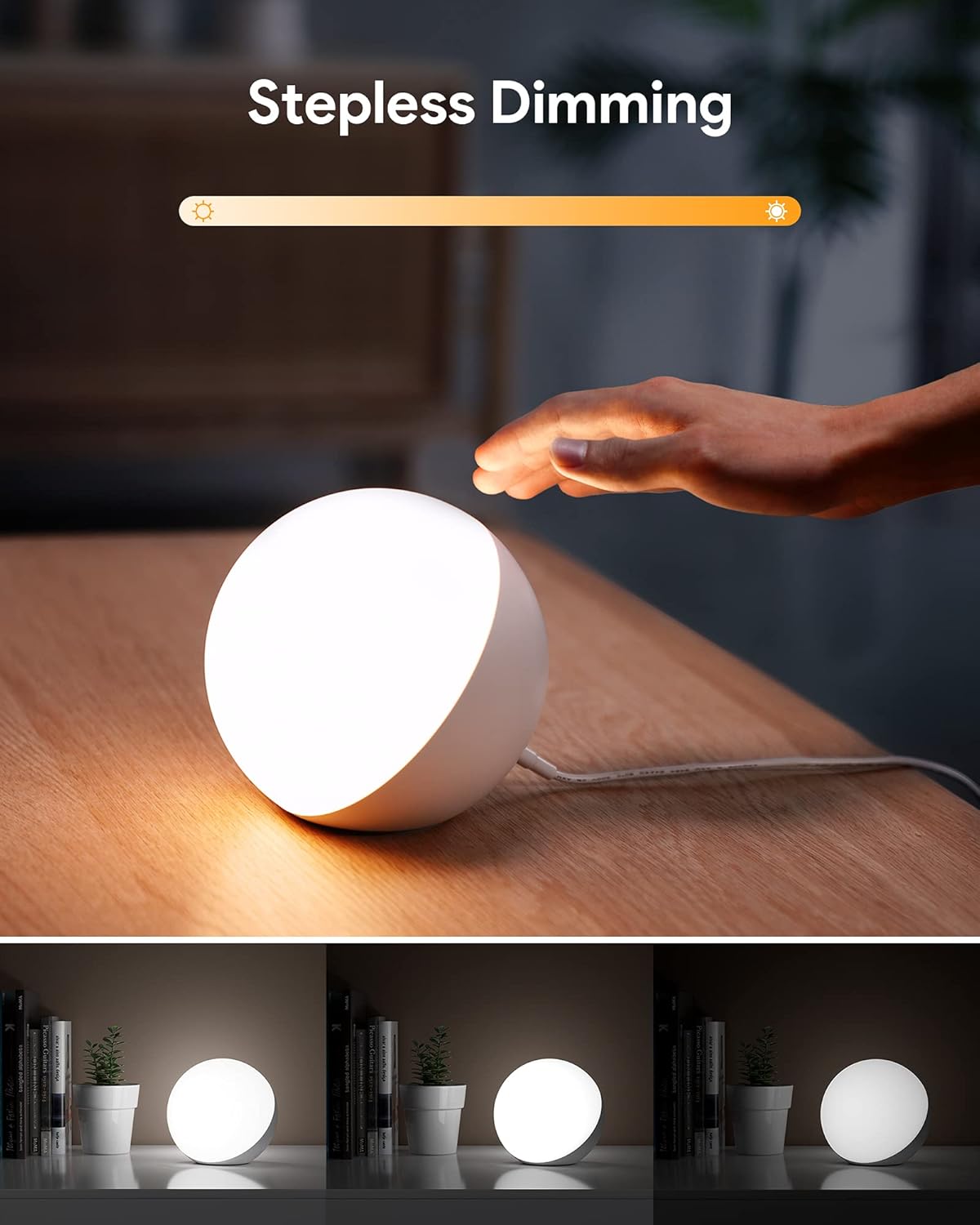
Image: Hifree Touch Lamp showcasing its stepless dimming capability, transitioning from bright to dim light.

Image: Hifree Touch Lamp functioning as a gentle baby night light in a dimly lit room.
Maintenance
- Cleaning: To clean the lamp, unplug it from the power outlet. Use a soft, dry cloth to wipe the surface. Do not use abrasive cleaners or solvents.
- Storage: If storing the lamp for an extended period, unplug it and keep it in a cool, dry place away from direct sunlight.
- LED Lifespan: The energy-saving LED technology ensures a lifespan of more than 10,000 hours, requiring no bulb replacement.
Troubleshooting
- Lamp not turning on: Ensure the power cable is securely connected to both the lamp and the power outlet. Check if the outlet is functioning correctly.
- Touch control unresponsive: Ensure your hands are clean and dry. Try unplugging the lamp for a few seconds and plugging it back in to reset.
- App connectivity issues:
- Ensure the lamp is within range of your Wi-Fi router.
- Verify your Wi-Fi network is 2.4GHz (5GHz networks may not be supported by the lamp).
- Restart your router and the lamp.
- Re-attempt the pairing process in the "Smart Life" app.
- Color or brightness not changing: If using touch control, ensure you are using the correct tap/long press gestures. If using the app, check the app settings and ensure the lamp is properly connected.
If you encounter persistent issues, please refer to the "Customer Support" section for assistance.
Specifications
| Feature | Detail |
|---|---|
| Brand | Hifree |
| Model | Touch Control (LT-T16) |
| Product Dimensions | 5.12"D x 5.12"W x 4.86"H |
| Item Weight | 1.19 Pounds |
| Lamp Type | Desk Lamp, Night Light, Table Lamp |
| Shade Material | Acrylic |
| Switch Type | Push Button, Touch |
| Special Feature | Dimmable, Mood light, Color Changing |
| Power Source | Corded Electric |
| Connectivity Technology | Auxiliary, Bluetooth, Wi-Fi |
| Indoor/Outdoor Usage | Indoor |
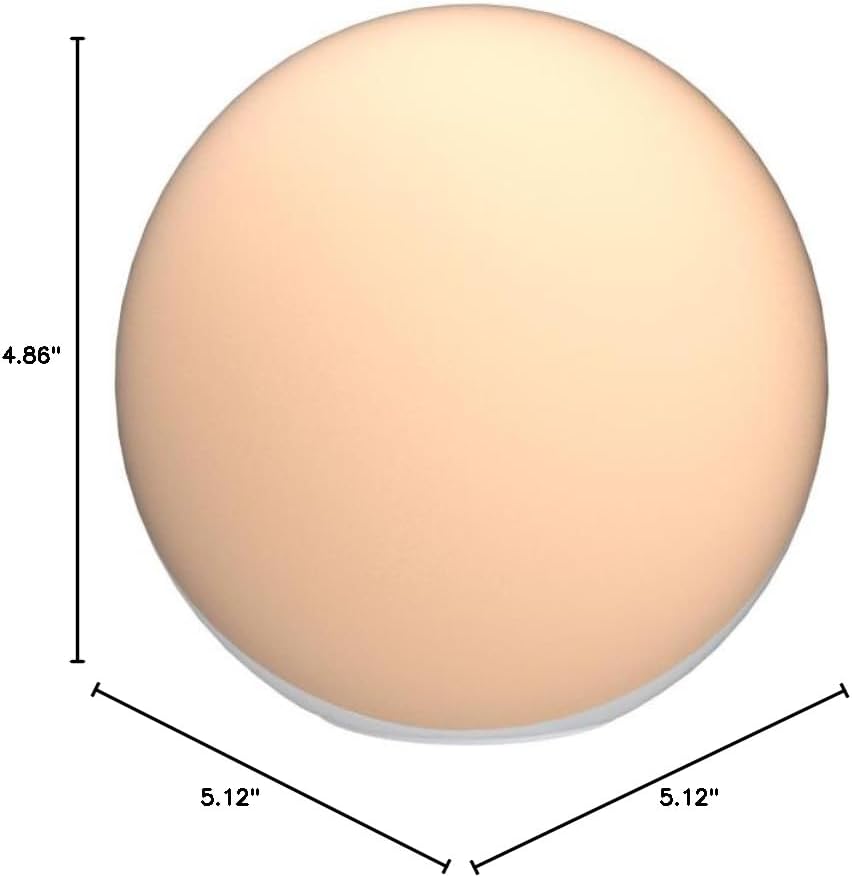
Image: Diagram illustrating the dimensions of the Hifree Touch Lamp.
Warranty and Customer Support
24 Months Warranty: Hifree provides a 24-month warranty for this product. This covers manufacturing defects and ensures quality protection.
Customer Support: Hifree offers year-round hassle-free service. If you have any questions or issues regarding the product, missing parts, or pre-purchase inquiries, please feel free to contact their customer support. They aim to respond in less than 12 hours and provide an extraordinary experience. All product quality problems will result in a free replacement without questions.
Contact information can typically be found in your product package or user manual.
Related documentsTouch Control

Ask a question about this manual
Ask about setup, troubleshooting, compatibility, parts, safety, or missing instructions. Manuals+ will review the question and use this page’s manual context to help answer it.