
1. Introduction
This manual provides essential information for the safe and effective operation, maintenance, and troubleshooting of your FYC Q23L Walking Treadmill. Please read this manual thoroughly before initial use and retain it for future reference.

Image 1.1: The FYC Q23L Walking Treadmill in operation.
2. Safety Information
Your safety is paramount. Observe all warnings and precautions to prevent injury or damage to the equipment.
2.1 General Safety Precautions
- Ensure the treadmill is placed on a flat, stable surface.
- Maintain a clear area of at least 2 feet behind and 1 foot on each side of the treadmill.
- Do not allow children or pets near the treadmill during operation.
- Always wear appropriate athletic footwear.
- Consult a physician before starting any new exercise program.
2.2 Safety Key
The treadmill is equipped with a red safety key. Attach the clip of the safety key to your clothing before starting your workout. In case of an accidental fall or emergency, the safety key will detach, immediately stopping the treadmill and cutting power, providing an additional layer of safety.

Image 2.1: The safety key and extended handrails for user support.
2.3 Handrails
The FYC Q23L treadmill features full-size extended handrails designed to provide support for balance and stability during use. These handrails are constructed from carbon steel with a 50mm pipe thickness for enhanced durability and user confidence.
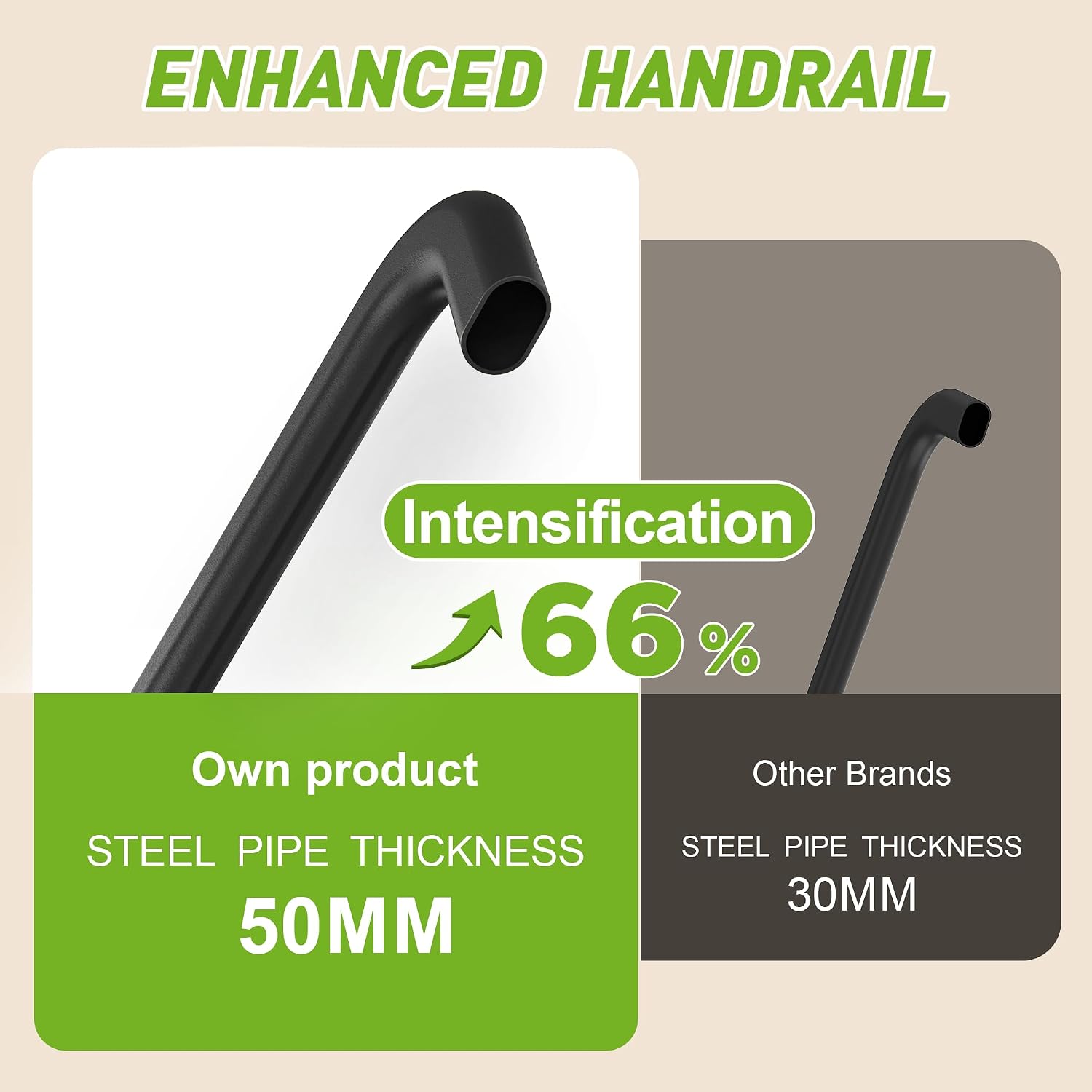
Image 2.2: Illustration of the robust 50mm steel pipe thickness of the handrails.
2.4 Weight Capacity
The maximum user weight recommendation for this treadmill is 300 pounds (136 kg). Do not exceed this weight limit.
3. Product Overview and Components
The FYC Q23L Walking Treadmill is designed for home exercise, offering features for walking, jogging, and light running. Key components include:
- Running Belt: Six layers of thickened material with 8 spring double shock-absorbing running boards for reduced knee impact.
- Control Panel: Backlit LED display with intuitive buttons.
- Handrails: Extended for balance and safety.
- Safety Key: Magnetic key for emergency stops.
- Heart Rate Sensors: Integrated into handrails.
- Mobile Rollers: For easy repositioning.

Image 3.1: The double running board design with shock-absorbing pads.
4. Setup and Assembly
The FYC Q23L Walking Treadmill requires minimal assembly and can typically be set up within ten minutes. Follow the instructions provided in the included user manual for detailed assembly steps.
4.1 Unpacking
Carefully remove all components from the packaging. Ensure all parts listed in the packing list are present. Included components are: Chest Strap, Lubricant, Power Cord, Safety Key, and User Manual.
4.2 Assembly Steps
- Place the treadmill base on a flat surface.
- Raise the handrail assembly into the upright position.
- Secure the handrail assembly using the provided knobs or fasteners as per the detailed instructions.
- Ensure all connections are tight and secure before plugging in the power cord.
5. Operation
5.1 Control Panel Functions
The control panel features a backlit LED display and intuitive buttons for easy operation.
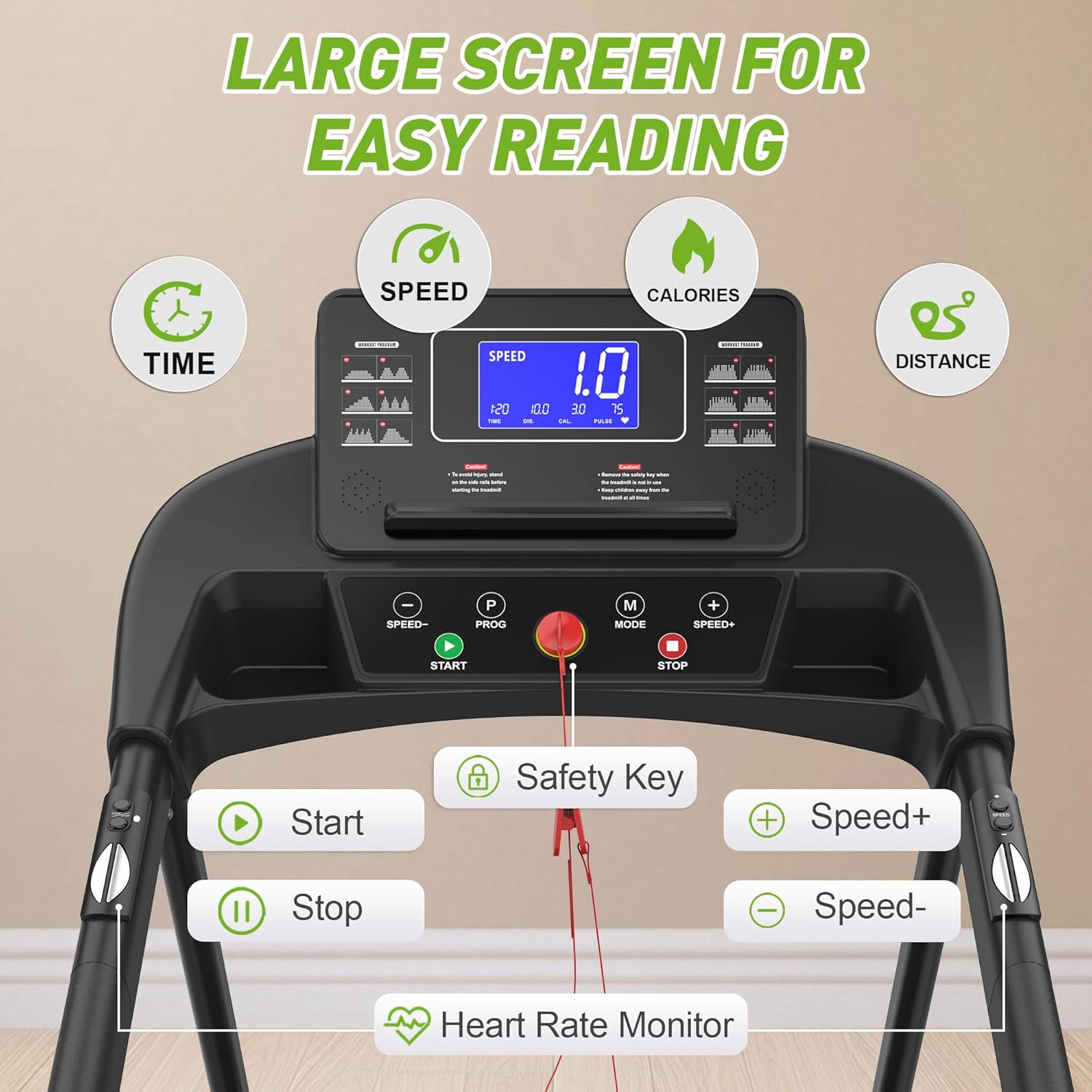
Image 5.1: The control panel with display and function buttons.
- START: Press to begin the treadmill belt movement.
- STOP: Press to stop the treadmill belt movement.
- SPEED +/-: Adjusts the running belt speed. The speed range is 0.5 to 7.5 miles per hour.
- MODE (M): Cycles through different display modes or workout programs.
- PROG (P): Selects from 12 preset workout modes, offering various intensity levels.
5.2 Starting a Workout
- Ensure the safety key is properly attached to both the treadmill and your clothing.
- Step onto the treadmill's side rails, not directly onto the belt.
- Press the START button. The belt will begin to move at a low speed.
- Carefully step onto the moving belt and use the SPEED +/- buttons to adjust to your desired pace.
5.3 Heart Rate Monitoring
To monitor your heart rate, grip the heart rate sensors located on the handrails. Your heart rate will be displayed on the LED screen.

Image 5.2: Using the integrated heart rate sensor.
5.4 Fit Show App Connectivity (Bluetooth)
The treadmill supports Bluetooth connectivity with the Fit Show app. This app allows users to:
- Access simulated exercise scenarios (e.g., forest running, beach walking).
- Track exercise data including steps, heart rate, calorie consumption, and duration.
- Generate reports to manage fitness progress.
Refer to the Fit Show app's instructions for pairing and usage details.
6. Maintenance
Regular maintenance ensures the longevity and optimal performance of your treadmill.
6.1 Lubrication
The running belt requires periodic lubrication to reduce friction and wear. Use the provided lubricant and follow the instructions in the detailed user manual for proper application frequency and method.
6.2 Cleaning
Wipe down the treadmill surfaces with a damp cloth after each use to remove sweat and dust. Do not use abrasive cleaners or solvents.
6.3 Belt Adjustment
Periodically check the running belt for proper tension and alignment. Refer to the detailed user manual for instructions on how to adjust the belt if necessary.
7. Troubleshooting
If you encounter issues with your treadmill, refer to the following common troubleshooting tips. For problems not listed here, or if issues persist, contact customer support.
- Treadmill does not start: Ensure the power cord is securely plugged in and the safety key is correctly placed. Check the power switch.
- Belt stops unexpectedly: Verify the safety key is still in place.
- Unusual noises: Check for loose parts or objects under the belt. Lubricate the belt if needed.
- Inaccurate readings: Ensure sensors are clean and connections are secure.
8. Specifications
| Feature | Specification |
|---|---|
| Brand | FYC |
| Model Name | Q23L |
| Product Dimensions (LxWxH) | 50.5"D x 26"W x 7.6"H |
| Folded Size | 41.3" x 15" x 8.66" |
| Running Deck Length | 41.3 Inches |
| Running Deck Width | 15 Inches |
| Frame Material | Carbon Steel |
| Maximum Speed | 7.5 Miles per Hour |
| Motor Horsepower | 3 Horsepower |
| Maximum Weight Recommendation | 300 Pounds |
| Display Type | LED |
| Connectivity Technology | Bluetooth |
| Power Source | Corded Electric |
| Input Power | 220 Watts |
| Metrics Measured | Calories Burned, Distance, Heart Rate, Speed, Time |
| Included Components | Chest Strap, Lubricant, Power Cord, Safety Key, User Manual |

Image 8.1: Key performance specifications.

Image 8.2: Dimensions of the running area.
9. Warranty and Support
9.1 Warranty Information
The FYC Q23L Walking Treadmill comes with a two-year quality guarantee, covering manufacturing defects and ensuring product reliability.
9.2 Customer Support
For any questions, assistance with setup, operation, maintenance, or troubleshooting, please contact our customer service team. Our support is available 6 days a week, 24 hours a day, to provide prompt assistance.
Refer to your purchase documentation or the product packaging for specific contact details.


