
1. Introduction
This manual provides comprehensive instructions for the assembly, operation, and maintenance of the Walfront ATU-100 Automatic Antenna Tuner DIY Kit. The ATU-100 is designed for amateur radio enthusiasts, offering automatic antenna tuning capabilities across the 1.8MHz to 50MHz HF frequency band. It features an OLED screen for clear data display and is intended for integration into amateur radio equipment, such as amplifiers or transceivers, or as a standalone device for matching power amplifier output impedance with an antenna feeder.
2. Safety Information
Warning:
To avoid suffocation hazard, keep all plastic packaging materials away from babies and children. Always handle electronic components with care, especially when soldering, and ensure proper ventilation. Disconnect power before making any connections or adjustments to prevent electrical shock.

Image: Safety warning label indicating suffocation hazard from plastic bags, translated into multiple languages.
3. Package Contents
The Walfront ATU-100 DIY Kit includes the following components:
- 1 x PCB Board
- 1 x Connection Line (Jumper Wires)
- 1 x IC (Integrated Circuit)
- 2 x Plug (Connectors)
- 15 x Relay
- 6 x Capacitance (Capacitors)
- 6 x Porcelain Ring (Toroids for inductors)
- 1 x Coil (Pre-wound or wire for winding)
- 1 x Transistor
- 1 x Diode
- 2 x Connector (e.g., SMA or BNC)
- 2 x Copper Wire
- 1 x User Manual (Printed)
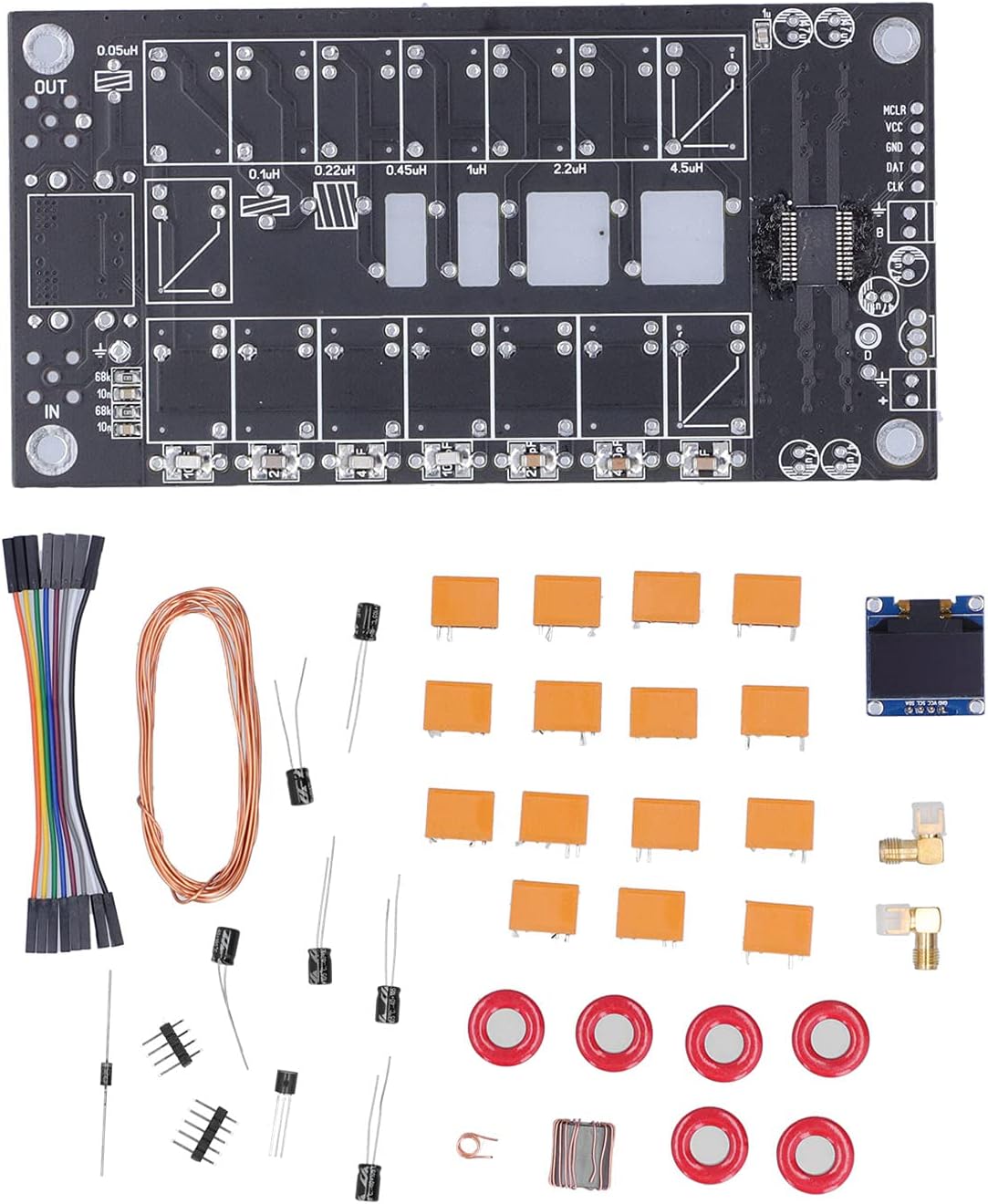
Image: Overview of all components included in the Walfront ATU-100 DIY kit, neatly arranged for assembly.
4. Assembly Instructions (Setup)
The ATU-100 is a DIY kit requiring careful assembly. This section provides general guidance; for detailed step-by-step instructions, please refer to the included printed user manual and the schematic diagram.
- Component Identification: Before starting, familiarize yourself with all components listed in Section 3. Refer to the schematic diagram to understand component placement and connections.
- PCB Preparation: Inspect the PCB for any manufacturing defects.
- Soldering Components:
- Begin with smaller components like resistors and diodes, then proceed to ICs, transistors, and relays.
- Pay close attention to the polarity of diodes, ICs, and electrolytic capacitors.
- Ensure all solder joints are clean, shiny, and free of bridges.
- The kit utilizes brand chip capacitors and 1000V high voltage chip capacitors.
- Inductor and Capacitor Installation: The PCB is designed for 7 inductors and 7 capacitors. Carefully install these components as indicated on the PCB and schematic. The kit includes porcelain rings for winding coils if necessary.
- OLED Screen Connection: Connect the OLED screen to the designated header on the PCB using the provided connection lines. Ensure correct pin orientation (MCLR, VCC, GND, DAT, CLK).
- Input/Output Connectors: Solder the input (IN) and output (OUT) connectors to the PCB.
- Power Connection: Connect the power input according to the schematic. The maximum current consumption is 400mA.
Important Considerations:
- This kit is recommended for individuals with prior experience in electronics assembly and soldering.
- Patience and attention to detail are crucial for successful assembly.
- Review customer feedback regarding "flimsy contacts" and ensure all connections are robustly made, especially for interconnect wiring.

Image: Schematic diagram of the ATU-100, illustrating the circuit design and component interconnections.

Image: The main PCB of the ATU-100 kit, highlighting areas for component placement and soldering.

Image: Detailed view of the integrated circuit (IC) on the ATU-100 PCB, central to the tuner's operation.
5. Operating Instructions
Once assembled and connected, the ATU-100 operates as an automatic antenna tuner.
- Connection: Connect the output of your power amplifier (PA) or transceiver to the "IN" port of the ATU-100. Connect your antenna feeder to the "OUT" port.
- Power On: Apply power to the ATU-100. The OLED screen should illuminate and display operational information.
- Automatic Tuning: The ATU-100 is designed for automatic tuning. When RF power is applied, the device will automatically adjust its internal inductance and capacitance values to achieve the best possible impedance match between your radio and antenna.
- OLED Display: The OLED screen provides real-time data, including SWR (Standing Wave Ratio), power, and other relevant tuning parameters. Monitor this display to confirm successful tuning.
- Frequency Range: The tuner is effective across a wide frequency band from 1.8MHz to 50MHz, covering common amateur radio HF bands.
The device utilizes a 2x5 group relay system (with maximum configuration) to achieve effective operation across its wide frequency range.
6. Maintenance
To ensure the longevity and optimal performance of your ATU-100, follow these maintenance guidelines:
- Keep Clean: Regularly clean the PCB and components with a soft, dry brush to remove dust and debris. Avoid using liquids directly on the circuit board.
- Environmental Conditions: Operate and store the tuner in a dry environment, away from extreme temperatures, humidity, and direct sunlight.
- Connection Integrity: Periodically check all soldered connections and connectors for looseness or corrosion. Re-solder any weak joints if necessary.
- Power Supply: Ensure a stable and correct power supply voltage is used.
7. Troubleshooting
If you encounter issues with your ATU-100, consider the following troubleshooting steps:
- No Power/OLED Display Off:
- Verify the power supply connection and voltage.
- Check for any short circuits on the PCB.
- Ensure the OLED screen is correctly connected to its header.
- Poor Tuning Performance/High SWR:
- Inspect all component placements and solder joints, especially for inductors, capacitors, and relays.
- Ensure the input and output connections to your radio and antenna are secure and correctly wired.
- Confirm that the antenna itself is functional and within the tuner's operating frequency range.
- Check for any "flimsy contacts" as reported by some users, and reinforce connections if needed.
- Incorrect Readings on OLED:
- Verify the IC and other control components are correctly installed and soldered.
- Ensure no solder bridges are present that could interfere with signal paths.
If issues persist after troubleshooting, consult the included user manual or seek assistance from experienced amateur radio operators or the manufacturer.
8. Specifications
| Feature | Specification |
|---|---|
| Model | ATU-100 |
| Material | PCB |
| Frequency Range | 1.8MHz ~ 50MHz |
| Maximum Current Consumption | 400mA |
| Number of Installed Inductors | 7 |
| Number of Installed Capacitors | 7 |
| Power Measurement Step (<10W) | 0.1 Watt |
| Power Measurement Step (>10W) | 1 Watt |
| Power Measurement Accuracy | 10% |
| Maximum Installation Inductance | 8.53µH |
| Minimum Installation Inductance | 0.05µH |
| Maximum Installed Capacity | 1869pF |
| Minimum Installed Capacity | 10pF |
| PCB Dimensions (Approx.) | 128mm x 62mm (5.0in x 2.4in) |
| OLED Screen Dimensions (Approx.) | 27mm x 28mm (1.1in x 1.1in) |
| Item Weight | 6.4 ounces |

Image: Dimensional drawing of the ATU-100 PCB and OLED display module.
9. Warranty and Support
Warranty information for the Walfront ATU-100 DIY Kit is typically provided by the seller or manufacturer at the time of purchase. Please refer to your purchase documentation or contact the seller directly for details regarding warranty coverage and terms.
For technical support or further assistance with assembly and operation, please consult the included printed user manual or contact Walfront customer service through their official channels.