
Cecotec 05722
Cecotec Popstar Glass Titanium Window Cleaner User Manual
Model: 05722
1. Introduction
Thank you for choosing the Cecotec Popstar Glass Titanium Window Cleaner. This manual provides essential information for the safe and efficient operation, maintenance, and troubleshooting of your device. Please read it thoroughly before first use and keep it for future reference.
Safety Instructions
- Read all instructions before using the appliance.
- Keep the appliance out of reach of children.
- Do not immerse the appliance in water or other liquids.
- Use only the charger supplied with the appliance.
- Do not use the appliance if the cable or plug is damaged.
- Ensure the dirty water tank is correctly installed before use.
- Do not use the appliance to vacuum flammable or explosive liquids.
- Always disconnect the appliance from the power supply before cleaning or maintenance.
2. Product Components
The Cecotec Popstar Glass Titanium Window Cleaner comes with the following components:
- 1x Window Vacuum Cleaner Unit
- 1x Large Nozzle (280 mm)
- 1x Narrow Nozzle (150 mm)
- 1x Extendable Tube (98 cm)
- 1x Spray Bottle
- 1x Mop Pad
- 1x Charger
- 1x Instruction Manual

Image: The main window cleaner unit, spray bottle, and extendable pole.

Image: All included components, including the main unit, spray bottle, mop pad, two nozzles, extendable pole, and charger.
3. Setup and First Use
Charging the Battery
- Before first use, fully charge the device.
- Connect the charger to the charging port on the window cleaner unit.
- Plug the charger into a suitable power outlet.
- The charging indicator light will illuminate. Charging typically takes several hours.
- Once fully charged, disconnect the charger.
Assembling the Spray Bottle and Mop
- Attach the mop pad to the spray bottle's cleaning head.
- Fill the spray bottle with water and your preferred window cleaning solution.
Attaching Nozzles
Select the appropriate nozzle (280 mm for larger surfaces, 150 mm for smaller areas) and securely attach it to the vacuum unit.
Using the Extendable Tube
For high windows or hard-to-reach areas, attach the window cleaner unit to the 98 cm extendable tube. Ensure it is securely fastened before use.
4. Operating Instructions
The Cecotec Popstar Glass Titanium offers a 3-in-1 cleaning function: spray, clean, and vacuum.
Step-by-Step Cleaning Process
- Spray: Use the spray bottle to apply cleaning solution evenly onto the surface to be cleaned.
- Clean: Use the mop pad on the spray bottle to spread the solution and loosen dirt.
- Vacuum: Turn on the window vacuum cleaner unit. Place the nozzle firmly against the top of the wet surface and draw it downwards in a straight, even motion. The vacuum will suction the dirty water into its 100 ml collection tank.
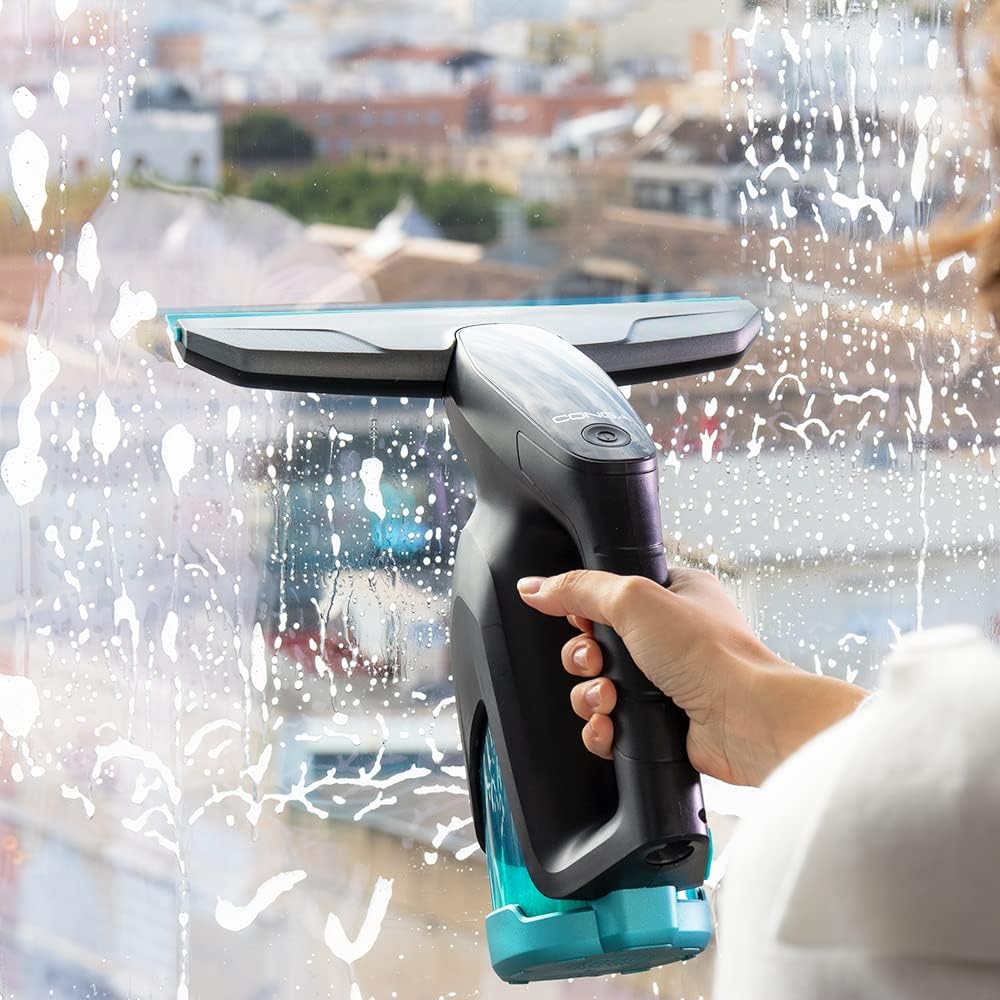
Image: A hand holding the window cleaner unit, actively vacuuming soapy water from a window.

Image: The window cleaner unit being used to vacuum liquid from a window, showing the suction action.

Image: A close-up of the cleaner's head on a window covered in cleaning solution, ready for vacuuming.

Image: A person using the window cleaner attached to the extendable pole to clean a large, tall window.

Image: A hand using the window cleaner unit to clean a glass table surface, demonstrating its versatility.
For optimal results, ensure the nozzle is always in full contact with the surface. Overlapping strokes slightly can help prevent streaks.
5. Maintenance and Cleaning
Regular maintenance ensures the longevity and performance of your window cleaner.
Emptying the Dirty Water Tank
- After each use, or when the tank is full, turn off the device.
- Remove the dirty water tank from the main unit.
- Empty the collected dirty water.
- Rinse the tank with clean water and allow it to air dry before reattaching.
Cleaning the Nozzles and Mop Pad
- Rinse the nozzles under running water to remove any residue.
- The mop pad can be hand-washed or machine-washed according to its care instructions.
- Ensure all components are dry before storage.
Storing the Appliance
Store the window cleaner and its accessories in a cool, dry place, away from direct sunlight and extreme temperatures.
6. Troubleshooting
If you encounter issues with your Cecotec Popstar Glass Titanium, refer to the following common problems and solutions:
| Problem | Possible Cause | Solution |
|---|---|---|
| Device does not turn on. | Battery is discharged. | Charge the battery fully. |
| Poor suction performance. | Dirty water tank is full or improperly installed. Nozzle is clogged or not properly attached. | Empty and re-install the dirty water tank. Clean the nozzle and ensure it is securely attached. |
| Leaves streaks on surfaces. | Insufficient cleaning solution. Nozzle not in full contact with surface. Dirty nozzle or mop pad. | Apply more cleaning solution. Ensure firm, even pressure. Clean the nozzle and mop pad. |
| Water leaks from the device. | Dirty water tank is not properly sealed or is damaged. | Check the dirty water tank for proper installation and any damage. Replace if necessary. |
If the problem persists after trying these solutions, please contact customer support.
7. Technical Specifications
- Brand: Cecotec
- Model Number: 05722
- Product Name: Window Vacuum Cleaner
- Power Source: Battery powered
- Voltage: 5 Volts
- Power: 18 Watts
- Autonomy: Up to 40 minutes
- Cleaning Area per Charge: Up to 100 m²
- Dirty Water Tank Capacity: 100 ml
- Nozzle Widths: 280 mm (large), 150 mm (narrow)
- Extendable Tube Length: 98 cm
- Dimensions (L x W x H): 13.2 x 28.3 x 64.6 cm
- Item Weight: 2 Kilograms
- Country of Origin: Spain
8. Warranty and Support
Warranty Information
This product is covered by a manufacturer's warranty. Please refer to the warranty card included in the packaging for specific terms and conditions, including the warranty period and coverage details. Keep your proof of purchase for warranty claims.
Customer Support
For technical assistance, spare parts, or any questions regarding your Cecotec Popstar Glass Titanium Window Cleaner, please contact Cecotec customer support.
Refer to the official Cecotec website for the most up-to-date contact information and support resources.
Related documents05722

Ask a question about this manual
Ask about setup, troubleshooting, compatibility, parts, safety, or missing instructions. Manuals+ will review the question and use this page’s manual context to help answer it.