1. Introduction and Overview
The Makita 40V max XGT Brushless Cordless 24-inch Hedge Trimmer (Model GHU02Z) is engineered for professional landscaping applications, offering zero emissions and reduced noise levels. This tool features a Makita-built brushless motor capable of delivering up to 5,000 Strokes Per Minute (SPM) for efficient trimming. It includes three speed options to manage power output and extend run time. The 24-inch dual-action, double-sided shear blade ensures optimal cutting performance. A reverse function is integrated to clear blade jams effectively. The hedge trimmer can achieve up to 6 hours of continuous operation with a 40V max XGT 4.0Ah Battery (sold separately). For enhanced user comfort during vertical and angle trimming, a 5-position rotating rear handle is provided. A tip guard protects the blade end from hard surfaces. The tool incorporates Extreme Protection Technology (XPT) for improved dust and water resistance, and features IPX4-rated weather-resistant construction for durability in demanding job site conditions.

Image 1.1: Makita 40V Max XGT 24-inch Cordless Hedge Trimmer (GHU02Z) with an XGT battery, illustrating the tool's design and power source integration.
2. Safety Information
WARNING: This product can expose you to chemicals including lead, which is known to the State of California to cause cancer and birth defects or other reproductive harm. For more information go to www.P65Warnings.ca.gov.
Always wear appropriate personal protective equipment, including eye protection, gloves, and hearing protection, when operating the hedge trimmer. Ensure the work area is clear of bystanders, pets, and obstacles. Disconnect the battery before performing any adjustments, cleaning, or maintenance. Keep hands and feet away from the cutting blades at all times. Do not operate the tool in wet conditions or near flammable liquids or gases.
3. Package Contents
The Makita 40V Max XGT 24-inch Cordless Hedge Trimmer (Model GHU02Z) package typically includes the following items:
- Makita GHU02Z Hedge Trimmer (Bare Tool)
- Blade Cover
- Instruction Manual
Note: Battery and charger are sold separately and are required for operation.
4. Setup
4.1 Battery Installation
- Ensure the hedge trimmer is turned off.
- Align the charged Makita 40V max XGT battery with the battery slot on the tool.
- Slide the battery into the slot until it clicks securely into place. Verify that the battery is fully seated and locked.
4.2 Blade Cover Removal
Before operating the hedge trimmer, carefully remove the blade cover. Store the blade cover in a safe place for reattachment after use.
4.3 Handle Adjustment
The 5-position rotating rear handle can be adjusted to provide increased comfort and control during various trimming tasks, including vertical and angle trimming. Rotate the handle to the desired position and ensure it locks securely before operation.
5. Operating Instructions
5.1 Powering On/Off
- To power on the hedge trimmer, press the main power button. The indicator lights will illuminate.
- To power off, press the main power button again.
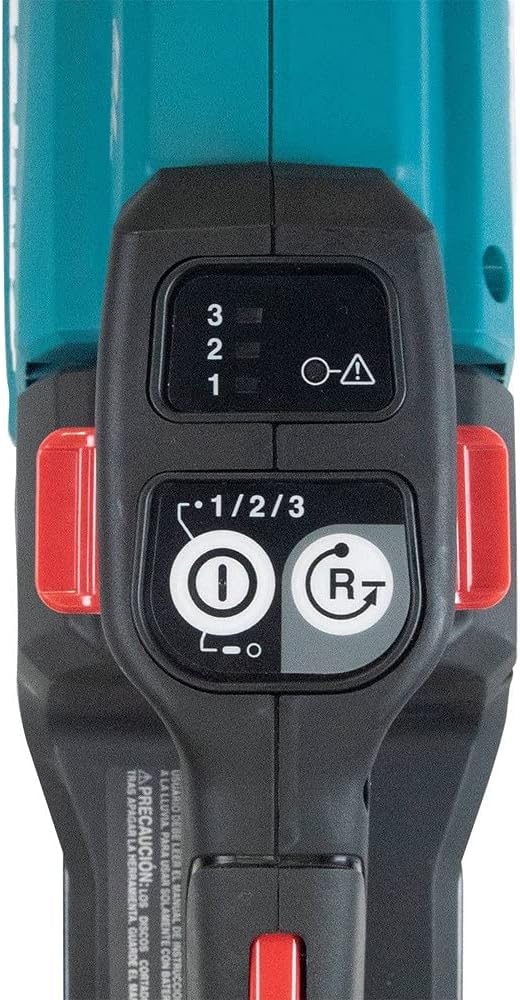
Image 5.1: Close-up of the control panel, showing the power button, speed selector, and reverse function button.
5.2 Speed Selection
The hedge trimmer offers three speed options:
- Low: 2,000 SPM (Strokes Per Minute) - Suitable for lighter trimming and extended run time.
- Medium: 3,600 SPM - Balanced performance for general trimming tasks.
- High: 5,000 SPM - For maximum cutting power on thicker branches.
Use the speed selector switch on the control panel to choose the appropriate speed for the material being cut.
5.3 Trimming Technique
- Hold the hedge trimmer firmly with both hands, maintaining a balanced stance.
- Begin trimming by moving the blades smoothly along the hedge. For optimal results, use a sweeping motion.
- Avoid forcing the blades through thick branches. Allow the blades to cut at their own pace.
- For vertical trimming, utilize the rotating rear handle to achieve a comfortable and ergonomic grip.

Image 5.2: The hedge trimmer in operation, demonstrating horizontal trimming on a well-maintained hedge.

Image 5.3: A user performing vertical trimming with the Makita hedge trimmer, highlighting the versatility of the rotating handle.
5.4 Clearing Jams
If the blade jams during operation:
- Immediately release the trigger.
- Press the reverse function button on the control panel to attempt to clear the jam.
- If the jam persists, disconnect the battery from the tool.
- Carefully remove the obstruction from the blades using appropriate hand protection. Never use your bare hands.
6. Maintenance
6.1 Blade Cleaning
After each use, ensure the battery is disconnected. Clean the blades thoroughly with a stiff brush to remove sap, leaves, and other debris. Applying a light coat of rust-preventative oil to the blades will help maintain their condition and prevent corrosion.

Image 6.1: Detailed view of the 24-inch dual-action, double-sided shear blade, emphasizing the cutting teeth.
6.2 Blade Sharpening
Periodically inspect the blades for sharpness. Dull blades can reduce cutting efficiency, increase battery consumption, and put additional strain on the motor. For blade sharpening or replacement, it is recommended to consult a qualified service center or refer to the detailed instructions in the full user manual.
6.3 Storage
Before storing, ensure the battery is removed and the blade cover is securely attached. Store the hedge trimmer in a dry, secure location, out of reach of children and away from direct sunlight or extreme temperatures.
7. Troubleshooting
| Problem | Possible Cause | Solution |
|---|---|---|
| Trimmer does not start | Battery not charged or improperly inserted. Power button not activated. | Ensure the battery is fully charged and properly inserted. Press the power button firmly. |
| Blades jam frequently | Cutting material too thick. Blades are dull or dirty. | Reduce cutting speed. Avoid cutting branches thicker than recommended capacity. Use the reverse function. Clean and sharpen blades. |
| Reduced cutting performance | Dull or dirty blades. Incorrect speed setting. | Clean and sharpen blades. Select a higher speed setting for tougher material. |
| Excessive vibration | Damaged or unbalanced blades. Loose components. | Inspect blades for damage; replace if necessary. Check all fasteners for tightness. If vibration persists, seek professional service. |
8. Specifications
| Brand | Makita |
| Model Number | GHU02Z |
| Power Source | Battery Powered (40V max XGT Lithium-Ion) |
| Blade Length | 24 Inches |
| Cutting Width | 24 Inches |
| Item Weight | 9.5 Pounds |
| Product Dimensions | 12"L x 12"W x 12"H |
| Blade Material | High Carbon Steel |
| Motor Type | Brushless |
| Speed Settings | 3 (Low: 2,000 SPM, Medium: 3,600 SPM, High: 5,000 SPM) |
| Approximate Run Time | Up to 6 hours (with 40V max XGT 4.0Ah battery) |
| Protection Features | Extreme Protection Technology (XPT), IPX4-rated weather-resistant construction |

Image 8.1: Diagram of the Makita brushless motor, illustrating its internal components and design.
9. Warranty and Support
For detailed warranty information, including terms, conditions, and registration, please refer to the official Makita website or the warranty card included with your product. Keep your purchase receipt as proof of purchase for any warranty claims.
For technical support, service, or to locate an authorized service center, please visit the official Makita website or contact Makita customer service directly. You can find more information at the Makita Store on Amazon.


