
Introduction
This instruction manual provides detailed guidance for the assembly, transformation, and care of your Transformers Legacy Series Commander Decepticon Motormaster action figure. This figure is inspired by the animated series, The Transformers, and features an updated Generations design. It is capable of transforming into multiple modes and combining with other figures to form Menasor.
Safety Information
WARNING: Small parts may be generated. Not for children under 3 years.
Recommended age for this product is 8 years and up.
Package Contents
- 1 x Motormaster Figure
- 1 x Trailer
- 1 x Energon Sword Accessory
- 1 x Energon Blaster Accessory
- 1 x Instruction Manual
Please ensure all components are present before proceeding.
Operating Instructions: Transformation
Mode 1: Truck Mode

Motormaster's truck mode is a robust semi-truck with an attached trailer. This mode is the base for transformation into robot mode and battle station mode.
Mode 2: Robot Mode

The action figure converts from truck to robot in 23 steps. Refer to the included instructions for detailed visual guidance.
- Detach the trailer from the truck cab.
- Transform the truck cab into the Motormaster robot figure. This involves unfolding the limbs, rotating the torso, and revealing the head.
- Attach the Energon sword and blaster accessories to the robot's hands as desired.

Mode 3: Battle Station Mode

The trailer converts into a battle station in 23 steps. This mode can be used as a base for the Motormaster robot figure.
Combiner Mode: Menasor
Decepticon Motormaster serves as the core component for forming the mighty Menasor. To achieve this combined form, additional Deluxe Stunticon figures (each sold separately) are required. Motormaster forms the torso and head of Menasor, while the other Stunticons form the limbs.
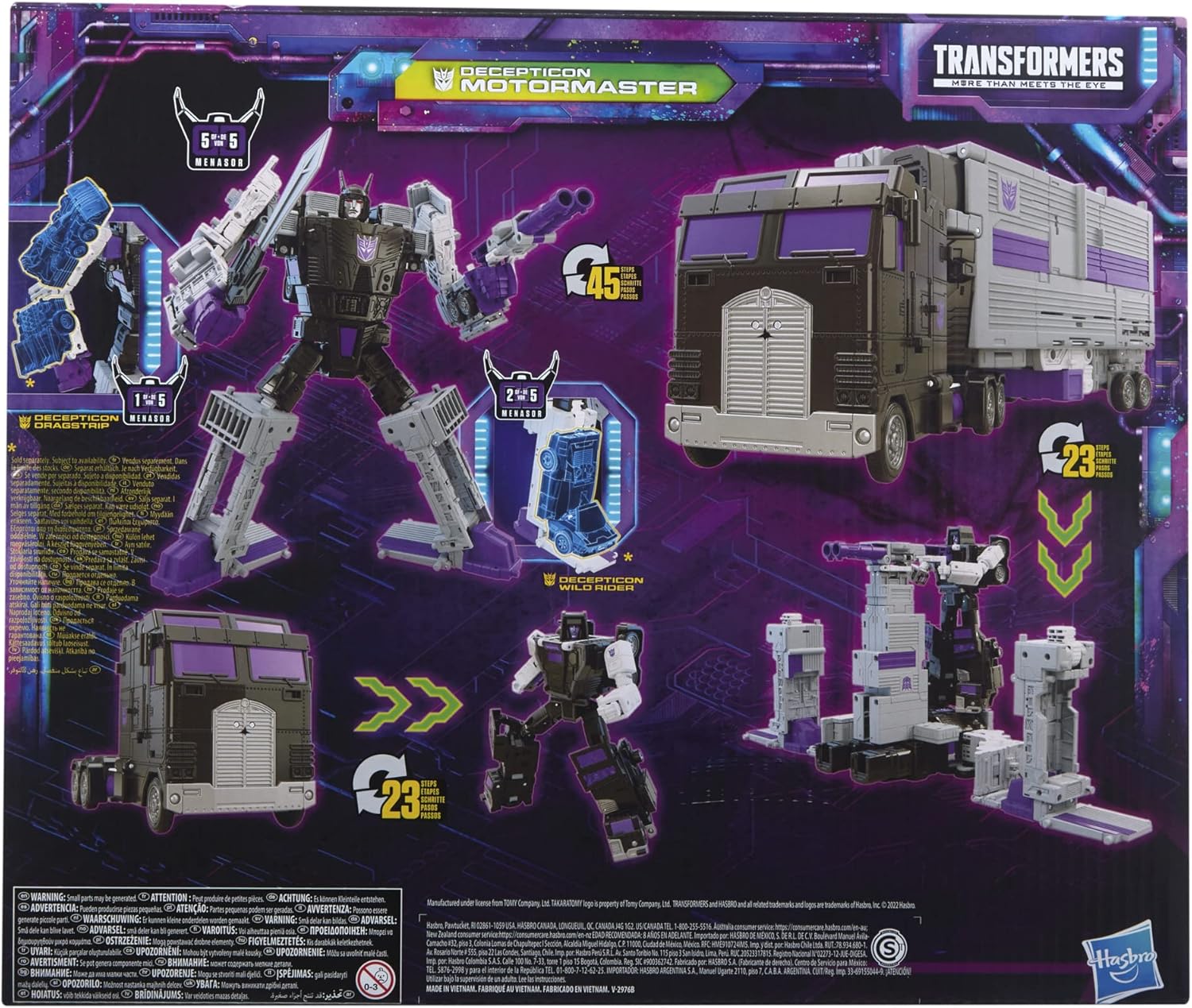
Follow the specific instructions provided with each Stunticon figure for proper combination into Menasor.
Maintenance
- To clean the figure, gently wipe with a dry, soft cloth. Avoid using harsh chemicals or abrasive materials.
- Store the figure in a cool, dry place away from direct sunlight to prevent discoloration or material degradation.
- Handle transformation joints with care to prevent breakage.
Troubleshooting
- Joints are stiff: Gently work the joint back and forth to loosen it. Do not force.
- Parts do not align during transformation: Review the instruction manual carefully. Ensure all previous steps are correctly completed and parts are oriented correctly.
- Accessories do not fit: Ensure the accessories are correctly oriented and inserted into the designated ports.
Specifications
| Feature | Detail |
|---|---|
| Product Dimensions | 13 x 3 x 13 inches |
| Item Weight | 1.63 pounds |
| ASIN | B09H1PVDY9 |
| Item Model Number | F2987 |
| Manufacturer Recommended Age | 8 years and up |
| Batteries | 2 AAA batteries required. |
| Release Date | July 30, 2022 |
| Manufacturer | Hasbro |
Warranty and Support
For warranty information or product support, please contact Hasbro customer service directly. Details can typically be found on the product packaging or the official Hasbro website.
Visit the official Transformers Store for more information: Transformers Store