
Introduction
This manual provides detailed instructions for the setup, operation, and maintenance of your ENWShop Replacement Yamaha VAF7640 Remote Control. This remote is designed to be a direct replacement for the original remote shipped with Yamaha ATS1080, ATS-1080, YAS1080, and YAS-1080 soundbar models, offering full functionality without requiring programming.
1. Setup
1.1 Battery Installation
The remote control requires one CR2032 3V lithium coin cell battery (included). Follow these steps to install or replace the battery:
- Locate the battery compartment on the back of the remote control.
- Using a small coin or a flat-head screwdriver, gently pry open the battery cover.
- Insert the CR2032 battery with the positive (+) side facing upwards, ensuring it is securely seated.
- Replace the battery cover, pressing firmly until it clicks into place.
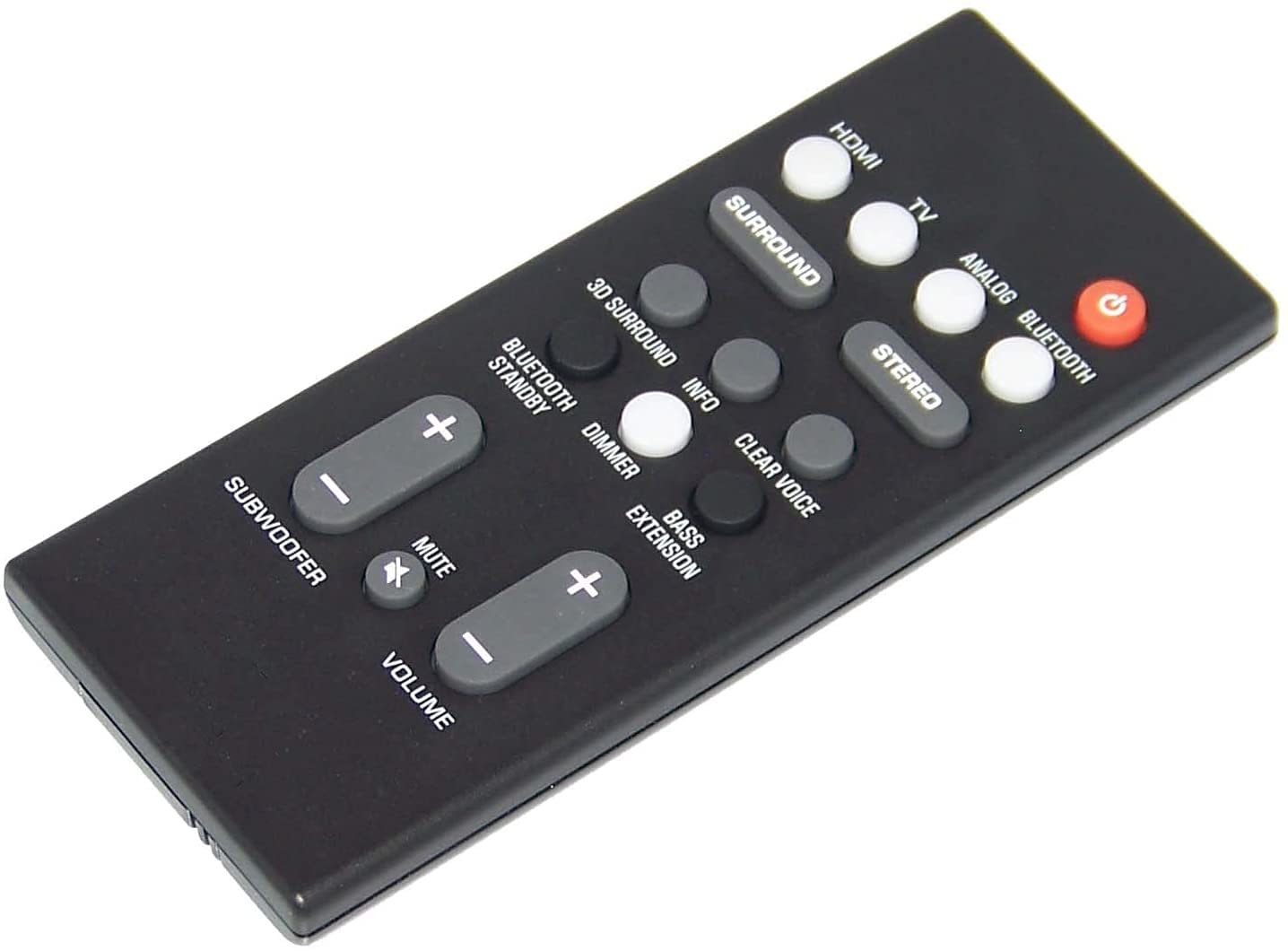
Image: Front and back view of the ENWShop Replacement Yamaha VAF7640 Remote Control. The back view clearly shows the battery compartment designed for a CR2032 battery.
2. Operating Instructions
This remote control is pre-programmed for immediate use with compatible Yamaha soundbar models. Point the remote directly at your soundbar when operating.
2.1 Power On/Off
- Power Button (Orange Circle with Power Symbol): Press to turn the soundbar on or off.
2.2 Input Selection
Select your desired audio input source:
- HDMI: Selects the HDMI input.
- TV: Selects the TV audio input (e.g., ARC).
- BLUETOOTH: Activates Bluetooth pairing mode or selects Bluetooth input.
- NET: Selects network audio input.
2.3 Volume Control
- VOLUME (+/-): Increases or decreases the main volume level.
- Mute Button (🔇): Mutes or unmutes the sound.
2.4 Subwoofer Control
- SUBWOOFER (+/-): Adjusts the subwoofer volume level independently.
2.5 Sound Modes
Optimize your audio experience with various sound modes:
- CLEAR VOICE: Enhances dialogue clarity.
- 3D SURROUND: Activates 3D surround sound effect.
- MOVIE: Sound mode optimized for movies.
- TV: Sound mode optimized for general TV viewing.
- MUSIC: Sound mode optimized for music playback.
- SPORTS: Sound mode optimized for sports broadcasts.
- GAME: Sound mode optimized for gaming.
- STEREO: Standard stereo sound mode.
- BASS EXT: Enhances bass output.
- INFO: Displays information on the soundbar's display (if applicable).
3. Maintenance
3.1 Cleaning
To clean the remote control, wipe it with a soft, dry cloth. Do not use liquid cleaners or abrasive materials, as these can damage the surface or internal components.
3.2 Battery Replacement
Replace the CR2032 battery when the remote's range decreases significantly or it stops responding. Refer to section 1.1 for battery installation instructions. Always dispose of used batteries responsibly according to local regulations.
4. Troubleshooting
If you experience issues with your remote control, try the following solutions:
- Remote not responding:
- Ensure the battery is installed correctly with the positive (+) side up.
- Replace the battery with a new CR2032 battery.
- Make sure there are no obstructions between the remote control and the soundbar's infrared sensor.
- Confirm you are within the effective operating range (typically up to 20 feet).
- Short operating range:
- The battery may be low; replace it.
- Ensure the remote's infrared emitter and the soundbar's sensor are clean and unobstructed.
- Specific buttons not working:
- This remote is a direct replacement and should not require programming. If specific buttons are unresponsive, ensure the soundbar is powered on and the correct input is selected.
- If the issue persists after replacing the battery, the remote may be faulty.
5. Specifications
| Feature | Detail |
|---|---|
| Model Number | VAF7640 |
| Compatibility | Yamaha ATS1080, ATS-1080, YAS1080, YAS-1080 Soundbars |
| Connectivity Technology | Infrared (IR) |
| Max Number of Supported Devices | 1 (Soundbar) |
| Color | Black |
| Special Feature | Ergonomic design |
| Battery Type | 1 x CR2032 3V Lithium Coin Cell (included) |
| Item Weight | 2.39 ounces |
| Package Dimensions | 8.66 x 2.64 x 1.34 inches |
6. Warranty Information
This ENWShop Replacement Remote Control comes with a standard manufacturer's warranty against defects in materials and workmanship. Please retain your proof of purchase for warranty claims. For specific warranty terms and conditions, refer to the product packaging or contact ENWShop customer support.
7. Customer Support
For further assistance, technical support, or inquiries regarding your ENWShop Replacement Yamaha VAF7640 Remote Control, please contact ENWShop customer service through the retailer's platform where the product was purchased. Please have your product model number (VAF7640) and purchase details ready.